Category: Software Development

  • Lovable, Bolt, Cursor to Production: What Actually Needs Rebuilding

    Lovable, Bolt, Cursor to Production: What Actually Needs Rebuilding

    Moving a Lovable, Bolt, or Cursor app to production feels like you have to throw it out and start over. You do not. Taking an AI app to production means keeping the parts that already work and rebuilding a short, specific list of the parts that do not. This post is that list.

    The mistake most founders make is treating it as all or nothing. Either the AI build is “real” and they ship it as is, or it is “fake” and they scrap everything. The truth sits in the middle. A good chunk of what these tools generate is fine to keep. A small, predictable set of things has to be redone before real users and real data show up.

    Here is what to keep, what to rebuild, and how to tell the difference for your own app. Think of it as a field guide to taking an AI app to production.

    Key takeaways

    • Taking an AI app to production is a rebuild of specific parts, not a restart. Most of the app survives.
    • You almost always keep the interface, the core user flow, and the idea itself.
    • You almost always rebuild authentication, the data model and its security, secret handling, payments, and error handling.
    • The database and backend logic are the “it depends” pieces. Keep them if they are clean and correct, rebuild if they are tangled.
    • Do it in order: security first, then data, then performance, then structure. A full restart is rare and only makes sense when the core data model is wrong.

    Production ready is not demo ready

    A demo has to work once, for you, with clean input. Production has to work a thousand times, for strangers, with messy input, while protecting their data. Those are different jobs, and AI builders are built for the first one.

    That is not a knock on the tools. Lovable, Bolt, and Cursor are very good at turning an idea into something you can click in an hour. The gap shows up later, when the thing that demoed well meets a hundred real users. Knowing which parts close that gap is the whole game, and it is the real work of taking an AI app to production.

    What you almost always keep
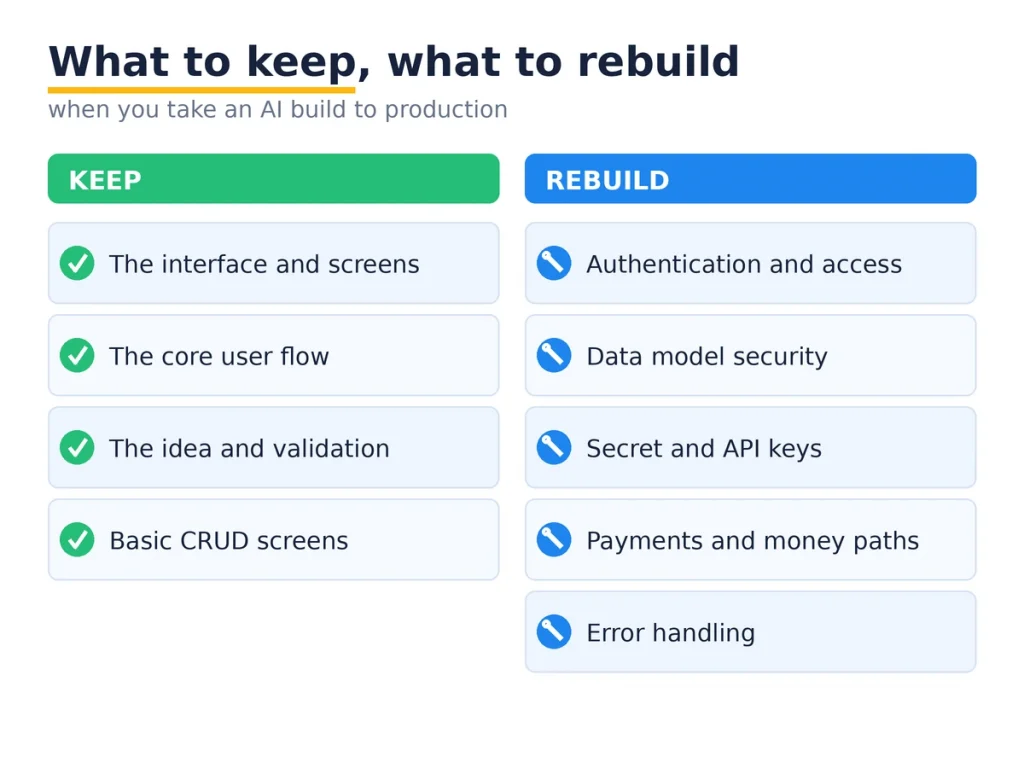
    What to keep and what to rebuild when taking an AI-built app to production.

    Start with the good news, because it is most of the app.

    The interface. The screens, the layout, the components, the styling. AI tools are strong here, and there is rarely a reason to rebuild a frontend that already looks right and works. Keep it.

    The core user flow. The path a user takes through the app, the steps, the order of screens. If it makes sense and people can follow it, that design work is done. It carries straight into production.

    The idea and the validation. The most valuable thing the AI build gave you is proof that people want this. That does not get rebuilt. It is the reason to rebuild anything at all.

    Basic CRUD and content. Simple create, read, update, delete screens and the copy on them are usually fine. They just need the security layer underneath them fixed, which is a different job from rebuilding the screens.

    What you almost always rebuild

    This is the short list that turns an AI app to production into a safe one. It is short, but it is not optional.

    Authentication and access control. AI builders wire up a login that works, then leave the rules about who can see what wide open. This gets rebuilt properly, with real checks on every request, so one user cannot read another user’s data.

    The data model security. If you are on Supabase or Firebase, Row Level Security is usually off, which means your tables are readable by anyone. The schema is often fine. The rules protecting it are not. Those get rebuilt.

    Secret handling. API keys for Stripe, OpenAI, or your database tend to sit in the frontend where anyone can read them. Every one of those gets rotated and moved server side. This is not negotiable before launch.

    Payments and money paths. A demo checkout that works on a happy path is not a payment system. Real payments handle failures, refunds, retries, and edge cases. That logic gets built for real.

    Error handling. AI code assumes everything succeeds. Production code assumes things fail and handles it, so a user sees a clear message instead of a blank screen while their data quietly disappears. This gets added across the app.

    What depends on your build

    Two pieces sit in the middle, and the answer is “look before you decide.”

    The backend and business logic. If the AI wrote clean, separated logic, keep it. If it is one tangled block where every function knows about every other, it is cheaper to rebuild that layer than to keep patching it. Most AI builds land somewhere between, so you keep the sound parts and redo the messy ones.

    The database schema. Usually you keep it. The tables and relationships the AI designed are often reasonable. You rebuild the schema only when it is fundamentally wrong in a way that every feature depends on, which is the one case that can justify a bigger teardown.

    How to decide, piece by piece

    When you are not sure whether to keep or rebuild something, run it through three questions.

    Is it correct? Does it actually do the right thing for real inputs, not just the demo input?

    Is it secure? Can a user reach data or actions that are not theirs?

    Will it scale? Does it still work at a thousand rows and a thousand users, not just ten?

    If a piece is a yes on all three, keep it. If it fails any one, rebuild that piece. This keeps you from the two expensive mistakes: shipping something broken because it looked done, and rebuilding something that was already fine. That triage is the heart of any AI app to production plan.

    The order for taking an AI app to production
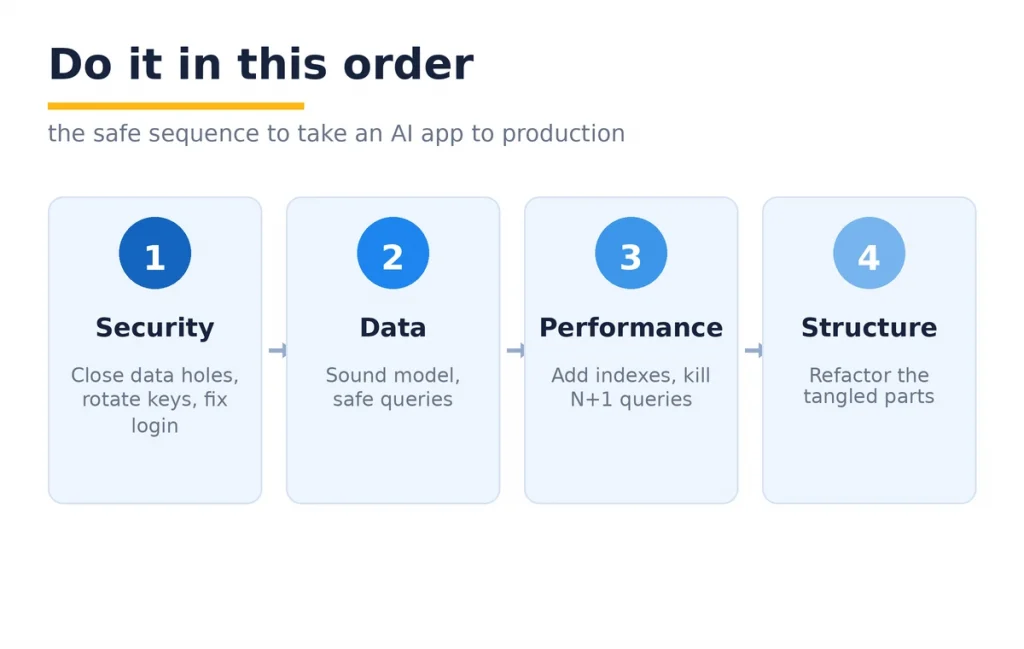
    The order to take an AI app to production: security, data, performance, structure.

    Sequence matters, because the risks are not equal. Do it in this order.

    Security first. Close the data access holes, rotate and move the keys, fix authentication. These are the things that get you breached, so they go first. Many of these are the same six places vibe-coded apps break, and the fixes carry straight over.

    Data second. Make sure the model is sound and the queries are safe. Performance third: add the indexes and fix the slow queries before growth, not after. Structure last: refactor the tangled parts once the app is safe and fast, so it can take new features without breaking.

    That order means the scary risks are gone early, and the slower cleanup happens on an app that is already safe to run.

    How much you rebuild, and how long it takes

    The rebuild list above is real work, but it is a slice of the app, not the whole thing. For a sound AI build with the usual issues, the security and data pass is often a few days. A fuller hardening, with payments and structure, runs one to three weeks. Add the fact that you are keeping the interface and the flow, and you are miles ahead of a from-scratch build.

    Compare that to the alternative. Scrapping a working app and rebuilding everything throws away the parts the AI got right, which is most of it. The point of moving an AI app to production is to spend your money only where it is needed.

    When to actually start over

    Sometimes a full restart is the honest answer. It is rare. It comes down to one thing: the data model.

    If the way the app stores and relates data is fundamentally wrong, and every screen and feature is built on top of that wrong model, patching it costs more than rebuilding. That is the case where you keep the interface and the idea, and rebuild the engine underneath. For everything short of that, a targeted rebuild beats a restart.

    What a real one looks like

    A founder came to us with a Cursor and Bolt build. A booking app, live, paying customers, growing. He assumed he needed a full rewrite before he could scale. He did not.

    We kept the entire frontend and the booking flow, which were good. We rebuilt authentication so users could only see their own bookings, turned on Row Level Security, moved the Stripe and database keys off the browser, and added real handling to the payment path. Then we added tests around booking and checkout. About two weeks. The app he already had went to production, minus the parts that would have leaked data or lost payments.

    That is the usual shape of an AI app to production. Keep most, rebuild the risky slice, ship.

    An honest caveat

    Not every AI build is worth taking forward. If you built it to test an idea and the idea did not land, do not spend a week hardening it. Throw it away and move on. That is what prototypes are for.

    The rebuild advice here is for the app that got real, that has users or is about to. When there is something real to protect, the keep-versus-rebuild split saves you both from shipping something unsafe and from paying for a rewrite you did not need.

    Where Mobilions fits

    We have shipped software since 2016: 250+ projects for 100+ clients across 20+ countries. A large and growing part of that work now is taking AI builds to production, the exact keep-versus-rebuild call this post is about.

    Our AI code cleanup service starts by drawing that line for your app: what stays, what gets rebuilt, and in what order. We close the security gaps first, then the data and payment paths, and add the testing that keeps it stable.

    If you would rather build the next version cleanly from the start, our approach to custom AI software development keeps the speed without the rebuild later.

    FAQ

    What does it mean to take an AI app to production?

    Taking an AI app to production means getting an app built with tools like Lovable, Bolt, or Cursor ready for real users and real data. It involves keeping the working parts and rebuilding security, payments, and error handling. A demo works once. Production works safely at scale.

    Do I have to rebuild my whole AI-built app for production?

    No. Most of the app usually survives, including the interface and the core user flow. You rebuild a specific list: authentication, data security, secret handling, payments, and error handling. A full rebuild is only needed when the core data model is wrong.

    What can I keep from a Lovable or Bolt build?

    You almost always keep the frontend, the screen layouts, the user flow, and the basic create and read screens. These are what AI tools do well. The idea and the validation carry over too. What needs work is the security and reliability layer underneath.

    What always needs rebuilding before production?

    Authentication and access control, the data model security (like Row Level Security), secret and API key handling, the payment path, and error handling. These are the parts AI builders skip to make the demo work, and they are the parts that leak data or lose money in production.

    Is a Cursor or Bolt app good enough for production?

    It is a strong first version, not a finished product. The generated app is fine to build on, but it needs a hardening pass before real users arrive. With that pass, a Cursor or Bolt app can absolutely run in production.

    How long does it take to move an AI app to production?

    For a sound build with the usual issues, the security and data pass is often a few days. A fuller pass with payments and structure runs one to three weeks. It is faster than a rewrite because you keep the interface and the flow.

    How much does it cost to make an AI app production ready?

    It depends on how deep the problems go, but it is far cheaper than a full rebuild because most of the app is kept. You pay to redo a specific slice, mainly security, payments, and error handling, not the whole application.

    Should I rebuild my AI app or start over?

    Rebuild the risky parts and keep the rest, which is the common case. Start over only when the core data model is fundamentally wrong and every feature depends on it. For everything else, a targeted rebuild is cheaper and faster than a restart.

    How do I know which parts to rebuild?

    Run each piece through three questions: is it correct, is it secure, and will it scale. If it passes all three, keep it. If it fails any one, rebuild that piece. This keeps you from shipping something broken or paying to redo something that was fine.

    Is AI-generated code safe for production?

    Not by default. Studies have found a large share of AI-generated code ships with security vulnerabilities. The code is a fine starting point, but it needs a security review and rebuild of the sensitive parts before it faces real users.

    Can I scale an app built with AI tools?

    Yes, once the performance and security parts are rebuilt. Missing indexes, exposed data, and no error handling all cap how far an AI build can grow. Fix those, and the app scales like any other well-built product.

    What is the difference between demo ready and production ready?

    Demo ready means it works once, for you, with clean input. Production ready means it works repeatedly, for strangers, with messy input, while protecting their data. AI tools deliver demo ready. The gap between the two is the rebuild list.

    Do I need a developer to take my AI app to production?

    For the security and payment parts, yes. Those are the pieces where a mistake leaks data or loses money, and they need someone who has done it before. The interface and flow you can often keep as is, which is what makes the job smaller than a rewrite.

    Will I lose my work if I rebuild parts of the app?

    No. A proper rebuild keeps the frontend, the flow, and the data you already have. Only the specific weak parts get replaced, and the app stays the app your users know. You are upgrading the engine, not buying a new car.

    Which AI coding tools need the most rebuilding for production?

    They are more similar than different. Lovable, Bolt, Cursor, and Replit all produce a working demo and leave the same gaps: open data access, exposed keys, thin payment logic, and no tests. The rebuild list is nearly the same regardless of which tool built the app.

    What should I do first when taking an AI app to production?

    Start with security. Check whether users can reach each other’s data, whether any secret keys are in the frontend, and whether login can be bypassed. Fix those before anything else, because they carry the most risk, then move to data, performance, and structure.

    The next step

    You do not need to rebuild your app. You need to know which five or six parts to rebuild, and to do them in the right order. Keep the interface and the flow that already work, redo the security and payment layer that does not, and ship.

    If you have an AI build with users on it, start by listing what is correct, secure, and ready to scale, and what is not. That list is your plan for taking your AI app to production.

    If you want a second set of eyes before you launch, tell us what you built and we will help you draw the keep-versus-rebuild line. It is the call we make every week.

  • CRM for Financial Advisors: A Complete 2026 Guide

    CRM for Financial Advisors: A Complete 2026 Guide

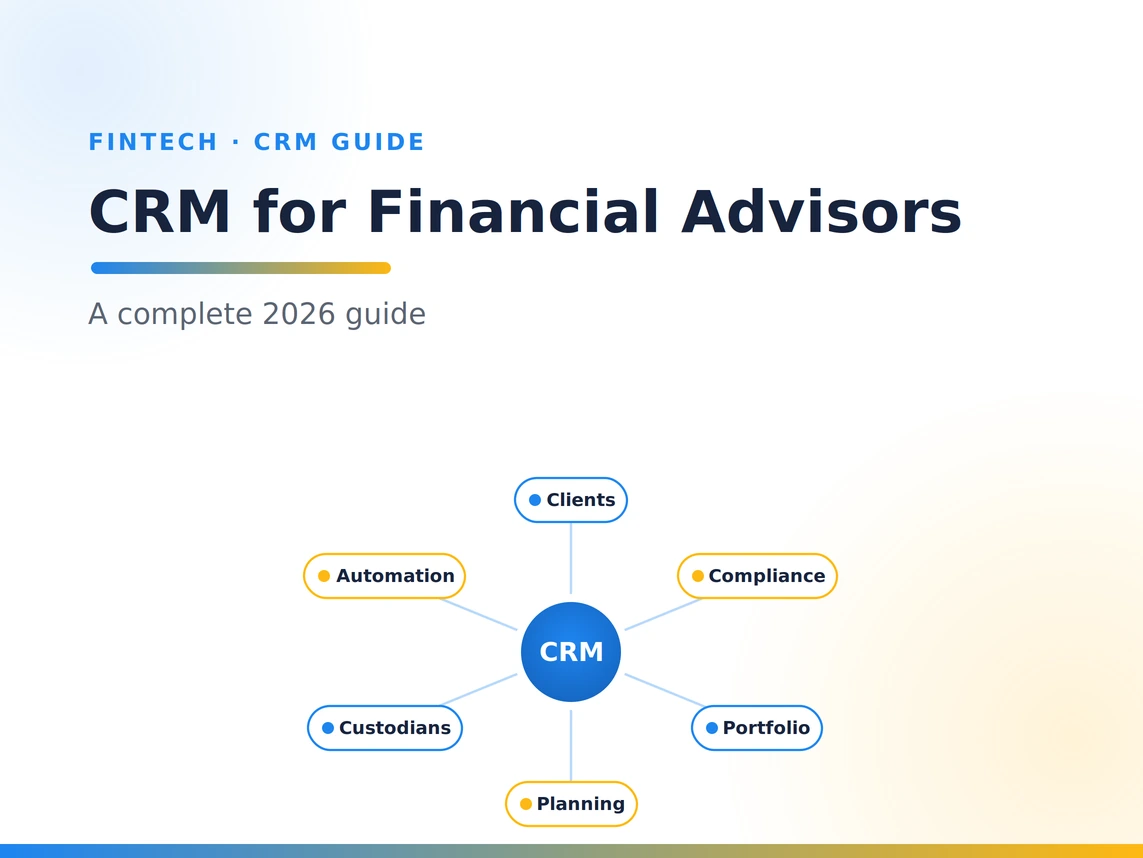
    A CRM for financial advisors is the software system that holds every client relationship, automates the daily work of running an advisory practice, and keeps the compliance record that regulators require. It is the operational hub of the firm, the one place where client data, meetings, tasks, communications, and the entire service calendar live together. A generic sales CRM tracks deals. A CRM for financial advisors tracks households, beneficiaries, risk profiles, review schedules, and the regulated paper trail behind every recommendation, which is a different job.

    The category matters more than almost any other tool an advisor buys. In Kitces research, CRM was the single most widely adopted technology among financial advisors, at 85.7 percent, ahead of financial planning software and performance reporting. And yet the same research found that advisor satisfaction with CRM now lags behind how important advisors say it is. That gap is the whole story of this guide.

    The problem is rarely that CRMs are bad. It is that firms pick the wrong fit, skip the integrations, or never drive real adoption, so a tool the whole practice depends on becomes a source of friction. As the person who builds and integrates these systems for firms, I wrote this to help you choose and implement one that your team will actually use.

    Key Takeaways

    • An advisor CRM is not a generic sales CRM. It is built for households, compliance recordkeeping, and integrations with custodians, portfolio, and planning tools.
    • It is the most-used advisor technology for a reason. The CRM is the system of record for the client relationship and the audit trail behind it.
    • Compliance is a core feature, not an add-on. SEC rules require advisers to preserve client communications and records for years, and the CRM is where much of that lives.
    • The best CRM is the one your team adopts. Fit, usability, and integration drive satisfaction far more than the feature list on a sales page.
    • You have three paths, not two. Buy an off-the-shelf advisor CRM, build a custom one, or customize and integrate a flexible platform. The middle path is often the sweet spot.
    • Implementation decides the outcome. Clean data migration, real integrations, and training separate the firms that love their CRM from the ones that resent it.

    What is a CRM for financial advisors?

    A CRM, or client relationship management system, is software that centralizes everything about your clients and the work you do for them. For a financial advisor, that means far more than names and phone numbers. A proper advisor CRM organizes clients by household and relationship, so a couple, their trust, and their two children are linked rather than scattered. It stores the data that advice depends on: risk tolerance, goals, account types, held-away assets, key dates, and know-your-client information. It records every meaningful interaction, from a portfolio review to a quick call about a withdrawal, because those interactions are both good service and a regulatory requirement.

    The distinction from a generic CRM is not cosmetic. A sales CRM is designed to move a prospect through a pipeline and then close. An advisory relationship does not close. It compounds over decades, across market cycles, generations, and life events. The software has to be built for the long relationship, the household structure, the compliance record, and the specific tools an advisor uses every day. That is why a CRM for financial advisors sits at the center of the practice while a repurposed sales tool so often ends up half used and resented.

    Why financial advisors need a CRM

    The case for a dedicated CRM comes down to three things: relationships at scale, compliance, and return on the investment.

    Relationships at scale. A solo advisor with 40 clients can hold the details in their head. A growing firm with hundreds of households cannot. The CRM is what lets a team deliver the same attentive, personal service to client number 300 as to client number three, by making sure no review is missed, no promised follow up is dropped, and anyone on the team can pick up a relationship and know exactly where it stands.

    Compliance. This is not optional and it is not minor. Under SEC Rule 204-2, investment advisers must preserve extensive books and records, including originals of written communications received and copies of communications sent that relate to recommendations, transactions, and performance. Most of those records must be kept for at least five years, with the first two years in an easily accessible place. A CRM built for advisors captures and organizes much of that trail automatically, turning a compliance burden into a background process.

    Return on investment. CRM is one of the most studied software categories in business, and the returns are well documented. Nucleus Research has estimated that CRM returns 8.71 dollars for every dollar spent, driven by productivity, retention, and the ability to serve more clients without adding proportional headcount. For an advisory firm, where a single retained relationship can be worth many times the annual cost of the software, the math is rarely the hard part. Adoption is.

    Must-Have Features of a CRM for Financial Advisors

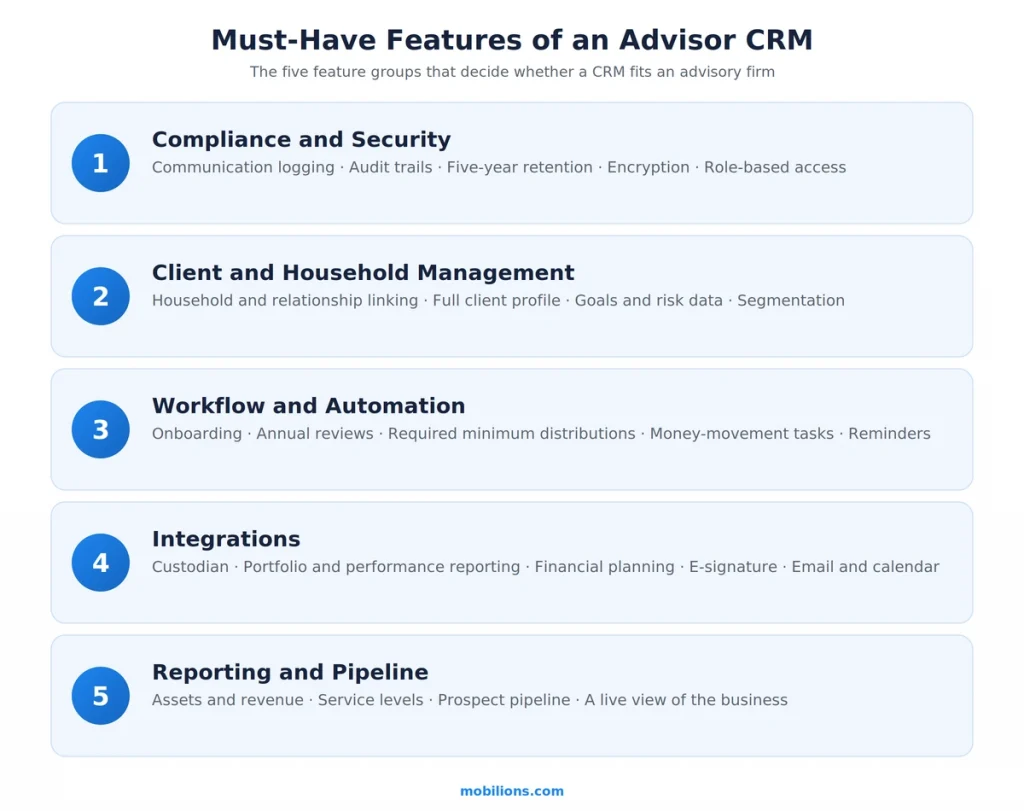
    Not every feature matters equally. After building and integrating these systems, I group the ones that actually move the needle into five categories. Treat this as your evaluation checklist.

    Must-have features of a CRM for financial advisors

    Compliance and security. Communication logging and archiving, audit trails, retention that matches the five-year rule, role-based access, encryption, and support for the safeguarding obligations under SEC Regulation S-P, whose 2024 amendments add incident response and breach notification duties. If a CRM cannot help you meet your recordkeeping and data-protection obligations, nothing else about it matters.

    Client and household management. Household and relationship linking, a complete client profile with goals and risk data, segmentation so you can serve your top households differently, and a clear view of every account and beneficiary. This is the heart of the system of record.

    Workflow and automation. Repeatable processes for onboarding, annual reviews, required minimum distributions, birthdays, and money movement, with tasks that assign themselves and never fall through the cracks. Automation is where an advisor CRM converts good intentions into consistent execution.

    Integrations. This is the feature category advisors underweight and later regret. The CRM has to connect to your custodian, your portfolio management and performance reporting, your financial planning software, e-signature, and email and calendar. A CRM that does not integrate becomes an island of duplicate data entry, and duplicate entry is where both time and accuracy go to die.

    Reporting and pipeline. A live view of the business: assets, revenue, service levels, prospects, and where each relationship stands. You cannot manage what you cannot see.

    Buy, Build, or Customize: The Three Paths

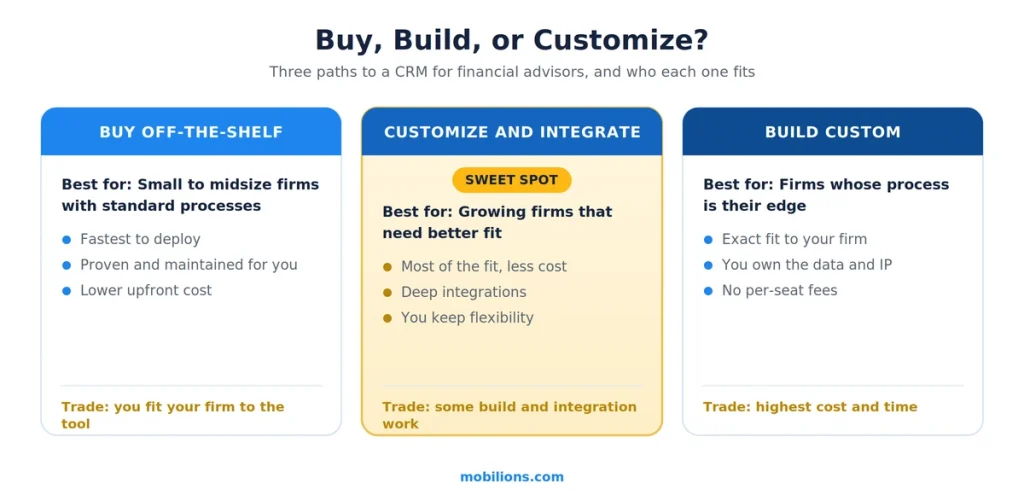
    Buy build or customize a CRM for financial advisors

    Most articles frame this as buy versus build. In practice there are three paths, and choosing well is the most consequential technology decision an advisory firm makes.

    Buy an off-the-shelf advisor CRM. You adopt a platform built specifically for advisors. It is the fastest to deploy, proven across thousands of firms, and maintained for you. The trade is fit. You shape your firm to the tool, live with the workflows it assumes, and accept its limits on customization and data ownership. For many small and midsize firms with fairly standard processes, this is the right answer, and it should be the default you compare everything else against.

    Build a custom CRM. You commission software designed around exactly how your firm works. You own the data and the intellectual property, you integrate deeply with your specific stack, and nothing is bloated with features you do not use. The trade is cost and time, plus the responsibility of maintaining it. Building makes sense when your process is a genuine competitive advantage, when no off-the-shelf tool fits your model, or when you are large enough that the per-seat cost of a commercial platform rivals the cost of owning your own.

    Customize and integrate a flexible platform. This is the middle path, and for growing firms it is often the sweet spot. You start from a capable, extensible platform and build the advisor-specific layer on top: the household model, the compliance workflows, and above all the integrations that tie your custodian, planning, and portfolio tools together.

    You get most of the fit of a custom build for a fraction of the cost and risk, because you are not reinventing the CRM core, only the parts that make it yours. A great deal of the work my team does for advisory firms lives here, in custom software development and integration that turns a decent platform into a system the firm truly owns.

    PathBest forMain advantageMain trade-off
    Buy off-the-shelfSmall to midsize firms with standard processesFast, proven, maintained for youYou fit your firm to the tool
    Customize and integrateGrowing firms that need better fit and integrationMost of the fit at a fraction of the costSome build and integration work
    Build customFirms whose process is a competitive edgeExact fit and full data ownershipHighest cost and time

    The honest guidance: start by assuming you will buy, then let genuine gaps in fit, integration, or ownership push you toward customizing, and reserve a full custom build for when the first two paths clearly cannot serve your model. This is the same disciplined build versus buy reasoning that applies to any SaaS or software decision.

    How to choose the right CRM for your firm

    The right choice is a function of your firm, not a universal winner. Weigh five things.

    Firm size and complexity. A solo practice and a fifty-person RIA have different needs. Match the tool to where you are and where you will be in three years, not to the biggest brand.

    Your existing tech stack. The CRM has to integrate with the custodian, planning, and portfolio tools you already use. Start from your stack and work backward. A CRM that does not connect to your core systems is a downgrade no matter how good it looks in a demo.

    Compliance requirements. Confirm the platform supports the recordkeeping and data-safeguarding obligations that apply to you. This is a gate, not a preference.

    Growth plans. Choose for the firm you are building. Migrating a CRM is painful, so the cost of outgrowing your choice is high. Favor platforms and architectures that scale with you.

    Usability and adoption. This is the one firms underweight and the one that decides success. The Kitces satisfaction gap exists largely because advisors buy on features and then struggle with fit and adoption. The best CRM is the one your team will actually open every morning. If it is painful to use, it will not be used, and an unused CRM has negative value because your data ends up split across the tool and the spreadsheets people quietly keep on the side.

    Implementation: why CRMs fail, and how to succeed

    The software is rarely why a CRM project disappoints. Implementation is. Three things separate the firms that love their CRM from the ones that resent it.

    Clean data migration. Whatever you move in is what you live with. Migrating years of messy contact records, duplicate households, and half-filled fields without cleaning them first just relocates the mess. Budget real time to map, dedupe, and validate the data before it lands in the new system.

    Real integrations. The value of an advisor CRM comes from its connections. Wire it to the custodian, planning, and portfolio tools so data flows automatically and your team stops entering the same information twice. Integration is not a nice to have. It is where the productivity actually comes from.

    Adoption and training. A CRM only works if the whole team uses it the same way. That takes defined processes, training, and leadership that models the behavior. The goal is a single source of truth that everyone trusts, because the moment people stop trusting the data, they go back to their own spreadsheets and the system of record quietly dies.

    Real-world scenario: a growing RIA outgrows its spreadsheets

    Consider a registered investment adviser that has grown from two people to a team of twelve, with several hundred households. For years the firm ran on a shared spreadsheet, a shared inbox, and the founders’ memory. It worked until it did not. Reviews started slipping, two advisors called the same client in one week, and preparing for a compliance exam meant a frantic hunt through old emails.

    The firm moves to a proper CRM. Because its process is fairly standard, it starts with an off-the-shelf advisor platform, then customizes the parts that matter: it integrates the custodian and the planning software so account data flows in automatically, builds an annual review workflow that assigns tasks to the right person at the right time, and turns on communication logging so the compliance record builds itself. The founders invest a month in cleaning the data before migrating, and they train the whole team on one shared way of working.

    The result is not magic, it is consistency. No review is missed. Any team member can open a household and see the full picture. Compliance recordkeeping happens in the background. The firm adds clients without adding chaos, and the CRM stops being a chore and starts being the backbone of the business. Same category of software that frustrates other firms. The difference is fit and implementation.

    Common mistakes and myths

    Mistake: using a generic sales CRM. A repurposed sales tool lacks household modeling, advisor integrations, and compliance features. It looks cheaper and costs more once you account for the workarounds.

    Mistake: buying features you will never adopt. A long feature list is not value. Value is the handful of capabilities your team will use every day. Buy for adoption, not for the demo.

    Mistake: treating the CRM as an island. A CRM that does not integrate with your custodian, planning, and portfolio tools creates duplicate data entry and stale records. Integration is the whole point.

    Myth: a CRM is just a digital rolodex. A contact list is the smallest part of it. The real product is the workflow engine, the compliance record, and the integrated system of record for the client relationship.

    Myth: the most expensive platform is the best. The best platform is the one that fits your firm and gets used. Price and fit are different questions.

    Myth: you must rip and replace. Customizing and integrating a flexible platform is a legitimate third path that often beats both buying blind and building from scratch.

    Why Mobilions

    Choosing, customizing, and integrating a CRM for an advisory firm is a software engineering and compliance problem, and that is our work. Mobilions has built software since 2016, delivering more than 250 projects for over 100 clients across more than 20 countries.

    We help advisory and financial firms in three ways: building custom CRMs designed around exactly how a firm works, customizing and extending flexible platforms with the advisor-specific layer, and integrating the CRM with custodians, planning, and portfolio tools so data flows automatically and securely. If your firm has outgrown its current setup or is weighing buy versus build, our custom software development team can help you decide and deliver. You can also hire dedicated developers to extend your own team, or talk to us about your CRM and integration roadmap.

    Summary

    A CRM for financial advisors is the operational and compliance hub of an advisory practice, and it is the most widely adopted technology in the profession for good reason. It is not a generic sales CRM. It is built for households, for the regulated record behind every recommendation, and for the integrations that tie an advisor’s tools together. The features that matter fall into five groups: compliance and security, client and household management, workflow and automation, integrations, and reporting.

    When you choose, weigh firm size, your existing stack, compliance needs, growth plans, and above all adoption, because the best CRM is the one your team actually uses. Remember there are three paths, not two: buy, build, or customize and integrate. And know that implementation, not the software, decides whether the project succeeds. Clean data, real integrations, and genuine adoption are what turn a CRM from a cost into the backbone of a growing firm.

    Frequently asked questions

    What is a CRM for financial advisors?

    A CRM for financial advisors is software that centralizes client relationships, automates the daily work of running an advisory practice, and maintains the compliance record regulators require. It organizes clients by household, stores the data behind advice such as goals and risk tolerance, logs every interaction, and integrates with the custodian, planning, and portfolio tools an advisor uses. It is purpose built for the long advisory relationship, unlike a generic sales CRM designed to close deals.

    Why do financial advisors need a CRM?

    Because it lets a firm deliver consistent, personal service at scale, keeps the compliance record that rules like SEC Rule 204-2 require, and produces a strong return. A CRM makes sure no review is missed and no follow up is dropped, captures the communications advisers must preserve, and, according to Nucleus Research, returns several dollars for every dollar spent through productivity and retention. As a firm grows past a few dozen clients, memory and spreadsheets stop working and the CRM becomes essential.

    Is a CRM worth it, or can I keep using spreadsheets?

    Spreadsheets work until you pass a couple dozen households, then they break. They give you no audit trail, no automated reminders, and no safe way to meet recordkeeping rules. A CRM is worth it the moment missed reviews, duplicate work, or a compliance exam become real risks, which for most growing firms happens earlier than they expect. The spreadsheet feels free, but the errors and lost time are not.

    What features should a CRM for financial advisors have?

    Five categories matter most: compliance and security such as communication logging, audit trails, retention, and data safeguarding; client and household management with relationship linking and segmentation; workflow and automation for onboarding, reviews, and money movement; integrations with the custodian, planning, and portfolio tools; and reporting on assets, revenue, and pipeline. If you evaluate against these five, you will see past the marketing.

    What should a CRM for financial advisors integrate with?

    At a minimum your custodian, your portfolio management and performance reporting, your financial planning software, e-signature, and email and calendar. Many firms also connect their phone system and marketing tools. Integration is where the real productivity comes from, because it stops your team entering the same client data twice and keeps every system showing the same, current picture of each household.

    What can you automate in an advisor CRM?

    The repeatable work that usually slips: client onboarding steps, annual review scheduling, required minimum distribution reminders, birthday and anniversary touches, money movement tasks, and follow ups after meetings. A good advisor CRM also logs client communications for the compliance record automatically. Automation is what turns good intentions into consistent execution across the whole team, so nothing depends on someone remembering.

    What is the best CRM for financial advisors?

    There is no single best CRM, because the right choice depends on your firm size, existing tech stack, compliance needs, growth plans, and how easily your team will adopt it. Advisor-specific platforms, enterprise financial-services systems, general-purpose CRMs adapted for advisory use, and custom-built solutions each fit different firms. The best one for you is the one that integrates with your stack, meets your compliance obligations, and that your team will actually use every day.

    What is the best CRM for a small or solo advisory firm?

    For a small or solo practice, the best CRM is the simplest one that still covers compliance recordkeeping and connects to your core tools. Prioritize ease of daily use and a low setup burden over a long feature list. An entry tier of an advisor-specific platform usually fits better than an enterprise system you will barely use and pay for anyway.

    Are free or open-source CRMs a good option for advisors?

    They can work for a very early solo practice, but most lack the household modeling, compliance archiving, and advisor integrations that make a CRM worth having. The sticker price is zero, the real cost is not. Setup, maintenance, and compliance risk usually add up to more than a purpose-built advisor CRM would have cost, once you account for your own time.

    How much does a CRM for financial advisors cost?

    Off-the-shelf advisor CRMs are typically priced per user per month, so the cost scales with team size, with higher tiers for more features and integrations. Customizing a platform adds a one-time build and integration cost on top of subscription fees. A fully custom build is a larger upfront investment but removes per-seat fees and gives you ownership. The bigger cost to watch is hidden: a CRM your team does not adopt wastes both its price and the productivity it was supposed to deliver.

    Should financial advisors buy or build a CRM?

    There are three options: buy an off-the-shelf advisor CRM, build a custom one, or customize and integrate a flexible platform. Buying is fastest and right for most small and midsize firms with standard processes. Building fits firms whose process is a competitive advantage or who have outgrown commercial tools. Customizing and integrating is the middle path and often the best value for growing firms. Start by assuming you will buy, then let real gaps in fit and integration push you toward the other paths.

    Can financial advisors just use a generic sales CRM?

    It is usually a false economy. Generic sales CRMs lack household modeling, advisor-specific integrations, and the compliance and recordkeeping features advisers need, so firms end up building fragile workarounds or keeping side spreadsheets. A platform built for advisors, or a flexible platform customized for advisory use, handles the compliance record and the integrations a repurposed sales tool cannot.

    How do you keep a CRM compliant?

    Make sure the CRM supports your recordkeeping and data-protection obligations. Under SEC Rule 204-2, advisers must preserve client communications and records, generally for at least five years with the first two easily accessible, and SEC Regulation S-P adds safeguarding and breach-response duties. In practice that means turning on communication logging and archiving, keeping audit trails, enforcing role-based access and encryption, and confirming retention settings match the rules.

    How is AI changing CRM for financial advisors in 2026?

    AI is moving into advisor CRMs as meeting note capture, summaries, next best action prompts, and drafts of routine client messages, which cut the manual data entry advisors dislike most. It augments the advisor, it does not replace the relationship or the judgment. Every AI output that touches a client still needs human review and a compliance record behind it, so treat it as an assistant, not an autopilot.

    How do you migrate to a new CRM without losing client data?

    Treat migration as the real project, not an afterthought. Export your existing data, map every field to the new system, and dedupe and clean households before you import, not after. Validate a sample, keep the old system read-only for a while as a safety net, and move in one clean cut rather than dragging two systems along and splitting your data across both.

    How do you get your team to actually adopt the CRM?

    Adoption is the single biggest predictor of success, and it comes from process, not software. Define one shared way of working, train everyone on it, and have leadership model the behavior daily. Make the CRM the single source of truth and retire the side spreadsheets, because the moment people distrust the data they drift back to their own copies and the system of record quietly dies.

    How long does it take to implement an advisor CRM?

    It depends on firm size and data quality, but plan for weeks, not days, and treat data migration and integration as the real work. Cleaning and mapping years of contact data, wiring up the custodian and planning integrations, and training the team on one shared process take the most time. Rushing these steps is the most common reason CRM projects disappoint, so a deliberate rollout is worth far more than a fast one.