The 7 stages of app development are strategy, planning, design, development, testing, deployment, and maintenance. Every serious app, from a simple utility to a system used by millions, moves through those same seven stages, in that order, whether the team names them or not. That is the short answer, and if you came for the list, there it is.
Here is the part the list does not tell you, and the part that actually matters if you are about to build an app. Having shipped mobile apps for years, I can tell you the stages are the easy thing to memorize and the hard thing to do well.
The difference between an app that launches on time and one that quietly bleeds money is almost never that a team skipped a stage. It is that they rushed the early stages, where mistakes are cheap to fix, and paid for it in the late ones, where the same mistakes cost a fortune. So this guide answers the question two ways: what each of the 7 stages of app development actually is, and what really happens inside it, including where each one tends to go wrong.
Key takeaways
If you only have a minute, these are the points that matter most about the 7 stages of app development.
The 7 stages are strategy, planning, design, development, testing, deployment, and maintenance, in that order. Every app goes through all seven, even the ones that pretend they are only doing the middle three.
The early stages are the cheapest place to fix mistakes. A problem caught in strategy or design costs a fraction of the same problem caught in production, so the money you save is made at the start, not the end.
Development is only one of seven stages. Teams that treat app building as just writing code skip the strategy, design, and testing that decide whether the code is worth anything.
Maintenance is not the end, it is most of the life. An app is a living product, and the work after launch usually outlasts and outcosts the work before it.
App development phases vs stages: what to call them
People search for the same idea under different names: app development phases, the stages of developing an app, or simply application development stages. They all describe the seven steps in this guide, from discovery to launch and support. Whichever term you use, the sequence and what happens at each step stays the same. The stakes only rise with scale. In enterprise mobile app development, where security, compliance, and system integration come into play, getting these early stages right matters even more.
The 7 stages of app development at a glance
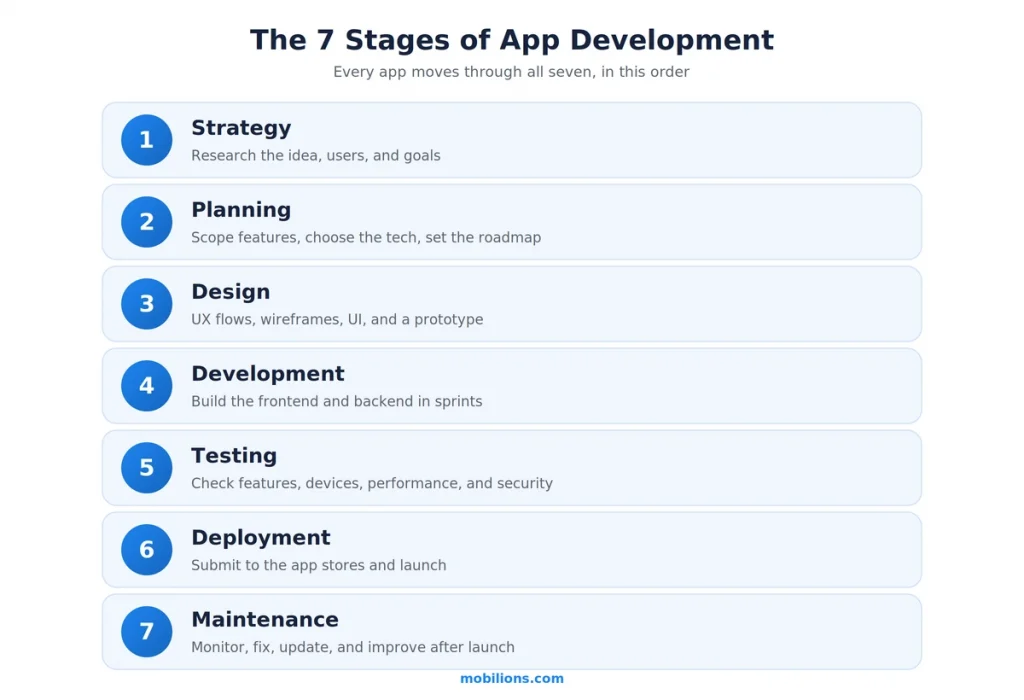
Before going deep, here is the whole map in one place. Read this table and you already understand the shape of any app project.
| # | Stage | What actually happens | What you get out of it |
|---|---|---|---|
| 1 | Strategy | Research the idea, users, market, and goals | A clear reason to build and a definition of success |
| 2 | Planning | Scope features, choose the tech, build the roadmap | A realistic plan of what to build and in what order |
| 3 | Design | UX flows, wireframes, UI, and a clickable prototype | A tested design before a line of code is written |
| 4 | Development | Build the frontend and backend in sprints | The actual working app, feature by feature |
| 5 | Testing | Check functionality, devices, performance, and security | Confidence the app works before real users see it |
| 6 | Deployment | Submit to the app stores and launch | A live app people can download |
| 7 | Maintenance | Monitor, fix, update, and improve after launch | An app that stays working and keeps getting better |
The stages are sequential in logic but overlapping in practice, which I will come back to. First, what each one really involves.
Stage 1: Strategy
Strategy is where you decide whether to build at all, and it is the stage teams are most tempted to skip because it does not feel like progress. It is. This is where you define the problem the app solves, who it is for, what success looks like in numbers, and whether the idea can actually make money or save it. You research the market and the competitors, you talk to real potential users, and you turn a vague idea into a specific goal.
The deliverable is not a document for its own sake. It is a clear, honest answer to the question of why this app should exist and how you will know if it worked. Where this stage goes wrong is simple: teams fall in love with a solution before validating the problem, and then build something beautifully engineered that nobody needs. The cheapest pivot you will ever make is the one you make here, before anything is built.
Stage 2: Planning
Planning turns the strategy into a plan you can actually execute. This is where you decide the scope, which features are in the first version and which wait, how the app will be built, native or cross-platform, what the backend and integrations need to be, and the realistic timeline and budget. A good plan ruthlessly prioritizes, because the fastest way to sink an app is to try to launch with every feature instead of the few that matter.
The deliverable is a scoped roadmap: a prioritized feature list, a technical approach, and a timeline everyone believes. Where planning goes wrong is scope creep and wishful timelines. A plan that assumes everything goes perfectly is not a plan, it is a hope, and the first surprise breaks it. The teams that ship plan for the first version to be small and the surprises to be real.
Stage 3: Design
Design is where the app becomes something you can see and click before it is expensive to change. It has two halves that people often confuse. User experience design maps the flows and structure, how a user actually moves through the app to get something done, usually as wireframes. User interface design is the visual layer on top, the colors, type, and components. The stage ends with a prototype, a clickable version of the app that looks and feels real without being built.
The deliverable is a tested design and prototype. This is the single most underrated stage, because a problem you find by watching someone use a prototype costs almost nothing to fix, while the same problem found after development costs a rebuild. Where design goes wrong is jumping to pretty screens before the flows are right, or skipping the prototype and discovering in testing that the app is confusing. Design is cheap. Redesigning a built app is not. Getting this right is a core part of what our mobile app development team treats as non-negotiable before build starts.
Stage 4: Development
Development is the stage everyone pictures when they think about building an app, and it is where the working product finally gets built. It usually splits into the frontend, the app itself that runs on the phone, and the backend, the servers, databases, and APIs that power it. Serious teams build in short sprints, delivering working pieces of the app in increments rather than disappearing for months and reappearing with a finished thing, because increments let you catch problems early and adjust.
The deliverable is the working app, built feature by feature. Where development goes wrong is usually not the code itself, it is building against a weak plan or an untested design, so the team ships exactly what was asked for and it turns out to be the wrong thing. Development is also where cutting corners on architecture quietly creates the technical debt you pay for during maintenance. Good development is disciplined, tested as it goes, and honest about tradeoffs.
Stage 5: Testing
Testing, or quality assurance, is where you find the problems before your users do, and it is the stage whose value is easiest to prove with a number. The cost of fixing a defect rises sharply the later you catch it. As analyses of the classic software-engineering data show, a bug caught in design or requirements is dramatically cheaper to fix than the same bug caught in production, often by an order of magnitude or more. Every hour spent testing before launch saves many hours after it.
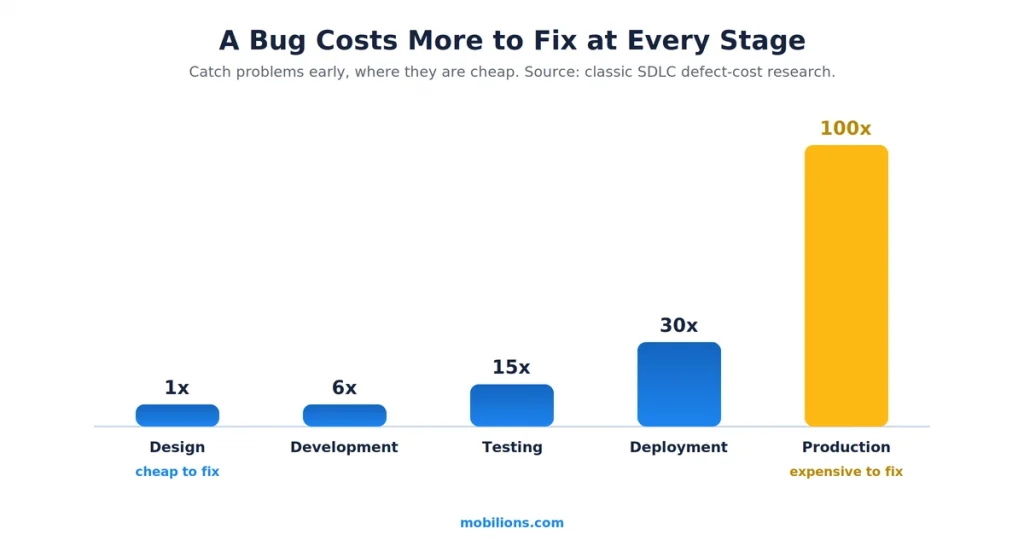
Real testing is more than clicking around. It covers whether features work as intended, whether the app behaves across the range of devices and operating systems it has to support, whether it performs under load, and whether it is secure. The deliverable is confidence, backed by evidence, that the app is ready. Where testing goes wrong is treating it as a rushed final step squeezed by a slipping deadline, or testing only on the developer’s own clean, fast phone. Testing is not the gate before launch, it is a discipline that should run through development.
Stage 6: Deployment
Deployment is the launch: getting the app into the world where people can download it. For mobile, that means submitting to the Apple App Store and Google Play, each of which reviews apps against its own policies before approving them, and a rejection can cost days. This stage also includes the release plan itself, whether you launch to everyone at once or roll out gradually to a slice of users first to catch anything the testing missed.
The deliverable is a live app, available to real users. Where deployment goes wrong is treating it as a formality. App-store review is a real step to plan for, store listings and screenshots are part of the launch and often rushed, and a big-bang launch with no staged rollout means any surprise hits everyone at once. A calm deployment is a planned one, with the store requirements handled early rather than discovered at submission.
Stage 7: Maintenance
Maintenance is the stage people forget when they budget, and it is usually the biggest one. An app is not a project that ends at launch, it is a product that lives. After release you monitor how it performs and where it crashes, you fix the issues real usage surfaces, you keep up with new operating-system versions and store policy changes that arrive every year, and you improve the app based on what users actually do. Skipping this is how a working app slowly rots: it breaks on a new OS version, falls behind, and quietly loses its users.
The deliverable is an app that keeps working and keeps getting better. Where maintenance goes wrong is not budgeting for it at all, so the team that built the app moves on and there is no one to keep it alive. A common planning figure is to budget an ongoing amount each year for maintenance, because the post-launch life of an app usually outlasts and outcosts the build. This is also why it helps to build with a team you can keep, or to hire developers who will still be there after launch.
Where each of the 7 stages tends to go wrong
If you remember one thing from a practitioner rather than a textbook, remember this table. Each stage has a single most common way it fails, and knowing them in advance is most of how you avoid them.
| Stage | Where it most often goes wrong |
|---|---|
| Strategy | Building a solution before validating the problem is real |
| Planning | Scope creep and a timeline that assumes nothing goes wrong |
| Design | Jumping to pretty screens before the flows are right, or skipping the prototype |
| Development | Building well against a weak plan or an untested design |
| Testing | Rushed as a final step, or tested only on the developer’s clean, fast phone |
| Deployment | Treating app-store review as a formality, or a big-bang launch with no staged rollout |
| Maintenance | Not budgeting for it, so the app is abandoned shortly after launch |
Notice that almost none of these failures are about writing bad code. They are about decisions made, or skipped, around the code, which is exactly why understanding all seven stages matters more than being good at any single one.
How long do the 7 stages take, and do they overlap?
The stages are sequential in logic but not in a rigid, one-finishes-then-the-next-starts way. In a modern agile process, design, development, and testing overlap heavily: a feature gets designed, built, and tested while the next feature is being designed, in a loop, rather than the whole app being designed, then the whole app being built. Strategy and planning still come first because you cannot build well without them, and deployment and maintenance still come after because you cannot launch what does not exist. But the middle is a cycle, not a straight line.
Timelines vary enormously with scope. A simple app might move through all seven stages in a few months, while a complex one takes a year or more, and the split matters: teams consistently underestimate strategy, design, and testing and overestimate how much of the timeline is pure development. The lesson from every project I have shipped is that time invested in the early stages is not time lost, it is time bought back with interest in the late ones.
A real-world scenario
To make the stages concrete, picture a founder with an idea for a fitness app. The tempting move is to jump straight to stage 4 and start building. The move that works runs the stages in order.
In strategy, they discover through user conversations that people do not want another tracking app, they want accountability, which reshapes the whole idea before a dollar is spent building. In planning, they cut the feature list from twenty ideas to the three that deliver that accountability, and choose cross-platform to reach both app stores fast. In design, a clickable prototype reveals that their onboarding is confusing, and they fix it in an afternoon rather than after launch. In development, they build those three features well in sprints.
In testing, they catch a crash that only happens on older Android phones, exactly the kind of thing a developer’s own new phone would never reveal. In deployment, they handle App Store review early and roll out to a small group first. And in maintenance, they watch real usage, fix what surfaces, and add the fourth feature only once the first three have proven themselves. That is the same seven stages everyone has, run with discipline, and it is the difference between launching and stalling.
Common mistakes and myths
A few misconceptions send app projects off the rails.
The first myth is that app development means development. It is one stage of seven, and the teams that treat building as the whole job skip the strategy, design, and testing that decide whether the building was worth it.
The second mistake is rushing the early stages to get to code faster. It feels like speed and it is the opposite, because every mistake left in strategy, planning, or design gets more expensive at every later stage.
The third mistake is treating testing as an optional final step. The bug-cost data is clear that this is the most expensive corner you can cut, and it is cut most often when a deadline slips.
The fourth mistake is forgetting maintenance exists. An app budgeted only through launch is an app abandoned shortly after it, because the real product life is everything that comes after.
The honest caveat worth stating plainly: naming the seven stages is easy, and no framework builds an app for you. The value is not in the list, it is in the discipline of doing each stage properly and resisting the constant temptation to skip the early, unglamorous ones to get to the code. That discipline is the actual difference between the apps that make it and the ones that do not.
Why Mobilions
Mobilions has been building custom software, mobile apps, and AI solutions since 2016. We have delivered more than 250 projects for over 100 clients across 20-plus countries, which means we have run these seven stages hundreds of times, on everything from first-time founder apps to systems used across dozens of countries. When we take on a build, we spend real effort on the early stages that most teams rush, because that is where the money and the timeline are actually decided, and we stay through maintenance rather than disappearing at launch. If you are planning an app and want it run through all seven stages properly, that is exactly the work our mobile app development team does every week.
Summary
So what are the 7 stages of app development? They are strategy, planning, design, development, testing, deployment, and maintenance. Every app moves through all seven, and the list is the easy part. The hard part, and the part that decides whether an app succeeds, is doing the early stages properly, because a mistake caught in strategy or design costs a fraction of the same mistake caught in production.
Development is only one of the seven stages, testing is a discipline rather than a final gate, and maintenance is most of an app’s real life rather than an afterthought. Run all seven with discipline, invest where it is cheap to fix things, and you build an app that launches and lasts.
Frequently asked questions
What are the 7 stages of app development?
The 7 stages of app development are strategy, planning, design, development, testing, deployment, and maintenance, in that order. Strategy defines why to build, planning scopes what to build, design shapes how it looks and works, development builds it, testing checks it, deployment launches it, and maintenance keeps it working and improving after launch.
I have an app idea, where do I start?
Start at stage 1, strategy. Before any design or code, define the problem you are solving, who it is for, and how it will make money, then validate that with real potential users. Most failed apps skipped this and built something nobody needed. A clear strategy is the cheapest insurance in the whole process.
Which stage of app development is the most important?
No single stage is skippable, but the early stages, strategy, planning, and design, carry the most weight because mistakes caught there are the cheapest to fix. A problem found in design costs a fraction of the same problem found in production, so the early stages quietly decide the budget and timeline of everything that follows.
Is development just one of the app development stages?
Yes. Development, the actual building of the app, is one of the seven stages, not the whole process. Treating app development as only writing code skips the strategy, design, and testing that determine whether the code is worth building, which is a common reason apps fail.
Where does an MVP fit in the 7 stages of app development?
An MVP, minimum viable product, scopes stages 2 to 6 around the smallest useful version. Instead of building every feature, you plan, design, build, test, and launch the core that proves the idea, then use maintenance and real feedback to expand. It reduces risk and gets you to market faster.
Which platform should I build first, iOS or Android?
That decision belongs in the planning stage, not later. Choose based on where your target users are, your budget, and your monetization. Many startups launch on one platform first to learn cheaply, then expand. Cross-platform tools like Flutter or React Native can also cover both from one codebase, which planning should weigh.
What is the difference between UI and UX in the design stage?
UX, user experience, is how the app works and feels, the flow and logic. UI, user interface, is how it looks, the screens, colors, and buttons. Both live in the design stage, stage 3. Good UX decides whether the app is useful, good UI decides whether it is pleasant to use. You need both.
Why is testing so important in app development?
Because the cost of fixing a defect rises sharply the later it is caught. A bug found during design or testing is far cheaper to fix than the same bug in production, often by an order of magnitude. Skipping or rushing testing is the most expensive corner a team can cut when a deadline slips.
How do I get my app into the App Store or Google Play?
That is the deployment stage, stage 6. You prepare store listings, screenshots, and privacy details, meet each store’s review guidelines, and submit the build. Apple reviews every app before approval, and Google is faster but still checks policy. Planning for these rules early avoids last-minute rejections at launch.
What is the difference between deployment and maintenance?
Deployment is the launch, getting the app approved by the app stores and released to users. Maintenance is everything after, monitoring the live app, fixing issues, updating for new OS versions and store policies, and improving it over time. Deployment is a moment, maintenance is the ongoing life of the app.
What happens after an app launches?
Maintenance, which is the seventh stage and often the largest. After launch you monitor performance and crashes, fix issues real usage reveals, keep up with new operating-system versions and store policy changes, and improve the app based on how people actually use it. An app is a living product, so the work after launch usually outlasts the work before it.
Which stage handles app security?
Security is not one stage, it runs through several. It starts in planning, where you decide how to handle data, continues through development with secure coding, and is checked in testing before launch. After launch, maintenance keeps it patched as new threats appear. Treating security as an afterthought is how apps get breached.
Do the 7 stages have to happen in order?
Strategy and planning come first and deployment and maintenance come last, but the middle stages of design, development, and testing overlap heavily in a modern agile process. Rather than designing the whole app, then building the whole app, teams design, build, and test one feature while starting the next, in a loop.
How long does the app development process take?
It depends on scope. A simple app can move through all seven stages in a few months, while a complex one takes a year or more. Teams usually underestimate strategy, design, and testing and overestimate pure development time. The middle stages of design, development, and testing typically overlap rather than running strictly one after another.
How much does it cost to build an app through all 7 stages?
It depends on scope, but a simple app usually runs into the tens of thousands and a complex one into the hundreds of thousands. The cost is spread across the stages, not just development. Strategy, design, testing, and post-launch maintenance often add up to more than the coding itself, so budget for the whole process.
How much does it cost to skip stages of app development?
More than doing them. Skipping the early stages does not remove the work, it moves it to a later stage where it costs far more, because a problem left in strategy, design, or planning compounds through development, testing, and production. The cheapest app is usually the one that took the early stages seriously.
Do I need to hire an agency to go through all 7 stages?
Not always, but most teams benefit from one. A good agency covers all seven stages with the right mix of strategy, design, engineering, and QA, so nothing falls through the gaps. A solo freelancer can handle a small app, but the strategy, testing, and maintenance stages are where thin teams usually struggle.

Dhaval Patel is a Senior Mobile Developer at Mobilions with deep, hands-on experience shipping Android, iOS, and cross-platform apps. He has helped build products used by teams across 20+ countries. He writes practical guides on mobile app development, app performance, and the real-world trade-offs of building for phones and tablets.