Moving a Lovable, Bolt, or Cursor app to production feels like you have to throw it out and start over. You do not. Taking an AI app to production means keeping the parts that already work and rebuilding a short, specific list of the parts that do not. This post is that list.
The mistake most founders make is treating it as all or nothing. Either the AI build is “real” and they ship it as is, or it is “fake” and they scrap everything. The truth sits in the middle. A good chunk of what these tools generate is fine to keep. A small, predictable set of things has to be redone before real users and real data show up.
Here is what to keep, what to rebuild, and how to tell the difference for your own app. Think of it as a field guide to taking an AI app to production.
Key takeaways
- Taking an AI app to production is a rebuild of specific parts, not a restart. Most of the app survives.
- You almost always keep the interface, the core user flow, and the idea itself.
- You almost always rebuild authentication, the data model and its security, secret handling, payments, and error handling.
- The database and backend logic are the “it depends” pieces. Keep them if they are clean and correct, rebuild if they are tangled.
- Do it in order: security first, then data, then performance, then structure. A full restart is rare and only makes sense when the core data model is wrong.
Production ready is not demo ready
A demo has to work once, for you, with clean input. Production has to work a thousand times, for strangers, with messy input, while protecting their data. Those are different jobs, and AI builders are built for the first one.
That is not a knock on the tools. Lovable, Bolt, and Cursor are very good at turning an idea into something you can click in an hour. The gap shows up later, when the thing that demoed well meets a hundred real users. Knowing which parts close that gap is the whole game, and it is the real work of taking an AI app to production.
What you almost always keep
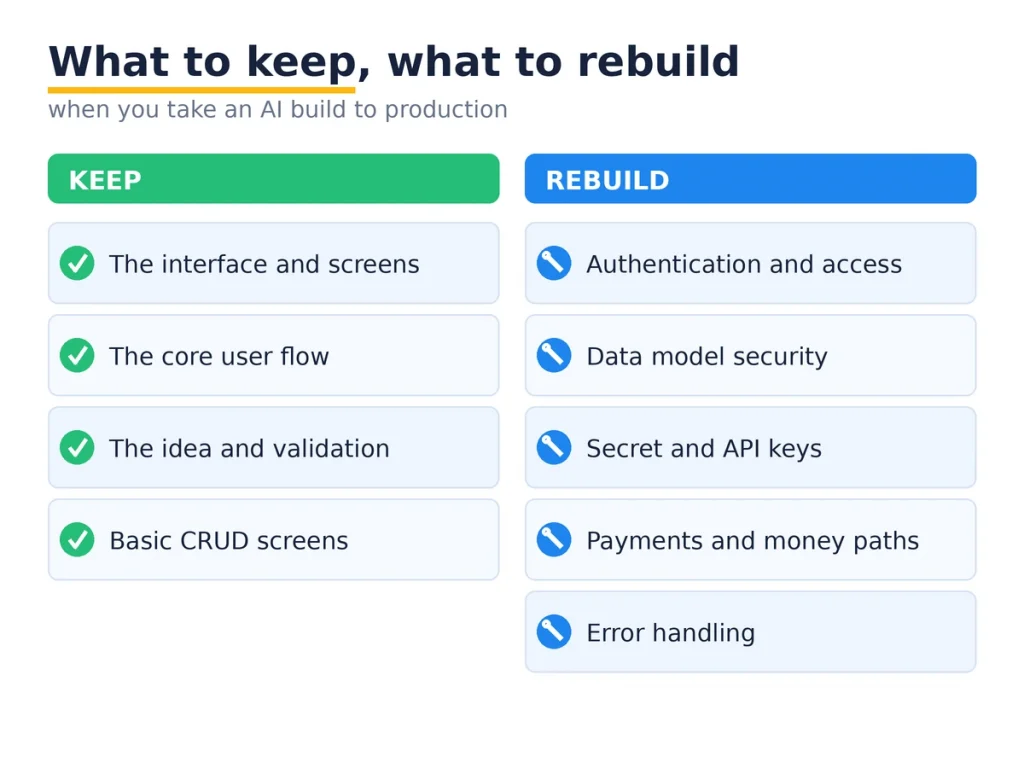
Start with the good news, because it is most of the app.
The interface. The screens, the layout, the components, the styling. AI tools are strong here, and there is rarely a reason to rebuild a frontend that already looks right and works. Keep it.
The core user flow. The path a user takes through the app, the steps, the order of screens. If it makes sense and people can follow it, that design work is done. It carries straight into production.
The idea and the validation. The most valuable thing the AI build gave you is proof that people want this. That does not get rebuilt. It is the reason to rebuild anything at all.
Basic CRUD and content. Simple create, read, update, delete screens and the copy on them are usually fine. They just need the security layer underneath them fixed, which is a different job from rebuilding the screens.
What you almost always rebuild
This is the short list that turns an AI app to production into a safe one. It is short, but it is not optional.
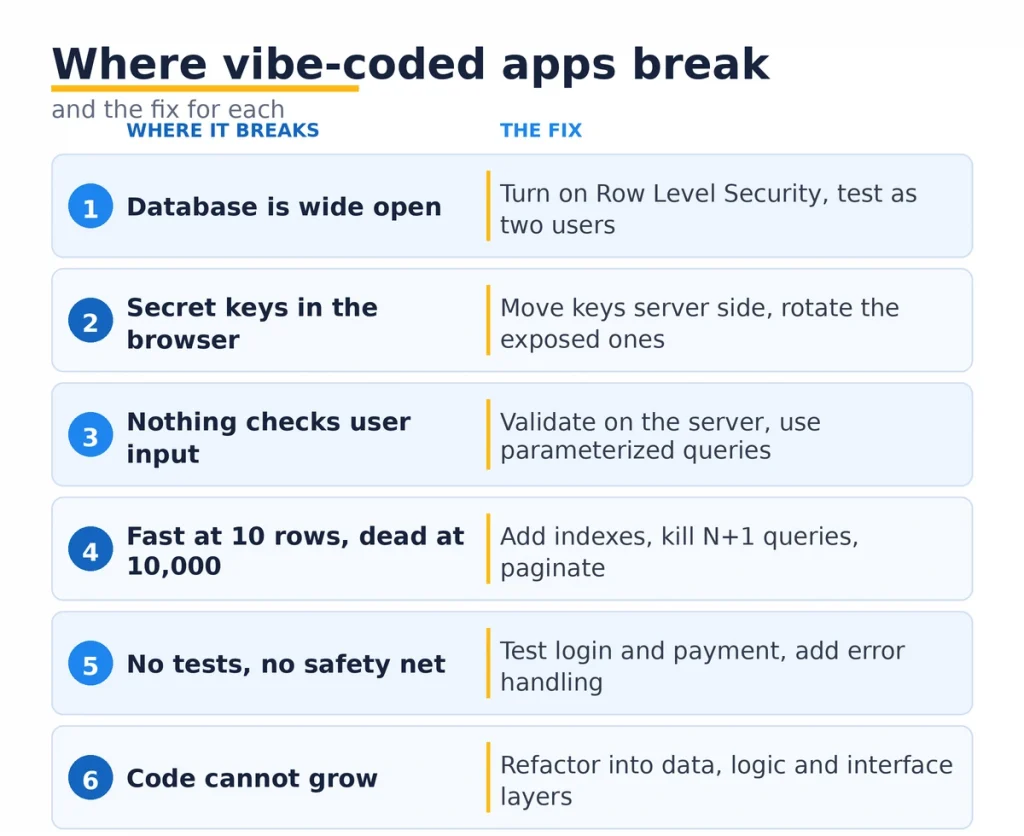
Authentication and access control. AI builders wire up a login that works, then leave the rules about who can see what wide open. This gets rebuilt properly, with real checks on every request, so one user cannot read another user’s data.
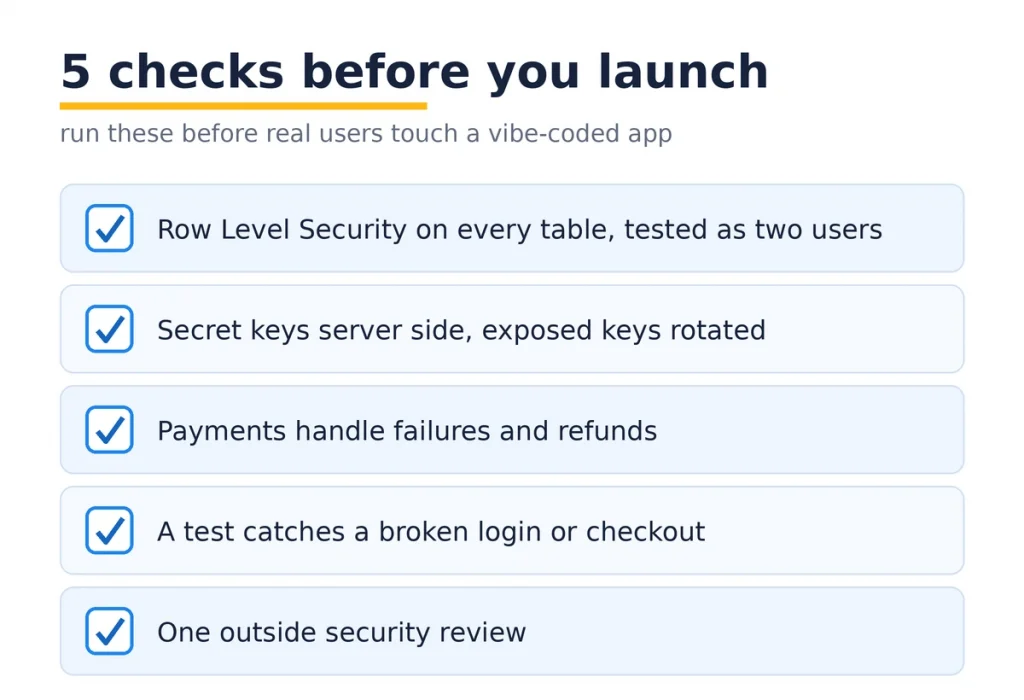
The data model security. If you are on Supabase or Firebase, Row Level Security is usually off, which means your tables are readable by anyone. The schema is often fine. The rules protecting it are not. Those get rebuilt.
Secret handling. API keys for Stripe, OpenAI, or your database tend to sit in the frontend where anyone can read them. Every one of those gets rotated and moved server side. This is not negotiable before launch.
Payments and money paths. A demo checkout that works on a happy path is not a payment system. Real payments handle failures, refunds, retries, and edge cases. That logic gets built for real.
Error handling. AI code assumes everything succeeds. Production code assumes things fail and handles it, so a user sees a clear message instead of a blank screen while their data quietly disappears. This gets added across the app.
What depends on your build
Two pieces sit in the middle, and the answer is “look before you decide.”
The backend and business logic. If the AI wrote clean, separated logic, keep it. If it is one tangled block where every function knows about every other, it is cheaper to rebuild that layer than to keep patching it. Most AI builds land somewhere between, so you keep the sound parts and redo the messy ones.
The database schema. Usually you keep it. The tables and relationships the AI designed are often reasonable. You rebuild the schema only when it is fundamentally wrong in a way that every feature depends on, which is the one case that can justify a bigger teardown.
How to decide, piece by piece
When you are not sure whether to keep or rebuild something, run it through three questions.
Is it correct? Does it actually do the right thing for real inputs, not just the demo input?
Is it secure? Can a user reach data or actions that are not theirs?
Will it scale? Does it still work at a thousand rows and a thousand users, not just ten?
If a piece is a yes on all three, keep it. If it fails any one, rebuild that piece. This keeps you from the two expensive mistakes: shipping something broken because it looked done, and rebuilding something that was already fine. That triage is the heart of any AI app to production plan.
The order for taking an AI app to production
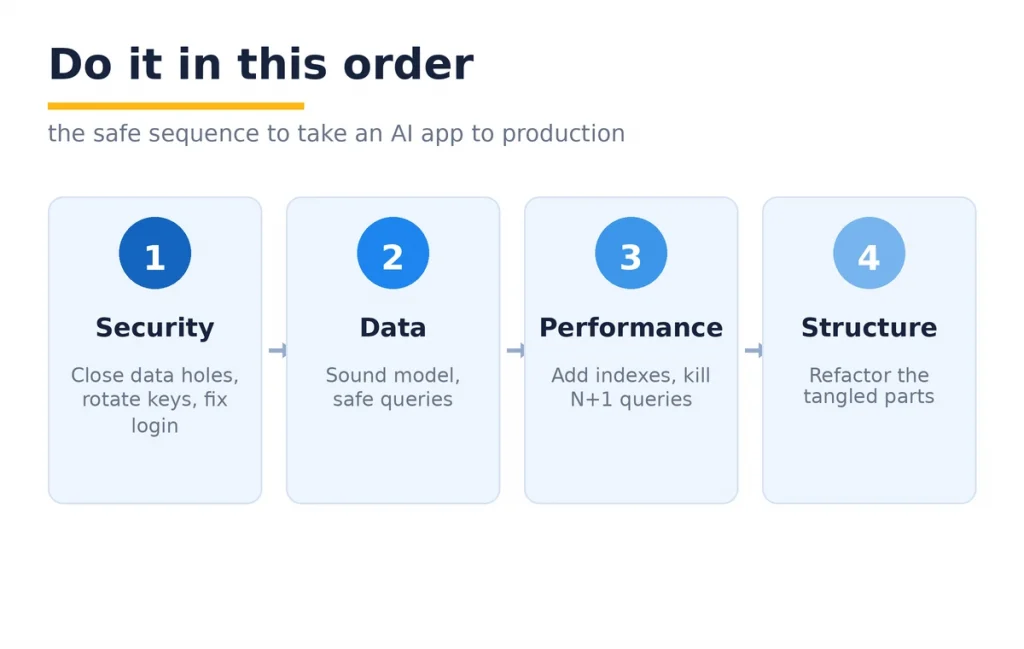
Sequence matters, because the risks are not equal. Do it in this order.
Security first. Close the data access holes, rotate and move the keys, fix authentication. These are the things that get you breached, so they go first. Many of these are the same six places vibe-coded apps break, and the fixes carry straight over.
Data second. Make sure the model is sound and the queries are safe. Performance third: add the indexes and fix the slow queries before growth, not after. Structure last: refactor the tangled parts once the app is safe and fast, so it can take new features without breaking.
That order means the scary risks are gone early, and the slower cleanup happens on an app that is already safe to run.
How much you rebuild, and how long it takes
The rebuild list above is real work, but it is a slice of the app, not the whole thing. For a sound AI build with the usual issues, the security and data pass is often a few days. A fuller hardening, with payments and structure, runs one to three weeks. Add the fact that you are keeping the interface and the flow, and you are miles ahead of a from-scratch build.
Compare that to the alternative. Scrapping a working app and rebuilding everything throws away the parts the AI got right, which is most of it. The point of moving an AI app to production is to spend your money only where it is needed.
When to actually start over
Sometimes a full restart is the honest answer. It is rare. It comes down to one thing: the data model.
If the way the app stores and relates data is fundamentally wrong, and every screen and feature is built on top of that wrong model, patching it costs more than rebuilding. That is the case where you keep the interface and the idea, and rebuild the engine underneath. For everything short of that, a targeted rebuild beats a restart.
What a real one looks like
A founder came to us with a Cursor and Bolt build. A booking app, live, paying customers, growing. He assumed he needed a full rewrite before he could scale. He did not.
We kept the entire frontend and the booking flow, which were good. We rebuilt authentication so users could only see their own bookings, turned on Row Level Security, moved the Stripe and database keys off the browser, and added real handling to the payment path. Then we added tests around booking and checkout. About two weeks. The app he already had went to production, minus the parts that would have leaked data or lost payments.
That is the usual shape of an AI app to production. Keep most, rebuild the risky slice, ship.
An honest caveat
Not every AI build is worth taking forward. If you built it to test an idea and the idea did not land, do not spend a week hardening it. Throw it away and move on. That is what prototypes are for.
The rebuild advice here is for the app that got real, that has users or is about to. When there is something real to protect, the keep-versus-rebuild split saves you both from shipping something unsafe and from paying for a rewrite you did not need.
Where Mobilions fits
We have shipped software since 2016: 250+ projects for 100+ clients across 20+ countries. A large and growing part of that work now is taking AI builds to production, the exact keep-versus-rebuild call this post is about.
Our AI code cleanup service starts by drawing that line for your app: what stays, what gets rebuilt, and in what order. We close the security gaps first, then the data and payment paths, and add the testing that keeps it stable.
If you would rather build the next version cleanly from the start, our approach to custom AI software development keeps the speed without the rebuild later.
FAQ
What does it mean to take an AI app to production?
Taking an AI app to production means getting an app built with tools like Lovable, Bolt, or Cursor ready for real users and real data. It involves keeping the working parts and rebuilding security, payments, and error handling. A demo works once. Production works safely at scale.
Do I have to rebuild my whole AI-built app for production?
No. Most of the app usually survives, including the interface and the core user flow. You rebuild a specific list: authentication, data security, secret handling, payments, and error handling. A full rebuild is only needed when the core data model is wrong.
What can I keep from a Lovable or Bolt build?
You almost always keep the frontend, the screen layouts, the user flow, and the basic create and read screens. These are what AI tools do well. The idea and the validation carry over too. What needs work is the security and reliability layer underneath.
What always needs rebuilding before production?
Authentication and access control, the data model security (like Row Level Security), secret and API key handling, the payment path, and error handling. These are the parts AI builders skip to make the demo work, and they are the parts that leak data or lose money in production.
Is a Cursor or Bolt app good enough for production?
It is a strong first version, not a finished product. The generated app is fine to build on, but it needs a hardening pass before real users arrive. With that pass, a Cursor or Bolt app can absolutely run in production.
How long does it take to move an AI app to production?
For a sound build with the usual issues, the security and data pass is often a few days. A fuller pass with payments and structure runs one to three weeks. It is faster than a rewrite because you keep the interface and the flow.
How much does it cost to make an AI app production ready?
It depends on how deep the problems go, but it is far cheaper than a full rebuild because most of the app is kept. You pay to redo a specific slice, mainly security, payments, and error handling, not the whole application.
Should I rebuild my AI app or start over?
Rebuild the risky parts and keep the rest, which is the common case. Start over only when the core data model is fundamentally wrong and every feature depends on it. For everything else, a targeted rebuild is cheaper and faster than a restart.
How do I know which parts to rebuild?
Run each piece through three questions: is it correct, is it secure, and will it scale. If it passes all three, keep it. If it fails any one, rebuild that piece. This keeps you from shipping something broken or paying to redo something that was fine.
Is AI-generated code safe for production?
Not by default. Studies have found a large share of AI-generated code ships with security vulnerabilities. The code is a fine starting point, but it needs a security review and rebuild of the sensitive parts before it faces real users.
Can I scale an app built with AI tools?
Yes, once the performance and security parts are rebuilt. Missing indexes, exposed data, and no error handling all cap how far an AI build can grow. Fix those, and the app scales like any other well-built product.
What is the difference between demo ready and production ready?
Demo ready means it works once, for you, with clean input. Production ready means it works repeatedly, for strangers, with messy input, while protecting their data. AI tools deliver demo ready. The gap between the two is the rebuild list.
Do I need a developer to take my AI app to production?
For the security and payment parts, yes. Those are the pieces where a mistake leaks data or loses money, and they need someone who has done it before. The interface and flow you can often keep as is, which is what makes the job smaller than a rewrite.
Will I lose my work if I rebuild parts of the app?
No. A proper rebuild keeps the frontend, the flow, and the data you already have. Only the specific weak parts get replaced, and the app stays the app your users know. You are upgrading the engine, not buying a new car.
Which AI coding tools need the most rebuilding for production?
They are more similar than different. Lovable, Bolt, Cursor, and Replit all produce a working demo and leave the same gaps: open data access, exposed keys, thin payment logic, and no tests. The rebuild list is nearly the same regardless of which tool built the app.
What should I do first when taking an AI app to production?
Start with security. Check whether users can reach each other’s data, whether any secret keys are in the frontend, and whether login can be bypassed. Fix those before anything else, because they carry the most risk, then move to data, performance, and structure.
The next step
You do not need to rebuild your app. You need to know which five or six parts to rebuild, and to do them in the right order. Keep the interface and the flow that already work, redo the security and payment layer that does not, and ship.
If you have an AI build with users on it, start by listing what is correct, secure, and ready to scale, and what is not. That list is your plan for taking your AI app to production.
If you want a second set of eyes before you launch, tell us what you built and we will help you draw the keep-versus-rebuild line. It is the call we make every week.

Ankit Dhimmar is the CTO of Mobilions, leading engineering across custom software, SaaS platforms, and cloud architecture. With over a decade building and scaling production systems, he focuses on the decisions that keep software reliable as it grows. He writes about software architecture, SaaS product engineering, and building systems that last.