Most guides on custom android app development treat the word “custom” as filler and jump straight to a cost table. It is not filler. Custom means the app is built from scratch for your specific business, on a real engineering stack, instead of assembled from a template or a no-code builder that you will outgrow in a year. Having shipped Android apps for years, I can tell you that distinction is the whole decision, because it changes what you can build, what it costs, and whether the app survives contact with the real Android world, which is far messier than the iOS one.
Here is the honest version up front. Android reaches more people than any other mobile platform, roughly 70 percent of the world’s phones run it, so the opportunity is enormous. But that reach comes from more than a thousand device makers and a wide spread of operating-system versions, and that diversity, called fragmentation, is the single thing that makes Android engineering genuinely hard.
A custom app built on the modern Android stack, Kotlin and Jetpack Compose, with fragmentation handled deliberately, is a very different product from a cheap template that looks fine on the developer’s own phone and breaks on half the devices in the field. This guide covers what custom really means, the modern stack, the fragmentation problem, the Android-specific constraints, cost, and the mistakes that quietly sink these builds.
Key takeaways
If you only have a minute, these are the points that matter most about custom android app development.
Custom means built for your business on a real stack, not assembled from a template. It costs more up front and is worth it when you need control, scale, or integrations a builder cannot give you.
Android’s reach is unmatched but so is its fragmentation. About 70 percent of phones run Android, spread across more than a thousand manufacturers and many OS versions, and handling that spread is the real engineering work.
The modern stack is Kotlin and Jetpack Compose. Google recommends Compose for new apps, and it is what serious teams build on in 2026, not the older XML View system.
Cost scales with complexity, not screens. A simple custom app runs about $15,000 to $40,000, and a complex one with real integrations runs $100,000 to $250,000 or more, with the difference driven by backend, integrations, and device coverage.
What does “custom” Android app development actually mean?
The useful way to think about it is a spectrum of control. At one end are no-code builders and templates, which are fast and cheap and fine for a simple, standard app, but you are limited to what the builder supports and you do not own the underlying code in any meaningful way. At the other end is custom development, where engineers build the app from the ground up in real code, which means you can build exactly what your business needs, integrate with any system, own the codebase, and scale without hitting a wall.
Custom is the right call when your app is core to the business rather than a marketing afterthought, when it needs to integrate with your existing systems, when it handles real data or real scale, or when the experience itself is a competitive advantage. It is the wrong call, honestly, for a simple brochure app that a template would handle for a fraction of the cost. Part of doing this well is being clear-eyed about which one you actually need, because paying for custom when a template would do is as much a mistake as the reverse. When we scope mobile app development with clients, that honest sort is the first conversation.
Why build for Android?
The case for Android is reach. Around 70 percent of the world’s mobile devices run Android according to Statcounter’s global data, and in many of the fastest-growing markets that figure is far higher. If your users are global, or outside the wealthiest markets, or simply broad, Android is not the secondary platform, it is the primary one. Android also gives developers more freedom than iOS: deeper access to the system, more flexible distribution including outside the Play Store, and fewer constraints on what an app can do in the background, though those freedoms come with the responsibility to handle them well.
The flip side of that reach is the thing the next sections are really about. Serving 70 percent of the world’s phones means serving an enormous range of devices, and that is where custom android app development stops being a UI exercise and becomes real engineering.
What is the modern Android stack in 2026?
If a vendor proposes to build your custom Android app on the old Java and XML View system, that is a signal to look elsewhere, because the platform has moved on. The modern stack is Kotlin as the language and Jetpack Compose as the UI toolkit.
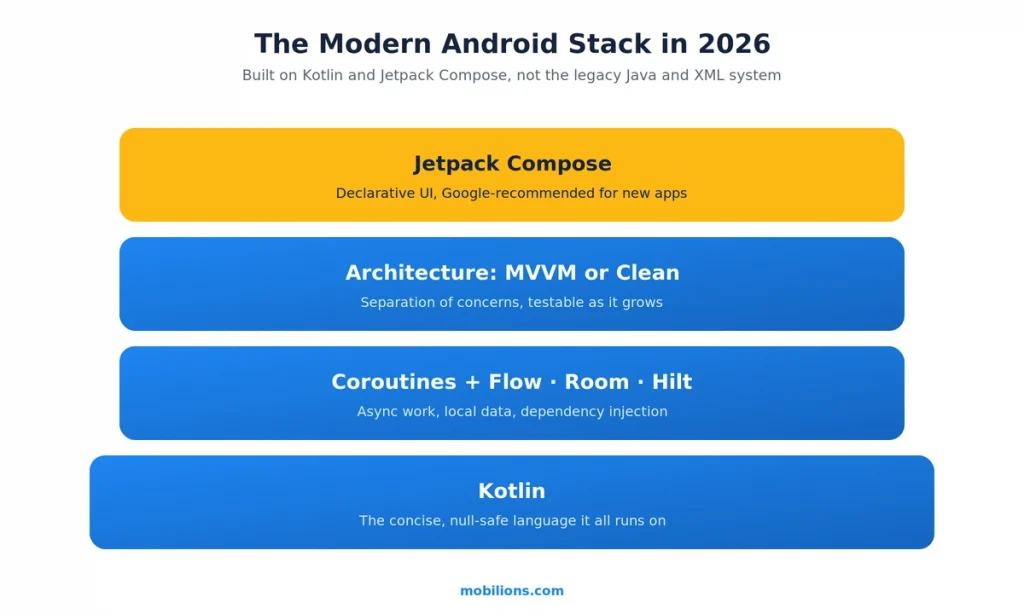
Kotlin is Google’s preferred language for Android, and it is more concise and safer than Java, particularly around the null-pointer errors that caused a huge share of old Android crashes. Jetpack Compose is Google’s modern, declarative UI toolkit, and Google now recommends it for new apps. Instead of describing screens in XML and wiring them up with boilerplate, you build the UI in Kotlin as functions that react to state, which means less code, live previews, and far simpler state management. It is not a toy or an early bet, either. Airbnb, Disney+, Spotify, Meta’s Threads, and Google Play itself are built with Compose.
Around those two sits the rest of a real architecture, and the specific names matter less than the fact that they exist and are used deliberately.
| Layer | Modern choice | What it does |
|---|---|---|
| Language | Kotlin | Concise, null-safe, Google’s preferred Android language |
| UI | Jetpack Compose | Declarative UI in Kotlin, Google-recommended for new apps |
| Architecture | MVVM or Clean, with a clear separation of concerns | Keeps the app testable and maintainable as it grows |
| Async | Kotlin Coroutines and Flow | Handles background work and data streams cleanly |
| Local data | Room | A reliable local database layer |
| Dependency injection | Hilt | Wires the app together without brittle manual plumbing |
You do not need to memorize this list. You need to make sure whoever builds your app is using something like it rather than a decade-old approach, because the stack is what determines whether the app is maintainable two years from now.
The hard part: Android fragmentation
This is the section the cost guides skip, and it is the one that actually separates a custom Android app that works from one that does not. Android runs on devices from more than a thousand manufacturers, across thousands of distinct models, with wildly different screen sizes, chipsets, memory, sensors, and manufacturer skins layered on top of the base system.
On top of the hardware spread there is version spread. Per Statcounter’s Android version data, as of mid-2025 Android 14 held the largest share while Android 15 was rolling out and the newest Android 16 was climbing fast, all while older versions from Android 10 through 13 still held meaningful share, and that mix shifts by country. For contrast, on iOS the vast majority of active iPhones run one of the last couple of releases. Android is simply a far wider target.
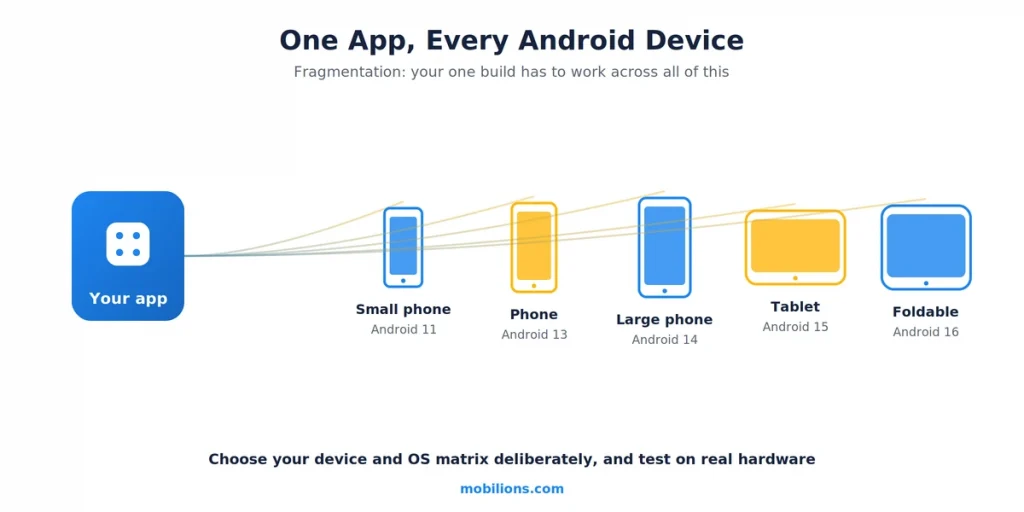
Fragmentation is not an abstract worry. It shows up as a bug that only appears on one manufacturer’s skin, a layout that breaks on a foldable or a tablet, a feature that works on Android 15 but crashes on Android 11, or a performance problem that only surfaces on budget chipsets.
The teams that handle it well do a few specific things: they use real user data to decide which devices and OS versions actually matter for their audience rather than trying to support everything equally, they test on a blend of emulators for speed and real devices for the hardware-specific issues, they gate risky features behind flags and roll them out progressively, and they monitor crashes and performance broken down by device model and OS version so a device-specific problem is visible instead of hidden in an average. Fragmentation is manageable, but only if it is treated as a first-class design constraint from the start, not discovered in the support queue after launch.
What Android-specific constraints should you design around?
Beyond fragmentation, a few Android realities shape a custom build and are worth knowing before you scope one.
Background execution is restricted and has gotten stricter with each release. Modern Android limits what an app can do when it is not in the foreground to protect battery, so anything that needs to run in the background, location tracking, syncing, long uploads, has to use the right system mechanism rather than assuming it can just keep running. Getting this wrong is a top cause of features that work in testing and fail on real phones.
Permissions are increasingly granular and user-controlled, so an app has to request access at the right moment and behave gracefully when a user says no. Google Play policies are strict and actively enforced, covering data handling, permissions, target-API requirements, and more, and an app that ignores them can be rejected or pulled, so compliance is a design input, not a launch-day checklist.
Play submission itself is a real step to plan for rather than a formality: Google reviews new apps and updates, a rejection can cost days, and every year Google raises the minimum target API level that apps must meet to stay updatable, so an app that is not maintained slowly ages out of the store. None of this is a reason to avoid Android, but all of it is a reason to build with the store’s rules in mind from day one, the same way our mobile app development team treats compliance as part of the architecture rather than a final gate.
And security matters more on Android precisely because the ecosystem is open, which means encrypting data at rest, using the platform’s secure storage, and not trusting the device are baseline, not extras. This is also where a custom Android build often needs to be scoped together with the custom software and backend it talks to, rather than as an isolated mobile project.
Native or cross-platform for a custom Android app?
As a mobile engineer, my default for a custom Android app that is genuinely Android-first is native Kotlin, because it gives you the fullest access to the platform, the best performance, the smoothest handling of the fragmentation and background constraints above, and immediate support for new Android features the day they ship. Cross-platform frameworks like Flutter and React Native are excellent and the right call when you need both Android and iOS from one codebase on a tight budget and timeline, and for a lot of business apps that tradeoff is worth it.
The honest rule is this: if the app is Android-first, performance-sensitive, or leans heavily on platform-specific capabilities, go native Kotlin; if you need both platforms fast and the app is business-logic-heavy rather than platform-heavy, cross-platform is reasonable. The wrong move is picking cross-platform to save money and then fighting the framework for the Android-specific behavior you needed native for all along. If you are weighing this for a specific build, our enterprise mobile app guide walks through the same native-versus-cross-platform reasoning in more depth.
How much does custom Android app development cost?
Cost scales with complexity, integrations, and device coverage far more than with the number of screens. Based on typical industry ranges and real engagements, here is the honest picture.
| Tier | What you get | Cost | Timeline |
|---|---|---|---|
| Simple custom app | Focused feature set, minimal backend | $15,000 to $40,000 | 2 to 4 months |
| Mid-complexity | Real backend, integrations, custom UI | $40,000 to $100,000 | 4 to 7 months |
| Complex custom | Heavy integrations, scale, real-time features | $100,000 to $250,000+ | 7 to 12 months |
| Enterprise-grade | Compliance, multi-system, high scale | $250,000+ | 12+ months |
The jump between tiers is rarely about more screens. It is about backend complexity, third-party and internal integrations, real-time features, and how many devices and OS versions you commit to supporting well. Budget for maintenance too, typically 15 to 20 percent of the build cost each year, because Android ships a new OS version annually and Play policy and security requirements keep moving.
What does the custom Android development process look like?
| Phase | What happens |
|---|---|
| Discovery | Define the real requirements, the target devices and OS versions, and integrations |
| Design | UX and UI, designed for a range of screen sizes from the start |
| Build | Kotlin and Compose sprints, with fragmentation and background constraints handled as they come |
| Test | Emulators plus real-device testing across the priority device and OS matrix |
| Launch | Play Store submission against current policies, staged rollout |
| Maintain | OS-version updates, Play policy changes, security patches, monitoring by device |
The phase teams underinvest in is testing, because the emulator on a fast laptop hides exactly the device-specific problems that fragmentation creates. Real-device testing across the priority matrix is not optional on Android, it is where the quality actually comes from.
A real-world scenario
To make this concrete, picture a logistics company that wants a custom Android app for its warehouse and delivery staff, running on a mix of company-issued rugged Android devices and some older budget phones.
A systematic reading of this guide sorts the build quickly. It is Android-first and runs on specific rugged hardware, so it goes native Kotlin rather than cross-platform, to get full control of the hardware and background behavior. Because the fleet includes older budget devices, the team uses real usage data to set a minimum supported Android version and tests on the actual rugged hardware, not just emulators, since those devices behave differently.
Because staff scan and sync in areas with poor connectivity, the app is designed to work offline and sync in the background using the correct modern background-work mechanism rather than assuming it can run freely. And because it handles operational data, security and Play policy compliance are designed in from discovery. The result is a custom app that holds up on the messy real-world device mix, which is exactly what a template or a naive cross-platform build would have failed to do.
Myths and common mistakes
A few errors sink custom Android builds more often than any technical problem.
The first myth is that custom always means expensive and slow. Custom means built for your needs, and a focused custom app can be modest in cost. The expense comes from complexity and integrations, not from the word custom itself.
The second mistake is ignoring fragmentation until the support tickets arrive. If you do not decide which devices and OS versions you support and test on real hardware, you will ship bugs you never saw, and Android is unforgiving here.
The third mistake is building on the old stack. An app built on Java and XML Views in 2026 is harder to maintain and hire for than one built on Kotlin and Compose, and you feel it every year the app lives.
The fourth mistake is treating the emulator as sufficient testing. The emulator runs on a fast, clean machine and hides the exact device-specific issues that define Android quality. Real-device testing is where quality is earned.
The honest caveat worth stating plainly: Android’s openness and reach are its strength and its difficulty at the same time. The same freedom that lets you build almost anything also means an enormous device matrix to get right, and any guide that makes custom Android sound as simple as iOS is skipping the part that actually costs time. That is not a reason to avoid Android, it is a reason to build it properly.
Why Mobilions
Mobilions has been building custom software, mobile apps, and AI solutions since 2016. We have delivered more than 250 projects for over 100 clients across 20-plus countries, which means we have shipped custom Android apps on the modern stack, across the real device fragmentation this guide describes, not just written about it.
When we scope a custom Android build, we start by defining the real device and OS matrix and the integrations, we build on Kotlin and Compose, and we treat fragmentation and Play compliance as design inputs rather than launch-day surprises. If you are planning a custom Android app and want to scope it honestly before committing a budget, or you need to hire Android developers who have shipped on the modern stack, that is the conversation our team has with founders and businesses every week.
Summary
Custom android app development in 2026 means building for your specific business on a real, modern stack, Kotlin and Jetpack Compose, rather than assembling a template you will outgrow. Android’s roughly 70 percent global reach is the opportunity, and its fragmentation across more than a thousand manufacturers and many OS versions is the real engineering challenge, one you handle by choosing your supported device and OS matrix deliberately and testing on real hardware.
Design around Android’s background limits, permissions, Play policies, and security from the start. Go native Kotlin when the app is Android-first or performance-sensitive, and cross-platform when you need both platforms fast. Budget by complexity, from about $15,000 for a simple app to well over $100,000 for a complex one. Get the stack and the fragmentation right and you have a custom app that actually works across the real Android world.
Frequently asked questions
What is custom Android app development?
It is building an Android app from scratch in real code, tailored to a specific business, rather than assembling it from a template or no-code builder. Custom gives you full control over features, integrations, the codebase, and how the app scales, which matters when the app is core to the business rather than a simple brochure.
How much does custom Android app development cost?
It depends on complexity, integrations, and how many devices and OS versions you support. A simple custom app runs about $15,000 to $40,000, a mid-complexity app $40,000 to $100,000, and a complex one with heavy integrations $100,000 to $250,000 or more. Budget 15 to 20 percent of the build cost each year for maintenance.
How long does it take to build a custom Android app?
Roughly 2 to 4 months for a simple app, 4 to 7 months for a mid-complexity build, and 7 to 12 months or more for a complex custom app. The timeline scales with backend and integration complexity and the breadth of devices you support, more than with the number of screens.
What is the best tech stack for custom Android apps in 2026?
Kotlin as the language and Jetpack Compose as the UI toolkit, which Google recommends for new apps, along with a clear architecture like MVVM, Kotlin Coroutines for async work, Room for local data, and Hilt for dependency injection. Building on the old Java and XML View system in 2026 makes an app harder to maintain and hire for.
What is Android fragmentation and why does it matter?
Fragmentation is the wide diversity of Android devices: more than a thousand manufacturers, many screen sizes and chipsets, and many OS versions in active use. It matters because a feature can work on one device or version and break on another, so you pick which devices and versions to support and test on real hardware, not just emulators.
Should a custom Android app be native or cross-platform?
Go native Kotlin when the app is Android-first, performance-sensitive, or leans on platform-specific features, since native gives the fullest control and best handling of fragmentation and background limits. Choose cross-platform like Flutter or React Native when you need both Android and iOS from one codebase on a tighter budget and the app is business-logic-heavy rather than platform-heavy.
Why is Android development considered harder than iOS?
Mainly fragmentation. Android runs on a far wider range of devices and OS versions than iOS, where most active phones run one of the last couple of releases, so the testing matrix is much larger and device-specific bugs are more common. Android’s stricter background-execution limits and open ecosystem add further considerations.
Do I need to support every Android version?
No, and trying to is a mistake. Use real usage data for your audience to set a sensible minimum supported version and a priority device list, support those well, and let very old or rare configurations fall outside your matrix. Supporting everything equally wastes effort on devices your users do not have.
What are the main challenges in custom Android app development?
Device and OS fragmentation is the biggest, followed by stricter background-execution limits, granular permissions, strict and enforced Google Play policies, and security in an open ecosystem. Handling these as design inputs from the start, rather than discovering them after launch, is what separates a custom app that works from one that does not.
Should I hire a freelance Android developer or an agency?
A freelancer is cheaper and fine for a small, well-defined app or a single feature. An agency costs more but brings a full team, process, design, real-device testing, and continuity, which matters for a custom app you plan to grow. For a first serious custom Android build, a team usually beats coordinating several freelancers yourself.
How do I choose the right Android app developer?
Look at a portfolio of shipped Android apps, not just screenshots, and check that they build on the modern Kotlin and Jetpack Compose stack. Ask how they handle fragmentation, real-device testing, background limits, and Play policies. Start with a small paid task before a big commitment, and treat clear communication as the strongest signal.
Should I build my Android app in Kotlin or Flutter?
Choose Kotlin when the app is Android-first, performance-sensitive, or leans on platform-specific features, since native gives full control and immediate access to new Android capabilities. Choose Flutter when you need both Android and iOS from one codebase on a tighter budget and the app is business-logic-heavy. Match the tool to the app, not the trend.
Can AI or ChatGPT build my Android app?
AI tools can scaffold code, speed up development, and build simple prototypes, but they cannot deliver a production custom Android app on their own. Someone still has to own architecture, fragmentation, security, Play compliance, and the judgment calls AI gets wrong. Treat AI as a strong accelerator for a skilled developer, not a replacement for one.
How can I build a custom Android app on a budget?
Cut scope, not quality. Ship a focused first version that proves the core idea, support only the devices and Android versions your real users have rather than everything, and use cross-platform if you also need iOS cheaply. A tight custom app on the modern stack beats a bloated one, and you add features once demand is proven.
Do I need to publish a custom Android app on the Google Play Store?
Usually yes for a public app, and Play has strict, enforced policies on data, permissions, and target API levels, plus a review that can reject an update. Android also allows distribution outside the Play Store, which suits internal or enterprise apps. Either way, plan compliance from day one rather than as a launch-day checklist.
What is an MVP for a custom Android app, and where should I start?
Start by defining the real requirements, the priority devices and Android versions, and the integrations, then build the smallest version that delivers the core value on the modern Kotlin and Compose stack. Test on real hardware, not just an emulator. A focused MVP validates demand before you invest in the complex integrations and scale.
How much does it cost to maintain a custom Android app?
Typically 15 to 20 percent of the build cost per year, and more if the app is central to your business. Android ships a new OS version annually, Google raises the minimum target API level every year, and Play policy and security requirements keep moving, so budgeting for maintenance keeps your app from slowly aging out of the store.

Dhaval Patel is a Senior Mobile Developer at Mobilions with deep, hands-on experience shipping Android, iOS, and cross-platform apps. He has helped build products used by teams across 20+ countries. He writes practical guides on mobile app development, app performance, and the real-world trade-offs of building for phones and tablets.