A template site and a custom web app get lumped together as “a website,” and that one word hides a decision worth tens of thousands of dollars. A website tells people about your business. A custom web app is a tool they use to get something done: a booking system, a dashboard, a portal, a marketplace. It has logins, a database, real logic, and it behaves more like software than a brochure. Custom web app development is the work of building that tool from scratch, shaped around how your business actually runs instead of forcing you into someone else’s template.
The hard part is rarely the code. It is knowing what to build, who to trust to build it, and how not to get burned on price, timeline, or a developer who disappears after launch. We have built web platforms since 2016, so this guide is the practical version: what a custom web app really is, what it costs and how long it takes in 2026, the tech that goes into it, and how to hire a team you will not regret.
Key takeaways
- A website informs; a custom web app is a tool people use, with logins, a database, and real logic behind it.
- In 2026, a simple custom web app runs roughly $15,000 to $25,000, mid-complexity $25,000 to $80,000, and complex or enterprise builds $80,000 to $250,000 and up.
- Most custom web apps take three to six months for a solid first version. Scope discipline is what keeps that from doubling.
- The common 2026 stack is React or Next.js on the front end, Node.js or Laravel on the back end, PostgreSQL for data, and AWS or Google Cloud to run it.
- Hire on shipped work and seniority, not the lowest quote, and get code ownership in writing before anyone starts.
Website or custom web app? Know which you need
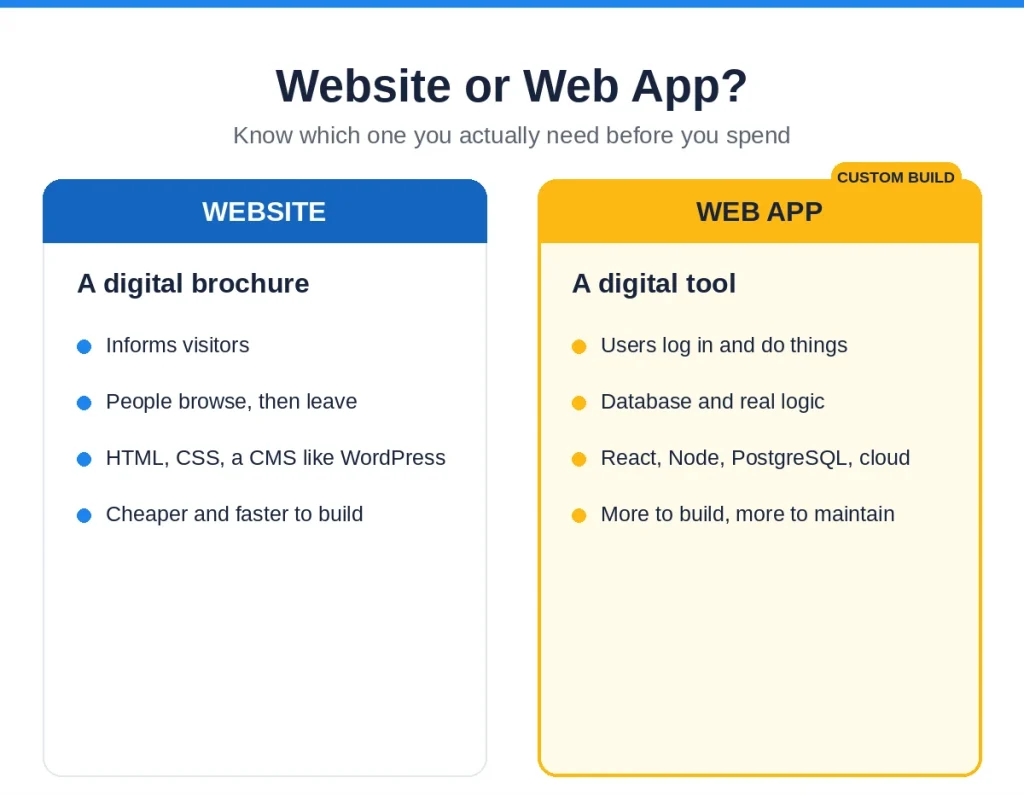
This is the first fork, and picking wrong wastes either money or opportunity. A website is a digital brochure. It informs, it loads fast, and people browse it in a fairly linear way. You can build one on WordPress or a template builder, and for a lot of businesses that is exactly right.
A custom web app is a digital tool. People log in and do something: manage orders, book appointments, track data, run a workflow. It behaves like desktop software that happens to live in a browser, with real-time feedback, multi-step forms, and logic that a template cannot give you. Under the hood it needs a front-end framework, an API-driven backend, a database, authentication, and a real deployment pipeline. If your idea is “a place to do X,” not “a page about X,” you need a web app.
The quick test: if a user needs an account and the thing changes based on what they do, it is an app. If they read it and leave, it is a website. When it is genuinely a website you need, we will tell you, because paying for custom web development you do not need is the most common way people overspend here.
Custom, off-the-shelf, or no-code: when custom is worth it
Even once you know you need an app, custom is not the only route, and being honest about that saves real money. Off-the-shelf SaaS is the right call when a tool already does the job well enough. Do not rebuild a CRM that Salesforce or HubSpot already nailed. No-code and low-code platforms can be a smart way to test an idea or run a simple internal tool fast and cheap, and for some businesses that is the whole answer.
Custom web app development earns its cost in three situations: when the app is your actual product or a real competitive advantage, when off-the-shelf tools force your business to bend around their limits, or when you need to fully own and control the software. The test is simple. If the app is core to how you make money or serve customers, build it custom. If it is a supporting tool someone else already sells, buy or assemble it and spend your budget where it counts. A good partner will tell you when not to build, even when it means a smaller project.
Signs you have outgrown a website or template
Most custom builds start because a simpler setup finally broke. The signs are consistent: you are stitching together five different tools and copying data between them by hand, your template cannot do the one workflow your business actually runs on, you are paying rising monthly fees for software that still does not quite fit, or customers keep asking for something your current site simply cannot do. When the workarounds cost more time and money than the tool saves, that is the moment a custom web app pays for itself. Until then, the workaround is often the smarter spend, and a good team will say so.
What custom web app development actually involves
Custom web app development is not just “writing code.” The build is the middle of a longer process, and the parts on either side are where projects succeed or quietly fail.
- Discovery and scope. Turn the idea into a clear first version: who uses it, what the core workflow is, and what is explicitly out of scope for now.
- Design. Map the screens and flows, usually as a clickable prototype, so you can react to something real before code exists.
- Build. Front end, back end, database, and integrations, delivered in short cycles with working software you can see each step.
- Testing and QA. Real testing across browsers and devices, plus security checks, not a quick click-through at the end.
- Launch and handover. Deploy, hand over the code and documentation, and make sure you can actually run and change it.
- Maintenance. Updates, security patches, and improvements once real users are on it. This never fully stops for a live app.
Teams that skip discovery build the wrong thing fast. Teams that skip testing ship bugs to customers. The process is not bureaucracy, it is how you avoid paying twice.
How much does custom web app development cost in 2026?
Cost is the first question everyone asks, so here are the real 2026 ranges instead of “it depends.” These are typical US-market figures for a build from an experienced team.
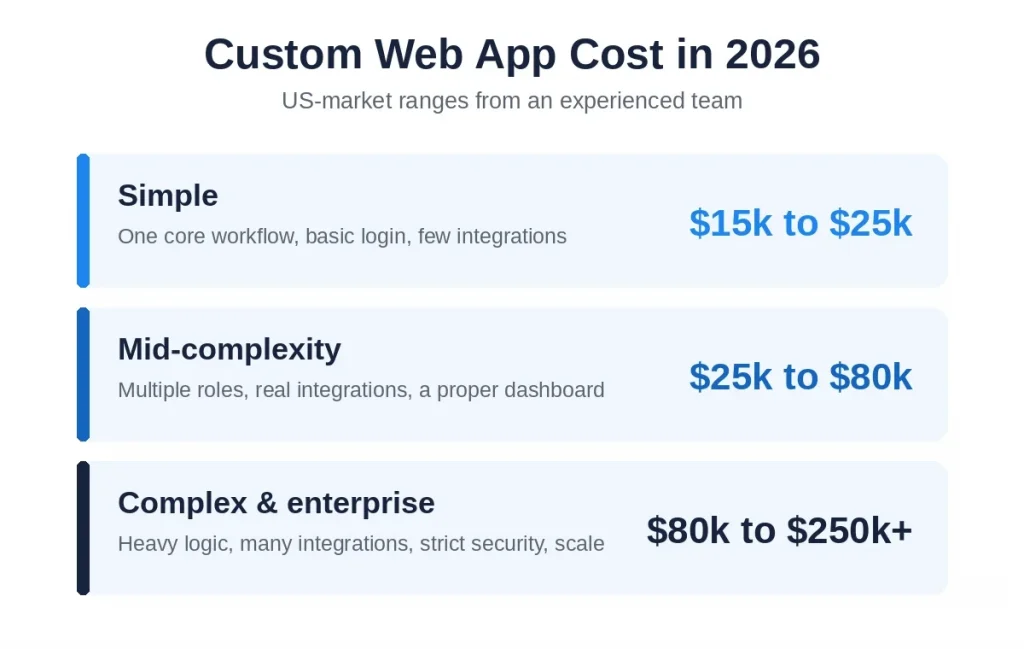
- Simple web app (one core workflow, basic auth, limited integrations): roughly $15,000 to $25,000.
- Mid-complexity (multiple user roles, real integrations, a proper dashboard): about $25,000 to $80,000.
- Complex or enterprise (heavy logic, many integrations, strict security, scale): $80,000 to $250,000 and beyond.
Four things move you up or down that range: feature complexity, the number of third-party integrations, how much security and compliance you need, and the seniority and location of the team. Senior developer rates rose in 2026 as demand for cloud, security, and AI skills climbed, so “cheap and senior” is mostly a myth. The costs people forget are the ones after launch: hosting, maintenance, and the security updates you cannot skip on a live app. Budget for the year, not just the build.
One honest warning. A quote that is far below everyone else is not a bargain, it is a signal. It usually means the scope is thinner than you think, the team is junior, or the real bill arrives later as rework. Get itemized quotes and compare what is actually included.
How long does it take to build a custom web app?
Most custom web apps reach a solid first version in three to six months. A simple app can ship faster; a complex platform takes longer. The single biggest variable is not the technology, it is scope discipline. Every “while we are at it, let us also add” pushes the date out and the cost up.
A realistic shape: a couple of weeks on discovery and design, then the build in short cycles with something working to look at every couple of weeks, then testing, then launch. Building the highest-risk or highest-value part first is what protects the timeline, because it surfaces the hard problems while there is still room to react. Beware anyone promising a full custom app in a few weeks. They are either underscoping or planning to cut the corners you will pay for later.
The tech stack behind a modern web app (2026)
You do not need to know the tools to hire well, but knowing the common 2026 stack helps you tell a current team from one stuck in 2018.
- Front end: React, and Next.js for apps that need both fast initial loads and rich interactivity, with TypeScript for fewer bugs and Tailwind for styling.
- Back end: Node.js or Laravel for most apps, Python where data or AI work is involved, exposed through clean APIs.
- Database: PostgreSQL is the common default, with other stores added when a specific need calls for it.
- Cloud and delivery: AWS or Google Cloud to run it, with continuous deployment so changes ship safely and often.
The architecture trend in 2026 is pragmatic. Instead of splitting everything into dozens of microservices too early, good teams build a well-organized single application (a “modular monolith”) and break out services only when scale actually demands it. That choice alone can save a startup a lot of money and pain. What matters for you is not the buzzwords, it is that the team can explain why they chose their stack for full-stack development of your specific app, rather than defaulting to whatever they always use.
Freelancer, agency, or in-house team?
There is no universally right answer, only a right answer for your stage. Here is the honest tradeoff.
- Freelancer: cheapest and fine for a small, well-defined piece. The risk is continuity and coverage. One person gets sick, goes quiet, or lacks a skill your app needs halfway through, and you are stuck.
- Agency or dedicated team: a coordinated group that covers front end, back end, design, and QA, with continuity built in. Best when the app matters to your business and you want one team that owns the whole thing.
- In-house: the right long-term move once the app is core to your company and you can fund and lead a permanent team.
For most businesses building their first serious web app, a senior dedicated team is the safe middle: agency-level coverage without the cost and risk of hiring full-time before you know what you need.
How to hire and vet a web developer or team
This is where the Reddit horror stories come from, so slow down here. The goal is to tell a senior team that ships from a confident one that does not.
- Check shipped work, not just a portfolio. Ask for live web apps you can actually use, ideally similar to yours. Screenshots prove nothing.
- Verify references. Talk to a past client and ask the real question: what went wrong, and how did they handle it?
- Test seniority. A senior developer explains tradeoffs and pushes back on your scope. A junior agrees to everything. Ask how they would handle a specific hard part of your app and listen for judgment, not jargon.
- Ask about after launch. Who fixes bugs, what maintenance costs, and what happens if you part ways. Vague answers here are a red flag.
The red flags to walk away from: a quote far below everyone else, no named senior engineers, unclear code ownership, agreeing to your entire feature list on the first call with no pushback, and no plan for support after launch. Any one of these is a warning. Two is a no.
Fixed price or hourly?
Both are fine; they suit different situations. Fixed price works when the scope is genuinely nailed down and unlikely to change, because you get budget certainty. The catch is that any change becomes a negotiation, and truly fixed scope is rare in a first build. Hourly, or a monthly retainer, suits work that will evolve, because you can steer as you learn, but it needs a team you trust to be honest with your time. For most custom web apps we recommend a fixed, low-risk first milestone to build trust, then a flexible arrangement for the rest. Whatever the model, insist on visibility: a shared board and regular working builds, so you always know where the money is going.
Scoping your project so it does not blow up
Scope creep is the number one killer of web app budgets, and it is preventable. Before you hire, write down the core problem in one or two sentences and the must-have workflow for version one. Then sort every feature into “the app is useless without this” and “everything else.” The first list is your build. The second is your roadmap. A good team will help you cut, and will flag the requirements likely to cause trouble before the contract, not after. If a developer agrees to an enormous feature list without a single question, they have just told you how the project ends.
Security and data protection
A web app holds user accounts and data, which makes security part of the product, not an add-on. At a minimum your app needs encryption in transit and at rest, secure authentication (ideally with multi-factor for sensitive data), protection against the common web vulnerabilities, and sensible handling of personal data. If you deal with health, financial, or regulated data, the bar is higher and needs to be designed in from the start. Ask any team directly how they handle security, and be wary of anyone who treats it as an afterthought. A breach is far more expensive than doing it right the first time.
Building for scale and the future
You do not need to build for millions of users on day one, and doing so usually wastes money. But you do need an architecture that will not have to be thrown away when you grow. That means clean separation between parts of the app, a database designed to handle more data, and a cloud setup that can scale up when traffic does. The right approach is to build simply now, but in a way that leaves the door open. A senior team designs for the next stage without over-engineering for a scale you may never reach.
Maintenance and support after launch
Launch is not the finish line for a web app, it is the start of its real life. Browsers update, dependencies age, security issues appear, and users ask for changes. Budget for ongoing maintenance, typically a share of the build cost each year, to keep the app secure, fast, and current. Just as important, make sure you can actually maintain it: you should own the source code, the documentation, and the accounts, so you are never held hostage by the team that built it. The best partners make themselves replaceable on purpose, and stay because the work is good, not because you are trapped.
Protecting your idea and your code
Founders worry about idea theft, and while the idea is rarely the valuable part, the underlying concern is right: ownership. Use an NDA with any team you discuss the project with in detail. More importantly, get it in writing that you own the source code, the intellectual property, and the documentation, with no license back to the developer and no lock-in. The real nightmare is not a competitor copying your concept. It is finding out a year later that you cannot move your own app to another team because the code was never truly yours. Settle ownership before the first line of code, not after.
Common types of custom web apps (and what they cost)
“Web app” covers a lot of ground, and the type shapes both the build and the price. A single-page app (SPA) feels fast and software-like, loading once and updating in place, and typically runs $30,000 to $120,000 depending on how much logic sits on the screen. A multi-page app (MPA) suits larger products with many sections and integrations, commonly $40,000 to $150,000 or more. A progressive web app (PWA) adds installability and offline use, and often lands between $15,000 and $50,000.
Beyond those shapes, the common business apps are SaaS platforms, customer or client portals, internal tools and dashboards, and marketplaces. Each has its own hard part: a marketplace lives or dies on trust and payments, a SaaS product on multi-tenancy and billing, an internal tool on fitting the messy way people actually work. Knowing which one you are building is the first real step to scoping it honestly, because the label sets the budget and the risks.
Questions to ask before you hire
Bring these to any team you are considering. The answers, and how comfortable they are giving them, tell you almost everything.
- Can I see and use two or three live apps you have built like mine?
- Who exactly will work on this, and how senior are they?
- Who owns the code, IP, and accounts when we are done?
- How do you decide what goes in version one versus later?
- How do you handle security and data protection?
- What happens after launch, and what does maintenance cost?
- How will I see progress, and how often?
A senior team answers these plainly, and has asked you half of them first. A team that gets vague, especially on ownership and support, is showing you how the relationship will feel the day something goes wrong.
Managing the project so it stays on track
You do not need to be technical to run a web app project well, but you do need to stay involved. Agree on a single point of contact on each side. Insist on short cycles with working software you can click through, not just status updates, because a demo tells you the truth and a written report can hide it. Make decisions quickly when the team asks, since a stalled decision stalls the build.
And write changes down: when you add or drop something, note the effect on time and cost, so there are no surprises at the end. The projects that go smoothly are rarely the ones with the flashiest developers. They are the ones where the client stayed engaged and the scope stayed honest.
The mistakes we see most often
- Paying for a custom web app when a simple website would have done the job.
- Skipping discovery and building the wrong thing quickly.
- Choosing the cheapest quote, then paying again to fix or rebuild it.
- No clear scope, so the project sprawls and the budget doubles.
- Treating security and maintenance as afterthoughts instead of part of the build.
- Unclear code ownership, discovered only when you try to leave.
- Over-engineering for a scale you do not have yet.
Where to start with custom web app development
Start with one sentence: what will your web app let people do that they cannot do today? Write down the core workflow, cut everything that is not essential to it, and confirm you actually need an app and not a website. That clarity is worth more than any technology choice, and it is the thing that makes custom web app development go smoothly instead of sideways.
If you want a straight read on your idea, what it will cost, how long it will take, and what to build first, a senior engineer will walk through it with you, no obligation. Book a discovery call.
Frequently asked questions
How much does custom web app development cost in 2026?
Roughly $15,000 to $25,000 for a simple app, $25,000 to $80,000 for mid-complexity, and $80,000 to $250,000 or more for complex and enterprise builds. Cost tracks feature complexity, integrations, security needs, and the team’s seniority. Get itemized quotes and be suspicious of anything far below the rest.
How long does it take to build a custom web app?
Most reach a solid first version in three to six months. Simple apps ship faster; complex platforms take longer. Scope discipline matters more than the technology for hitting the timeline.
What is the difference between a website and a web app?
A website informs, like a digital brochure people browse. A web app is a tool people log into and use to get something done, with a database, real logic, and software-like behavior. If users need an account and the app changes based on what they do, it is a web app.
Should I hire a freelancer or a web development agency?
A freelancer is cheapest and fine for a small, well-defined task, but risky on continuity and coverage. An agency or dedicated team gives you front end, back end, design, and QA with continuity built in. For a serious first build, a senior team is usually the safer choice.
Do I need a full-stack or a front-end developer?
A front-end developer builds what users see. A full-stack developer also builds the server, database, and logic behind it. A real web app needs full-stack coverage, whether from one senior generalist or a team.
How do I know if a web developer is senior?
They explain tradeoffs, push back on your scope, and ask sharp questions instead of agreeing to everything. Ask how they would handle a specific hard part of your app and listen for judgment, not buzzwords.
Fixed price or hourly: which is better?
Fixed price gives budget certainty when the scope is genuinely locked, but changes become negotiations. Hourly or a retainer suits work that will evolve and needs a team you trust. A fixed first milestone, then a flexible arrangement, is a good middle path.
What tech stack should my web app use?
A common, strong 2026 stack is React or Next.js on the front end, Node.js or Laravel on the back end, PostgreSQL for data, and AWS or Google Cloud to run it. What matters is that the team can explain why they chose it for your app, not that they used a trendy name.
How do I protect my web app idea when hiring?
Use an NDA for detailed discussions, and get code and IP ownership in writing, with no license back to the developer. The real risk is being unable to move your own app because the code was never truly yours, so settle ownership before work starts.
What should a web app project scope include?
The core problem in a sentence, the must-have workflow for version one, who the users are, the integrations needed, and an explicit list of what is out of scope for now. Clear scope up front is the best defense against a budget that doubles.
How much does web app maintenance cost after launch?
Plan for ongoing maintenance, typically a share of the build cost each year, to cover updates, security patches, and improvements. A live web app always needs upkeep; the exact amount depends on its size and how fast it changes.
Should I hire developers locally or offshore?
Judge on seniority, communication, and shipped work, not location. A senior remote or offshore team with time-zone overlap and clear ownership often gives you the same quality at a lower cost than a local agency.

Ankit Dhimmar is the CTO of Mobilions, leading engineering across custom software, SaaS platforms, and cloud architecture. With over a decade building and scaling production systems, he focuses on the decisions that keep software reliable as it grows. He writes about software architecture, SaaS product engineering, and building systems that last.