Enterprise mobile app development is what happens when a mobile app has to answer to an IT department, a security team, and a compliance auditor, not just an app store reviewer. It is a different discipline from building a consumer app, and treating the two the same is the fastest way to blow a budget and a deadline.
This guide explains what makes enterprise mobile app development different, how the build actually works, what the stack looks like in 2026, how apps get distributed through MDM instead of public stores, and what all of it costs. It is written from the perspective of engineers who scope, build, and support these systems in production.
What is enterprise mobile app development?
Enterprise mobile app development is the process of building mobile applications for internal business use, such as field operations, logistics, sales enablement, or employee tools, that must integrate with existing company systems and meet strict security and compliance requirements.
The users are employees, partners, or vetted customers, not the open public. That single fact changes almost everything: how the app authenticates people, where it gets its data, how it is distributed, and how it is governed after launch.
A consumer app optimizes for downloads and delight. An enterprise app optimizes for reliability, security, and fit with the systems a business already runs. Both are mobile apps. Only one has to pass a SOC 2 audit.
Why enterprise mobile apps are different from consumer apps
The gap shows up in four places, and each one adds cost and engineering care that a consumer app never sees.
Security is a first-class requirement, not a feature. Enterprise mobile apps carry role-based access control, single sign-on through SSO or LDAP, encrypted local storage, and often certificate pinning. Security work typically adds 15 to 30 percent to a development budget, and that is money well spent rather than overhead.
They integrate with legacy systems. An enterprise app rarely stands alone. It has to talk to an ERP, a CRM, a data warehouse, or a decades-old internal API that was never designed for mobile. This integration depth, not the number of screens, is usually the biggest driver of cost and timeline.
They are governed after launch. Consumer apps ship and iterate freely. Enterprise apps live under IT policy: managed updates, remote wipe, device compliance checks, and audit trails. The app has to cooperate with that governance from day one.
They run at organizational scale with offline realities. Warehouse floors, hospital basements, and remote sites have poor connectivity, so offline mode and reliable sync are common requirements rather than nice-to-haves.
Enterprise mobile application development services: what you actually get
When you hire a team for enterprise mobile application development, the deliverable is not just an app binary. It is a system that IT can trust and operate.
A complete service covers discovery and security scoping, UX for real workflows rather than marketing screens, the mobile app itself, the backend and integration layer, and the deployment and support model. The integration layer, connecting the app to your ERP, CRM, identity provider, and data systems, is often where most of the real engineering lives.
Good enterprise mobile app development services also include the unglamorous parts: role and permission modeling, audit logging, compliance documentation, and a rollout plan. These are the things that decide whether the app is adopted or abandoned.
The point of naming this clearly is simple. If a vendor quotes you only for screens and features, they have not scoped the enterprise part of enterprise mobile app development, and the number will move once reality arrives.
How to build enterprise mobile apps: the process
Knowing how to build enterprise mobile apps is mostly about doing the hard thinking before writing code. The process we use runs in five stages.
Discovery and security scoping. Map the workflows, the systems the app must integrate with, the compliance regime (HIPAA, SOC 2, ISO 27001, GDPR), and the device and distribution model. This is where the true scope, and the honest cost, becomes visible.
Architecture. Decide the integration approach, the offline and sync strategy, the identity model (SSO, LDAP, OAuth), and the platform choice. Cross-platform frameworks like Flutter and React Native are common here because they cut the cost of shipping to both iOS and Android.
Development. Build the app, the backend, and the integration layer in parallel, with security controls baked in rather than bolted on. Role-based access, encrypted storage, and audit logging are written as the app is written.
Security testing and hardening. Enterprise apps get a dedicated security pass, penetration testing, and a hardening phase. Budget roughly 4 to 8 weeks and $15,000 to $40,000 for thorough enterprise security testing on a serious app.
Deployment and support. Package the app for MDM distribution, plan the rollout, train users, and stand up ongoing support. The launch is the start of the app’s life, not the end of the project.
The technology stack for enterprise mobile apps
There is no single correct stack, but enterprise choices cluster around a few sensible defaults in 2026.
On the client, cross-platform frameworks (Flutter, React Native) dominate internal apps because one codebase serving iOS and Android roughly halves the build and maintenance cost. Native (Swift, Kotlin) is chosen when the app needs deep device features or maximum performance.
On the backend, teams reach for well-supported, boring-in-a-good-way choices: Node.js, Python, Java, or Go, with PostgreSQL or a managed cloud database, running on AWS, Azure, or Google Cloud. The premium is on reliability and support, not novelty.
For identity and security, the stack includes an enterprise identity provider (Okta, Microsoft Entra, or the company’s existing directory), SSO and LDAP integration, and mobile security controls aligned to the OWASP Mobile Application Security standard. Our mobile app development and custom software development teams treat this integration middleware, which connects the app to the ERP and CRM systems the business already runs, as the core of the build.
Enterprise mobile app distribution and MDM deployment
Here is the difference that surprises teams new to this: enterprise apps usually do not ship through the public App Store or Google Play. They are distributed privately through Mobile Device Management.
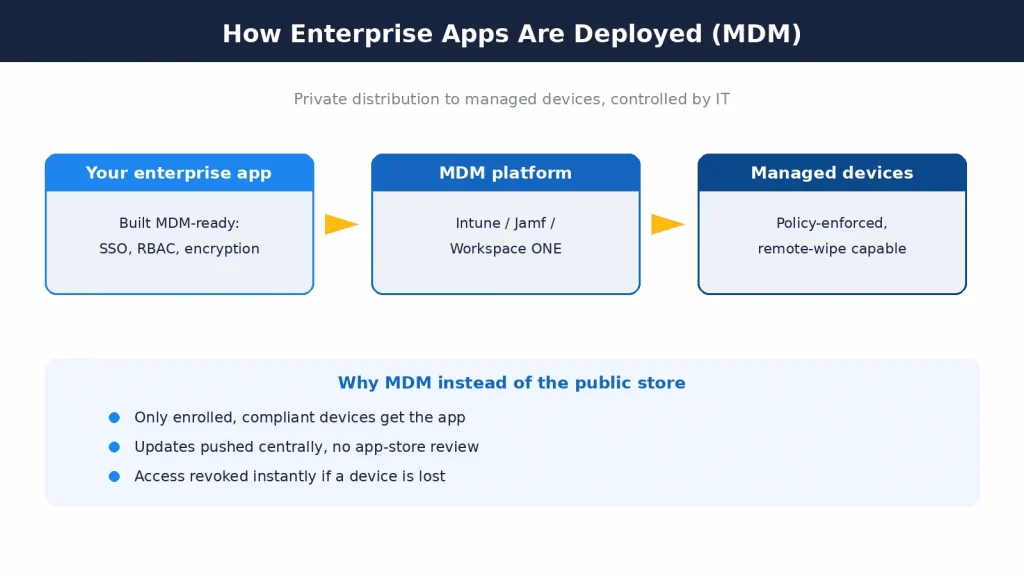
Enterprise mobile app distribution runs through MDM platforms such as Microsoft Intune, VMware Workspace ONE, or Jamf, paired with Apple Business Manager and Android Enterprise. The app is pushed to managed devices, configured by policy, and updated centrally, with the ability to remotely wipe it if a device is lost.
This MDM enterprise app deployment model is what lets IT enforce compliance: only enrolled, policy-compliant devices get the app, and access can be revoked instantly. It also means your enterprise mobile app development platform choices have to be MDM-compatible from the start, because retrofitting management support later is painful.
Practically, MDM integration and setup adds roughly $5,000 to $15,000 to a project, depending on the platform and how many device types need management policies. That is a small line item next to the adoption and security it buys.
How much does enterprise mobile app development cost in 2026?
Cost scales with compliance burden and integration depth far more than with screen count. With that framing, 2026 numbers fall into three honest bands.
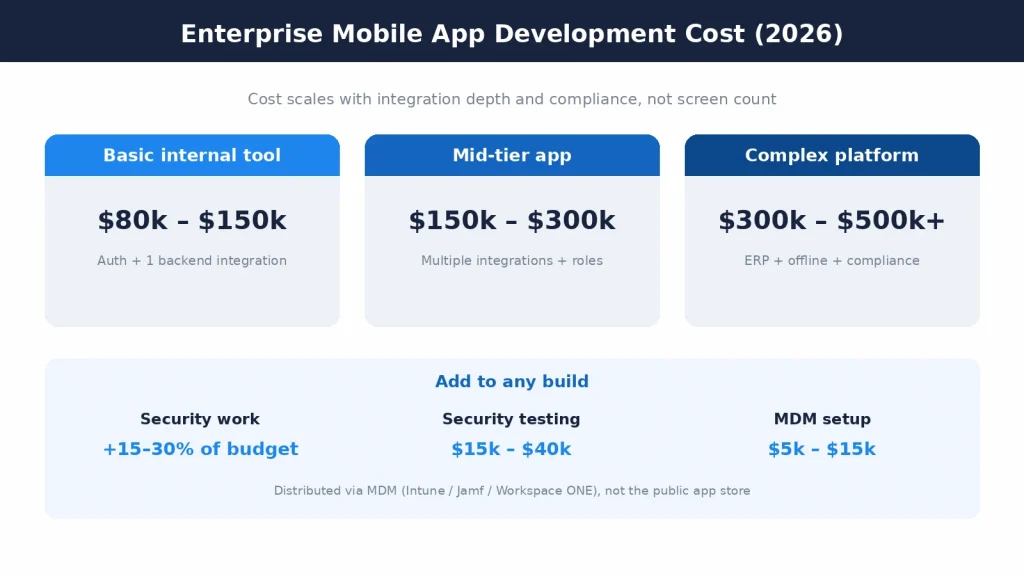
A basic internal tool, with authentication and a single backend integration, runs about $80,000 to $150,000. A mid-tier app, with multiple integrations and user roles, runs about $150,000 to $300,000. A complex platform, with ERP integration, offline mode, and formal compliance, runs $300,000 to $500,000 and can pass $1,000,000 for the largest programs.
Inside those totals, security work adds 15 to 30 percent, dedicated security testing adds $15,000 to $40,000, and MDM setup adds $5,000 to $15,000. None of these are places to cut, because they are the parts that make the app safe to deploy across an organization.
The most useful thing you can do for your budget is scope the integrations and compliance early. That is where enterprise mobile app development costs are made or blown, and a vendor who scopes them honestly will save you far more than one who quotes a low number and discovers the ERP later.
Build versus buy: when a custom enterprise app makes sense
Not every internal need justifies a custom build, and an honest enterprise mobile app development partner will tell you when to buy instead.
Off-the-shelf software wins when your process is standard and a mature product already fits it, such as generic expense tracking or standard field-service ticketing. You get it faster and cheaper, and someone else maintains it. Forcing a custom build on a solved problem is a waste of budget.
Custom enterprise mobile app development wins when the workflow is your competitive edge, when integration with your specific systems is deep, or when compliance and data control rule out a shared SaaS product. If the app has to bend to your ERP and your rules rather than the other way around, buying rarely works.
The middle path is common: buy the commodity pieces and build the parts that are truly yours, connected through an integration layer. The decision should come from the workflow and the integration depth, not from a preference for building. Scope it honestly and the answer is usually clear before a line of code is written.
Choosing an enterprise mobile app development company
The right enterprise mobile app development company is one that talks about your systems and your security before it talks about screens. That is the fastest signal of whether they have done this before.
Look for real integration experience with ERP, CRM, and identity systems, a documented security and compliance track record, and a support model that lasts beyond launch. Ask how they handle MDM distribution and managed updates, because a team that has shipped enterprise apps will have a clear answer. If you need to scale a team quickly, you can also hire mobile developers who already work this way.
Be cautious of quotes that price only the visible app. A serious enterprise mobile application development company scopes the integration layer, the security work, and the rollout, and it will tell you when your requirements push the project into a higher cost band rather than discovering it mid-build.
Ownership matters too. You should own the code, the infrastructure, and the roadmap. A good partner builds the app to hand it over, not to lock you in.
A quick example: what an enterprise build looks like in practice
Consider a logistics company that wants a driver and warehouse app. It needs to work offline in low-signal areas, sync when connectivity returns, read and write to the existing ERP, authenticate staff through the company’s identity provider, and deploy to company-owned devices only.
The scope decisions follow directly. Cross-platform on Flutter to cover both device types cheaply. An integration layer between the app and the ERP so the app never talks to the ERP directly. Offline-first data with conflict-safe sync. SSO through the existing directory, role-based access for drivers versus supervisors, and audit logging for compliance.
Distribution goes through Intune, not the public store, so IT controls who has the app and can wipe a lost device. On these requirements the project lands in the mid-to-complex band, and the integration and offline work, not the screen count, is what sets the price.
Notice what drove every decision above: not the number of screens, but the systems the app had to touch and the environment it had to survive. Change the ERP or the connectivity and the estimate changes with it. That is enterprise mobile app development in one concrete picture, and it is why honest scoping beats a low quote every time.
Core features that define enterprise mobile applications
Certain capabilities show up in almost every serious build, and together they are what separate enterprise mobile applications from ordinary apps. Knowing them helps you scope realistically and judge a vendor’s quote.
Role-based access control comes first. Different employees see and do different things, so the app models roles and permissions rather than treating every user the same. This alone touches the UI, the backend, and the audit layer.
Single sign-on is expected, not optional. Employees should sign in with the same identity they use for everything else, through SSO, LDAP, or OAuth against the company directory, so there is no separate password to manage or leak.
System integration is usually the heart of the app. Enterprise apps read and write to ERP, CRM, and data platforms, and that integration layer is where most of the engineering time goes. Offline mode and reliable sync sit alongside it, because real work happens in places with poor connectivity.
Finally, audit logging, encrypted storage, and MDM compatibility round out the baseline. These are the controls that let a security team sign off and an auditor tick the box, and they are the reason enterprise mobile app development is scoped differently from a consumer build.
Compliance and industry considerations
The compliance regime an app falls under changes the scope more than almost any feature decision, so it belongs in the first conversation, not the last.
In fintech, enterprise mobile app development carries PCI DSS obligations, strong authentication, transaction integrity, and audit trails, and the security bar is high because the data is money. Anything touching payments or account data is scoped as sensitive from the start.
In healthcare, HIPAA governs how patient data is stored, transmitted, and accessed, which pushes encryption, access logging, and strict role controls to the front. An app that handles protected health information is a compliance project with a mobile front end, not a mobile project with a compliance checkbox.
In logistics and field operations, the pressure is less about regulation and more about reliability: offline-first behavior, device durability, and clean ERP sync. Different industries stress different parts of the same discipline, which is why a team that has shipped in your sector scopes faster and more honestly.
The common thread is that compliance and integration depth, taken together, set the true size of an enterprise build. A vendor who asks about your regulatory environment early is protecting your budget, not padding it.
Common mistakes that derail enterprise mobile app projects
Most enterprise mobile app development trouble is predictable, and nearly all of it traces back to scoping the wrong things.
The first mistake is pricing screens instead of integrations. The visible app is the cheap part; the ERP, CRM, and identity connections are where the effort lives. A quote that ignores them will be wrong, and the correction always arrives mid-build when it is most expensive.
The second is treating security and compliance as a final phase. Retrofitting encryption, role-based access, and audit logging into a finished app costs far more than building them in, and it often forces a redesign. Security scoped late is security done twice.
The third is ignoring distribution until the end. If the app was not built to be MDM-compatible, packaging it for managed deployment becomes its own mini-project. Distribution is an architecture decision, not a launch-day task.
The fourth is skipping the rollout and training plan. An enterprise app that nobody adopts is a total loss regardless of how well it is built, and adoption depends on a real rollout, not a launch email. The engineering is only half the job; getting the app onto devices and into daily use is the other half.
Frequently asked questions
What is enterprise mobile app development?
Enterprise mobile app development is building mobile apps for internal business use that integrate with company systems like ERP and CRM, enforce enterprise security and access controls, and meet compliance requirements. The users are employees or vetted partners rather than the general public.
How to build enterprise mobile apps?
Choose a company that scopes your integrations, security, and rollout before pricing screens, has real ERP, CRM, and identity integration experience, documents its security and compliance work, offers support beyond launch, and hands you full ownership of the code and infrastructure.
How much does enterprise mobile app development cost in 2026?
A basic internal tool costs about $80,000 to $150,000, a mid-tier app with multiple integrations and roles about $150,000 to $300,000, and a complex platform with ERP integration, offline mode, and compliance $300,000 to $500,000 or more. Security adds 15 to 30 percent and MDM setup adds $5,000 to $15,000.
How long does it take to build an enterprise mobile app?
A basic internal tool can take a few months; a mid-tier app with several integrations typically runs four to eight months; a complex compliant platform can run eight months or more. Security testing alone adds roughly four to eight weeks.
How do we choose an enterprise mobile app development company?
How do we choose an enterprise mobile app development company?
Why are enterprise mobile apps more expensive than consumer apps?
Because cost scales with compliance and integration depth, not screen count. Enterprise apps must connect to legacy systems, enforce role-based security and SSO, support offline use, pass security testing, and deploy under IT governance, all of which a consumer app skips.
What is MDM enterprise app deployment?
MDM (Mobile Device Management) enterprise app deployment distributes an app privately to managed devices through platforms like Microsoft Intune, VMware Workspace ONE, or Jamf, rather than the public app stores. It lets IT enforce device compliance, push updates centrally, and remotely wipe the app if a device is lost.
Should we build native or cross-platform for an enterprise app?
Cross-platform frameworks like Flutter and React Native are the common default for internal enterprise apps because one codebase for iOS and Android roughly halves build and maintenance cost. Native is worth it when the app needs deep device features or maximum performance.
Build an enterprise app that IT will actually trust
Enterprise mobile app development succeeds or fails on the parts users never see: the integrations, the security, and the deployment. If you are scoping an internal app and want an honest read on cost, timeline, and stack, talk to Mobilions. Senior engineers scope it, build it, ship it through your MDM, and support it in production.

Dhaval Patel is a Senior Mobile Developer at Mobilions with deep, hands-on experience shipping Android, iOS, and cross-platform apps. He has helped build products used by teams across 20+ countries. He writes practical guides on mobile app development, app performance, and the real-world trade-offs of building for phones and tablets.