Category: Mobile

Mobile engineering guides from Mobilions on iOS, Android, Flutter, and React Native, written by senior engineers who ship production apps.

  • Mobile Health App Development: A Complete 2026 Guide

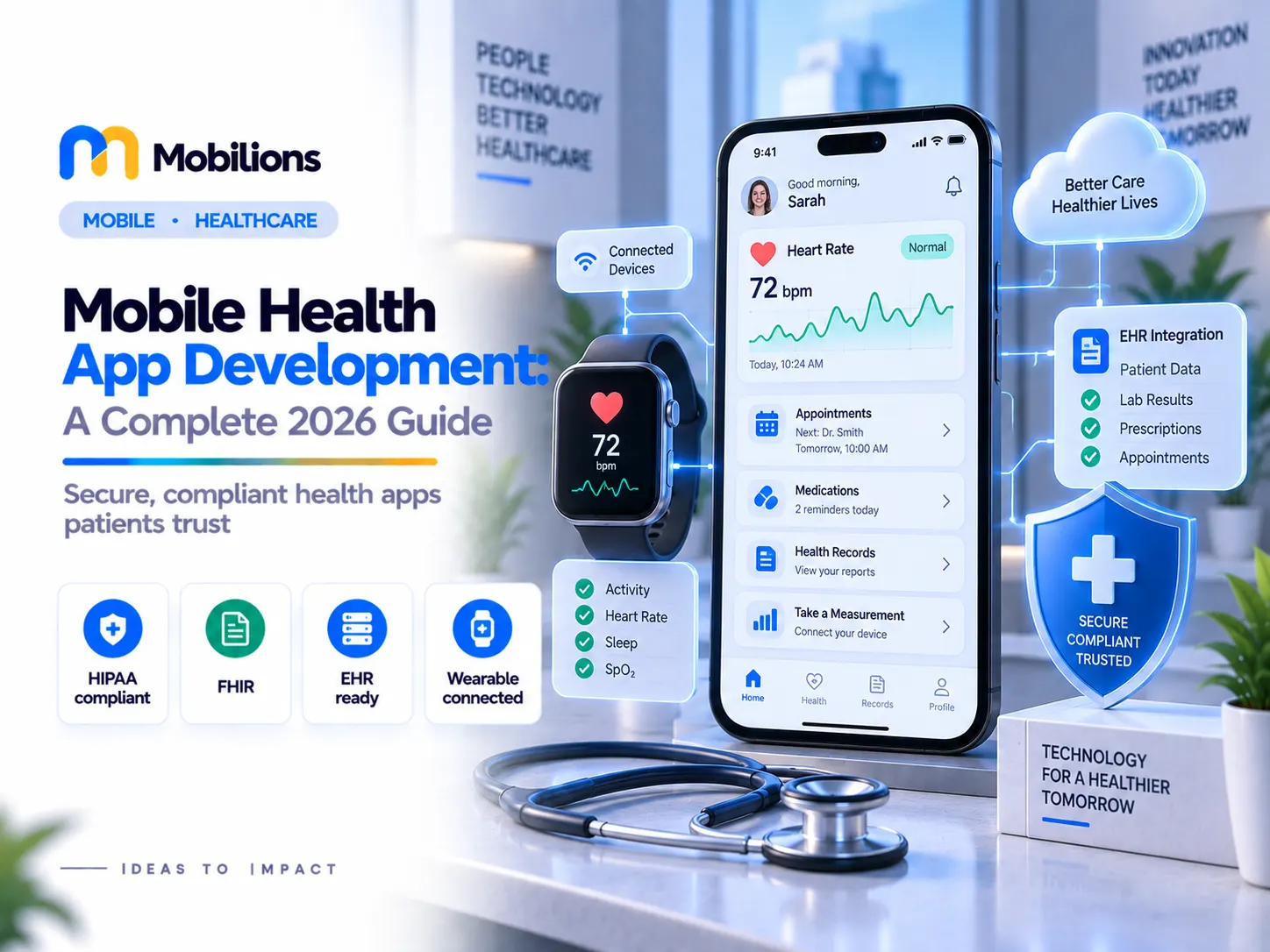
    Mobile Health App Development: A Complete 2026 Guide

    Mobile health app development is where good software meets real medical stakes. When your app tracks a heartbeat, reminds someone to take insulin, or carries a diagnosis between a patient and a doctor, a bug is not an inconvenience, it is a safety and compliance event. That single fact separates it from ordinary app work.

    This guide covers what mobile health app development actually involves in 2026: the app types worth building, the features that matter, the compliance you cannot skip, real costs and timelines, and how to choose a partner. It is written from the perspective of engineers who build and support healthcare software in production, not from a brochure. If you want the broader enterprise view, see our guide to healthcare mobile app development; this one focuses on patient-facing and connected mHealth apps.

    What is mobile health app development?

    Mobile health app development, often called mHealth, is the process of designing, building, securing, and maintaining mobile apps that deliver health services to patients or clinicians: telemedicine, remote monitoring, medication management, fitness and wellness, and access to medical records.

    The users are patients, caregivers, doctors, or all three. The data is some of the most sensitive there is. And in many cases the app influences a health decision, which can pull it into medical-device regulation. Those three realities shape every choice in a build.

    The market reflects the demand. The global mHealth apps market is projected to reach about $45 billion in 2026 and more than double by the mid-2030s. But the winners are not the apps with the most screens; they are the ones users trust with their health day after day, which is earned in security, accuracy, and experience.

    What types of mobile health apps can you build?

    Most mHealth projects fall into a few proven categories, and knowing which one you are building sets the scope.

    Telemedicine apps connect patients and clinicians for video visits, chat, and e-prescriptions. Remote patient monitoring (RPM) apps collect vitals from the patient, often through wearables, and surface them to a care team. Together with EHR/EMR access apps, these are the three highest-demand categories in 2026.

    Beyond those, there are medication and chronic-care management apps, mental health and wellness apps, fitness and lifestyle apps, and clinical tools for providers. The lighter the clinical role, the lighter the compliance; a wellness step-counter is not regulated like an app that recommends an insulin dose. Naming your category early tells you honestly how heavy the build will be.

    What features should a mobile health app include?

    Features fall into three layers: the basics patients expect, the ones that drive retention, and the clinical and security features that make the rest safe to ship.

    The basics are secure sign-in, a clear health dashboard, appointment booking, and reliable notifications. If these are slow or confusing, adoption stalls, and an unused health app helps no one.

    The retention drivers are what turn an install into a habit: video consultations, secure messaging with a clinician, medication and appointment reminders, and integration with wearables and fitness trackers so data flows in automatically. In 2026, AI-assisted features like symptom triage and personalized insights are increasingly expected too, though they must be handled carefully when they touch clinical decisions.

    The third layer is clinical and security capability: EHR access, e-prescriptions, consent management, audit logging, and encryption everywhere. These are not glamorous, but they are the difference between a demo and a system a hospital or patient will actually trust.

    Compliance: the non-negotiable core of mHealth

    In healthcare, compliance is the product, not a phase you bolt on later. This is the single most important thing to understand before you budget.
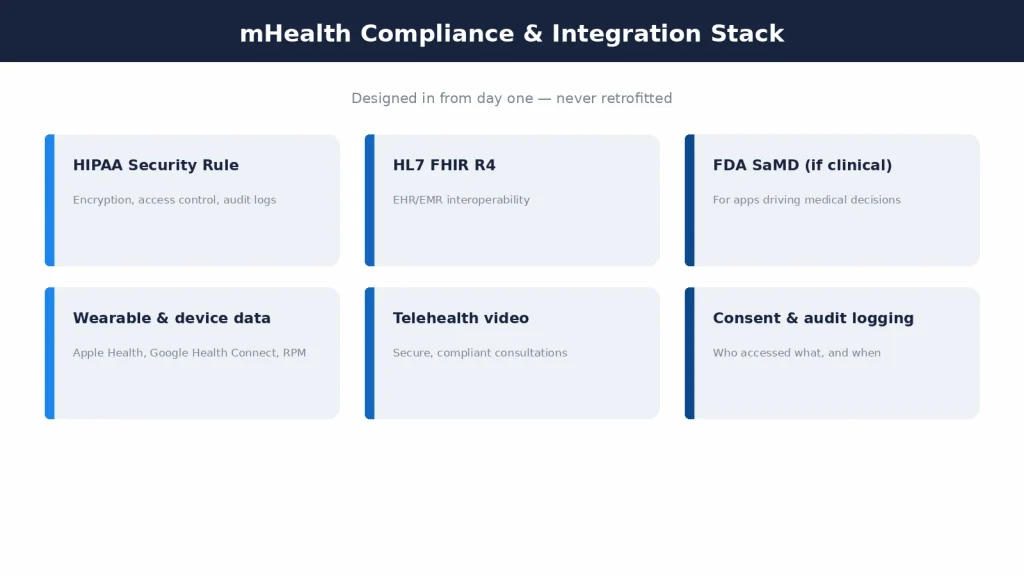
    mHealth compliance and integration stack (HIPAA, FHIR, wearables) by Mobilions

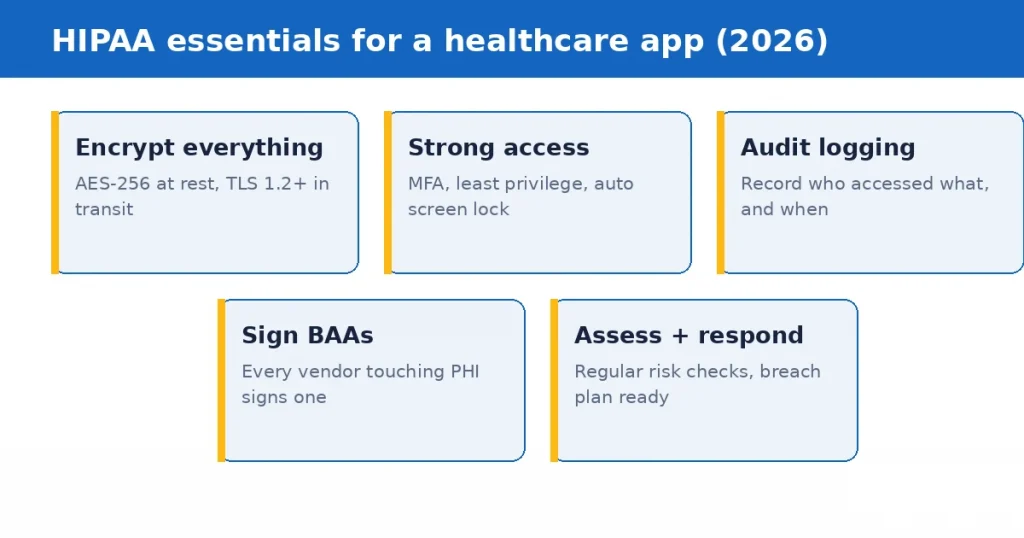
    A serious mHealth app usually has to satisfy three layers. First, HIPAA in the US governs how protected health information is stored, transmitted, and accessed; building to the U.S. Department of Health and Human Services HIPAA Security Rule is mandatory for any app touching PHI, and it typically adds 20 to 30 percent to a project. Second, EHR interoperability runs on HL7 FHIR (the R4 standard), which is how your app exchanges records with hospital systems. Third, if the app drives a clinical decision, it may be classified as Software as a Medical Device and fall under FDA SaMD rules.

    Compliance cannot be retrofitted. Encryption, access control, consent, and audit trails have to be designed into the architecture from the first commit; adding them to a finished app costs far more and often forces a redesign. A vendor who quotes mobile health app development without a detailed compliance plan has not scoped the hard part.

    How much does mobile health app development cost in 2026?

    Cost scales with clinical complexity, compliance, and integrations far more than with screen count. With that framing, 2026 numbers fall into clear bands.
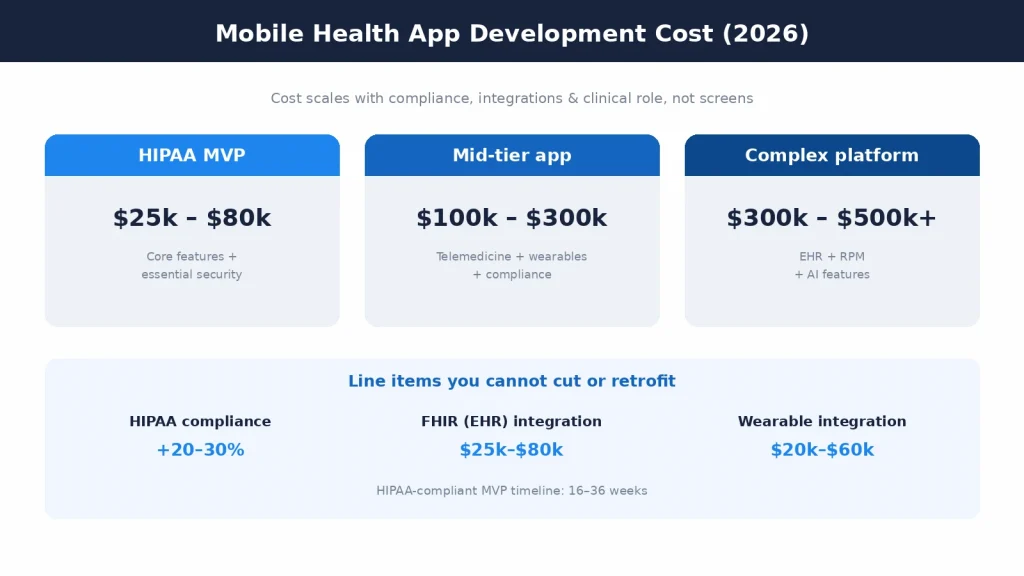
    Mobile health app development cost bands for 2026 by Mobilions

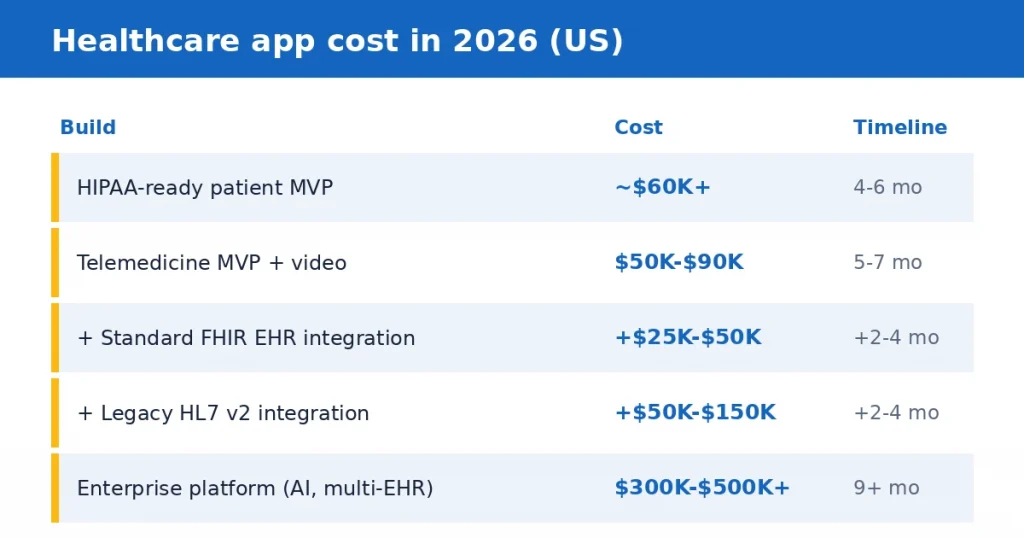
    A HIPAA-compliant MVP, with core features and essential security, runs roughly $25,000 to $80,000. A mid-tier app, with telemedicine, wearable integration, and full compliance, runs about $100,000 to $300,000. A complex platform, with EHR integration, RPM, and advanced or AI features, runs $300,000 and can pass $500,000 for the largest programs.

    Inside those totals, the big line items are specific. HIPAA compliance adds 20 to 30 percent. A FHIR R4 integration adds roughly $25,000 to $80,000 and 90 to 120 days. Wearable and medical-device integration to track vitals adds $20,000 to $60,000. None of these are safe places to cut, because they are exactly what makes the app usable, connected, and legal.

    The most useful thing you can do for your budget is scope compliance and integrations early. That is where mobile health app development costs are made or blown, and an honest partner will tell you which band your requirements fall into before you commit.

    How long does it take to build a mobile health app?

    Timelines track complexity, not ambition. A HIPAA-compliant mHealth MVP typically takes 16 to 36 weeks. A full platform with EHR integration and compliance certification runs longer, often into 12 to 18 months.

    The parts that extend timelines are rarely the screens. They are the FHIR integration (90 to 120 days on its own), the security hardening, the compliance work, and the testing a health app demands before it can touch real patient data. A realistic schedule builds these in rather than treating them as a final sprint.

    A good partner defines milestones in discovery so you have an honest timeline before building starts, and ships in visible iterations rather than disappearing into a long black box.

    Native or cross-platform for a health app?

    This is a common question, and the honest answer is that both work when done right.

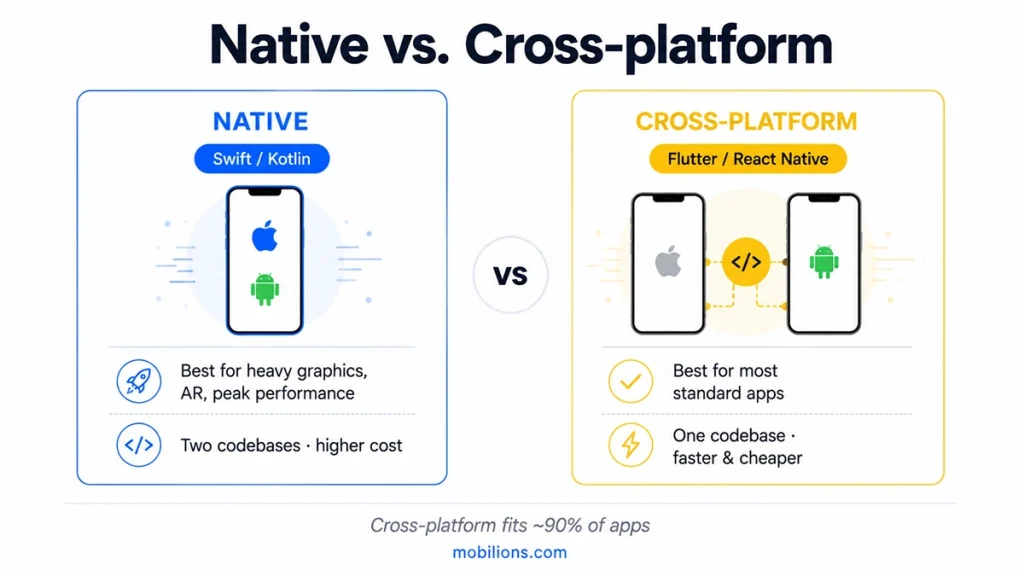
    Cross-platform frameworks like React Native and Flutter serve most mHealth apps well, letting you build for iOS and Android from one codebase and roughly halving build and maintenance cost. They are entirely capable of secure, HIPAA-compliant healthcare apps; the reliability comes from the engineering, not the framework.

    Native development, with Swift for iOS and Kotlin for Android, is worth it when you need the deepest device and sensor integration, the tightest performance, or the most direct access to platform health frameworks like Apple HealthKit and Google Health Connect. Many RPM apps lean native for exactly that reason.

    The right call depends on your features and your data sources. A good team recommends based on your requirements, not on what it prefers to build.

    Integrations that make a health app useful

    An mHealth app is only as valuable as what it connects to, and each integration carries its own security and compliance weight.

    The EHR/EMR integration through FHIR is the foundation for any clinical app; it is how records flow between your app and hospital systems. Wearable and device integration (Apple Health, Google Health Connect, and specific medical devices) is what powers remote monitoring and automatic vitals capture. Telehealth needs a secure, compliant video layer. And identity, payments, and pharmacy or lab integrations round out a full patient experience.

    Because each of these touches sensitive data, the integration layer, not the UI, is usually where most of the real engineering time goes. This is the heart of mobile health app development, and it is what a serious healthcare software team scopes first.

    Why user experience matters more in health apps

    In most apps, poor UX costs engagement. In a health app, it can cost adherence, which is the whole point. If a patient cannot find how to log a symptom, book a visit, or take the right dose, the app has failed at its job even if every feature works.

    Good mHealth UX means accessibility for older and impaired users, plain language over medical jargon, minimal steps for the actions that matter, and clarity under stress. It also means designing trust: people share health data only with apps that feel safe and legitimate. Design is not decoration here; it is part of the clinical outcome.

    The team behind a mobile health app

    A serious mobile health app development effort needs more than app developers. It needs mobile engineers for iOS and Android, backend engineers for the API and integration layer, a security specialist who owns encryption and threat modeling, a compliance lead who knows HIPAA and FHIR, a UX designer who understands clinical and accessibility needs, and QA engineers who test against real-world and adversarial scenarios.

    You rarely need all of these full-time from day one, which is why many clinics and health startups work with an experienced custom software development partner who brings the compliance and integration expertise that is hardest to hire. The point is that a health app is a multi-disciplinary build, and treating it as just “an app” is exactly how the compliance and security gaps appear.

    Mobile health app trends in 2026

    The bar for a competitive health app keeps rising, and mobile health app development in 2026 has to account for a few clear shifts.

    The biggest is AI moving into care. Symptom triage, personalized health insights, and administrative automation are increasingly expected, but they raise the compliance stakes: the moment AI influences a clinical decision, the app moves toward Software as a Medical Device territory and needs the governance to match. AI in health is powerful, but it is not a place for shortcuts.

    Remote patient monitoring is the second shift. With wearables now mainstream, patients expect their vitals to flow into an app automatically and reach their care team without a manual step. This is driving RPM from a niche feature into a baseline expectation for chronic-care and post-acute apps.

    Interoperability is the third. FHIR has become the common language of health data, and patients increasingly expect to see and move their records across providers from one app. An mHealth app that cannot exchange data cleanly feels closed and dated. Accessibility and multi-language support round out the modern baseline, because a health app that excludes users is both a business miss and, often, a compliance one. The takeaway is that these are core scope now, not later upgrades.

    Why healthcare apps fail, and how to avoid it

    Most healthcare-app trouble is predictable, and nearly all of it traces back to underestimating the hard parts.

    The first mistake is treating compliance and security as a later phase. Retrofitting HIPAA controls, encryption, and audit logging into a finished app costs far more than building them in, and it often forces a rebuild. Security scoped late is security done twice.

    The second is pricing screens instead of integrations and compliance. The visible app is the cheap part; FHIR integration, the security layer, and regulatory work are where the budget lives. A quote that ignores them will be wrong.

    The third is ignoring adoption: an app that is clinically correct but hard to use gets abandoned, and a health app nobody opens delivers no outcomes. The fourth is shipping and stopping; a health app needs ongoing maintenance to stay compliant, secure, and current as regulations and devices change.

    How to choose a mobile health app development company

    The right partner talks about your compliance, your integrations, and patient safety before it talks about screens. That is the fastest signal that they have built healthcare software before.

    Look for real HIPAA and FHIR experience, a documented security track record, healthcare projects in the portfolio, and a support model that lasts beyond launch. Ask how they handle PHI, consent, and audit logging, and whether they have shipped EHR or wearable integrations, because a team that has done this will have clear answers.

    Be cautious of quotes that price only the visible app, and of anyone promising a fully compliant health app on a consumer-app budget and timeline. Ownership matters too: you should own the code, the infrastructure, and the data pipelines, with no lock-in.

    Why some health apps cost $50k and others $500k

    The same phrase, mobile health app development, can describe a $50,000 project and a $500,000 one, and the gap confuses a lot of founders. The difference is almost never the number of screens.

    A $50,000 app is usually a focused MVP: one clear use case, a handful of features, standard authentication, and light or no clinical role. A $500,000 app carries deep EHR integration through FHIR, remote monitoring with medical-device data, telehealth video, multiple user roles, formal compliance certification, and often AI. Each of those is a serious engineering workstream, not a screen.

    Three factors drive most of the spread: compliance depth (a wellness tracker versus an FDA-regulated clinical tool), integration count (a standalone app versus one wired into hospital systems and devices), and data sensitivity (how much protected health information flows through it). Understand those three and the price stops being a mystery. It also means the honest first step is scoping, because a vendor who quotes before understanding your clinical role and integrations is guessing.

    A quick example: what an mHealth build looks like

    Consider a clinic that wants a remote patient monitoring app for chronic-care patients. It needs secure login, a patient dashboard, automatic vitals from a wearable, alerts to the care team, secure messaging, and integration with the clinic’s EHR, all under HIPAA.

    The scope decisions follow directly. Cross-platform on React Native to reach iOS and Android affordably, or native if the wearable integration demands it. A FHIR R4 integration to exchange records with the EHR. Wearable integration through Apple Health and Google Health Connect for vitals. Encryption everywhere, consent management, and audit logging from day one, with a compliance workstream running in parallel.

    Notice what drove every decision above: not the number of screens, but the systems the app had to connect to and the health data it carried. Change the EHR, the device, or the clinical role and the estimate changes with it. The screens were the fastest part to build and the least important to the outcome.

    On these requirements the project lands in the mid-to-complex band, and the FHIR integration, wearable work, security, and compliance, not the screen count, set the price and the timeline. That is mobile health app development in one concrete picture: the app is the easy part, and the trust and connectivity underneath it are the real product.

    Frequently asked questions

    What is mobile health app development?

    Mobile health app development (mHealth) is building mobile apps that deliver health services to patients or clinicians, such as telemedicine, remote monitoring, medication management, and records access, engineered to protect sensitive health data and meet regulations like HIPAA.

    How much does it cost to build a mobile health app in 2026?

    A HIPAA-compliant MVP runs about $25,000 to $80,000, a mid-tier app with telemedicine and wearables about $100,000 to $300,000, and a complex EHR-integrated platform $300,000 or more. HIPAA adds 20 to 30 percent, a FHIR integration $25,000 to $80,000, and wearable integration $20,000 to $60,000.

    Does my mobile health app need HIPAA compliance?

    If it stores, transmits, or accesses protected health information in the US, yes, HIPAA is mandatory. Apps that exchange records with hospitals also need HL7 FHIR, and apps that drive clinical decisions may fall under FDA Software as a Medical Device rules. Compliance must be built in from the start.

    How long does it take to build a mobile health app?

    A HIPAA-compliant MVP typically takes 16 to 36 weeks; a full platform with EHR integration and compliance certification runs 12 to 18 months. FHIR integration alone adds 90 to 120 days, and security and compliance testing extend timelines further.

    What features should a mobile health app have?

    Core features are secure login, a health dashboard, appointment booking, and notifications. High-value features are video consultations, secure messaging, medication reminders, and wearable integration, all wrapped in encryption, consent management, and audit logging.

    Can React Native be used for serious healthcare apps?

    Yes. React Native and Flutter are fully capable of secure, HIPAA-compliant health apps, and cross-platform roughly halves cost. Native (Swift/Kotlin) is worth it when you need the deepest device, sensor, or health-framework integration, common in remote monitoring apps.

    How do you protect patient data in a health app?

    Through end-to-end encryption in transit and at rest, strong authentication, least-privilege access control, consent management, secure local storage, and full audit logging, all aligned to the HIPAA Security Rule and designed in from the first commit rather than added later.

    How do you choose a mobile health app development company?

    Choose one that scopes compliance, integrations, and patient safety before pricing screens, has real HIPAA and FHIR experience, shows healthcare projects, supports the app beyond launch, and hands you full ownership of the code and data.

    Build a health app patients and clinicians can trust

    Mobile health app development succeeds or fails on the parts users never see: the compliance, the integrations, and the security. If you are scoping a health app and want an honest read on cost, timeline, and what production really requires, talk to Mobilions. Senior engineers who build healthcare and mobile apps scope it, build it, secure it, and support it in production, with compliance planned from day one.

  • Mobile Banking App Development: A Complete 2026 Guide

    Mobile Banking App Development: A Complete 2026 Guide

    Mobile banking app development is one of the few software projects where a single security gap can end the business, not just the product. That is what makes it different from an ordinary app: the users are trusting you with their money, and the regulators are watching how you handle it. Get it right and you have a product people open every day; get it wrong and you have a breach, a fine, and a headline.

    This guide walks through what mobile banking app development actually involves in 2026, from the features that keep users, to the security and compliance you cannot skip, to what it costs, how long it takes, and how to choose who builds it. It is written from the perspective of engineers who ship and support production financial software, not from a sales deck.

    What is mobile banking app development?

    Mobile banking app development is the process of designing, building, securing, and maintaining a mobile application that lets customers manage money: check balances, move funds, pay bills, and control cards, all connected to a core banking system in real time.

    The app is the visible part, but most of the real work is invisible: the integration with core banking, the security layer, the compliance controls, and the fraud detection that runs behind every tap. A banking app that only looks good is a demo. A banking app that stays accurate, secure, and compliant under real traffic is a product.

    That distinction shapes every decision in this guide. In consumer apps you optimize for delight; in mobile banking app development you optimize for trust, and trust is earned in the parts users never see.

    What features should a mobile banking app include?

    Features fall into three layers: the basics users expect, the ones that drive retention, and the security features that make the rest safe to ship.

    The basics are table stakes: account overview and balances, transaction history, fund transfers, bill payments, and card management. If any of these is slow or confusing, users go back to the website, and you have lost the point of the app.

    The retention drivers are what separate a banking app people tolerate from one they rely on. The highest-impact ones in 2026 are biometric login, real-time transaction alerts with instant card controls, instant peer-to-peer payments, AI-powered spending insights, and fast in-app support. These are the features that turn an account into a habit.

    The third layer is security, and it is not optional in a banking context. A complete stack includes biometric authentication, multi-factor authentication for high-risk actions, end-to-end encryption, AI-powered fraud detection with real-time alerts, instant card freeze and unfreeze, and behavioral biometrics for continuous session checks. We will come back to this, because it is where the budget and the risk concentrate.

    The trap is treating features as a checklist. The right feature set depends on who your customers are and what they actually do with their money, which is why good mobile banking app development starts with the customer, not the feature list.

    Security and compliance: the non-negotiables

    In banking, security and compliance are the product, not a phase you add at the end. This is the single most important thing to understand before you budget or plan.

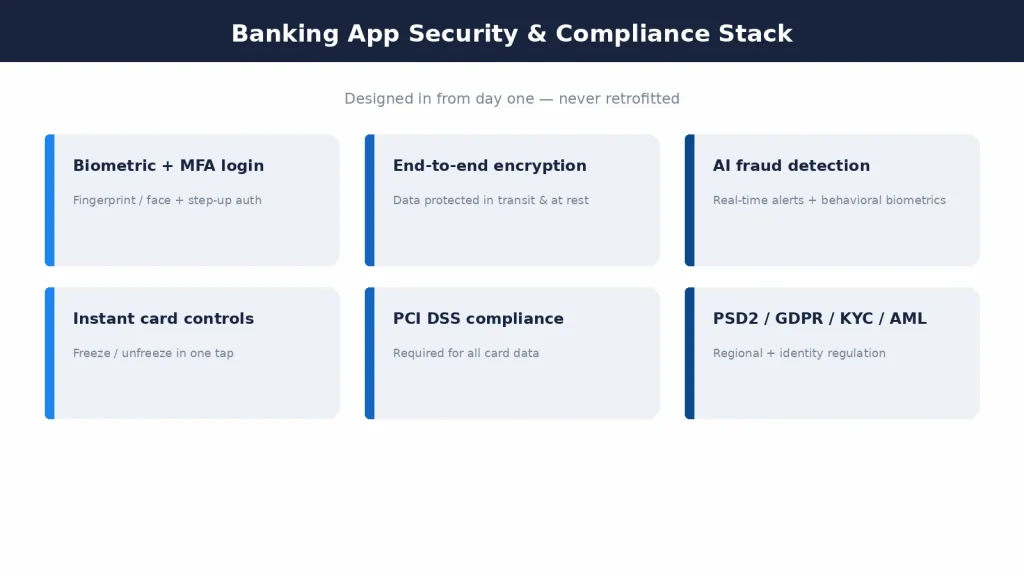
    Mobile banking app security and compliance stack by Mobilions

    Security cannot be retrofitted. Security added at the end of development is harder to get right and far more expensive to fix. It has to be designed into the architecture from the first commit. In practice, security work alone can consume roughly a fifth of the budget before a single customer-facing feature is built, and that is money well spent rather than overhead.

    The security layer includes encryption of data in transit and at rest, secure authentication (biometric plus MFA), certificate pinning, jailbreak and root detection, secure local storage, and real-time fraud monitoring. Aligning the build to a recognized standard such as the OWASP Mobile Application Security project turns “we think it is secure” into something you can actually verify.

    Compliance is a legal gate, not a nice-to-have. A banking app has to satisfy PCI DSS for card data, plus regional rules like PSD2 in Europe, GDPR for personal data, and KYC and AML for identity and anti-fraud. This regulatory work typically adds $30,000 to $100,000 to a project and, like security, cannot be bolted on afterward. Anything that touches card data must follow the PCI Security Standards Council requirements from day one.

    Biometric authentication deserves special mention because users now expect it and it is central to both security and experience. Building it against an open standard like the FIDO Alliance specifications keeps it interoperable and future-proof rather than tied to one vendor.

    The honest summary: if a vendor quotes mobile banking app development without a detailed security and compliance plan, they have not scoped the hard part, and the number will move once reality arrives.

    How much does mobile banking app development cost in 2026?

    Cost scales with security, compliance, and integration depth far more than with the number of screens. With that framing, 2026 numbers fall into clear bands.

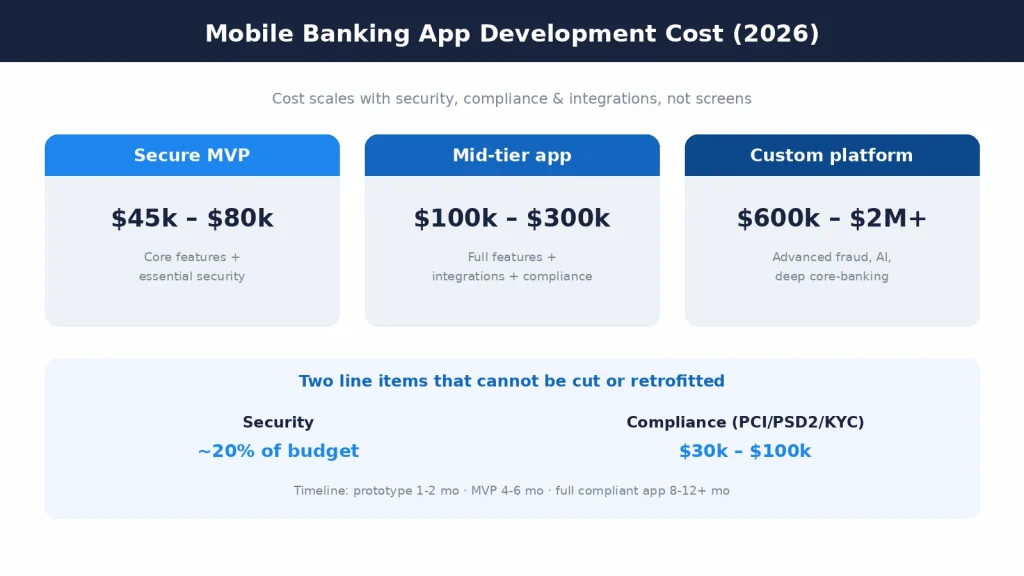
    Mobile banking app development cost bands for 2026 by Mobilions

    A basic MVP, with core banking features and essential security, starts around $45,000 to $80,000. A mid-tier app, with the full retention feature set, multiple integrations, and complete compliance, runs roughly $100,000 to $300,000. A full-scale custom digital banking platform, built from scratch with advanced fraud, AI features, and deep core-banking integration, runs $600,000 and can pass $1,000,000 to $2,000,000 for the largest programs.

    Inside those totals, three line items dominate: security (around a fifth of the budget), regulatory compliance ($30,000 to $100,000), and integrations with core banking and payment systems. None of these are safe places to cut, because they are exactly what makes the app usable and legal.

    The most useful thing you can do for your budget is scope the compliance and integrations early. That is where mobile banking app development costs are made or blown, and an honest partner will tell you which cost band your requirements fall into before you commit rather than discovering it mid-build.

    How long does it take to build a mobile banking app?

    Timelines track complexity, not ambition. A clickable prototype can be ready in one to two months. A production MVP typically takes four to six months. A full-featured, fully compliant banking app usually runs eight to twelve months or more, and a large in-house custom platform can stretch to eighteen months and beyond.

    The parts that extend timelines are rarely the screens. They are the security hardening, the compliance certification, the core-banking integration, and the testing that a financial app demands before it can touch real money. Rushing these is how projects fail, so a realistic schedule builds them in rather than treating them as a final sprint.

    A good partner defines milestones in discovery so you have an honest schedule before building starts, and ships in visible iterations rather than disappearing into a long black box.

    Native or cross-platform for a banking app?

    This is one of the most common questions in mobile banking app development, and the answer depends on your priorities.

    Cross-platform frameworks like React Native and Flutter let you build for iOS and Android from one codebase, which roughly halves build and maintenance cost and speeds up delivery. For most banking apps, where the feature set is shared across platforms, this is the pragmatic default in 2026.

    Native development, with Swift for iOS and Kotlin for Android, is worth it when you need the deepest device-level security features, the highest performance, or platform-specific capabilities that a cross-platform layer cannot reach cleanly. Some banks choose native specifically for the tightest control over security primitives.

    Mobile banking app development The honest guidance is that cross-platform is the right call for the majority of banking apps, and native is the right call when security depth or performance genuinely demands it. A good team recommends based on your requirements, not on what it prefers to build.

    The mobile banking app development process

    Building a banking app is a staged exercise, and the order matters because each stage de-risks the next.

    Discovery and compliance scoping comes first: map the features, the core-banking integration, the regulatory regime, and the security requirements. This is where the true scope, and the honest cost, becomes visible.

    Design follows, turning real customer workflows into an interface that is fast and trustworthy, because in banking, a confusing screen erodes the trust the whole product depends on. Then development builds the app, the backend, the integration layer, and the security controls in parallel, with security written in rather than bolted on.

    Security testing and compliance certification is a dedicated phase, not an afterthought: penetration testing, code review, and the audits required to satisfy PCI DSS and regional regulators. Finally, deployment and ongoing support: launch, monitor, and maintain, because a banking app is a living product that must stay patched and compliant for years.

    The team behind a banking app

    A serious mobile banking app development effort needs more than app developers. It needs mobile engineers for iOS and Android, backend engineers for the integration and API layer, a security specialist who owns encryption and threat modeling, a compliance lead who knows PCI DSS and regional rules, a UX designer who understands financial workflows, and QA engineers who test against real-world attack scenarios.

    You rarely need all of these full-time from day one, which is why many banks and fintechs work with an experienced custom software development partner who brings the security and compliance expertise that is hardest to hire, or hire mobile developers to extend an existing team. The point is that a banking app is a multi-disciplinary build, and treating it as just “an app” is how the security and compliance gaps appear. The teams that ship successful banking apps staff for the invisible work first, because that is where the product actually lives.

    Integrations a banking app needs

    An app is only as useful as what it connects to. Mobile banking app development almost always involves several integrations, and each one is a place where reliability and security are won or lost.

    The core banking system is the foundation: the app reads and writes real account data through it, usually via a secure API layer rather than talking to it directly. Payment processing and card networks handle transactions and card controls. KYC and identity providers handle onboarding and verification. And increasingly, open banking APIs connect the app to other financial institutions for account aggregation and payments.

    Each integration carries its own security and compliance weight, which is why the integration layer, not the UI, is usually where most of the real engineering time goes.

    Why banking apps fail, and how to avoid it

    Most banking-app trouble is predictable, and nearly all of it traces back to underestimating the hard parts.

    The first mistake is treating security and compliance as a later phase. Retrofitting encryption, fraud detection, and PCI controls into a finished app costs far more than building them in, and it often forces a redesign. Security scoped late is security done twice.

    The second is pricing screens instead of integrations and compliance. The visible app is the cheap part; the core-banking integration, the security layer, and the regulatory work are where the effort and the budget live. A quote that ignores them will be wrong.

    The third is neglecting the boring reliability work, offline handling, error states, and performance under load, in a product where a failed transaction is not a minor bug but a broken trust. The fourth is shipping and stopping: a banking app needs continuous maintenance to stay patched, compliant, and ahead of new fraud patterns.

    How to choose a mobile banking app development company

    The right partner talks about your security, compliance, and integrations before it talks about screens. That is the fastest signal that they have built financial software before.

    Look for real experience with core-banking integration, a documented security and compliance track record, and a support model that lasts beyond launch. Ask how they handle PCI DSS and fraud detection, and how they test against real attack scenarios, because a team that has shipped banking apps will have clear answers.

    Be cautious of quotes that price only the visible app, and of anyone who promises a fully compliant banking app on a consumer-app budget and timeline. Ownership matters too: you should own the code, the infrastructure, and the roadmap, with no lock-in.

    What customers expect from a banking app in 2026

    Customer expectations have moved, and mobile banking app development has to move with them or the app feels dated on launch day.

    The clearest shift is toward intelligence. Users now expect AI-powered spending insights, categorized transactions, and proactive alerts that tell them something useful before they ask. A banking app that only shows a list of transactions feels like a statement; one that explains where the money went feels like a tool.

    Personalization and speed are the next expectations. People want biometric login that just works, instant P2P payments, real-time notifications, and card controls they can act on in one tap, like freezing a lost card immediately. Every extra second or step in these core flows is a reason to abandon the app.

    Open banking is reshaping the baseline too. Customers increasingly expect to see and move money across institutions from one app, which means open banking API strategy is now part of serious banking-app planning rather than a future nice-to-have. Accessibility and multi-language support round out the modern baseline, because a banking app that excludes users is both a business miss and, in many regions, a compliance one.

    The takeaway is that the bar for a competitive banking app keeps rising, and the apps that win treat these expectations as core scope rather than a later upgrade.

    A quick example: what a banking build looks like

    Consider a regional bank that wants a modern app for its retail customers. It needs balances and transactions, transfers and bill pay, card controls, biometric login, real-time fraud alerts, and integration with its existing core banking system, all under PCI DSS and local regulation.

    The scope decisions follow directly. Cross-platform on React Native to serve iOS and Android cost-effectively. A secure API layer between the app and the core banking system so the app never touches it directly. Biometric authentication and MFA built against open standards. Encryption everywhere, fraud monitoring in real time, and a compliance workstream running in parallel from day one.

    Notice what drove every decision above: not the number of screens, but the systems the app had to connect to and the rules it had to satisfy. Change the core banking platform or the regulatory regime and the estimate changes with it. The screens were the fastest part to build and the least important to the outcome.

    On these requirements the project lands in the mid-to-upper cost band, and the integration, security, and compliance work, not the screen count, is what sets the price and the timeline. That is mobile banking app development in one concrete picture: the app is the easy part, and the trust underneath it is the real product.

    Frequently asked questions

    What is mobile banking app development?

    Mobile banking app development is the process of designing, building, securing, and maintaining a mobile app that lets customers manage money, connected in real time to a core banking system, and built to meet strict security and regulatory requirements like PCI DSS.

    How much does it cost to build a mobile banking app in 2026?

    A basic secure MVP starts around $45,000 to $80,000, a mid-tier app with full features and compliance runs about $100,000 to $300,000, and a full custom digital banking platform runs $600,000 and up. Security takes roughly a fifth of the budget and compliance adds $30,000 to $100,000.

    How long does it take to develop a mobile banking app?

    A prototype takes one to two months, a production MVP four to six months, and a full-featured compliant app eight to twelve months or more. Security hardening, compliance certification, and core-banking integration are what extend the timeline.

    How secure are mobile banking apps?

    Well-built banking apps are very secure because security is engineered in: biometric authentication, multi-factor authentication, end-to-end encryption, certificate pinning, jailbreak and root detection, and real-time fraud monitoring. The risk comes from apps where security was added late rather than designed in.

    What features should a mobile banking app have?

    Core features are balances, transaction history, transfers, bill pay, and card management. High-retention features are biometric login, real-time transaction alerts with card controls, instant P2P payments, AI spending insights, and in-app support, all wrapped in a strong security layer.

    What compliance does a banking app need?

    Typically PCI DSS for card data, plus regional rules such as PSD2 in Europe, GDPR for personal data, and KYC and AML for identity and anti-fraud. Compliance adds $30,000 to $100,000 and must be built in from the start, not retrofitted.

    Should a banking app be native or cross-platform?

    Cross-platform with React Native or Flutter is the pragmatic default for most banking apps because one codebase for iOS and Android roughly halves cost. Native is worth it when you need the deepest device-level security or maximum performance.

    How do you choose a mobile banking app development company?

    Choose one that scopes your security, compliance, and core-banking integration before pricing screens, has documented financial-software experience, tests against real attack scenarios, supports the app beyond launch, and hands you full ownership of the code and infrastructure.

    Build a banking app your customers can trust

    Mobile banking app development succeeds or fails on the parts users never see: the security, the compliance, and the integrations. If you are scoping a banking app and want an honest read on cost, timeline, and what production really requires, talk to Mobilions. Senior engineers who build fintech and mobile apps scope it, build it, secure it, and support it in production, with the security and compliance planned from the first day rather than discovered on the last.

  • Grocery Delivery App Development: A Complete 2026 Guide

    Grocery Delivery App Development: A Complete 2026 Guide

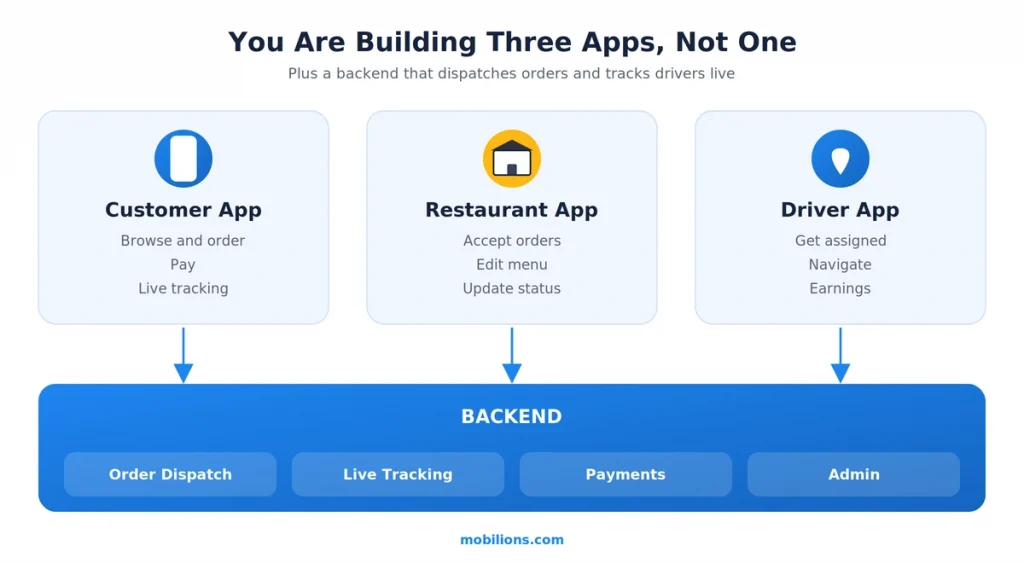
    Grocery delivery app development in 2026 is not one app, it is a system: a customer app, a shopper or driver app, and an admin dashboard, usually connected to store inventory. A basic single-store MVP runs roughly $25,000 to $60,000 over 2 to 4 months. A real multi-store or quick-commerce platform (Instacart-style) with routing, inventory sync, and dark-store fulfilment runs $150,000 to $500,000 and up, over 5 to 9 months. The market is huge and growing fast (online grocery is close to $0.9 trillion in 2026), but the hard part is operations, real-time tracking, substitutions, and delivery logistics, not the shopping screens. Start with one model and one region, get the operations right, then scale.

    Grocery delivery app development looks like building a shopping app with a delivery button, and that misunderstanding is exactly why so many of these projects blow their budgets. What you are actually building is a small logistics company that happens to have an app on top. The catalogue and cart are the easy part. Keeping inventory accurate, routing drivers, handling out-of-stock substitutions, and tracking an order in real time is where the real engineering and the real cost sit.

    This guide is the practical version for founders, retailers, and startups. It covers what grocery delivery app development actually involves, whether the 2026 market is worth entering, the business models to choose from, the features each app needs, honest cost and timeline ranges, the parts that are genuinely hard, how to monetize, and how to pick a team. We build delivery and marketplace apps at Mobilions, so this is a builder’s view with real numbers, not a brochure.


    What grocery delivery app development actually involves

    Before any pricing makes sense, you need to see the full system, because the cost comes straight from it. A working grocery delivery product is at least three connected apps plus a backend.

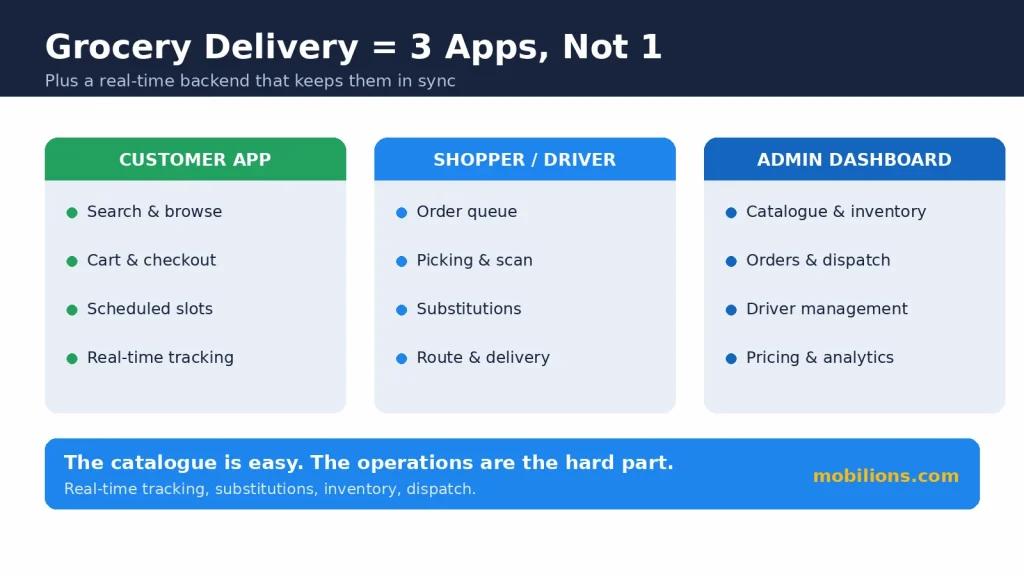
    Grocery delivery app development: the three apps, customer, shopper/driver, and admin dashboard

    There is the customer app (browse, search, cart, pay, track), the shopper or driver app (accept orders, pick items, handle substitutions, navigate, deliver), and the admin dashboard (catalogue, inventory, orders, drivers, pricing, analytics). Underneath sits a backend that ties them together in real time, plus integrations with payments, maps and routing, notifications, and often a store or POS system for live inventory. Depending on your model, you may also need a store-partner interface and a dark-store or warehouse workflow.

    That is why grocery delivery costs more than a typical app. You are not building one screen flow; you are building three coordinated apps and the real-time operations engine that keeps them in sync. Get that engine right and the business works. Get it wrong and you have a pretty catalogue that cannot actually fulfil an order.

    Is a grocery delivery app worth building in 2026?

    The market case is strong, with an important caveat about where the difficulty lives. Online grocery is one of the largest and fastest-growing digital markets: it sits close to $0.9 trillion globally in 2026 and is projected to keep growing at more than 20 percent a year, according to market research. Quick commerce, the 15-to-30-minute delivery model, is growing even faster, and grocery is its anchor category. Dark stores, small local fulfilment hubs, are expanding rapidly to make that speed possible.

    So the demand is real and rising. The caveat is that this is an operationally hard, thin-margin business dominated by well-funded players, and the winners compete on fulfilment speed, accuracy, and unit economics, not on app design. A grocery delivery app is worth building if you have a genuine edge, a store network, a region the incumbents serve poorly, a niche (organic, ethnic, bulk), or a fulfilment advantage, and it is a hard place to be without one. Build for the operations, not just the app.

    The main business models

    Your model decides your architecture and your cost, so choose it deliberately before you build. There are four common ones.

    Multi-vendor marketplace (Instacart-style): you connect many stores and shoppers to customers without owning inventory. Widest reach, most complex to build, because you are coordinating many partners, shoppers, and catalogues.

    Single-store or chain app: a retailer’s own delivery app for its own stores and inventory. Simpler and the most common starting point for an existing grocery business.

    Quick-commerce / dark store: you own small local fulfilment hubs and promise very fast delivery (15 to 30 minutes). Operationally intense and capital-heavy, but the fastest-growing model.

    Hyperlocal / store-fulfilled: you use existing stores as fulfilment points, which is how large retailers have scaled delivery cheaply. A pragmatic middle path.

    Most new entrants should start with the narrowest model that fits their real advantage, usually a single-store or single-region app, prove the operations, and expand. Trying to launch a full multi-vendor marketplace as a first product is the classic way to run out of money before the operations work.

    Must-have features, app by app

    Scope drives cost, so it helps to separate the essentials for each app from the extras.

    Customer app (essential): smart product search and browse, cart and checkout, multiple payment options, scheduled delivery slots, real-time order tracking, order history and reorder, and substitution preferences. Shopper/driver app (essential): order queue, in-store picking list, barcode or item scan, substitution handling with customer approval, route navigation, and proof of delivery. Admin dashboard (essential): catalogue and inventory management, order and dispatch management, driver management, pricing and promotions, and analytics.

    Nice-to-have and differentiating features, AI personalization, demand forecasting, loyalty and subscriptions, multi-language, and advanced route optimization, matter, but they come after the core three-app loop works end to end. The mistake is padding the customer app with features while under-building the shopper and admin sides, which is where fulfilment actually happens.

    AppCore jobWatch out for
    CustomerBrowse, order, trackReal-time tracking, substitutions
    Shopper / driverPick, substitute, deliverPicking flow, routing, offline areas
    AdminCatalogue, orders, driversLive inventory sync, dispatch logic

    How much does grocery delivery app development cost?

    Here are honest 2026 ranges. They are wide because “grocery delivery app” spans a single-store MVP and a national marketplace.

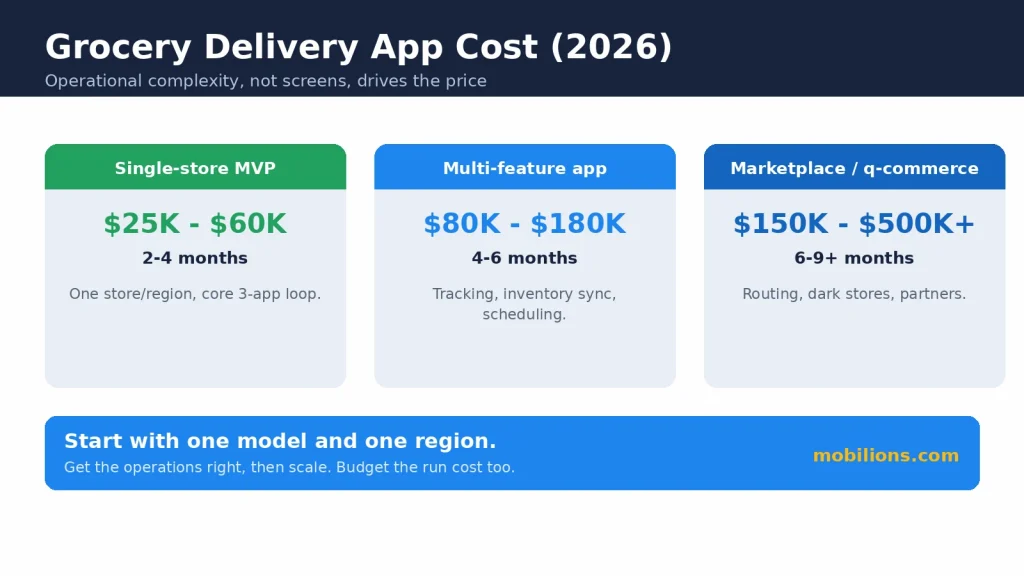
    Grocery delivery app development cost 2026: single-store MVP, multi-feature, and marketplace tiers

    A basic single-store MVP (one store or region, core customer app plus a simple driver and admin flow) runs roughly $25,000 to $60,000 over 2 to 4 months. A solid multi-feature app with real tracking, inventory sync, scheduling, and a proper admin runs $80,000 to $180,000. A multi-store or quick-commerce platform with routing, dark-store workflows, and partner systems runs $150,000 to $500,000, and a large enterprise marketplace can exceed $1,000,000. The single biggest cost driver is not the customer app; it is the operational complexity, routing, real-time inventory, multi-party coordination, behind it.

    Then there are the ongoing costs founders miss: maintenance (roughly 15 to 20 percent of build per year), backend and hosting that must scale with orders, third-party services (maps, payments, SMS, push), app store fees, and the operational cost of running deliveries themselves. An app is the smaller line item; running the operation is the bigger one. Budget for both from the start.

    How long does it take?

    Timeline tracks model and scope closely. A single-store MVP typically takes 8 to 16 weeks. A full multi-feature app runs 4 to 6 months. A multi-store or quick-commerce platform runs 6 to 9 months or more. Those windows assume a locked scope and a single model to start; the fastest way to overrun is to try to build every model and feature at once. A good team will push you to launch a focused first version in one region so you can learn the operations before scaling them.

    How it is built: the tech behind it

    A quick, non-technical picture of the moving parts, because it explains where the effort goes. The apps are usually built cross-platform (Flutter or React Native) to reach iOS and Android efficiently, on top of a backend that handles orders, users, and real-time state. Real-time tracking uses live location and websockets so the customer sees the driver move.

    Payments run through a provider like Stripe rather than being built from scratch. Routing and navigation use a maps platform such as Google Maps Platform for driver directions and delivery estimates. And inventory either lives in your admin or syncs from a store or POS system so the catalogue reflects what is actually in stock.

    The engineering value is in wiring these together reliably under real order volume, which is exactly the part that is easy to underestimate.

    The parts that are genuinely hard

    It is worth naming where projects actually struggle, because that is where your budget and your team’s quality really matter.

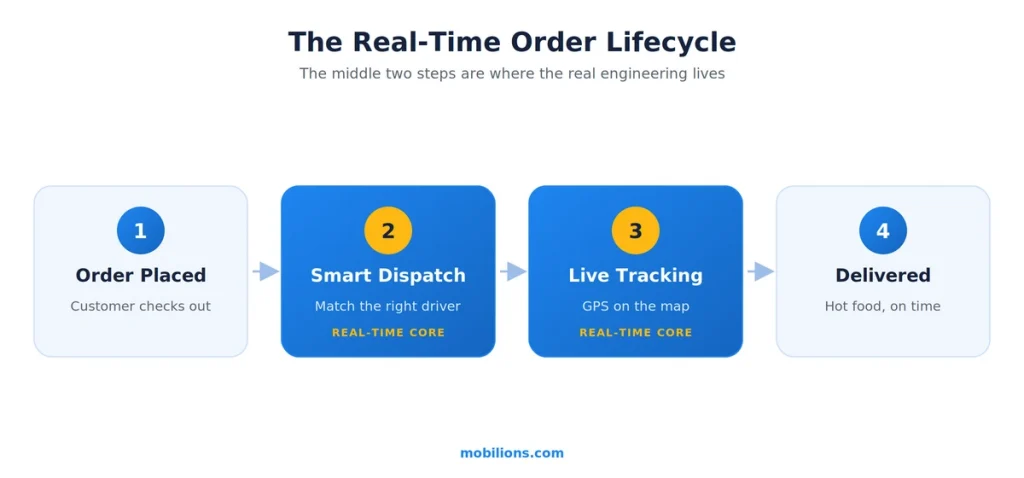
    Real-time tracking that stays accurate as drivers move through dead zones is harder than it looks. Substitutions, an item is out of stock, the shopper needs a fast, clear way to offer an alternative and get approval, are a constant source of customer frustration when done badly. Live inventory that reflects reality prevents the worst experience of all, ordering something that is not there. Routing and dispatch, assigning orders to the right driver and sequencing deliveries efficiently, is a genuine optimization problem at scale.

    And peak load, everyone orders at similar times, means the system has to hold up when it matters most. These are the difference between an app that demos well and one that runs a real operation, and they are where an experienced team earns its fee.

    How to monetize a grocery delivery app

    Revenue comes from several levers, and most platforms combine them. Delivery fees and service fees on each order are the direct model. Markups on product prices are common in marketplaces. Subscriptions (a membership for free or cheaper delivery) improve retention and are widely used by the leaders. Commissions from partner stores apply in marketplace models. And in-app advertising or promoted products become a real revenue line at scale. The honest point about grocery is that margins are thin, so the model has to be designed carefully around real unit economics, what it actually costs you to fulfil an order, rather than assumed. A beautiful app with negative unit economics is not a business.

    Why grocery delivery apps fail

    Most failures are not about the app; they are about the operation and the economics. The common patterns: launching too broad (many stores or the whole city) before the fulfilment works, so quality collapses; ignoring unit economics until the delivery costs eat the revenue; under-building the shopper and admin sides so orders cannot be fulfilled smoothly; poor inventory accuracy that leads to constant substitutions and refunds; and competing on app features against incumbents who compete on speed and price.

    The fixes are consistent: start narrow, get the operations and the numbers right in one region, build the fulfilment side as seriously as the customer side, and expand only from evidence. Treating this as an app project rather than an operations business is the root mistake.

    How to choose a development company

    Because the operational engine decides success, pick a team that has built one before. Look for a partner with real delivery, logistics, or marketplace experience (ask to see comparable apps they have shipped), an MVP-first, one-model-first process rather than a push to build everything, transparent pricing with a clear scope, and honest answers about the operational hard parts, not just the screens. Confirm what is included (the three apps, backend, integrations, testing, support), who owns the code (you should), and how they handle scaling and maintenance. Red flags: a quote that only prices the customer app, no relevant portfolio, hand-waving about real-time tracking and inventory, or a promise to build a full marketplace fast and cheap.

    How Mobilions helps

    We build delivery and marketplace apps end to end, and we have shipped software since 2016. For grocery, we start by pinning down your model and your real advantage, then build a focused first version, the three-app loop for one store or region, with the operational parts (real-time tracking, substitutions, inventory, dispatch) built properly rather than faked for a demo. We build cross-platform to reach both stores efficiently, integrate payments, maps, and inventory the right way, design around your actual unit economics, and hand you full ownership of the code. We scale it with you once the operation works in one place.

    What we will not do is quote you a cheap customer app and leave the fulfilment side hollow, because that is precisely the app that cannot run a real delivery business.

    The bottom line

    Grocery delivery app development in 2026 is a systems-and-operations build, not a shopping-app build. Budget roughly $25,000 to $60,000 for a single-store MVP, $80,000 to $180,000 for a solid app, and $150,000 to $500,000 or more for a multi-store or quick-commerce platform, and remember the operation costs more to run than the app costs to build. The market is enormous and growing fast, but it is operationally hard and margin-thin, and it rewards fulfilment quality over interface polish.

    Choose one model and one region, build the customer, shopper, and admin apps as one coordinated system, get real-time tracking, substitutions, inventory, and unit economics right, and expand from evidence. Do that, and grocery delivery is a large opportunity. Treat it as an app instead of an operation, and it is an expensive way to learn how hard logistics is.

    If you want a straight estimate and a first-version plan for your specific grocery model, that is exactly the conversation our senior engineers have with founders and retailers every week.

    Book a discovery call for an honest scope and quote, no obligation. You can also explore our mobile app development services and how we work with ecommerce and retail businesses.

    Key takeaways

    • Grocery delivery app development means at least three apps, customer, shopper/driver, and admin, plus a real-time backend and store integrations, not a single shopping app.
    • A single-store MVP runs about $25,000 to $60,000 (2 to 4 months); a multi-store or quick-commerce platform runs $150,000 to $500,000+ (6 to 9 months).
    • The market is huge and fast-growing (online grocery near $0.9 trillion in 2026, quick commerce growing even faster), but it is operationally hard and margin-thin.
    • Choose a model first, multi-vendor marketplace, single-store, quick-commerce/dark store, or hyperlocal, and start with the narrowest one that fits your advantage.
    • The hard parts are real-time tracking, substitutions, live inventory, routing/dispatch, and peak load, not the shopping screens; build the shopper and admin sides as seriously as the customer app.
    • Monetize through delivery and service fees, markups, subscriptions, commissions, and ads, but design around real unit economics because margins are thin.
    • Most failures come from launching too broad, ignoring unit economics, and under-building fulfilment; start narrow, get one region right, and scale from evidence.

    Frequently asked questions

    How much does it cost to build a grocery delivery app in 2026?

    A basic single-store MVP runs about $25,000 to $60,000 over 2 to 4 months. A solid multi-feature app with real tracking, inventory sync, and a proper admin runs $80,000 to $180,000, and a multi-store or quick-commerce platform runs $150,000 to $500,000 or more. The biggest cost driver is operational complexity, routing, real-time inventory, multi-party coordination, not the customer-facing screens, and you should also budget ongoing maintenance and operating costs.

    How long does it take to develop a grocery delivery app?

    A single-store MVP typically takes 8 to 16 weeks, a full multi-feature app takes 4 to 6 months, and a multi-store or quick-commerce platform takes 6 to 9 months or more. These assume a locked scope and one model to start. Trying to build every model and feature at once is the main cause of overruns, so launching a focused first version in one region is the fastest route.

    How many apps do I need for a grocery delivery service?

    At least three: a customer app (browse, order, track), a shopper or driver app (pick, substitute, navigate, deliver), and an admin dashboard (catalogue, inventory, orders, drivers). Depending on your model you may also need store-partner interfaces or a dark-store workflow. They are tied together by a real-time backend, and under-building the shopper and admin sides is a common, costly mistake.

    What features does a grocery delivery app need?

    The customer app needs search, cart and checkout, multiple payments, scheduled slots, real-time tracking, and substitution preferences. The driver app needs an order queue, picking list, substitution handling, navigation, and proof of delivery. The admin needs catalogue and inventory management, order and dispatch control, driver management, pricing, and analytics. AI personalization and route optimization are valuable additions once the core loop works.

    What business model should I choose?

    The main options are a multi-vendor marketplace (Instacart-style), a single-store or chain app, a quick-commerce dark-store model (15 to 30 minute delivery), or a hyperlocal store-fulfilled model. Most new entrants should start with the narrowest model that fits their real advantage, usually single-store or single-region, prove the operations, then expand. Launching a full marketplace as a first product is the classic way to run out of money.

    Is a grocery delivery app a good business in 2026?

    The market is large and growing fast, online grocery is near $0.9 trillion in 2026 and quick commerce is growing even quicker, so demand is real. But it is operationally hard, margin-thin, and dominated by well-funded players who compete on fulfilment speed and unit economics, not app design. It is a good business only if you have a genuine edge: a store network, an underserved region, a niche, or a fulfilment advantage.

    What makes grocery delivery apps technically hard?

    The hard parts are real-time driver tracking that stays accurate through dead zones, fast and clear substitution handling when items are out of stock, live inventory that reflects reality, routing and dispatch that assign and sequence deliveries efficiently, and holding up under peak order load. These operational systems, not the shopping screens, are where projects struggle and where an experienced team makes the difference.

    How do grocery delivery apps make money?

    Through delivery fees, service fees, markups on product prices, subscriptions (memberships for free or cheaper delivery), commissions from partner stores in marketplace models, and in-app advertising or promoted products at scale. Because grocery margins are thin, the model must be designed around real unit economics, what it actually costs to fulfil an order, rather than assumptions. A polished app with negative unit economics is not a viable business.

    Should I build native or cross-platform?

    Most grocery delivery apps are built cross-platform (Flutter or React Native) so the customer, driver, and admin apps reach iOS and Android efficiently without doubling the cost. Cross-platform performance is more than adequate for these apps, and it lets you get the whole three-app system to market faster, which matters more here than squeezing out native performance you do not need at launch.

    How do I choose a grocery delivery app development company?

    Look for real delivery, logistics, or marketplace experience (ask to see comparable shipped apps), an MVP-first and one-model-first process, transparent pricing that covers all three apps and the backend, and honest answers about the operational hard parts. Confirm what is included, who owns the code (you should), and how they scale and maintain it. Watch for quotes that price only the customer app or promise a full marketplace fast and cheap.

    Does Mobilions build grocery delivery apps?

    Yes. We build delivery and marketplace apps end to end, starting by pinning down your model and advantage, then building a focused first version, the customer, driver, and admin apps as one system, with real-time tracking, substitutions, inventory, and dispatch built properly. We integrate payments, maps, and inventory the right way, design around your unit economics, and hand you full ownership. Book a discovery call for an honest scope and quote.

  • Enterprise Mobile App Development: The Complete 2026 Guide

    Enterprise Mobile App Development: The Complete 2026 Guide

    Enterprise mobile app development is what happens when a mobile app has to answer to an IT department, a security team, and a compliance auditor, not just an app store reviewer. It is a different discipline from building a consumer app, and treating the two the same is the fastest way to blow a budget and a deadline.

    This guide explains what makes enterprise mobile app development different, how the build actually works, what the stack looks like in 2026, how apps get distributed through MDM instead of public stores, and what all of it costs. It is written from the perspective of engineers who scope, build, and support these systems in production.

    What is enterprise mobile app development?

    Enterprise mobile app development is the process of building mobile applications for internal business use, such as field operations, logistics, sales enablement, or employee tools, that must integrate with existing company systems and meet strict security and compliance requirements.

    The users are employees, partners, or vetted customers, not the open public. That single fact changes almost everything: how the app authenticates people, where it gets its data, how it is distributed, and how it is governed after launch.

    A consumer app optimizes for downloads and delight. An enterprise app optimizes for reliability, security, and fit with the systems a business already runs. Both are mobile apps. Only one has to pass a SOC 2 audit.

    Why enterprise mobile apps are different from consumer apps

    The gap shows up in four places, and each one adds cost and engineering care that a consumer app never sees.

    Security is a first-class requirement, not a feature. Enterprise mobile apps carry role-based access control, single sign-on through SSO or LDAP, encrypted local storage, and often certificate pinning. Security work typically adds 15 to 30 percent to a development budget, and that is money well spent rather than overhead.

    They integrate with legacy systems. An enterprise app rarely stands alone. It has to talk to an ERP, a CRM, a data warehouse, or a decades-old internal API that was never designed for mobile. This integration depth, not the number of screens, is usually the biggest driver of cost and timeline.

    They are governed after launch. Consumer apps ship and iterate freely. Enterprise apps live under IT policy: managed updates, remote wipe, device compliance checks, and audit trails. The app has to cooperate with that governance from day one.

    They run at organizational scale with offline realities. Warehouse floors, hospital basements, and remote sites have poor connectivity, so offline mode and reliable sync are common requirements rather than nice-to-haves.

    Enterprise mobile application development services: what you actually get

    When you hire a team for enterprise mobile application development, the deliverable is not just an app binary. It is a system that IT can trust and operate.

    A complete service covers discovery and security scoping, UX for real workflows rather than marketing screens, the mobile app itself, the backend and integration layer, and the deployment and support model. The integration layer, connecting the app to your ERP, CRM, identity provider, and data systems, is often where most of the real engineering lives.

    Good enterprise mobile app development services also include the unglamorous parts: role and permission modeling, audit logging, compliance documentation, and a rollout plan. These are the things that decide whether the app is adopted or abandoned.

    The point of naming this clearly is simple. If a vendor quotes you only for screens and features, they have not scoped the enterprise part of enterprise mobile app development, and the number will move once reality arrives.

    How to build enterprise mobile apps: the process

    Knowing how to build enterprise mobile apps is mostly about doing the hard thinking before writing code. The process we use runs in five stages.

    Discovery and security scoping. Map the workflows, the systems the app must integrate with, the compliance regime (HIPAA, SOC 2, ISO 27001, GDPR), and the device and distribution model. This is where the true scope, and the honest cost, becomes visible.

    Architecture. Decide the integration approach, the offline and sync strategy, the identity model (SSO, LDAP, OAuth), and the platform choice. Cross-platform frameworks like Flutter and React Native are common here because they cut the cost of shipping to both iOS and Android.

    Development. Build the app, the backend, and the integration layer in parallel, with security controls baked in rather than bolted on. Role-based access, encrypted storage, and audit logging are written as the app is written.

    Security testing and hardening. Enterprise apps get a dedicated security pass, penetration testing, and a hardening phase. Budget roughly 4 to 8 weeks and $15,000 to $40,000 for thorough enterprise security testing on a serious app.

    Deployment and support. Package the app for MDM distribution, plan the rollout, train users, and stand up ongoing support. The launch is the start of the app’s life, not the end of the project.

    The technology stack for enterprise mobile apps

    There is no single correct stack, but enterprise choices cluster around a few sensible defaults in 2026.

    On the client, cross-platform frameworks (Flutter, React Native) dominate internal apps because one codebase serving iOS and Android roughly halves the build and maintenance cost. Native (Swift, Kotlin) is chosen when the app needs deep device features or maximum performance.

    On the backend, teams reach for well-supported, boring-in-a-good-way choices: Node.js, Python, Java, or Go, with PostgreSQL or a managed cloud database, running on AWS, Azure, or Google Cloud. The premium is on reliability and support, not novelty.

    For identity and security, the stack includes an enterprise identity provider (Okta, Microsoft Entra, or the company’s existing directory), SSO and LDAP integration, and mobile security controls aligned to the OWASP Mobile Application Security standard. Our mobile app development and custom software development teams treat this integration middleware, which connects the app to the ERP and CRM systems the business already runs, as the core of the build.

    Enterprise mobile app distribution and MDM deployment

    Here is the difference that surprises teams new to this: enterprise apps usually do not ship through the public App Store or Google Play. They are distributed privately through Mobile Device Management.

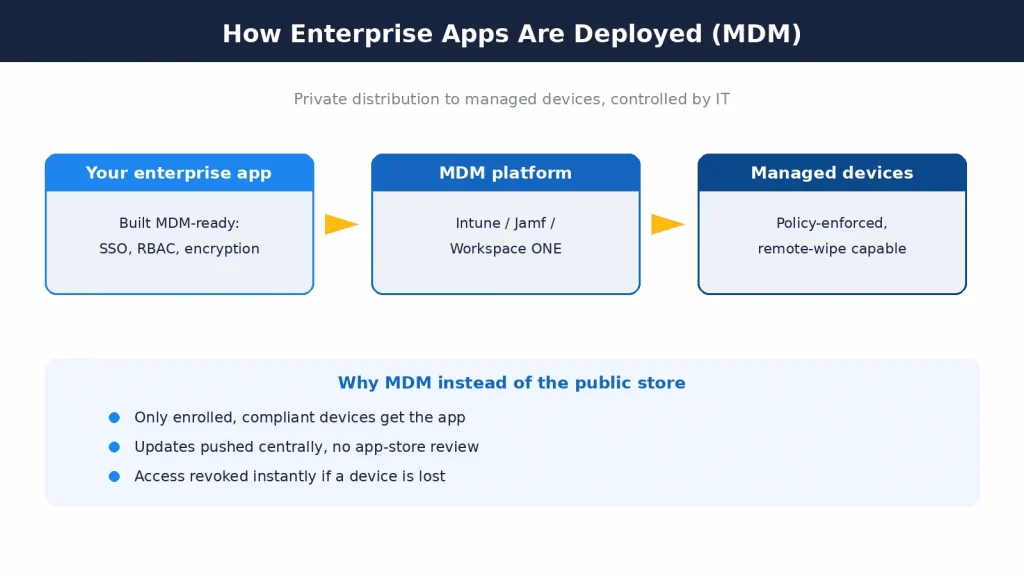
    How enterprise mobile apps are deployed through MDM by Mobilions

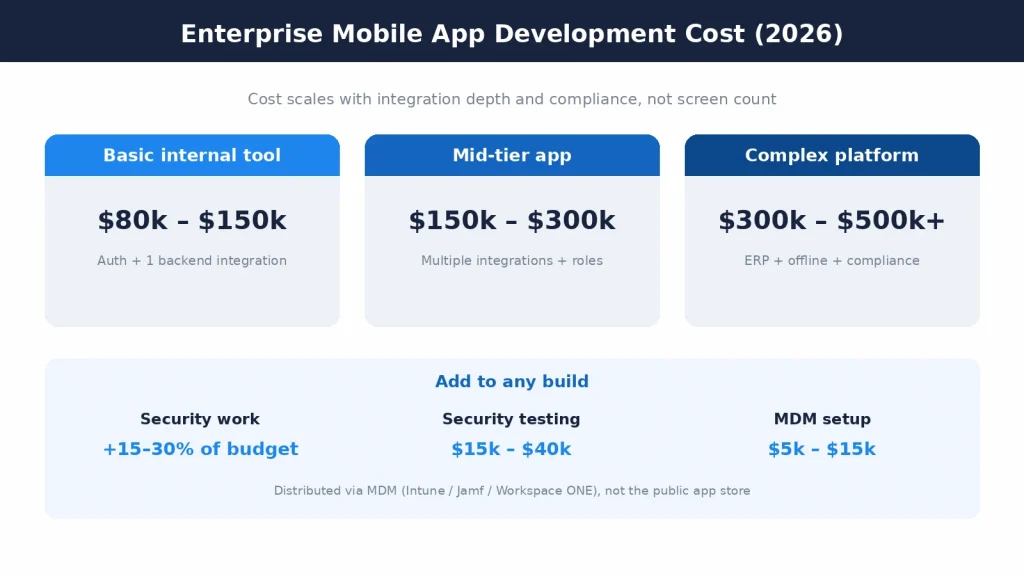
    Enterprise mobile app distribution runs through MDM platforms such as Microsoft Intune, VMware Workspace ONE, or Jamf, paired with Apple Business Manager and Android Enterprise. The app is pushed to managed devices, configured by policy, and updated centrally, with the ability to remotely wipe it if a device is lost.

    This MDM enterprise app deployment model is what lets IT enforce compliance: only enrolled, policy-compliant devices get the app, and access can be revoked instantly. It also means your enterprise mobile app development platform choices have to be MDM-compatible from the start, because retrofitting management support later is painful.

    Practically, MDM integration and setup adds roughly $5,000 to $15,000 to a project, depending on the platform and how many device types need management policies. That is a small line item next to the adoption and security it buys.

    How much does enterprise mobile app development cost in 2026?

    Cost scales with compliance burden and integration depth far more than with screen count. With that framing, 2026 numbers fall into three honest bands.

    Enterprise mobile app development cost bands for 2026 by Mobilions

    A basic internal tool, with authentication and a single backend integration, runs about $80,000 to $150,000. A mid-tier app, with multiple integrations and user roles, runs about $150,000 to $300,000. A complex platform, with ERP integration, offline mode, and formal compliance, runs $300,000 to $500,000 and can pass $1,000,000 for the largest programs.

    Inside those totals, security work adds 15 to 30 percent, dedicated security testing adds $15,000 to $40,000, and MDM setup adds $5,000 to $15,000. None of these are places to cut, because they are the parts that make the app safe to deploy across an organization.

    The most useful thing you can do for your budget is scope the integrations and compliance early. That is where enterprise mobile app development costs are made or blown, and a vendor who scopes them honestly will save you far more than one who quotes a low number and discovers the ERP later.

    Build versus buy: when a custom enterprise app makes sense

    Not every internal need justifies a custom build, and an honest enterprise mobile app development partner will tell you when to buy instead.

    Off-the-shelf software wins when your process is standard and a mature product already fits it, such as generic expense tracking or standard field-service ticketing. You get it faster and cheaper, and someone else maintains it. Forcing a custom build on a solved problem is a waste of budget.

    Custom enterprise mobile app development wins when the workflow is your competitive edge, when integration with your specific systems is deep, or when compliance and data control rule out a shared SaaS product. If the app has to bend to your ERP and your rules rather than the other way around, buying rarely works.

    The middle path is common: buy the commodity pieces and build the parts that are truly yours, connected through an integration layer. The decision should come from the workflow and the integration depth, not from a preference for building. Scope it honestly and the answer is usually clear before a line of code is written.

    Choosing an enterprise mobile app development company

    The right enterprise mobile app development company is one that talks about your systems and your security before it talks about screens. That is the fastest signal of whether they have done this before.

    Look for real integration experience with ERP, CRM, and identity systems, a documented security and compliance track record, and a support model that lasts beyond launch. Ask how they handle MDM distribution and managed updates, because a team that has shipped enterprise apps will have a clear answer. If you need to scale a team quickly, you can also hire mobile developers who already work this way.

    Be cautious of quotes that price only the visible app. A serious enterprise mobile application development company scopes the integration layer, the security work, and the rollout, and it will tell you when your requirements push the project into a higher cost band rather than discovering it mid-build.

    Ownership matters too. You should own the code, the infrastructure, and the roadmap. A good partner builds the app to hand it over, not to lock you in.

    A quick example: what an enterprise build looks like in practice

    Consider a logistics company that wants a driver and warehouse app. It needs to work offline in low-signal areas, sync when connectivity returns, read and write to the existing ERP, authenticate staff through the company’s identity provider, and deploy to company-owned devices only.

    The scope decisions follow directly. Cross-platform on Flutter to cover both device types cheaply. An integration layer between the app and the ERP so the app never talks to the ERP directly. Offline-first data with conflict-safe sync. SSO through the existing directory, role-based access for drivers versus supervisors, and audit logging for compliance.

    Distribution goes through Intune, not the public store, so IT controls who has the app and can wipe a lost device. On these requirements the project lands in the mid-to-complex band, and the integration and offline work, not the screen count, is what sets the price.

    Notice what drove every decision above: not the number of screens, but the systems the app had to touch and the environment it had to survive. Change the ERP or the connectivity and the estimate changes with it. That is enterprise mobile app development in one concrete picture, and it is why honest scoping beats a low quote every time.

    Core features that define enterprise mobile applications

    Certain capabilities show up in almost every serious build, and together they are what separate enterprise mobile applications from ordinary apps. Knowing them helps you scope realistically and judge a vendor’s quote.

    Role-based access control comes first. Different employees see and do different things, so the app models roles and permissions rather than treating every user the same. This alone touches the UI, the backend, and the audit layer.

    Single sign-on is expected, not optional. Employees should sign in with the same identity they use for everything else, through SSO, LDAP, or OAuth against the company directory, so there is no separate password to manage or leak.

    System integration is usually the heart of the app. Enterprise apps read and write to ERP, CRM, and data platforms, and that integration layer is where most of the engineering time goes. Offline mode and reliable sync sit alongside it, because real work happens in places with poor connectivity.

    Finally, audit logging, encrypted storage, and MDM compatibility round out the baseline. These are the controls that let a security team sign off and an auditor tick the box, and they are the reason enterprise mobile app development is scoped differently from a consumer build.

    Compliance and industry considerations

    The compliance regime an app falls under changes the scope more than almost any feature decision, so it belongs in the first conversation, not the last.

    In fintech, enterprise mobile app development carries PCI DSS obligations, strong authentication, transaction integrity, and audit trails, and the security bar is high because the data is money. Anything touching payments or account data is scoped as sensitive from the start.

    In healthcare, HIPAA governs how patient data is stored, transmitted, and accessed, which pushes encryption, access logging, and strict role controls to the front. An app that handles protected health information is a compliance project with a mobile front end, not a mobile project with a compliance checkbox.

    In logistics and field operations, the pressure is less about regulation and more about reliability: offline-first behavior, device durability, and clean ERP sync. Different industries stress different parts of the same discipline, which is why a team that has shipped in your sector scopes faster and more honestly.

    The common thread is that compliance and integration depth, taken together, set the true size of an enterprise build. A vendor who asks about your regulatory environment early is protecting your budget, not padding it.

    Common mistakes that derail enterprise mobile app projects

    Most enterprise mobile app development trouble is predictable, and nearly all of it traces back to scoping the wrong things.

    The first mistake is pricing screens instead of integrations. The visible app is the cheap part; the ERP, CRM, and identity connections are where the effort lives. A quote that ignores them will be wrong, and the correction always arrives mid-build when it is most expensive.

    The second is treating security and compliance as a final phase. Retrofitting encryption, role-based access, and audit logging into a finished app costs far more than building them in, and it often forces a redesign. Security scoped late is security done twice.

    The third is ignoring distribution until the end. If the app was not built to be MDM-compatible, packaging it for managed deployment becomes its own mini-project. Distribution is an architecture decision, not a launch-day task.

    The fourth is skipping the rollout and training plan. An enterprise app that nobody adopts is a total loss regardless of how well it is built, and adoption depends on a real rollout, not a launch email. The engineering is only half the job; getting the app onto devices and into daily use is the other half.

    Frequently asked questions

    What is enterprise mobile app development?

    Enterprise mobile app development is building mobile apps for internal business use that integrate with company systems like ERP and CRM, enforce enterprise security and access controls, and meet compliance requirements. The users are employees or vetted partners rather than the general public.

    How to build enterprise mobile apps?

    Choose a company that scopes your integrations, security, and rollout before pricing screens, has real ERP, CRM, and identity integration experience, documents its security and compliance work, offers support beyond launch, and hands you full ownership of the code and infrastructure.

    How much does enterprise mobile app development cost in 2026?

    A basic internal tool costs about $80,000 to $150,000, a mid-tier app with multiple integrations and roles about $150,000 to $300,000, and a complex platform with ERP integration, offline mode, and compliance $300,000 to $500,000 or more. Security adds 15 to 30 percent and MDM setup adds $5,000 to $15,000.

    How long does it take to build an enterprise mobile app?

    A basic internal tool can take a few months; a mid-tier app with several integrations typically runs four to eight months; a complex compliant platform can run eight months or more. Security testing alone adds roughly four to eight weeks.

    How do we choose an enterprise mobile app development company?

    How do we choose an enterprise mobile app development company?

    Why are enterprise mobile apps more expensive than consumer apps?

    Because cost scales with compliance and integration depth, not screen count. Enterprise apps must connect to legacy systems, enforce role-based security and SSO, support offline use, pass security testing, and deploy under IT governance, all of which a consumer app skips.

    What is MDM enterprise app deployment?

    MDM (Mobile Device Management) enterprise app deployment distributes an app privately to managed devices through platforms like Microsoft Intune, VMware Workspace ONE, or Jamf, rather than the public app stores. It lets IT enforce device compliance, push updates centrally, and remotely wipe the app if a device is lost.

    Should we build native or cross-platform for an enterprise app?

    Cross-platform frameworks like Flutter and React Native are the common default for internal enterprise apps because one codebase for iOS and Android roughly halves build and maintenance cost. Native is worth it when the app needs deep device features or maximum performance.

    Build an enterprise app that IT will actually trust

    Enterprise mobile app development succeeds or fails on the parts users never see: the integrations, the security, and the deployment. If you are scoping an internal app and want an honest read on cost, timeline, and stack, talk to Mobilions. Senior engineers scope it, build it, ship it through your MDM, and support it in production.

  • Fitness Mobile App Development: A Complete 2026 Guide

    Fitness Mobile App Development: A Complete 2026 Guide

    Fitness mobile app development in 2026 costs roughly $25,000 to $40,000 for a lean MVP, $70,000 to $110,000 for a solid cross-platform app (about 12 to 16 weeks), and $120,000 to $300,000+ for a feature-rich, multi-platform product. Wearable sync with Apple Health, Google Fit, Fitbit, and Garmin is now expected, not optional. The smart path for most founders is a cross-platform MVP with five to seven core features, validate real usage and retention, then invest further. The market is large (around $13.5 billion in 2026 and growing about 13 percent a year), but most apps fail on retention, so build for the second week, not just the first download.

    Fitness app development looks simple from the outside, a few workout screens and a timer, and expensive and confusing the moment you actually start pricing it. The truth sits in between. A fitness app is a real software product with wearable integrations, health data, subscriptions, and a brutal retention problem, and what you build and how you build it decides whether it earns money or joins the graveyard of abandoned fitness apps.

    This guide is the practical version for founders and fitness businesses. It covers what fitness mobile app development actually involves in 2026, whether the market is worth entering, the features users expect, real cost and timeline ranges, the native-versus-cross-platform decision, monetization, why apps fail, and how to choose a development team. We build mobile apps at Mobilions, so this is a builder’s view with real numbers, not a sales pitch dressed as a guide.

    What fitness mobile app development actually involves in 2026

    It helps to see the whole scope before the price tags, because the cost follows directly from it. A modern fitness app is several systems working together.

    There is the app itself on iOS and Android, the workout and content engine (plans, exercises, timers, tracking), wearable and health integrations so the app reads steps, heart rate, and workouts from the devices people already wear, a backend for accounts, data, and sync, subscriptions and payments, and the analytics you need to understand retention. On top of that sit the parts founders often forget: onboarding, notifications, a content pipeline to keep workouts fresh, and ongoing maintenance after launch.

    The reason fitness apps cost more than a simple utility is this integration surface. Reading health data correctly, syncing across devices, and keeping subscriptions and content flowing is where the engineering hours go, and it is also what separates an app people keep from one they delete in a week.

    Is a fitness app worth building? The 2026 market

    Before spending anything, it is fair to ask whether the market justifies it, and the numbers are encouraging with a catch.

    The fitness app market is large and growing, roughly $13.5 billion in 2026 and projected to keep expanding at about 13 percent a year, according to market research. Health and fitness apps also monetize better than most categories: subscriptions drive the majority of revenue, most of it from annual plans, and the category has one of the highest lifetime values on the App Store. Wearable-connected fitness is the fastest-growing slice as more people own a Fitbit, Garmin, or smartwatch.

    The catch is that a big market is also a crowded one, and averages hide a harsh distribution: a small number of apps take most of the money while the majority struggle to retain users. So the honest answer to “is it worth it” is yes, the market is real and monetizable, but only if your app earns its place through genuine value and retention. Building one because the market is big, without a reason users would stay, is how you become part of the losing majority.

    Features users actually expect

    Feature scope is the single biggest driver of cost, so it pays to separate what is essential from what is nice to have.

    Fitness app features 2026: core, expected, and differentiator features to prioritise

    Core, non-negotiable features: account and profile, workout plans and exercise library, activity and progress tracking, and clean onboarding. Expected in 2026, not optional: wearable and health-app sync (Apple Health via Apple’s HealthKit, Google’s Health Connect, plus Fitbit and Garmin), push notifications and reminders, and subscription payments. Differentiators worth considering: AI-assisted plans or coaching, social and community features, live or on-demand classes, nutrition and macro tracking, and gamification. Often overlooked but important: solid analytics, a content management system so you can update workouts without a new release, and accessibility.

    The mistake is trying to ship all of it at once. The features that matter most for launch are the core set plus wearable sync and a reason to come back; everything else can follow once real users tell you what they want.

    How much does fitness mobile app development cost?

    Here are honest 2026 ranges. Your number depends on features, platforms, team location, and design polish, but these brackets are realistic.

    Fitness mobile app development cost 2026: MVP, cross-platform, and feature-rich price and timeline tiers

    A lean MVP with five to seven core features runs about $25,000 to $40,000. A solid cross-platform app with tracking, wearable sync, and subscriptions typically lands $70,000 to $110,000 over roughly 12 to 16 weeks. Add templated workout plans, macro tracking, barcode scanning, and richer content and you are looking at $120,000 to $190,000 over five to seven months. A feature-rich, multi-platform product with AI, live classes, and heavy custom design can reach $300,000 or more.

    Then there are the costs founders miss: ongoing maintenance (budget roughly 15 to 20 percent of build cost per year), backend and hosting, third-party services (payments, analytics, push), app store fees, and content creation to keep the app fresh. An app is not a one-time purchase; it is a product you fund over its life. Planning only for the build and not the year after it is the most common budgeting mistake.

    How long does it take?

    Timeline tracks scope closely, so use these as planning anchors.

    A basic MVP typically takes 8 to 12 weeks. A full-featured cross-platform app runs 4 to 7 months. A large, multi-platform product with AI and custom everything can take longer still. Those windows assume a focused scope and prompt decisions from your side; the fastest way to blow a timeline is to keep changing the requirements mid-build. A good team will push you to lock an MVP scope precisely so you can launch, learn, and then expand, rather than chasing a perfect first version that never ships.

    Native vs cross-platform: the real decision

    This choice shapes both cost and quality, so it deserves a clear-eyed look rather than a religious one.

    Native (Swift for iOS, Kotlin for Android) gives the best possible performance and the tightest access to device and health features, at a cost: you build two apps, which roughly doubles the effort and price. Cross-platform (Flutter or React Native) builds one codebase for both platforms, cutting time and cost substantially while delivering performance that is more than good enough for the vast majority of fitness apps. For most founders in 2026, cross-platform is the sensible default, especially for an MVP, because it gets you to both stores faster and cheaper.

    The pragmatic pattern many teams use: start with a cross-platform MVP to validate demand, then, if and when you have real traction and a specific need for native performance, invest in native for the platform that matters most. Choosing native from day one for a product you have not validated is how budgets disappear before you have a single retained user.

    iOS, Android, or both?

    A related question, with a simple framing. If budget is tight and you want to validate, launch on both at once via cross-platform, which a single Flutter or React Native build gives you almost for free compared with two native apps. If you must pick one to start, choose the platform where your audience actually is: iOS users tend to spend more on subscriptions, while Android has larger global reach, so the right answer depends on your market, not on a general rule. For most consumer fitness apps targeting the US and similar markets, launching on both through cross-platform is the cleanest path.

    Build custom or use a template?

    Templates and app builders exist, and they have a place, so here is the honest trade-off.

    A template or no-code builder can get a very simple fitness app live cheaply and fast, which is fine for a basic idea you want to test with minimal money. The limits show up quickly: templates struggle with deep wearable integration, custom workout logic, real scalability, and the polish that retention depends on, and you do not own the foundation. A custom build (or a custom MVP) costs more but gives you the integrations, the experience, and the ownership that a real product needs. A reasonable rule: use a template only to test a concept with near-zero budget; build custom the moment you are serious about retention and growth.

    How to monetize a fitness app

    Revenue model matters as much as features, and the data points clearly in one direction.

    Subscriptions are the dominant and most durable model for fitness apps, with annual plans driving most of that revenue, so a freemium-to-subscription funnel (free core, paid premium plans, coaching, or content) is the default worth designing around. Other models include one-time purchases or unlocks, in-app purchases for specific content, ads (usually weak for fitness and often at odds with a premium feel), and B2B2C deals with gyms, employers, or insurers. For most consumer fitness apps, a well-designed subscription with a genuine free tier and clear premium value is the model to build for, and it should be designed in from the start, not bolted on later.

    Why fitness apps fail (and how to avoid it)

    Most fitness apps do not fail on features; they fail on retention, so this is where to focus.

    The common pattern is a strong first download and a collapse by week two, because the app gave people no reason to come back or asked too much too soon. The fixes are consistent: nail onboarding so users reach value fast, use notifications and streaks thoughtfully to build habit without nagging, sync with wearables so tracking is effortless, keep content fresh so there is always a reason to open the app, and measure retention obsessively from day one. Building for the first install instead of the second week is the single most expensive mistake in this category, and it is entirely avoidable with the right priorities.

    How to choose a fitness app development company

    Since the team you pick largely determines the outcome, evaluate it properly.

    Look for a partner with real mobile and health-integration experience (ask to see fitness or health apps they have shipped), a clear MVP-first process rather than a push to build everything at once, transparent pricing with no vague lump sums, and honest answers about trade-offs, cost, and timeline. Ask what is included (design, backend, testing, store submission, post-launch support), who owns the code (you should), and how they handle maintenance. Watch for red flags: prices that seem too good to be true, no relevant portfolio, reluctance to explain the plan, or promises to build a huge app cheaply and fast. The right questions up front save far more than they cost.

    How Mobilions helps

    We build fitness and health mobile apps end to end, and we have shipped software since 2016. For founders, we start with a tight MVP: the core features plus wearable sync and the retention basics, built cross-platform so you reach both stores fast and affordably, with a clear path to native later if your traction justifies it. We handle the hard parts properly, Apple Health and Google Fit integration, subscriptions, sync, and analytics, design for the second-week return rather than just the first download, and hand you full ownership of the code. We are also honest when a smaller build or a phased plan serves you better than the biggest version.

    What we will not do is sell you a $300,000 app when a $40,000 MVP is what you need to validate the idea, because the point is a product that earns its keep, not the largest possible invoice.

    The bottom line

    Fitness mobile app development in 2026 is a real investment with real returns for the apps that earn retention. Budget roughly $25,000 to $40,000 for an MVP, $70,000 to $110,000 for a solid cross-platform app, and more for a feature-rich product, and remember the ongoing costs after launch. Expect wearable sync as standard, build cross-platform first for most cases, and design subscriptions and retention in from the start.

    The market is large and monetizes well, but it is crowded and unforgiving, and most apps fail on the second week rather than the first. Start focused, validate with a real MVP, measure retention, and expand from evidence rather than ambition. Do that, and a fitness app is one of the better products you can build in 2026. Rush a bloated first version without a retention plan, and it will be one of the more expensive lessons.

    If you want a straight estimate and an MVP plan for your specific fitness app idea, that is exactly the conversation our senior mobile engineers have with founders every week.

    Book a discovery call for an honest scope and quote, no obligation. You can also explore our mobile app development services and how we work with fitness and wellness businesses.

    Key takeaways

    • Fitness mobile app development in 2026 costs about $25,000 to $40,000 for an MVP, $70,000 to $110,000 for a solid cross-platform app, and $120,000 to $300,000+ for feature-rich, multi-platform products.
    • Wearable and health-app sync (Apple Health, Google Fit, Fitbit, Garmin) is now expected, not a premium add-on.
    • Timelines run about 8 to 12 weeks for an MVP and 4 to 7 months for a full app; changing scope mid-build is the main cause of delays.
    • Cross-platform (Flutter or React Native) is the sensible default for most apps and MVPs; go native later if traction and performance needs justify it.
    • Budget for ongoing costs (maintenance about 15 to 20 percent of build per year, hosting, content, store and service fees), not just the build.
    • Subscriptions, especially annual plans, are the dominant and most durable monetization model; design the funnel in from the start.
    • Most fitness apps fail on retention, not features; nail onboarding, wearables, fresh content, and second-week return, and choose a team with real health-app experience.

    Frequently asked questions

    How much does it cost to build a fitness app in 2026?

    A lean MVP with five to seven core features costs about $25,000 to $40,000. A solid cross-platform app with tracking, wearable sync, and subscriptions typically runs $70,000 to $110,000, and a feature-rich, multi-platform product can reach $120,000 to $300,000 or more. The final number depends on features, platforms, team location, and design, and you should also budget ongoing costs of roughly 15 to 20 percent of the build per year.

    How long does it take to develop a fitness app?

    A basic MVP usually takes 8 to 12 weeks, and a full-featured cross-platform app takes 4 to 7 months. Larger products with AI, live classes, and custom design take longer. These timelines assume a focused, locked scope, changing requirements mid-build is the most common cause of delays, so agreeing a precise MVP scope up front is the fastest route to launch.

    Should I build my fitness app native or cross-platform?

    For most founders, cross-platform (Flutter or React Native) is the sensible default, especially for an MVP, because it builds one codebase for both iOS and Android, cutting time and cost while delivering more than enough performance for a fitness app. Native (Swift and Kotlin) gives the best performance and device access but roughly doubles the cost. A common pattern is a cross-platform MVP first, then native later if traction justifies it.

    iOS, Android, or both, which should I launch on?

    If you build cross-platform, you can launch on both at once for close to the cost of one, which is usually the best path for validation. If you must pick one, choose where your audience is: iOS users tend to spend more on subscriptions, while Android has larger global reach. For most US-focused consumer fitness apps, launching on both through a cross-platform build is the cleanest option.

    What features should a fitness app have?

    The core essentials are accounts, workout plans and an exercise library, progress tracking, and clean onboarding. In 2026, wearable and health-app sync, notifications, and subscription payments are expected too. Differentiators like AI coaching, social features, live classes, and nutrition tracking are worth adding once the core proves itself. Avoid shipping everything at once, launch with the essentials plus a strong reason to return.

    Is a fitness app a good investment?

    The market is large, around $13.5 billion in 2026 and growing about 13 percent a year, and fitness apps monetize better than most categories, mainly through subscriptions. But it is crowded, and most apps fail on retention, so it is a good investment only if your app delivers genuine, repeatable value that keeps users coming back. Validate with an MVP and measure retention before investing heavily.

    Why do so many fitness apps fail?

    Most fail on retention rather than features: a strong first download followed by a collapse in week two, because the app gave users no reason to return or demanded too much too soon. The fixes are fast onboarding, thoughtful notifications and streaks, effortless wearable-based tracking, fresh content, and measuring retention from day one. Building for the first install instead of the second week is the category’s most expensive mistake.

    How should I monetize my fitness app?

    Subscriptions are the dominant and most durable model, with annual plans driving most revenue, so a freemium-to-subscription funnel (free core plus paid premium content or coaching) is the default to design around. Other options include in-app purchases, one-time unlocks, ads (usually weak for fitness), and B2B2C deals with gyms or employers. Design the subscription and its free-tier value from the start rather than adding it later.

    Can I use a template or app builder for a fitness app?

    A template or no-code builder can launch a very simple app cheaply, which is fine for testing a basic idea with minimal budget. But templates struggle with deep wearable integration, custom logic, scalability, and the polish retention needs, and you do not own the foundation. Use a template only to test a concept with near-zero budget, and build custom once you are serious about retention and growth.

    How do I choose a fitness app development company?

    Look for real mobile and health-integration experience (ask to see shipped fitness or health apps), an MVP-first process, transparent pricing, and honest answers about trade-offs. Confirm what is included, who owns the code (you should), and how maintenance works. Watch for red flags like prices that seem too good to be true, no relevant portfolio, or promises to build a huge app cheaply and fast.

    Does Mobilions build fitness mobile apps?

    Yes. We build fitness and health apps end to end, starting with a focused cross-platform MVP, core features plus wearable sync and retention basics, with a clear path to native later. We handle Apple Health and Google Fit integration, subscriptions, sync, and analytics, design for the second-week return, and hand you full ownership. Book a discovery call for an honest scope, timeline, and quote for your idea.

  • Healthcare Mobile App Development: A Complete 2026 Guide

    Healthcare Mobile App Development: A Complete 2026 Guide

    Healthcare mobile app development is the process of building iOS or Android apps that handle patient or clinical data, which means HIPAA compliance, strong security, and often EHR integration are part of the job from day one, not features you bolt on later. A basic HIPAA-ready MVP typically starts around $60,000 and ships in about four to six months. The cost and timeline track compliance, the integrations you need, and whether your app is a wellness tool or a regulated medical device.

    Most healthcare apps do not fail because the idea was wrong. They fail because the team treated a medical app like a regular app, and then hit compliance, security, and integration walls halfway through the build. By then the budget is spent and the timeline is gone.

    This guide is written to keep you out of that hole. It covers what healthcare mobile app development actually involves in 2026, what it costs, how long it takes, where HIPAA and the FDA fit in, and how to choose a team that has shipped this kind of app before. We have built and shipped mobile health products since 2016, including medical translation and nutrition platforms where a wrong answer carries real consequences, so the advice here is what we would tell a founder over a call.

    Key takeaways

    • Healthcare app development means compliance and security are part of the build from day one, not add-ons.
    • Know early whether your app is a wellness product or an FDA-regulated medical device. The line is narrower than most founders expect.
    • HIPAA in practice means AES-256 at rest, TLS 1.2 or higher in transit, MFA, audit logs, and signed BAAs with every vendor.
    • A HIPAA-ready MVP starts around $60,000 and ships in four to six months. EHR integration adds the most to both cost and timeline.
    • Choose a team with shipped healthcare apps, compliance fluency, named senior engineers, and clear code ownership.

    What healthcare mobile app development actually means

    A healthcare app is any mobile app that touches health data or clinical workflows. That covers a lot of ground: a patient booking a telehealth visit, a nurse checking a chart at the bedside, someone logging blood sugar, a therapist running a session. What ties them together is the data. The moment your app stores, moves, or displays information that can identify a person and their health, you are in regulated territory, and the rules shape every decision after that.

    This is the part founders underestimate. In a normal app, security and privacy are good practice. In a healthcare app, they are the product. Encryption, access control, audit logs, and consent are not features you add if there is time. They are the foundation the rest of the app sits on.

    Health app vs medical app: the line that changes everything

    Not every health app is a medical device, and the difference decides how heavy your build is. A wellness app that tracks steps, logs meals, or reminds you to take medication is usually a general wellness product with a lighter regulatory load. An app that diagnoses, treats, or drives a clinical decision can be a medical device that the FDA regulates as Software as a Medical Device (SaMD).

    The FDA draws the line at intended use. A blood pressure app that just displays your readings usually sits in enforcement discretion. Add a feature that interprets those readings and says you may have hypertension and should ask about medication, and you have crossed into regulated territory.

    That distinction is set out in the FDA’s guidance on device software functions and mobile medical applications. Check the current version before you finalise your feature list, because the boundary has moved more than once and it moves in the direction of more scrutiny, not less. Decide which side you are on before you build. It changes your timeline, your budget, and your legal exposure.

    HIPAA compliance: what it really requires

    If your app handles protected health information for anyone in the US, HIPAA applies. It is not a certificate you buy or a checkbox at the end. It is a set of safeguards baked into how the app is built, hosted, and run. Here is what that means in practice.

    • Encryption everywhere. Protected health information must be encrypted at rest and in transit. The working standard is AES-256 for stored data and TLS 1.2 or higher for data moving across the network.
    • Strong access control. Every user gets the minimum access they need, with multi-factor authentication, automatic screen lock, and session timeouts. On mobile specifically, that includes blocking screenshots on iOS and screen recording on Android so health data does not leak out the side door.
    • Audit logging. The system records who accessed what and when, so a breach can be investigated and access can be proven.
    • A Business Associate Agreement (BAA). Every vendor that touches the data, your cloud host, your video provider, your analytics, must sign a BAA. Using a service that will not sign one is a compliance gap by itself.
    • Risk assessments and breach response. HIPAA expects regular security risk assessments and a real plan for breach notification.
    Five HIPAA essentials for a healthcare app: encryption, access control, audit logging, business associate agreements, and risk assessment

    The Security Rule has been under active revision, and the direction of travel is toward making encryption and multi-factor authentication mandatory rather than addressable, with tighter breach timelines. Build to the stricter bar now. It is cheaper than retrofitting when a rule finalises, and none of it is wasted work even if the timeline slips.

    Founder note

    HIPAA compliance is not the whole app, it is a property of the app. It adds meaningfully to the base build cost, but retrofitting it into a non-compliant app later costs far more and sometimes means rebuilding. Start compliant.

    iOS vs Android: which platform first

    You do not have to pick one forever, but for an MVP, building one platform well beats building two platforms poorly. The right first choice depends on who your users are.

    If your users are patients in the US, iOS often makes sense first, since iPhone holds a large share of the US consumer market and Apple’s health frameworks are mature. If your app is for clinicians or serves a broad or global population, Android may matter more because of device range. If your budget is tight and you want both from day one, cross-platform is the practical answer, which brings us to the next decision.

    Native or cross-platform

    Cross-platform frameworks like Flutter and React Native let you build one codebase for both iOS and Android, which lowers cost and speeds up delivery. For most healthcare apps, that is the right call.

    You reach for native when you need heavy device-specific performance, deep integration with Apple HealthKit or Google Health Connect, or tight control over hardware like Bluetooth medical devices. Continuous glucose monitors, connected inhalers, and anything with a real-time data stream from a device tend to push you native, or at least native for that one module.

    A good team helps you decide based on your product, not on what they prefer to build. If a team recommends the same stack for every client regardless of the brief, that tells you something.

    We work across Flutter app development and React Native app development as well as native iOS and Android, and the choice genuinely changes per project.

    Core features of a healthcare app

    The exact feature set depends on whether your app is patient-facing, provider-facing, or both. These are the building blocks most healthcare apps draw from.

    • Secure sign-in and identity: MFA, biometric login, role-based access.
    • Patient profiles and health records, with consent controls.
    • Appointment booking and reminders.
    • Telehealth: encrypted video, chat, and file sharing.
    • Tracking and monitoring: medication, symptoms, vitals, often synced from wearables.
    • Notifications that respect privacy, with no health details on a lock screen.
    • EHR integration, so the app talks to the systems clinicians already use.

    The trap is trying to ship all of this at once. The apps that succeed launch with the two or three features that solve the core problem, prove people use them, and add the rest based on real feedback.

    What to cut from version one

    This is the conversation we have with almost every healthcare founder, and it saves more money than any other decision in the project.

    Cut multi-role from the first release. Building for patients and clinicians and administrators at once triples your permission model, your testing surface, and your compliance review. Pick the role that proves the product and build only for them.

    Cut EHR integration if you can prove value without it. It is the single biggest cost and schedule driver. Plenty of products validate with manual data entry or a simple export first, then integrate once a health system has actually committed.

    Cut native wearable integration. Apple HealthKit and Google Health Connect sound cheap because the SDKs are free. The cost is in the edge cases: missing data, duplicate readings, timezone drift, and users who revoke permission halfway through a study. Add it when the core loop works.

    Cut offline mode unless clinicians in the field are your users. Offline-first is a genuine engineering commitment involving conflict resolution and sync logic. It is worth it for a community health worker in a low-connectivity area. It is not worth it for an urban telehealth app.

    Do not cut audit logging, access control, or encryption. These are the things founders try to defer and they are the things you cannot add cleanly later. Every retrofit we have done started as a deferral.

    The pattern across the healthcare products we have shipped is the same: the launch feature set is smaller than the founder first imagined, and the compliance foundation is deeper. That combination ships. The reverse does not.

    EHR integration: the part that quietly drives cost

    If your app needs to read or write clinical data, it has to connect to electronic health record systems like Epic or Cerner. This is where a lot of healthcare budgets get their surprise.

    Modern EHRs expose FHIR-compliant APIs, the current healthcare data standard, which makes standard integrations relatively clean. Older systems that rely on HL7 v2 messaging or custom interface engines are a heavier lift.

    Three things drive the difference in effort:

    Which standard the system speaks. A FHIR API with good documentation is a different project from an HL7 v2 feed arriving over a legacy interface engine.

    Read or write. Reading patient data is far simpler than writing back into a clinical record. Write-back triggers a much heavier review process on the health system’s side, and their timeline is not yours to control.

    Whose sandbox you get. Some health systems have a working developer sandbox and a defined app review process. Others have a committee and a six-week wait for a call. This is often the real schedule risk and it has nothing to do with your code.

    If EHR integration is in your plan, scope it early and start the conversation with the health system before you start building. Budget and schedule both move more on this than on almost anything else.

    How much does healthcare app development cost in 2026

    There is no single price, because a wellness tracker and a telemedicine platform with EHR write-back are completely different products. The ranges below reflect what we see when scoping healthcare builds for the US market. Treat them as a starting frame, not a quote. We scope your specific app before giving a real number.

    App typeTypical cost (US, 2026)Rough timeline
    HIPAA-ready patient MVPAround $60,000 and up4 to 6 months
    Telemedicine MVP (portals, encrypted video, booking)$50,000 to $90,0005 to 7 months
    Real-time video infrastructure (add-on)$15,000 to $40,000Included above
    Standard FHIR EHR integrationAdd $25,000 to $50,000Add 2 to 4 months
    Legacy HL7 v2 integrationAdd $50,000 to $150,000Add 2 to 4 months
    Enterprise platform (AI, multi-EHR, multi-platform)$300,000 to $500,000 and up9 months and up
    Healthcare app development cost and timeline ranges in 2026, from a HIPAA-ready MVP at around 60,000 dollars to an enterprise platform above 300,000 dollars

    Compliance work is not a line item you can remove. It runs through security engineering, documentation, audit logging, vendor agreements, and testing, and it is a meaningful share of any healthcare build.

    Why healthcare apps cost more than regular apps

    The extra cost is not padding. It buys encryption and security engineering, compliance work and documentation, audit logging, signed vendor agreements, careful testing against real clinical workflows, and integrations that have to be exact because a wrong record is a patient safety issue.

    A consumer photo app can ship a bug and patch it Tuesday. A medication app cannot.

    How long does it take

    A focused HIPAA-ready MVP usually ships in about four to six months. Add telehealth video and you are closer to five to seven. Add EHR integration and you add two to four months on top.

    The timeline is driven less by screen count and more by compliance, integrations, and testing. There is also a category of delay that is not yours to control: health system review cycles, app store review for medical claims, and legal sign-off on your privacy policy and consent flows. Build slack for those into the plan rather than discovering them in month five.

    How to choose a healthcare app development company

    This is a specialist build, and general app teams get healthcare wrong in expensive ways. Here is how to tell a team that has shipped medical apps from one that will learn on your budget.

    • Shipped healthcare work. Ask for live health apps they have built, ideally in your space. Compliance experience shows up in the details they mention without being asked.
    • Compliance fluency. They should talk about HIPAA, BAAs, encryption, and the health app versus medical device line naturally, and tell you early if you are heading toward FDA territory.
    • Named senior engineers. You want senior people on your project, not a pitch team that hands the build to juniors. Ask who writes your code and whether you can interview them.
    • Clear ownership. In writing, you own the source code, the IP, and the app store listings, with no lock-in.
    • A real post-launch plan. Healthcare apps need ongoing maintenance, security patching, and OS updates. A team with no answer for month twelve is planning to disappear.

    Questions worth asking on the first call

    Five questions that separate teams quickly:

    1. Which of your healthcare apps is live right now, and can I download it?
    2. Who signs the BAA, you or the client, and which vendors in your usual stack will sign one?
    3. Based on what I have described, do you think this is a medical device? Why?
    4. What would you cut from my first version, and what would you refuse to cut?
    5. Who exactly writes the code, and can I speak to them before we sign?

    A team that has done this work answers all five without hedging. A team that has not will be vague on two or three, usually the medical device question and the one about who writes the code.

    Red flags to walk away from

    • A quote far below everyone else, which usually means compliance is missing from the scope.
    • Vague answers on HIPAA, or a promise that compliance is easy.
    • No named engineers and no shipped healthcare apps to show.
    • Fuzzy code-ownership terms.

    If you are weighing an in-house hire against an agency, our hire mobile developers page covers the engagement models, and the honest answer is that healthcare is one of the areas where prior domain experience matters more than raw headcount.

    How we approach healthcare apps at Mobilions

    We build healthcare apps compliant from the first commit, not compliant-later. That means encryption, access control, and audit logging in the foundation, signed BAAs with every vendor in the stack, and an honest early read on whether your app is a wellness product or heading toward SaMD. Senior engineers scope, build, and support the product, and you own the code, the IP, and the documentation throughout.

    We have shipped mobile health products since 2016. Careslate is a HIPAA-compliant AI medical translation app with live two-way audio built on a custom three-stage pipeline, used in clinical settings where a mistranslation has consequences. JoinBeet is a personalised medical nutrition platform with meal matching, wearable sync, and role-based admin access.

    Both are on our healthcare software development page alongside how we approach the sector, and the mobile side of that work sits under mobile app development.

    Ready to scope your healthcare app?

    Tell us what you want to build and who it is for. A senior engineer will give you an honest read on cost, timeline, and the compliance path, including the parts you can cut from the first version. Book a discovery call.

    Frequently asked questions

    How much does it cost to build a healthcare app?

    In the US in 2026, a HIPAA-ready patient MVP typically starts around $60,000, a telemedicine MVP runs $50,000 to $90,000, and enterprise platforms with AI and EHR integration reach $300,000 to $500,000 or more. The number tracks scope, integrations, and whether the app is regulated. Compliance work is a meaningful share of any healthcare build and cannot be removed from the scope.

    How long does it take to develop a healthcare app?

    A focused HIPAA-ready MVP usually ships in about four to six months. Telehealth video pushes that to five to seven months, and EHR integration adds another two to four months. Compliance and testing drive the timeline more than the number of screens, and health system review cycles can add delay you do not control.

    What is HIPAA compliance for a mobile app?

    It is a set of safeguards for protected health information: AES-256 encryption at rest, TLS 1.2 or higher in transit, multi-factor authentication, access controls, audit logging, and signed Business Associate Agreements with every vendor that touches the data. It is built into the app, not added at the end.

    Does my healthcare app need FDA approval?

    Only if it functions as a medical device, meaning it diagnoses, treats, or drives a clinical decision. Wellness trackers and appointment apps usually do not. Apps that interpret data and make clinical claims can be regulated as Software as a Medical Device. The line is narrow, so get an assessment early rather than after the build.

    What is the difference between a health app and a medical app?

    A health or wellness app tracks or supports general wellbeing, like steps, meals, or reminders, with a lighter regulatory load. A medical app diagnoses, treats, or informs a clinical decision and can be an FDA-regulated medical device. Intended use decides which one you are building, not the feature list on its own.

    Should I build for iOS or Android first?

    If your users are US patients, iOS is often a strong first choice. If you serve clinicians or a broad or global audience, Android may matter more. If you want both on a tight budget, a cross-platform build with Flutter or React Native is usually the practical answer.

    How much does HIPAA compliance add to the cost?

    It is not a separate line you can price and remove. Compliance runs through security engineering, audit logging, documentation, vendor agreements, and testing, so it raises the cost of the whole build rather than sitting beside it. Retrofitting compliance into an app built without it costs far more, so it is cheaper to start compliant.

    What is EHR integration and why does it cost so much?

    EHR integration connects your app to systems like Epic or Cerner so it can read or write clinical data. A modern FHIR integration commonly adds $25,000 to $50,000, while legacy HL7 v2 integration can add $50,000 to $150,000 and two to four months. Writing back into a clinical record is significantly harder than reading, and health system review timelines are not yours to control.

    Can I build a healthcare app without technical skills?

    Yes, most healthcare app founders are not engineers. You bring the clinical or business insight and partner with a team that handles the build and compliance. What matters is choosing a team that has shipped healthcare apps and can guide you through HIPAA and the medical device question.

    What features should my healthcare app include?

    Start with secure sign-in, patient profiles with consent, and the two or three features that solve your core problem, whether that is booking, telehealth video, or tracking. Add EHR integration, wearables, and extra features later based on real user feedback, not all at once.

    How do I make sure my healthcare app is secure?

    Encrypt data at rest and in transit, enforce MFA and least-privilege access, log every access, block screenshots and screen recording of health data, sign BAAs with all vendors, run regular security risk assessments, and test against real clinical workflows before launch.

    Does Mobilions build healthcare apps?

    Yes. We build HIPAA-compliant iOS, Android, and cross-platform healthcare apps, and have shipped mobile health products since 2016, including a medical translation app for clinical settings and a nutrition platform with wearable sync. We build compliant from day one and hand you full ownership of the code and IP.


  • What Are the 7 Stages of App Development?

    What Are the 7 Stages of App Development?

    The 7 stages of app development are strategy, planning, design, development, testing, deployment, and maintenance. Every serious app, from a simple utility to a system used by millions, moves through those same seven stages, in that order, whether the team names them or not. That is the short answer, and if you came for the list, there it is.

    Here is the part the list does not tell you, and the part that actually matters if you are about to build an app. Having shipped mobile apps for years, I can tell you the stages are the easy thing to memorize and the hard thing to do well.

    The difference between an app that launches on time and one that quietly bleeds money is almost never that a team skipped a stage. It is that they rushed the early stages, where mistakes are cheap to fix, and paid for it in the late ones, where the same mistakes cost a fortune. So this guide answers the question two ways: what each of the 7 stages of app development actually is, and what really happens inside it, including where each one tends to go wrong.

    Key takeaways

    If you only have a minute, these are the points that matter most about the 7 stages of app development.

    The 7 stages are strategy, planning, design, development, testing, deployment, and maintenance, in that order. Every app goes through all seven, even the ones that pretend they are only doing the middle three.

    The early stages are the cheapest place to fix mistakes. A problem caught in strategy or design costs a fraction of the same problem caught in production, so the money you save is made at the start, not the end.

    Development is only one of seven stages. Teams that treat app building as just writing code skip the strategy, design, and testing that decide whether the code is worth anything.

    Maintenance is not the end, it is most of the life. An app is a living product, and the work after launch usually outlasts and outcosts the work before it.

    App development phases vs stages: what to call them

    People search for the same idea under different names: app development phases, the stages of developing an app, or simply application development stages. They all describe the seven steps in this guide, from discovery to launch and support. Whichever term you use, the sequence and what happens at each step stays the same. The stakes only rise with scale. In enterprise mobile app development, where security, compliance, and system integration come into play, getting these early stages right matters even more.

    The 7 stages of app development at a glance

    The 7 stages of app development process strategy to maintenance

    Before going deep, here is the whole map in one place. Read this table and you already understand the shape of any app project.

    #StageWhat actually happensWhat you get out of it
    1StrategyResearch the idea, users, market, and goalsA clear reason to build and a definition of success
    2PlanningScope features, choose the tech, build the roadmapA realistic plan of what to build and in what order
    3DesignUX flows, wireframes, UI, and a clickable prototypeA tested design before a line of code is written
    4DevelopmentBuild the frontend and backend in sprintsThe actual working app, feature by feature
    5TestingCheck functionality, devices, performance, and securityConfidence the app works before real users see it
    6DeploymentSubmit to the app stores and launchA live app people can download
    7MaintenanceMonitor, fix, update, and improve after launchAn app that stays working and keeps getting better

    The stages are sequential in logic but overlapping in practice, which I will come back to. First, what each one really involves.

    Stage 1: Strategy

    Strategy is where you decide whether to build at all, and it is the stage teams are most tempted to skip because it does not feel like progress. It is. This is where you define the problem the app solves, who it is for, what success looks like in numbers, and whether the idea can actually make money or save it. You research the market and the competitors, you talk to real potential users, and you turn a vague idea into a specific goal.

    The deliverable is not a document for its own sake. It is a clear, honest answer to the question of why this app should exist and how you will know if it worked. Where this stage goes wrong is simple: teams fall in love with a solution before validating the problem, and then build something beautifully engineered that nobody needs. The cheapest pivot you will ever make is the one you make here, before anything is built.

    Stage 2: Planning

    Planning turns the strategy into a plan you can actually execute. This is where you decide the scope, which features are in the first version and which wait, how the app will be built, native or cross-platform, what the backend and integrations need to be, and the realistic timeline and budget. A good plan ruthlessly prioritizes, because the fastest way to sink an app is to try to launch with every feature instead of the few that matter.

    The deliverable is a scoped roadmap: a prioritized feature list, a technical approach, and a timeline everyone believes. Where planning goes wrong is scope creep and wishful timelines. A plan that assumes everything goes perfectly is not a plan, it is a hope, and the first surprise breaks it. The teams that ship plan for the first version to be small and the surprises to be real.

    Stage 3: Design

    Design is where the app becomes something you can see and click before it is expensive to change. It has two halves that people often confuse. User experience design maps the flows and structure, how a user actually moves through the app to get something done, usually as wireframes. User interface design is the visual layer on top, the colors, type, and components. The stage ends with a prototype, a clickable version of the app that looks and feels real without being built.

    The deliverable is a tested design and prototype. This is the single most underrated stage, because a problem you find by watching someone use a prototype costs almost nothing to fix, while the same problem found after development costs a rebuild. Where design goes wrong is jumping to pretty screens before the flows are right, or skipping the prototype and discovering in testing that the app is confusing. Design is cheap. Redesigning a built app is not. Getting this right is a core part of what our mobile app development team treats as non-negotiable before build starts.

    Stage 4: Development

    Development is the stage everyone pictures when they think about building an app, and it is where the working product finally gets built. It usually splits into the frontend, the app itself that runs on the phone, and the backend, the servers, databases, and APIs that power it. Serious teams build in short sprints, delivering working pieces of the app in increments rather than disappearing for months and reappearing with a finished thing, because increments let you catch problems early and adjust.

    The deliverable is the working app, built feature by feature. Where development goes wrong is usually not the code itself, it is building against a weak plan or an untested design, so the team ships exactly what was asked for and it turns out to be the wrong thing. Development is also where cutting corners on architecture quietly creates the technical debt you pay for during maintenance. Good development is disciplined, tested as it goes, and honest about tradeoffs.

    Stage 5: Testing

    Testing, or quality assurance, is where you find the problems before your users do, and it is the stage whose value is easiest to prove with a number. The cost of fixing a defect rises sharply the later you catch it. As analyses of the classic software-engineering data show, a bug caught in design or requirements is dramatically cheaper to fix than the same bug caught in production, often by an order of magnitude or more. Every hour spent testing before launch saves many hours after it.

    Cost of fixing a bug rises by app development stage

    Real testing is more than clicking around. It covers whether features work as intended, whether the app behaves across the range of devices and operating systems it has to support, whether it performs under load, and whether it is secure. The deliverable is confidence, backed by evidence, that the app is ready. Where testing goes wrong is treating it as a rushed final step squeezed by a slipping deadline, or testing only on the developer’s own clean, fast phone. Testing is not the gate before launch, it is a discipline that should run through development.

    Stage 6: Deployment

    Deployment is the launch: getting the app into the world where people can download it. For mobile, that means submitting to the Apple App Store and Google Play, each of which reviews apps against its own policies before approving them, and a rejection can cost days. This stage also includes the release plan itself, whether you launch to everyone at once or roll out gradually to a slice of users first to catch anything the testing missed.

    The deliverable is a live app, available to real users. Where deployment goes wrong is treating it as a formality. App-store review is a real step to plan for, store listings and screenshots are part of the launch and often rushed, and a big-bang launch with no staged rollout means any surprise hits everyone at once. A calm deployment is a planned one, with the store requirements handled early rather than discovered at submission.

    Stage 7: Maintenance

    Maintenance is the stage people forget when they budget, and it is usually the biggest one. An app is not a project that ends at launch, it is a product that lives. After release you monitor how it performs and where it crashes, you fix the issues real usage surfaces, you keep up with new operating-system versions and store policy changes that arrive every year, and you improve the app based on what users actually do. Skipping this is how a working app slowly rots: it breaks on a new OS version, falls behind, and quietly loses its users.

    The deliverable is an app that keeps working and keeps getting better. Where maintenance goes wrong is not budgeting for it at all, so the team that built the app moves on and there is no one to keep it alive. A common planning figure is to budget an ongoing amount each year for maintenance, because the post-launch life of an app usually outlasts and outcosts the build. This is also why it helps to build with a team you can keep, or to hire developers who will still be there after launch.

    Where each of the 7 stages tends to go wrong

    If you remember one thing from a practitioner rather than a textbook, remember this table. Each stage has a single most common way it fails, and knowing them in advance is most of how you avoid them.

    StageWhere it most often goes wrong
    StrategyBuilding a solution before validating the problem is real
    PlanningScope creep and a timeline that assumes nothing goes wrong
    DesignJumping to pretty screens before the flows are right, or skipping the prototype
    DevelopmentBuilding well against a weak plan or an untested design
    TestingRushed as a final step, or tested only on the developer’s clean, fast phone
    DeploymentTreating app-store review as a formality, or a big-bang launch with no staged rollout
    MaintenanceNot budgeting for it, so the app is abandoned shortly after launch

    Notice that almost none of these failures are about writing bad code. They are about decisions made, or skipped, around the code, which is exactly why understanding all seven stages matters more than being good at any single one.

    How long do the 7 stages take, and do they overlap?

    The stages are sequential in logic but not in a rigid, one-finishes-then-the-next-starts way. In a modern agile process, design, development, and testing overlap heavily: a feature gets designed, built, and tested while the next feature is being designed, in a loop, rather than the whole app being designed, then the whole app being built. Strategy and planning still come first because you cannot build well without them, and deployment and maintenance still come after because you cannot launch what does not exist. But the middle is a cycle, not a straight line.

    Timelines vary enormously with scope. A simple app might move through all seven stages in a few months, while a complex one takes a year or more, and the split matters: teams consistently underestimate strategy, design, and testing and overestimate how much of the timeline is pure development. The lesson from every project I have shipped is that time invested in the early stages is not time lost, it is time bought back with interest in the late ones.

    A real-world scenario

    To make the stages concrete, picture a founder with an idea for a fitness app. The tempting move is to jump straight to stage 4 and start building. The move that works runs the stages in order.

    In strategy, they discover through user conversations that people do not want another tracking app, they want accountability, which reshapes the whole idea before a dollar is spent building. In planning, they cut the feature list from twenty ideas to the three that deliver that accountability, and choose cross-platform to reach both app stores fast. In design, a clickable prototype reveals that their onboarding is confusing, and they fix it in an afternoon rather than after launch. In development, they build those three features well in sprints.

    In testing, they catch a crash that only happens on older Android phones, exactly the kind of thing a developer’s own new phone would never reveal. In deployment, they handle App Store review early and roll out to a small group first. And in maintenance, they watch real usage, fix what surfaces, and add the fourth feature only once the first three have proven themselves. That is the same seven stages everyone has, run with discipline, and it is the difference between launching and stalling.

    Common mistakes and myths

    A few misconceptions send app projects off the rails.

    The first myth is that app development means development. It is one stage of seven, and the teams that treat building as the whole job skip the strategy, design, and testing that decide whether the building was worth it.

    The second mistake is rushing the early stages to get to code faster. It feels like speed and it is the opposite, because every mistake left in strategy, planning, or design gets more expensive at every later stage.

    The third mistake is treating testing as an optional final step. The bug-cost data is clear that this is the most expensive corner you can cut, and it is cut most often when a deadline slips.

    The fourth mistake is forgetting maintenance exists. An app budgeted only through launch is an app abandoned shortly after it, because the real product life is everything that comes after.

    The honest caveat worth stating plainly: naming the seven stages is easy, and no framework builds an app for you. The value is not in the list, it is in the discipline of doing each stage properly and resisting the constant temptation to skip the early, unglamorous ones to get to the code. That discipline is the actual difference between the apps that make it and the ones that do not.

    Why Mobilions

    Mobilions has been building custom software, mobile apps, and AI solutions since 2016. We have delivered more than 250 projects for over 100 clients across 20-plus countries, which means we have run these seven stages hundreds of times, on everything from first-time founder apps to systems used across dozens of countries. When we take on a build, we spend real effort on the early stages that most teams rush, because that is where the money and the timeline are actually decided, and we stay through maintenance rather than disappearing at launch. If you are planning an app and want it run through all seven stages properly, that is exactly the work our mobile app development team does every week.

    Summary

    So what are the 7 stages of app development? They are strategy, planning, design, development, testing, deployment, and maintenance. Every app moves through all seven, and the list is the easy part. The hard part, and the part that decides whether an app succeeds, is doing the early stages properly, because a mistake caught in strategy or design costs a fraction of the same mistake caught in production.

    Development is only one of the seven stages, testing is a discipline rather than a final gate, and maintenance is most of an app’s real life rather than an afterthought. Run all seven with discipline, invest where it is cheap to fix things, and you build an app that launches and lasts.

    Frequently asked questions

    What are the 7 stages of app development?

    The 7 stages of app development are strategy, planning, design, development, testing, deployment, and maintenance, in that order. Strategy defines why to build, planning scopes what to build, design shapes how it looks and works, development builds it, testing checks it, deployment launches it, and maintenance keeps it working and improving after launch.

    I have an app idea, where do I start?

    Start at stage 1, strategy. Before any design or code, define the problem you are solving, who it is for, and how it will make money, then validate that with real potential users. Most failed apps skipped this and built something nobody needed. A clear strategy is the cheapest insurance in the whole process.

    Which stage of app development is the most important?

    No single stage is skippable, but the early stages, strategy, planning, and design, carry the most weight because mistakes caught there are the cheapest to fix. A problem found in design costs a fraction of the same problem found in production, so the early stages quietly decide the budget and timeline of everything that follows.

    Is development just one of the app development stages?

    Yes. Development, the actual building of the app, is one of the seven stages, not the whole process. Treating app development as only writing code skips the strategy, design, and testing that determine whether the code is worth building, which is a common reason apps fail.

    Where does an MVP fit in the 7 stages of app development?

    An MVP, minimum viable product, scopes stages 2 to 6 around the smallest useful version. Instead of building every feature, you plan, design, build, test, and launch the core that proves the idea, then use maintenance and real feedback to expand. It reduces risk and gets you to market faster.

    Which platform should I build first, iOS or Android?

    That decision belongs in the planning stage, not later. Choose based on where your target users are, your budget, and your monetization. Many startups launch on one platform first to learn cheaply, then expand. Cross-platform tools like Flutter or React Native can also cover both from one codebase, which planning should weigh.

    What is the difference between UI and UX in the design stage?

    UX, user experience, is how the app works and feels, the flow and logic. UI, user interface, is how it looks, the screens, colors, and buttons. Both live in the design stage, stage 3. Good UX decides whether the app is useful, good UI decides whether it is pleasant to use. You need both.

    Why is testing so important in app development?

    Because the cost of fixing a defect rises sharply the later it is caught. A bug found during design or testing is far cheaper to fix than the same bug in production, often by an order of magnitude. Skipping or rushing testing is the most expensive corner a team can cut when a deadline slips.

    How do I get my app into the App Store or Google Play?

    That is the deployment stage, stage 6. You prepare store listings, screenshots, and privacy details, meet each store’s review guidelines, and submit the build. Apple reviews every app before approval, and Google is faster but still checks policy. Planning for these rules early avoids last-minute rejections at launch.

    What is the difference between deployment and maintenance?

    Deployment is the launch, getting the app approved by the app stores and released to users. Maintenance is everything after, monitoring the live app, fixing issues, updating for new OS versions and store policies, and improving it over time. Deployment is a moment, maintenance is the ongoing life of the app.

    What happens after an app launches?

    Maintenance, which is the seventh stage and often the largest. After launch you monitor performance and crashes, fix issues real usage reveals, keep up with new operating-system versions and store policy changes, and improve the app based on how people actually use it. An app is a living product, so the work after launch usually outlasts the work before it.

    Which stage handles app security?

    Security is not one stage, it runs through several. It starts in planning, where you decide how to handle data, continues through development with secure coding, and is checked in testing before launch. After launch, maintenance keeps it patched as new threats appear. Treating security as an afterthought is how apps get breached.

    Do the 7 stages have to happen in order?

    Strategy and planning come first and deployment and maintenance come last, but the middle stages of design, development, and testing overlap heavily in a modern agile process. Rather than designing the whole app, then building the whole app, teams design, build, and test one feature while starting the next, in a loop.

    How long does the app development process take?

    It depends on scope. A simple app can move through all seven stages in a few months, while a complex one takes a year or more. Teams usually underestimate strategy, design, and testing and overestimate pure development time. The middle stages of design, development, and testing typically overlap rather than running strictly one after another.

    How much does it cost to build an app through all 7 stages?

    It depends on scope, but a simple app usually runs into the tens of thousands and a complex one into the hundreds of thousands. The cost is spread across the stages, not just development. Strategy, design, testing, and post-launch maintenance often add up to more than the coding itself, so budget for the whole process.

    How much does it cost to skip stages of app development?

    More than doing them. Skipping the early stages does not remove the work, it moves it to a later stage where it costs far more, because a problem left in strategy, design, or planning compounds through development, testing, and production. The cheapest app is usually the one that took the early stages seriously.

    Do I need to hire an agency to go through all 7 stages?

    Not always, but most teams benefit from one. A good agency covers all seven stages with the right mix of strategy, design, engineering, and QA, so nothing falls through the gaps. A solo freelancer can handle a small app, but the strategy, testing, and maintenance stages are where thin teams usually struggle.

  • Custom Android App Development: A Complete 2026 Guide

    Custom Android App Development: A Complete 2026 Guide

    Most guides on custom android app development treat the word “custom” as filler and jump straight to a cost table. It is not filler. Custom means the app is built from scratch for your specific business, on a real engineering stack, instead of assembled from a template or a no-code builder that you will outgrow in a year. Having shipped Android apps for years, I can tell you that distinction is the whole decision, because it changes what you can build, what it costs, and whether the app survives contact with the real Android world, which is far messier than the iOS one.

    Here is the honest version up front. Android reaches more people than any other mobile platform, roughly 70 percent of the world’s phones run it, so the opportunity is enormous. But that reach comes from more than a thousand device makers and a wide spread of operating-system versions, and that diversity, called fragmentation, is the single thing that makes Android engineering genuinely hard.

    A custom app built on the modern Android stack, Kotlin and Jetpack Compose, with fragmentation handled deliberately, is a very different product from a cheap template that looks fine on the developer’s own phone and breaks on half the devices in the field. This guide covers what custom really means, the modern stack, the fragmentation problem, the Android-specific constraints, cost, and the mistakes that quietly sink these builds.

    Key takeaways

    If you only have a minute, these are the points that matter most about custom android app development.

    Custom means built for your business on a real stack, not assembled from a template. It costs more up front and is worth it when you need control, scale, or integrations a builder cannot give you.

    Android’s reach is unmatched but so is its fragmentation. About 70 percent of phones run Android, spread across more than a thousand manufacturers and many OS versions, and handling that spread is the real engineering work.

    The modern stack is Kotlin and Jetpack Compose. Google recommends Compose for new apps, and it is what serious teams build on in 2026, not the older XML View system.

    Cost scales with complexity, not screens. A simple custom app runs about $15,000 to $40,000, and a complex one with real integrations runs $100,000 to $250,000 or more, with the difference driven by backend, integrations, and device coverage.

    What does “custom” Android app development actually mean?

    The useful way to think about it is a spectrum of control. At one end are no-code builders and templates, which are fast and cheap and fine for a simple, standard app, but you are limited to what the builder supports and you do not own the underlying code in any meaningful way. At the other end is custom development, where engineers build the app from the ground up in real code, which means you can build exactly what your business needs, integrate with any system, own the codebase, and scale without hitting a wall.

    Custom is the right call when your app is core to the business rather than a marketing afterthought, when it needs to integrate with your existing systems, when it handles real data or real scale, or when the experience itself is a competitive advantage. It is the wrong call, honestly, for a simple brochure app that a template would handle for a fraction of the cost. Part of doing this well is being clear-eyed about which one you actually need, because paying for custom when a template would do is as much a mistake as the reverse. When we scope mobile app development with clients, that honest sort is the first conversation.

    Why build for Android?

    The case for Android is reach. Around 70 percent of the world’s mobile devices run Android according to Statcounter’s global data, and in many of the fastest-growing markets that figure is far higher. If your users are global, or outside the wealthiest markets, or simply broad, Android is not the secondary platform, it is the primary one. Android also gives developers more freedom than iOS: deeper access to the system, more flexible distribution including outside the Play Store, and fewer constraints on what an app can do in the background, though those freedoms come with the responsibility to handle them well.

    The flip side of that reach is the thing the next sections are really about. Serving 70 percent of the world’s phones means serving an enormous range of devices, and that is where custom android app development stops being a UI exercise and becomes real engineering.

    What is the modern Android stack in 2026?

    If a vendor proposes to build your custom Android app on the old Java and XML View system, that is a signal to look elsewhere, because the platform has moved on. The modern stack is Kotlin as the language and Jetpack Compose as the UI toolkit.

    Modern Android app stack Kotlin and Jetpack Compose

    Kotlin is Google’s preferred language for Android, and it is more concise and safer than Java, particularly around the null-pointer errors that caused a huge share of old Android crashes. Jetpack Compose is Google’s modern, declarative UI toolkit, and Google now recommends it for new apps. Instead of describing screens in XML and wiring them up with boilerplate, you build the UI in Kotlin as functions that react to state, which means less code, live previews, and far simpler state management. It is not a toy or an early bet, either. Airbnb, Disney+, Spotify, Meta’s Threads, and Google Play itself are built with Compose.

    Around those two sits the rest of a real architecture, and the specific names matter less than the fact that they exist and are used deliberately.

    LayerModern choiceWhat it does
    LanguageKotlinConcise, null-safe, Google’s preferred Android language
    UIJetpack ComposeDeclarative UI in Kotlin, Google-recommended for new apps
    ArchitectureMVVM or Clean, with a clear separation of concernsKeeps the app testable and maintainable as it grows
    AsyncKotlin Coroutines and FlowHandles background work and data streams cleanly
    Local dataRoomA reliable local database layer
    Dependency injectionHiltWires the app together without brittle manual plumbing

    You do not need to memorize this list. You need to make sure whoever builds your app is using something like it rather than a decade-old approach, because the stack is what determines whether the app is maintainable two years from now.

    The hard part: Android fragmentation

    This is the section the cost guides skip, and it is the one that actually separates a custom Android app that works from one that does not. Android runs on devices from more than a thousand manufacturers, across thousands of distinct models, with wildly different screen sizes, chipsets, memory, sensors, and manufacturer skins layered on top of the base system.

    On top of the hardware spread there is version spread. Per Statcounter’s Android version data, as of mid-2025 Android 14 held the largest share while Android 15 was rolling out and the newest Android 16 was climbing fast, all while older versions from Android 10 through 13 still held meaningful share, and that mix shifts by country. For contrast, on iOS the vast majority of active iPhones run one of the last couple of releases. Android is simply a far wider target.

    Android fragmentation one app across many devices and OS versions

    Fragmentation is not an abstract worry. It shows up as a bug that only appears on one manufacturer’s skin, a layout that breaks on a foldable or a tablet, a feature that works on Android 15 but crashes on Android 11, or a performance problem that only surfaces on budget chipsets.

    The teams that handle it well do a few specific things: they use real user data to decide which devices and OS versions actually matter for their audience rather than trying to support everything equally, they test on a blend of emulators for speed and real devices for the hardware-specific issues, they gate risky features behind flags and roll them out progressively, and they monitor crashes and performance broken down by device model and OS version so a device-specific problem is visible instead of hidden in an average. Fragmentation is manageable, but only if it is treated as a first-class design constraint from the start, not discovered in the support queue after launch.

    What Android-specific constraints should you design around?

    Beyond fragmentation, a few Android realities shape a custom build and are worth knowing before you scope one.

    Background execution is restricted and has gotten stricter with each release. Modern Android limits what an app can do when it is not in the foreground to protect battery, so anything that needs to run in the background, location tracking, syncing, long uploads, has to use the right system mechanism rather than assuming it can just keep running. Getting this wrong is a top cause of features that work in testing and fail on real phones.

    Permissions are increasingly granular and user-controlled, so an app has to request access at the right moment and behave gracefully when a user says no. Google Play policies are strict and actively enforced, covering data handling, permissions, target-API requirements, and more, and an app that ignores them can be rejected or pulled, so compliance is a design input, not a launch-day checklist.

    Play submission itself is a real step to plan for rather than a formality: Google reviews new apps and updates, a rejection can cost days, and every year Google raises the minimum target API level that apps must meet to stay updatable, so an app that is not maintained slowly ages out of the store. None of this is a reason to avoid Android, but all of it is a reason to build with the store’s rules in mind from day one, the same way our mobile app development team treats compliance as part of the architecture rather than a final gate.

    And security matters more on Android precisely because the ecosystem is open, which means encrypting data at rest, using the platform’s secure storage, and not trusting the device are baseline, not extras. This is also where a custom Android build often needs to be scoped together with the custom software and backend it talks to, rather than as an isolated mobile project.

    Native or cross-platform for a custom Android app?

    As a mobile engineer, my default for a custom Android app that is genuinely Android-first is native Kotlin, because it gives you the fullest access to the platform, the best performance, the smoothest handling of the fragmentation and background constraints above, and immediate support for new Android features the day they ship. Cross-platform frameworks like Flutter and React Native are excellent and the right call when you need both Android and iOS from one codebase on a tight budget and timeline, and for a lot of business apps that tradeoff is worth it.

    The honest rule is this: if the app is Android-first, performance-sensitive, or leans heavily on platform-specific capabilities, go native Kotlin; if you need both platforms fast and the app is business-logic-heavy rather than platform-heavy, cross-platform is reasonable. The wrong move is picking cross-platform to save money and then fighting the framework for the Android-specific behavior you needed native for all along. If you are weighing this for a specific build, our enterprise mobile app guide walks through the same native-versus-cross-platform reasoning in more depth.

    How much does custom Android app development cost?

    Cost scales with complexity, integrations, and device coverage far more than with the number of screens. Based on typical industry ranges and real engagements, here is the honest picture.

    TierWhat you getCostTimeline
    Simple custom appFocused feature set, minimal backend$15,000 to $40,0002 to 4 months
    Mid-complexityReal backend, integrations, custom UI$40,000 to $100,0004 to 7 months
    Complex customHeavy integrations, scale, real-time features$100,000 to $250,000+7 to 12 months
    Enterprise-gradeCompliance, multi-system, high scale$250,000+12+ months

    The jump between tiers is rarely about more screens. It is about backend complexity, third-party and internal integrations, real-time features, and how many devices and OS versions you commit to supporting well. Budget for maintenance too, typically 15 to 20 percent of the build cost each year, because Android ships a new OS version annually and Play policy and security requirements keep moving.

    What does the custom Android development process look like?

    PhaseWhat happens
    DiscoveryDefine the real requirements, the target devices and OS versions, and integrations
    DesignUX and UI, designed for a range of screen sizes from the start
    BuildKotlin and Compose sprints, with fragmentation and background constraints handled as they come
    TestEmulators plus real-device testing across the priority device and OS matrix
    LaunchPlay Store submission against current policies, staged rollout
    MaintainOS-version updates, Play policy changes, security patches, monitoring by device

    The phase teams underinvest in is testing, because the emulator on a fast laptop hides exactly the device-specific problems that fragmentation creates. Real-device testing across the priority matrix is not optional on Android, it is where the quality actually comes from.

    A real-world scenario

    To make this concrete, picture a logistics company that wants a custom Android app for its warehouse and delivery staff, running on a mix of company-issued rugged Android devices and some older budget phones.

    A systematic reading of this guide sorts the build quickly. It is Android-first and runs on specific rugged hardware, so it goes native Kotlin rather than cross-platform, to get full control of the hardware and background behavior. Because the fleet includes older budget devices, the team uses real usage data to set a minimum supported Android version and tests on the actual rugged hardware, not just emulators, since those devices behave differently.

    Because staff scan and sync in areas with poor connectivity, the app is designed to work offline and sync in the background using the correct modern background-work mechanism rather than assuming it can run freely. And because it handles operational data, security and Play policy compliance are designed in from discovery. The result is a custom app that holds up on the messy real-world device mix, which is exactly what a template or a naive cross-platform build would have failed to do.

    Myths and common mistakes

    A few errors sink custom Android builds more often than any technical problem.

    The first myth is that custom always means expensive and slow. Custom means built for your needs, and a focused custom app can be modest in cost. The expense comes from complexity and integrations, not from the word custom itself.

    The second mistake is ignoring fragmentation until the support tickets arrive. If you do not decide which devices and OS versions you support and test on real hardware, you will ship bugs you never saw, and Android is unforgiving here.

    The third mistake is building on the old stack. An app built on Java and XML Views in 2026 is harder to maintain and hire for than one built on Kotlin and Compose, and you feel it every year the app lives.

    The fourth mistake is treating the emulator as sufficient testing. The emulator runs on a fast, clean machine and hides the exact device-specific issues that define Android quality. Real-device testing is where quality is earned.

    The honest caveat worth stating plainly: Android’s openness and reach are its strength and its difficulty at the same time. The same freedom that lets you build almost anything also means an enormous device matrix to get right, and any guide that makes custom Android sound as simple as iOS is skipping the part that actually costs time. That is not a reason to avoid Android, it is a reason to build it properly.

    Why Mobilions

    Mobilions has been building custom software, mobile apps, and AI solutions since 2016. We have delivered more than 250 projects for over 100 clients across 20-plus countries, which means we have shipped custom Android apps on the modern stack, across the real device fragmentation this guide describes, not just written about it.

    When we scope a custom Android build, we start by defining the real device and OS matrix and the integrations, we build on Kotlin and Compose, and we treat fragmentation and Play compliance as design inputs rather than launch-day surprises. If you are planning a custom Android app and want to scope it honestly before committing a budget, or you need to hire Android developers who have shipped on the modern stack, that is the conversation our team has with founders and businesses every week.

    Summary

    Custom android app development in 2026 means building for your specific business on a real, modern stack, Kotlin and Jetpack Compose, rather than assembling a template you will outgrow. Android’s roughly 70 percent global reach is the opportunity, and its fragmentation across more than a thousand manufacturers and many OS versions is the real engineering challenge, one you handle by choosing your supported device and OS matrix deliberately and testing on real hardware.

    Design around Android’s background limits, permissions, Play policies, and security from the start. Go native Kotlin when the app is Android-first or performance-sensitive, and cross-platform when you need both platforms fast. Budget by complexity, from about $15,000 for a simple app to well over $100,000 for a complex one. Get the stack and the fragmentation right and you have a custom app that actually works across the real Android world.

    Frequently asked questions

    What is custom Android app development?

    It is building an Android app from scratch in real code, tailored to a specific business, rather than assembling it from a template or no-code builder. Custom gives you full control over features, integrations, the codebase, and how the app scales, which matters when the app is core to the business rather than a simple brochure.

    How much does custom Android app development cost?

    It depends on complexity, integrations, and how many devices and OS versions you support. A simple custom app runs about $15,000 to $40,000, a mid-complexity app $40,000 to $100,000, and a complex one with heavy integrations $100,000 to $250,000 or more. Budget 15 to 20 percent of the build cost each year for maintenance.

    How long does it take to build a custom Android app?

    Roughly 2 to 4 months for a simple app, 4 to 7 months for a mid-complexity build, and 7 to 12 months or more for a complex custom app. The timeline scales with backend and integration complexity and the breadth of devices you support, more than with the number of screens.

    What is the best tech stack for custom Android apps in 2026?

    Kotlin as the language and Jetpack Compose as the UI toolkit, which Google recommends for new apps, along with a clear architecture like MVVM, Kotlin Coroutines for async work, Room for local data, and Hilt for dependency injection. Building on the old Java and XML View system in 2026 makes an app harder to maintain and hire for.

    What is Android fragmentation and why does it matter?

    Fragmentation is the wide diversity of Android devices: more than a thousand manufacturers, many screen sizes and chipsets, and many OS versions in active use. It matters because a feature can work on one device or version and break on another, so you pick which devices and versions to support and test on real hardware, not just emulators.

    Should a custom Android app be native or cross-platform?

    Go native Kotlin when the app is Android-first, performance-sensitive, or leans on platform-specific features, since native gives the fullest control and best handling of fragmentation and background limits. Choose cross-platform like Flutter or React Native when you need both Android and iOS from one codebase on a tighter budget and the app is business-logic-heavy rather than platform-heavy.

    Why is Android development considered harder than iOS?

    Mainly fragmentation. Android runs on a far wider range of devices and OS versions than iOS, where most active phones run one of the last couple of releases, so the testing matrix is much larger and device-specific bugs are more common. Android’s stricter background-execution limits and open ecosystem add further considerations.

    Do I need to support every Android version?

     No, and trying to is a mistake. Use real usage data for your audience to set a sensible minimum supported version and a priority device list, support those well, and let very old or rare configurations fall outside your matrix. Supporting everything equally wastes effort on devices your users do not have.

    What are the main challenges in custom Android app development?

    Device and OS fragmentation is the biggest, followed by stricter background-execution limits, granular permissions, strict and enforced Google Play policies, and security in an open ecosystem. Handling these as design inputs from the start, rather than discovering them after launch, is what separates a custom app that works from one that does not.

    Should I hire a freelance Android developer or an agency?

    A freelancer is cheaper and fine for a small, well-defined app or a single feature. An agency costs more but brings a full team, process, design, real-device testing, and continuity, which matters for a custom app you plan to grow. For a first serious custom Android build, a team usually beats coordinating several freelancers yourself.

    How do I choose the right Android app developer?

    Look at a portfolio of shipped Android apps, not just screenshots, and check that they build on the modern Kotlin and Jetpack Compose stack. Ask how they handle fragmentation, real-device testing, background limits, and Play policies. Start with a small paid task before a big commitment, and treat clear communication as the strongest signal.

    Should I build my Android app in Kotlin or Flutter?

    Choose Kotlin when the app is Android-first, performance-sensitive, or leans on platform-specific features, since native gives full control and immediate access to new Android capabilities. Choose Flutter when you need both Android and iOS from one codebase on a tighter budget and the app is business-logic-heavy. Match the tool to the app, not the trend.

    Can AI or ChatGPT build my Android app?

    AI tools can scaffold code, speed up development, and build simple prototypes, but they cannot deliver a production custom Android app on their own. Someone still has to own architecture, fragmentation, security, Play compliance, and the judgment calls AI gets wrong. Treat AI as a strong accelerator for a skilled developer, not a replacement for one.

    How can I build a custom Android app on a budget?

    Cut scope, not quality. Ship a focused first version that proves the core idea, support only the devices and Android versions your real users have rather than everything, and use cross-platform if you also need iOS cheaply. A tight custom app on the modern stack beats a bloated one, and you add features once demand is proven.

    Do I need to publish a custom Android app on the Google Play Store?

    Usually yes for a public app, and Play has strict, enforced policies on data, permissions, and target API levels, plus a review that can reject an update. Android also allows distribution outside the Play Store, which suits internal or enterprise apps. Either way, plan compliance from day one rather than as a launch-day checklist.

    What is an MVP for a custom Android app, and where should I start?

    Start by defining the real requirements, the priority devices and Android versions, and the integrations, then build the smallest version that delivers the core value on the modern Kotlin and Compose stack. Test on real hardware, not just an emulator. A focused MVP validates demand before you invest in the complex integrations and scale.

    How much does it cost to maintain a custom Android app?

    Typically 15 to 20 percent of the build cost per year, and more if the app is central to your business. Android ships a new OS version annually, Google raises the minimum target API level every year, and Play policy and security requirements keep moving, so budgeting for maintenance keeps your app from slowly aging out of the store.

  • Food Delivery App Development: A Complete 2026 Guide

    Food Delivery App Development: A Complete 2026 Guide

    Most guides on food delivery app development are really just cost calculators wearing a guide’s clothing. They give you a price range, a feature checklist, and a tech-stack table, and they stop exactly where the hard part begins. Having built and shipped mobile apps for years, I can tell you the menu screen and the checkout flow are the easy 40 percent. The other 60 percent, the part that decides whether your app actually works at dinner rush, is real-time logistics: matching an order to the right driver, tracking that driver live on a map, and keeping a customer, a restaurant, and a courier in sync at the same second.

    Here is the honest version up front. A food delivery app is not one app, it is three: a customer app, a restaurant app, and a driver app, all talking to a backend that has to make dispatch decisions in real time. The market is large and still growing, so the opportunity is real, but the projects that fail almost never fail on the customer-facing screens. They fail on the logistics engine underneath. This guide covers the whole thing, from business model and features to the real-time architecture, cost, and the mistakes that quietly sink these builds.

    Key takeaways

    If you only have a minute, these are the points that matter most about food delivery app development.

    You are building three apps, not one. A customer app, a restaurant app, and a driver app, coordinated by a backend that dispatches orders and tracks drivers live. Budgeting for one and discovering you need three is the classic first mistake.

    The real difficulty is real-time logistics, not the UI. Driver matching, live GPS tracking, and keeping three parties in sync are where the engineering effort and the risk concentrate.

    Cost scales with logistics, not screens. A basic build runs about $30,000 to $60,000, a serious real-time platform with a full driver-dispatch system runs $150,000 to $300,000 or more, and the difference is almost entirely the logistics engine.

    The market is big and still growing. The online food delivery market was about $288.8 billion in 2024 and is projected to reach roughly $505.5 billion by 2030, growing at about 9.4 percent a year, so the opportunity is real if you build the hard parts properly.

    Is building a food delivery app still worth it in 2026?

    Short answer: yes, if you have a real angle, because the category is still growing rather than saturating. According to Grand View Research, the global online food delivery market was worth about $288.8 billion in 2024, is projected to reach roughly $355.6 billion in 2026, and about $505.5 billion by 2030, growing at a compound annual rate of around 9.4 percent. The United States market is growing slightly faster than the global average at about 9.6 percent a year. Broader market forecasts from sources like Statista point the same direction.

    The shape of the market matters as much as the size. Platform-to-consumer delivery, the aggregator model where an app connects diners to many restaurants, held about 71 percent of the market in 2024. Online payment made up about 67 percent of transactions. Asia Pacific was the largest region at roughly 41.6 percent, with North America at about 27 percent. The practical read for a new entrant is that the giant horizontal aggregator space is crowded, so the realistic openings are vertical or local: a specific cuisine, a specific city, a restaurant chain’s own branded app, or a hyper-local neighborhood service where the incumbents are weak. You do not beat the incumbents on breadth. You beat them on focus.

    What are the types of food delivery apps and business models?

    Before scoping features, decide which model you are building, because it changes everything downstream, especially whether you own delivery logistics or not.

    The aggregator model lists many restaurants and passes orders to them, while the restaurants handle their own delivery. It is the lightest to build because you do not run a driver fleet, but it is the most crowded. The order plus delivery model, which is what most people picture, controls the logistics with its own driver network, which is far more powerful and far more complex to build. The direct-to-consumer model is a single restaurant or chain’s own branded app that bypasses the aggregators to avoid their commissions, which is often the smartest first build for an established brand. Cloud kitchen models run delivery-only kitchens with no dine-in. Subscription models add recurring fees for free delivery or perks. Hyper-local models focus on a tight neighborhood radius.

    ModelYou own delivery?Best fitBuild complexity
    AggregatorNoMarketplace connecting many restaurantsLower
    Order + deliveryYesA platform that controls the full experienceHigh
    Direct-to-consumerSometimesAn established restaurant or chain avoiding commissionsMedium
    Cloud kitchenYesDelivery-only brandsMedium to high
    Hyper-localUsuallyA focused neighborhood serviceMedium

    The single most important line in that table is the “you own delivery” column. The moment the answer is yes, you are building a real-time logistics system, and your cost and timeline roughly double. Decide this before you write a line of code.

    What features does a food delivery app actually need?

    : Food delivery app three-app architecture customer restaurant driver

    Because you are building three apps, the feature list splits three ways. Here is the realistic minimum for a delivery-owning platform, not a bloated wishlist.

    The customer app needs registration and login, restaurant and menu browsing with search and filters, a cart and checkout, multiple payment options including cards, wallets, and cash on delivery, live order tracking on a map, an estimated delivery time, ratings and reviews, order history and reordering, and push notifications for each status change.

    The restaurant app needs incoming order management with accept, reject, and modify, menu and availability editing so an item can be marked sold out instantly, order-status updates, basic sales analytics, and notifications. Getting this app right is underrated. A slow or confusing restaurant app is where delivery times quietly balloon.

    The driver app needs availability toggling, real-time order assignment based on location, turn-by-turn navigation, order-status updates from pickup to delivery, an earnings view, and in-app communication with the customer and restaurant.

    AppCore jobA few must-have features
    CustomerOrder and trackBrowse, cart, pay, live tracking, reorder
    RestaurantAccept and prepareOrder queue, menu editing, status updates, analytics
    DriverPick up and deliverAvailability, live assignment, navigation, earnings

    Plus an admin dashboard behind all three, where you manage restaurants, drivers, commissions, disputes, and promotions. Teams routinely forget to budget for the admin panel, then discover on launch week that they have no way to actually run the marketplace.

    The hard part: real-time logistics and live tracking

    This is the section most guides skip, and it is the one that actually determines whether your app succeeds. A food delivery platform is a three-sided marketplace, and its backend has to satisfy three competing goals at once: get the customer their food fast, keep the driver’s route efficient, and fit the restaurant’s prep time. Optimizing any one of those in isolation is easy. Doing all three together, live, is the real engineering problem, as this breakdown of DoorDash’s real-time logistics lays out well.

    Food delivery real-time order dispatch and tracking flow

    Order dispatch is the heart of it. When an order comes in, the system has to pick the right driver, not just the nearest one. A good dispatcher weighs driver proximity to the restaurant, the estimated delivery time, driver availability and history, and often a machine-learning prediction of whether a given driver will even accept the offer. At scale, the map is split into geographic zones so the matching problem stays small enough to solve in real time rather than searching every driver in the city for every order.

    Live tracking is the other half. The driver app streams GPS location, and the customer app shows it moving on a map. The right way to do this is a push-based connection using WebSockets or gRPC, not the app polling a server every few seconds, because polling is both laggy and expensive at scale. Large platforms pipe those location updates through streaming infrastructure such as Apache Kafka, cache hot routes in Redis, and compute estimated arrival times by blending live position with historical traffic and the restaurant’s prep time.

    You do not need DoorDash’s scale on day one, but you do need to choose an architecture on day one that will not have to be thrown away at ten thousand orders a day. This is exactly where a food delivery build stops being a mobile project and becomes a custom software and systems project, and where scoping the backend as an afterthought goes wrong.

    The part that breaks naive systems is demand volatility. Order volume is not steady. It spikes hard at lunch and dinner and collapses in between, and a dispatcher that works fine at noon can fall apart at 7 pm when a surge of orders hits a limited pool of available drivers. Mature platforms handle this by forecasting demand with time-series models and pre-positioning drivers before the rush rather than reacting to it, and by letting dynamic pricing rise to pull more drivers online when demand outstrips supply.

    You do not need any of that at launch, but you do need to know it is coming, because the difference between a demo that works and a product that survives dinner rush is almost entirely about how it behaves under load. Estimated arrival times are the visible symptom here: a customer forgives a slightly slow delivery far more readily than an ETA that keeps sliding, so getting ETA accuracy right under load is as much a trust feature as a technical one.

    What is the right tech stack for a food delivery app?

    The stack follows from the requirements above, especially the real-time ones. On mobile, you can go native with Swift and Kotlin or cross-platform with React Native or Flutter, and for most food delivery apps cross-platform is the sensible default, which I will come back to below. On the backend, Node.js and Python are both common and both fine; the more important choice is designing it as independently scalable services, since your dispatch, tracking, and payment systems have very different load patterns. For data, a relational database such as PostgreSQL handles orders and users, while Redis caches routes and sessions and something like Kafka moves the real-time event stream.

    The integrations are where the real-time magic lives. Mapping, routing, and ETAs typically run on the Google Maps Platform or a comparable provider. Payments run through a provider like Stripe so you never touch raw card data yourself. Notifications and in-app messaging often run through a service like Twilio or Firebase.

    LayerCommon choiceWhy
    MobileReact Native / Flutter (or native Swift/Kotlin)One team ships customer, restaurant, and driver apps
    BackendNode.js or Python, as scalable servicesDispatch, tracking, and payments scale differently
    DataPostgreSQL + Redis + KafkaOrders, caching, and the real-time event stream
    Maps and ETAGoogle Maps PlatformRouting, navigation, live tracking
    PaymentsStripe or similarSecure, compliant, no raw card handling

    How much does food delivery app development cost?

    Cost scales with logistics complexity far more than with screen count. Based on industry ranges and what real builds actually run, here is the honest picture.

    TierWhat you getCostTimeline
    BasicAggregator or single-restaurant app, no owned delivery$30,000 to $60,0003 to 6 months
    Mid-rangeCustomer + restaurant + basic driver app, some real-time tracking$60,000 to $150,0006 to 9 months
    AdvancedFull three-app platform with real dispatch and live logistics$150,000 to $300,000+9 to 12 months
    EnterpriseHigh-scale, multi-city, ML dispatch, surge pricing$300,000+12+ months

    Notice that the jump from basic to advanced is not about more screens. It is almost entirely the logistics engine: dispatch, live tracking, and the driver app. Budget for ongoing cost too. Maps, cloud infrastructure, payment fees, and notifications are real per-order operating costs, and maintenance typically runs 15 to 25 percent of the build cost each year.

    Native or cross-platform for a food delivery app?

    As a mobile engineer who has shipped both, my default recommendation for food delivery is cross-platform with React Native or Flutter, and the reason is specific to this product. You are building three apps, and cross-platform lets one team ship all three to both iOS and Android without triple the work. The business logic in these apps, ordering, status updates, tracking display, is well within what cross-platform handles cleanly.

    The one place I would consider native is the driver app, because it runs continuous background GPS and navigation for hours, and battery and background-location behavior is where native APIs still give you more control. A common and sensible pattern is cross-platform for the customer and restaurant apps, where iteration speed matters most, and a harder look at native for the driver app if battery drain becomes a real complaint. If you want the deeper version of this tradeoff, our mobile app development team makes this call on every build, and it is the same reasoning behind our enterprise mobile app work.

    How do food delivery apps make money?

    Revenue usually comes from several streams at once, not one. Restaurant commissions on each order are the largest for most aggregators, often in the 15 to 30 percent range, which is also exactly why so many restaurants want their own app. Customer delivery fees, often variable by distance and demand, are the second. Subscription plans that offer free or reduced delivery smooth revenue and improve retention, and they tend to be the strongest lever for repeat ordering because they change the customer’s default.

    Featured listings and in-app advertising let restaurants pay for visibility. Surge or dynamic pricing during peak demand adds margin, though it has to be handled carefully so it propagates correctly in real time and does not anger customers. For a direct-to-consumer restaurant app, the model is simpler and often more attractive: you are not earning commissions, you are avoiding paying them to an aggregator, which for a chain doing real volume can be worth more than any single revenue stream a marketplace could add.

    A real-world scenario

    To make this concrete, picture a regional restaurant chain with fifteen locations that is tired of paying 20 to 30 percent commissions to the big aggregators. They want their own branded app.

    A systematic reading of this guide sorts their build quickly. Their model is direct-to-consumer, so they do not need a giant restaurant-onboarding marketplace, which cuts scope and cost. They do own delivery within their own radius, so they still need a real driver app and live tracking, which keeps them in the mid-range tier rather than the basic one. They choose cross-platform for the customer app to launch on both platforms fast, and they scope the backend as proper services from day one because they know order volume spikes hard at dinner.

    They skip surge pricing and machine-learning dispatch at launch because at fifteen locations a simpler proximity-based dispatcher is plenty, and they add complexity only if scale demands it. The result is a focused build that avoids both traps: it is not a toy that cannot track a driver, and it is not an over-engineered DoorDash clone they do not need.

    Common mistakes and myths

    A few errors sink food delivery builds more often than any technical problem.

    The biggest myth is that a food delivery app is one app. It is three, plus an admin panel, and budgeting for one is how projects run out of money at 60 percent done.

    The second mistake is treating real-time logistics as a feature to add later. Live tracking and dispatch are architectural decisions that shape the whole backend. Bolt them on after the fact and you usually rebuild the backend.

    The third is underestimating the restaurant and driver apps because they are not customer-facing. A clunky restaurant app inflates delivery times, and a battery-draining driver app makes couriers quit. These two apps are where operational quality actually lives.

    The fourth is copying an incumbent’s full feature set. You do not need surge pricing, machine-learning dispatch, and a national restaurant marketplace to launch. You need the smallest system that reliably gets hot food to a customer, and you earn the complex features later.

    The honest caveat worth stating plainly: this is one of the harder consumer app categories to build well, precisely because of the real-time, three-sided nature. That is not a reason to avoid it. It is a reason to scope the logistics honestly and resist the temptation to treat it as a simple ordering app with a map bolted on.

    Why Mobilions

    Mobilions has been building custom software, mobile apps, and AI solutions since 2016. We have delivered more than 250 projects for over 100 clients across 20-plus countries, which means we have built the kind of three-app, real-time, logistics-heavy systems this guide describes, not just written about them.

    When we scope a food delivery build, we treat the driver-dispatch and live-tracking backend as the core of the project rather than an add-on, and we pair the mobile app development with the backend and systems work rather than handing it off. If you are planning a food delivery app and want to pressure-test the model and the logistics before committing a budget, or you need to hire mobile developers who have shipped real-time apps, that is the conversation we have with founders and brands every week.

    Summary

    Food delivery app development in 2026 is a real opportunity in a market still growing toward roughly $505.5 billion by 2030, but it is not a simple ordering app. You are building three coordinated apps, a customer app, a restaurant app, and a driver app, on top of a backend whose real job is real-time logistics: matching orders to drivers, tracking them live, and keeping three parties in sync. Decide your business model first, because owning delivery roughly doubles the work. Scope the logistics engine as the core, not an afterthought.

    Choose cross-platform for speed with a native option for the driver app, and budget honestly, from about $30,000 for a basic build to $150,000 and well beyond for a real logistics platform. Get the hard part right and the rest of the app is the easy part.

    Frequently asked questions

    How much does it cost to develop a food delivery app?

    It depends mostly on whether you own delivery logistics. A basic aggregator or single-restaurant app runs about $30,000 to $60,000, a mid-range build with a real driver app and tracking runs $60,000 to $150,000, and a full real-time logistics platform runs $150,000 to $300,000 or more. Maintenance adds 15 to 25 percent yearly.

    How long does it take to build a food delivery app?

    Roughly 3 to 6 months for a basic build, 6 to 9 months for a mid-range three-app platform, and 9 to 12 months or more for an advanced platform with real dispatch and live logistics. The timeline scales with the logistics engine far more than with the number of screens you design.

    Is it still profitable to build a food delivery app in 2026?

    Yes, if you have a focused angle. The market is still growing near 9.4 percent a year toward roughly $505.5 billion by 2030, but the broad aggregator space is crowded. The realistic openings are vertical or local: a specific cuisine, a city, a restaurant chain’s own app, or a hyper-local service.

    What features are essential for a food delivery app?

    Across three apps: customers need browsing, cart, payments, live tracking, and reordering; restaurants need order management, menu editing, and status updates; drivers need availability, live order assignment, navigation, and earnings. Behind them all sits an admin dashboard to manage restaurants, drivers, commissions, and disputes, which teams routinely forget to budget for.

    How do food delivery apps track drivers in real time?

    The driver app streams its GPS location over a push-based connection using WebSockets or gRPC rather than polling, and the customer app renders it live on a map. At scale, those updates flow through streaming infrastructure like Apache Kafka, with routes cached in Redis and ETAs computed from live position plus traffic and prep time.

    Should a food delivery app be native or cross-platform?

    Cross-platform with React Native or Flutter is the sensible default, because you are building three apps and one team can ship them all to iOS and Android. The exception worth considering is native for the driver app, since continuous background GPS and navigation is where native APIs give more control over battery behavior.

    What is the best tech stack for a food delivery app?

    Cross-platform mobile with React Native or Flutter, a backend of independently scalable services in Node.js or Python, PostgreSQL plus Redis plus Kafka for data and real-time events, the Google Maps Platform for routing and tracking, and Stripe or a similar provider for secure payments. The real-time requirements drive the choices.

    What are the different food delivery business models?

    The main ones are the aggregator model where you list many restaurants and they deliver, order plus delivery where you own the fleet, direct-to-consumer for one brand’s own app, cloud kitchens that are delivery-only, subscription, and hyper-local. Whether you own delivery is the single decision that most affects cost and complexity.

    What is the hardest part of building a food delivery app?

    Real-time logistics: dispatching each order to the right driver, tracking that driver live, and coordinating the customer, restaurant, and driver at the same moment. The customer-facing screens are the easy part. The dispatch and tracking backend is where the engineering effort and the risk actually concentrate.

    How much does it cost to build an app like Uber Eats or DoorDash?

    A true DoorDash-style platform, with a full driver fleet, machine-learning dispatch, surge pricing, and multi-city scale, starts around $150,000 to $300,000 and runs well past that at enterprise scale. Most new entrants do not need that on day one. A focused MVP in one city or vertical costs far less and validates the model first.

    Should I build a custom food delivery app or use a white-label clone?

    A white-label clone is cheaper and faster to launch, which suits a simple, standard offering. A custom build costs more but lets you own the code, tune the logistics engine, and differentiate, which matters because dispatch and tracking quality is where these apps win or lose. Clones usually struggle exactly where the hard real-time work lives.

    Do I need my own delivery drivers to launch a food delivery app?

    No. An aggregator or direct-to-consumer app can pass orders to restaurants that deliver themselves, or plug into a third-party delivery service through its API. You only build a driver app and dispatch system when you own the fleet, which is the choice that roughly doubles cost and timeline, so decide it deliberately and early.

    How do you keep payments secure in a food delivery app?

    Route payments through a provider like Stripe so you never store raw card data yourself, which keeps you PCI compliant by design. Support cards, wallets, and cash on delivery, encrypt data in transit and at rest, and add tokenization plus fraud checks. Never build your own card-handling layer when a trusted provider already exists.

    How can a food delivery app reduce delivery times?

    Mostly through better dispatch, not faster driving. Assign each order to the best-placed driver rather than the nearest, split the map into zones so matching stays fast, batch nearby orders, and pre-position drivers before the lunch and dinner rush. Accurate ETAs that do not keep sliding matter as much to trust as raw speed.

    What is an MVP for a food delivery app, and where should I start?

    Start with one model, one area, and the smallest system that reliably gets hot food to a customer. For most, that is a customer app, a simple restaurant app, basic driver assignment, and live tracking, skipping surge pricing and machine-learning dispatch. Prove demand in a focused market before adding the complex logistics features.

    What are the most common mistakes in food delivery app development?

    Budgeting for one app when you need three plus an admin panel, treating real-time logistics as a feature to bolt on later, underestimating the restaurant and driver apps because they are not customer-facing, and copying an incumbent’s full feature set instead of shipping the smallest system that reliably delivers hot food.

  • 12 Mobile App Development Tips From Senior Engineers (2026)

    12 Mobile App Development Tips From Senior Engineers (2026)

    People downloaded about 142 billion apps in 2025 and spent roughly $166 billion in the two app stores, according to the Business of Apps App Data Report. Here’s the part that doesn’t make the headline: most of those apps get opened once and deleted. The market is enormous and the bar is brutal, and the difference between an app that survives and one that gets uninstalled on day one is rarely the idea. It’s the engineering decisions made in the first few weeks.

    I’ve spent years shipping iOS, Android, and cross-platform apps, and the same handful of mistakes sink projects over and over. So these aren’t generic “best practices” scraped from every other blog. They’re the mobile app development tips I actually give founders and product teams before they write a line of code, with the reasoning behind each one, the named tools, and the trade-offs nobody mentions until it’s too late. Many of these tips matter even more in enterprise mobile application development, where security, integration, and compliance leave little room for error.

    What’s the most important mobile app development tip?

    Scope discipline. The single biggest predictor of whether a first app ships on time and on budget is whether the team had the discipline to cut the feature list down to what actually proves the idea. Everything else on this list matters, but a bloated first release is the mistake that quietly kills the most projects. Start there, and the rest of these tips get easier.

    12 Essential Mobile App Development Tips

    With that principle in mind, here are the twelve mobile app development tips that make the biggest difference to a build, in the order I’d prioritize them.

    1. Build a tight MVP, not a feature list

    Every founder arrives with a feature list. The job of a good engineering partner is to help you cut it in half, then cut it again. Your first release exists to answer one question: do people want the core thing this app does? Every feature you add before you know that answer is a bet you’re placing with real money and real months.

    A focused MVP usually ships in a couple of months; a “let’s include everything” v1 slips for a year and launches into silence because nobody validated the core loop. Pick the one workflow that is the reason the app exists, build that part beautifully, and ship it. When we built an AI fitness coaching app, the win wasn’t the length of the feature list. It was nailing the core coaching experience first. You can always add the settings screen later. This is the tip that saves the most money, which is why it’s first.

    2. Should you build native or cross-platform?

    This one decision drives your cost, your timeline, and your ceiling on performance, and too many teams make it by default instead of on purpose. Here’s the honest version:


    Native (Swift / Kotlin)Cross-platform (Flutter / React Native)
    Best forHeavy device features, graphics, AR, peak performanceStandard apps: marketplace, social, booking, content
    Cost & speedTwo codebases, slower, pricierOne codebase, faster, cheaper to maintain
    Performance ceilingHighestExcellent for ~90% of apps
    When it hurtsDuplicated work across two teamsEdge cases needing deep native integration
    Native vs cross-platform app development

    For most standard apps, cross-platform development is the right call: one codebase, one team, faster iteration. Go native when your app lives or dies on device-specific performance, like real-time camera processing, heavy 3D, or tight hardware integration. Don’t pick native because it “feels” more serious; pick it because a specific requirement demands it. The reverse is just as common a mistake: forcing cross-platform onto an app that genuinely needs native and then fighting the framework for months.

    3. If you go cross-platform, pick Flutter or React Native for the right reasons

    Both are excellent in 2026, and the endless “which is better” debate misses the point. The right answer depends on your team and your app, not on a benchmark chart.


    FlutterReact Native
    LanguageDartJavaScript / TypeScript
    Shines atPixel-perfect custom UI, smooth animation, identical look across platformsReusing web/React skills, huge library ecosystem
    Pick it whenYour UI is highly custom and brand-drivenYou already have a JS/React team
    HiringGrowing talent poolVery large talent pool

    Reach for React Native when you already have a JavaScript/React team, since the shared language makes it a natural fit and hiring is easier. Reach for Flutter when pixel-perfect custom UI and consistent behavior across platforms matter most. But the factor that beats both: who’s going to maintain this for the next three years? A framework your team can’t staff is the wrong framework, however good it looks in a demo.

    4. Design for the slowest device and smallest screen first

    Your app will be judged on a three-year-old mid-range Android on a weak connection, not the flagship phone on your desk. If it’s smooth there, it’s smooth everywhere. Build it the other way around and you’ll ship something that feels great in the office and janky to half your users.

    Practically: test on real low-end hardware early, keep your main list screens light, lazy-load images, and watch memory on older devices. The smallest screen also forces you to prioritize what actually matters on each view, which usually makes the design better for everyone, including the person on the newest phone.

    5. Plan for offline from day one

    Mobile networks drop. Elevators, subways, parking garages, rural areas, overseas roaming all mean your users will hit dead zones, and an app that shows a spinner or an error the moment connectivity blips feels broken. Retrofitting offline support after launch is painful because it touches your entire data layer, so decide early.

    You don’t need full offline sync for every app, but you do need to answer one question honestly: what happens when a request fails? At minimum, cache the last good state, queue writes to retry when the connection returns, and tell the user clearly what’s happening. Apps that handle a dropped connection gracefully feel dramatically more solid than ones that freeze at the first hiccup.

    6. Read the App Store and Play guidelines before you build

    Nothing stings like finishing a feature and then getting it rejected because it violates a store policy nobody read. Apple’s and Google’s review rules cover privacy, permissions, payments, data handling, and content, and all of it changes every year. A rejection can cost you a week or more at exactly the moment you’re trying to launch.

    Read the current App Store Review Guidelines and Google Play policies before you design anything that touches payments, user data, login, or device information. Two examples that catch teams constantly: using your own payment system where the store requires theirs, and requesting a permission without a clear, justified reason. It’s an hour of reading that saves you a launch delay.

    7. Add analytics and crash reporting before launch, not after

    You cannot fix what you cannot see, and the week after launch is exactly when you most need to see. Ship with analytics and crash reporting already wired in, with tools like Firebase, Crashlytics, or Sentry, so the moment real users arrive, you know which screens they use, where they drop off, and what’s crashing on which devices.

    Teams that bolt analytics on “later” spend the critical first weeks flying blind, guessing at problems they could have measured in an afternoon. Instrument the core funnel before you ship: the app open, the one key action that defines success, and the moments users abandon. That data is what turns your v1.1 from a hunch into a decision backed by real behavior.

    8. Test on real devices, and automate it

    Simulators are convenient and they lie. They don’t reproduce real memory limits, real GPS drift, real camera quirks, real thermal throttling, or the specific weirdness of a particular Android skin. Keep a small rack of real devices, a couple of older Androids and iPhones especially, and test every release on them.

    Then automate the boring parts. Unit tests for your logic, integration tests for your data layer, and end-to-end tests with a framework like XCTest, Espresso, or Detox for the flows that must never break. For a multi-vendor marketplace app, the checkout and payment paths are exactly the flows you automate first, because a silent break there costs real revenue. You don’t need 100% coverage; you need confidence that the paths that make you money still work after every change.

    9. Budget for maintenance from day one

    An app is not a project you finish; it’s a product you keep alive. Every year Apple and Google ship new OS versions, deprecate APIs, and change requirements, and your dependencies age underneath you. Skip maintenance and your app slowly rots, and then one OS update takes it down entirely, usually the week of a big campaign.

    A useful rule of thumb: budget roughly 15 to 20 percent of the original build cost per year for maintenance, and more if the app is central to your business. Plan it before you launch so it’s a line item, not a nasty surprise in month eight. The apps that stay healthy in the store for years are the ones whose owners treated upkeep as normal, not optional.

    10. Secure user data early

    Security retrofitted after launch is expensive and never as good as security designed in. Bake it in: use the platform keychain/keystore for secrets, never store tokens in plain text, encrypt sensitive data at rest, use proper auth flows, and validate your API connections. If you touch health, finance, or children’s data, the bar, and the legal exposure, is higher.

    The common failures are boring and completely avoidable: hard-coded API keys shipped inside the binary, tokens saved in plain preferences, and over-broad permissions that scare both users and reviewers. Handle auth, storage, and API security deliberately in the first sprint, not as a pre-launch panic.

    11. Optimize app size and cold-start time

    First impressions are measured in seconds and megabytes. A bloated download makes people abandon before they install, especially on limited data, and a slow cold start makes the app feel cheap before it has shown anything. Both are fixable, and both are usually ignored until a user complains in a review.

    Strip unused libraries and assets, compress and correctly size images, enable the platform’s app-thinning and code-shrinking tools, and move heavy work off the startup path so the first screen appears fast. Measure your install size and time-to-first-screen like the real metrics they are, because to your users, that first slow launch is your app’s personality.

    12. Set up CI/CD from day one

    Manual builds and hand-typed release steps are where mistakes and wasted hours live. Set up continuous integration and delivery early, using Fastlane, GitHub Actions, TestFlight, or Play internal testing, so every commit builds, tests run automatically, and shipping a new version to testers is one command, not a lost afternoon.

    It feels like overhead on a small team, right up until the first time a broken build almost reaches production and the pipeline catches it. Automating builds, tests, and releases from the start pays for itself within the first month and keeps paying every single release after.

    How long does it take, and what drives the cost?

    A focused MVP typically takes a few months; a complex app with many integrations, custom hardware features, or a heavy backend takes longer. The timeline and budget are driven far more by scope than by platform, which is exactly why the first of these mobile app development tips, cutting scope, matters so much.

    Four things move the number the most: how many core features you insist on for v1, whether you go native or cross-platform, how much custom design and animation you want, and how many third-party systems (payments, maps, messaging, CRMs) you integrate. Trim any of those and you ship sooner for less. This is where an honest engineering partner earns their keep, not by saying yes to everything, but by telling you which 20% of the plan delivers 80% of the value.

    What does the mobile app development process look like?

    At a high level, most successful apps move through the same stages: discovery and scoping (define the core problem and cut the MVP), design (flows and UI for the key screens), development (build the app and its backend in short iterations), testing (real devices plus automated tests), launch (store submission and release), and maintenance (updates, OS support, improvements informed by analytics).

    The teams that succeed treat these as a loop, not a line. You ship the MVP, watch what real users do, and feed that back into the next iteration. If you want a partner to run this loop with you end to end, that’s the heart of professional mobile app development, and if you just need experienced hands to extend your own team, you can also hire mobile developers directly.

    Six stages of mobile app development

    How do you get your app discovered?

    Building the app is half the battle; with 142 billion downloads spread across millions of apps, getting found is the other half. App Store Optimization (ASO) is the mobile equivalent of SEO, and most teams ignore it until downloads stall and they can’t work out why.

    The fundamentals are straightforward and high-impact. Your app’s title and subtitle carry real keyword weight, so use the words people actually search for, not clever branding nobody types. Screenshots and the preview video are your storefront, and the first two screenshots decide most installs, so lead with the benefit rather than a login screen. Ratings and reviews move both ranking and conversion, so prompt for a rating at a moment of delight, right after a user wins something in the app, never on first launch. And a steady update cadence signals to both stores that the app is alive and worth surfacing.

    None of this replaces a good product, but a great app with no ASO gets buried, and the fix costs a few hours, not a rebuild. Treat your store listing as a living asset you test and improve, exactly the way you would a landing page.

    Common mobile app mistakes to avoid

    Even good teams repeat the same avoidable errors:

    • Scope creep: adding “just one more feature” until the release date is meaningless.
    • Skipping real-device testing: shipping what happened to work on the simulator.
    • No analytics at launch: flying blind exactly when the data matters most.
    • Ignoring the maintenance budget: treating launch as the finish line.
    • Copying the desktop experience: mobile is a different context, not a smaller screen.
    • Permission overreach: asking for contacts, location, and camera on day one and scaring users off.

    Mobile App Development Tips: Key Takeaways

    • The hardest, highest-value discipline is scope: ship a tight MVP that proves the core idea, then expand.
    • Choose native vs. cross-platform on purpose; cross-platform (Flutter/React Native) fits most standard apps.
    • Design for the slowest device, plan for offline, and read store guidelines before building.
    • Ship with analytics and crash reporting already in, and test on real devices.
    • Treat maintenance, security, app size, and CI/CD as first-sprint concerns, not afterthoughts.

    Mobile app development tips are only useful if they change what you do before you build. Get the scope, the platform choice, and the boring foundations (testing, analytics, maintenance) right early, and everything downstream gets easier. If you want a second opinion on any of these decisions for your own app, that’s the work we do every day; reach out at hello@mobilions.com or explore our mobile app development services.

    Frequently asked questions


    What is the most important mobile app development tip? 

    Scope discipline. Build a tight MVP that proves your core idea instead of a long feature list. A focused first release ships faster, costs less, and gives you real user data to decide what to build next. That data is worth more than any feature you could have guessed at.


    How much does it cost to build a mobile app?

    A simple app usually runs $15,000 to $50,000, a mid-range app with custom features and integrations $50,000 to $150,000, and a complex app $150,000 or more. Cost is driven by features, integrations, and design polish far more than by platform. The fastest way to control it is to cut scope to a focused MVP first.


    How long does it take to build a mobile app? 

     A focused MVP typically takes a few months. Complex apps with multiple integrations, custom hardware features, or heavy backends take longer. The timeline depends far more on scope than on platform, which is why cutting scope is the fastest way to ship.


    Is native or cross-platform better for a new app?

    For most standard apps like marketplaces, social, booking, and content, cross-platform with Flutter or React Native is better: one codebase, faster to build, cheaper to maintain, and strong performance. Choose native with Swift or Kotlin only when a requirement like heavy graphics, AR, or deep hardware access demands the highest possible performance.


    Which is better, Flutter or React Native?

    Both are excellent in 2026. Choose React Native if you already have a JavaScript or React team and want an easier hiring pool. Choose Flutter if pixel-perfect custom UI and consistent cross-platform behavior matter most. The bigger factor than the framework is which one your team can realistically maintain for years.


    What programming language is best for mobile app development?

    It depends on the approach. Native iOS uses Swift, native Android uses Kotlin, and cross-platform uses Dart for Flutter or JavaScript and TypeScript for React Native. There is no single best language. The right choice follows from whether you go native or cross-platform and what skills your team already has.


    Should I build for iOS or Android first? 

    Build for the platform your target users actually carry. iOS often wins for US, higher-spending, or business audiences and is faster to test on fewer devices. Android wins for global reach and lower-cost markets. If budget allows, cross-platform frameworks let you launch on both from one codebase, which is why most new apps start there.


    What are the stages of the mobile app development process? 

    Discovery and scoping, design, development, testing, launch, and maintenance. The best teams treat these as a repeating loop: ship the MVP, learn from real usage through analytics, and feed that into the next iteration rather than trying to perfect everything before launch.


    What are the most common mobile app development mistakes? 

    Building too many features before validating the core idea, skipping real testing on real devices, ignoring performance and app size, treating security as an afterthought, and not budgeting for maintenance or marketing. Almost all of them trace back to one root cause: starting to build before the scope and the plan are clear.


    How do I make my mobile app secure? 

    Encrypt data at rest and in transit, never store secrets or API keys inside the app, use proper authentication with token expiry, and request only the permissions you truly need. Follow the OWASP Mobile guidelines and test for common vulnerabilities before launch. Security is far cheaper to design in early than to retrofit after an incident.


    Why is app testing so important? 

    Because a crash or a bad first impression costs you a user you paid to acquire, and app-store ratings punish it publicly. Test on real devices across screen sizes and OS versions, not just an emulator, and cover performance, offline behavior, and edge cases. Automated tests plus real-device checks catch the issues users would find first.


    Can I build a mobile app without coding, using no-code or AI? 

    For a simple app, an internal tool, or a quick prototype to validate an idea, yes. No-code platforms and AI assistants can get you to a working version fast. For a real, scalable, secure product with custom features, you still need proper development. No-code and AI are great for starting and testing, not for a serious app that must grow.


    How much does it cost to maintain a mobile app? 

    A common rule of thumb is 15 to 20 percent of the original build cost per year, and more if the app is central to your business. Maintenance covers new OS versions, deprecated APIs, security updates, and dependency upgrades. Budgeting for it before launch keeps your app from slowly breaking.


    How do I get more downloads for my app?

    Start with App Store Optimization: use searched keywords in your title and subtitle, lead with benefit-driven screenshots, and earn ratings by prompting at moments of delight. Pair that with a clear launch plan and steady updates. Discovery is as much work as development, so budget for it rather than assuming a good app markets itself.


    How do I stop my app from being rejected by the app stores? 

    Read Apple’s App Store Review Guidelines and Google Play’s policies before building features that touch payments, login, user data, or permissions. Most rejections come from privacy, permissions, and payment-policy issues that are simple to design around when you know the rules up front.


    How do I find and choose the right app developer? 

    Look at a relevant portfolio of shipped apps, not just screenshots, and check reviews or references. Ask how they handle testing, security, and post-launch support, and start with a small paid task before a big commitment. The best signal is clear communication: a developer who asks sharp questions about your idea usually builds a better app.


    Should I hire a freelancer or an agency to build my app? 

    A freelancer is cheaper and fine for a small, well-defined app or a single feature. An agency costs more but brings a full team, process, design, testing, and continuity, which matters for a real product you plan to grow. For a first serious app, an agency or a dedicated team usually beats coordinating several freelancers yourself.