Tag: agentic AI

  • Latest AI Agent Frameworks in 2026: What Changed and Which to Choose

    Latest AI Agent Frameworks in 2026: What Changed and Which to Choose

    Among the latest AI agent frameworks 2026, there is no single best one, there is a best one for your situation. LangGraph leads for production, stateful agents; CrewAI is fastest for role-based multi-agent prototypes; the new Microsoft Agent Framework is the unified successor to AutoGen for Microsoft stacks; OpenAI’s Agents SDK is simplest if you are all-in on OpenAI; and Google’s ADK suits Gemini-first teams. The bigger shift is underneath the frameworks: the MCP standard now connects agents to tools everywhere, and no-code platforms like n8n let non-developers build real agents. Pick the framework that matches your stack, your team’s skill, and whether you need production reliability or a quick prototype.

    The latest AI agent frameworks 2026 landscape brought bigger shifts than any single new feature, and it now moves fast enough that a guide written six months ago is already wrong in places. Frameworks that were the obvious choice last year are in maintenance mode now, new standards have quietly become universal, and a wave of no-code tools has made “which framework” a question even non-developers have to answer.

    This guide cuts through it. It covers what actually changed in 2026, the frameworks that matter and what each is genuinely best at, the protocols that now sit underneath all of them, the no-code route for non-technical teams, and a straight decision guide for choosing. We build production agents at Mobilions across these frameworks, so this is a practitioner’s view, not a leaderboard. Where a framework is overhyped or fading, this guide says so. A framework runs the agent, but the data, retrieval, and governance around it belong to a broader AI fabric architecture.

    Latest AI Agent Frameworks 2026: What Actually Changed

    A few shifts define the latest AI agent frameworks 2026, and they matter more than any single framework’s new features.

    AutoGen faded, Microsoft consolidated. AutoGen, one of the early multi-agent favorites, is now in maintenance mode: no new features, community-managed. Microsoft folded its agent work into a single Microsoft Agent Framework, the unified successor to AutoGen and Semantic Kernel, with graph-based workflows, responsible-AI guardrails through Azure AI Foundry, and both Python and .NET runtimes. If you were on AutoGen, this is where the road now leads.

    MCP became the universal standard. The Model Context Protocol (MCP), which standardizes how an agent connects to tools and data, went from a promising idea to something every major lab and IDE ships: Claude, OpenAI, Google’s Gemini and Vertex AI, Cursor, Windsurf, JetBrains, and more. This is the biggest quiet change of the year, because it means tool integration is no longer framework-specific glue, it is a shared standard.

    Protocols split into two jobs. Alongside MCP (agent to tools), the A2A protocol emerged for agent-to-agent coordination. The clean way to remember it: MCP gives your agent hands, A2A gives your agents colleagues.

    No-code got real. Platforms like n8n, with over a thousand integration nodes and now MCP support, made it genuinely possible for non-developers to build working agents, not toys. The “do I even need a framework” question is now a legitimate one for many teams.

    With that context, here are the frameworks themselves.

    The main AI agent frameworks in 2026

    There is no universal winner among the latest AI agent frameworks 2026, because each optimizes for something different. Here is what each is genuinely best at.

    LangGraph (LangChain)

    LangGraph is the most battle-tested choice for production, stateful agents that need tight control. It models an agent as a directed graph with conditional edges, which gives you precise control over flow, plus built-in checkpointing with time-travel debugging, so you can inspect and rewind an agent’s state. It is model-agnostic, pairs with LangSmith for enterprise-grade observability and evaluation, and now has Deep Agents for long-running workflows. The trade-off is a steeper learning curve. If you are shipping a serious agent to production, this is usually the default.

    CrewAI

    CrewAI has the lowest barrier to entry. It uses a role-based mental model (you define agents as roles working in a crew), and you can be running in about twenty lines. It is model-agnostic and ideal for getting a team-based, multi-agent prototype working quickly. It is the framework to reach for when you want to prove an idea fast, and many teams keep it for production too once it fits.

    Microsoft Agent Framework

    The new unified framework for the Microsoft stack, replacing AutoGen and Semantic Kernel. It offers graph-based workflows, responsible-AI guardrails via Azure AI Foundry, and both Python and .NET runtimes at 1.0 general availability. If your organization already runs on Azure and Microsoft tooling, this is the natural home.

    OpenAI Agents SDK

    The simplest path if you are committed to OpenAI models. It uses explicit handoffs between agents and context variables for state (ephemeral by default). The limitation is the flip side of its simplicity: it is restricted to OpenAI models, so it is a poor fit if you want model flexibility.

    Google ADK

    Google’s Agent Development Kit organizes agents into a hierarchical tree and is optimized for Gemini, though it supports other models. It is the sensible choice for Gemini-first and Google Cloud teams.

    Mastra

    Mastra is TypeScript-native, which makes it the natural fit for JavaScript and TypeScript teams building AI into web applications rather than working in Python. It handles persistent memory and long-running operations, so it is a real production option, not just a convenience.

    Framework comparison at a glance
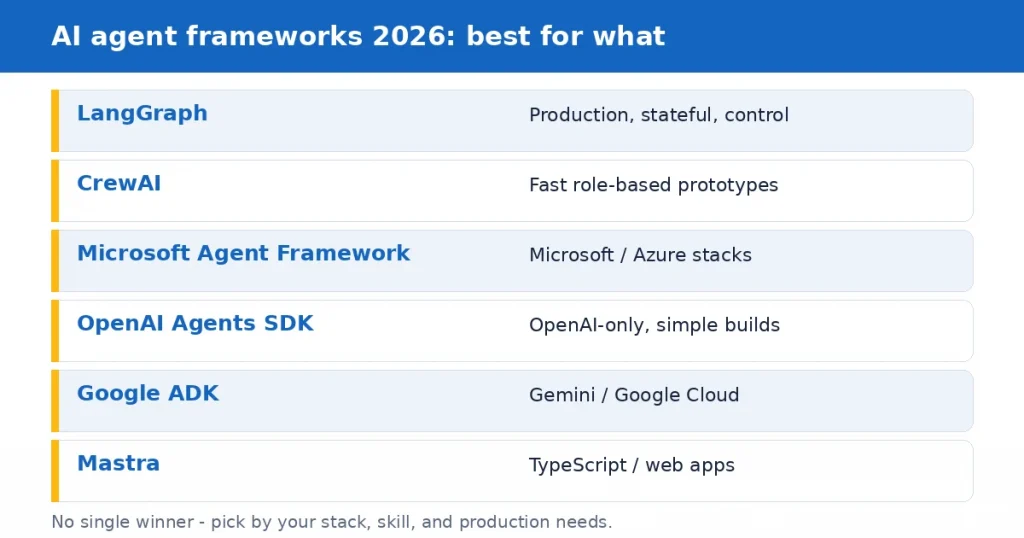
    AI agent frameworks 2026 compared: LangGraph, CrewAI, Microsoft Agent Framework, OpenAI Agents SDK, Google ADK, Mastra and what each is best for
    FrameworkBest forModel supportLearning curve
    LangGraphProduction, stateful, controlAnyHigher
    CrewAIFast role-based prototypesAnyLow
    Microsoft Agent FrameworkMicrosoft / Azure stacksAny (Azure-centric)Medium
    OpenAI Agents SDKOpenAI-only, simple buildsOpenAI onlyLow
    Google ADKGemini / Google CloudGemini-first, othersMedium
    MastraTypeScript / web appsAnyMedium

    The honest summary: LangGraph for production control, CrewAI for speed, Microsoft or Google or OpenAI if you are committed to their ecosystem, and Mastra if you live in TypeScript.

    The protocols that now sit underneath everything

    In 2026 the frameworks matter less than they used to, because two standards do a lot of the heavy lifting no matter which framework you pick.
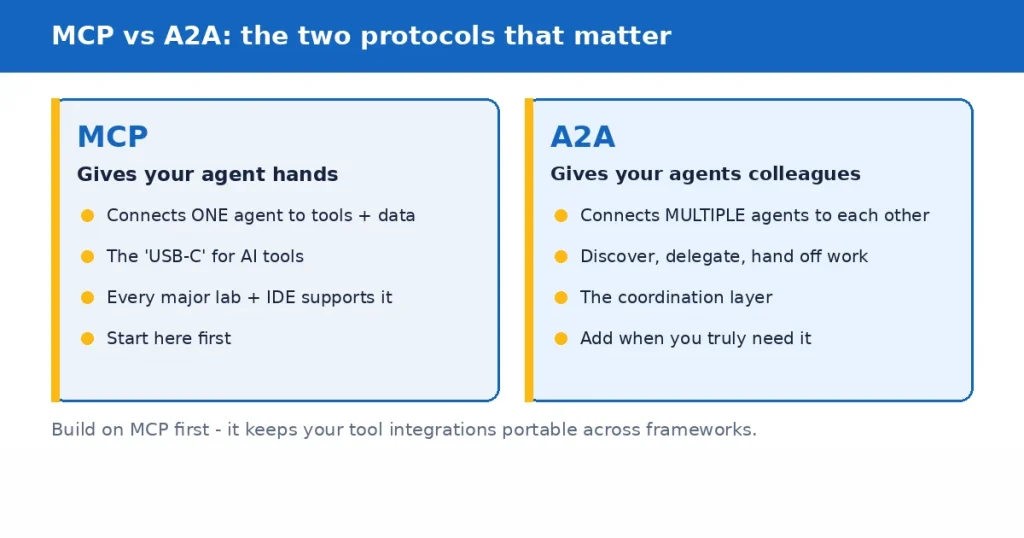
    MCP vs A2A: MCP connects an agent to tools, A2A connects agents to each other

    MCP (Model Context Protocol) standardizes how a single agent connects to tools and data. It is the USB-C port for AI: one interface that lets any agent plug into any tool. Because every major lab and IDE now supports it, building integrations is increasingly a matter of using a standard rather than writing custom connectors. If you are starting today, MCP is the first thing to adopt.

    A2A (Agent-to-Agent Protocol) standardizes how multiple agents discover each other, delegate tasks, and pass work back and forth. It is the coordination layer for multi-agent systems. Most teams need MCP first and reach for A2A only when they genuinely have multiple agents that must collaborate.

    The practical takeaway: choose a framework, but build on MCP, because it keeps your tool integrations portable across frameworks and future changes.

    The no-code and low-code route

    Not every agent needs a framework and an engineering team. Low-code platforms like n8n are event-driven tools that expose HTTP, conditional routing, and AI nodes without custom agent code, and with over a thousand integration nodes plus MCP support, they can build genuinely useful agents. This substantially lowers the barrier for non-technical teams.

    The honest guidance: for standard, well-defined workflows, a no-code platform may be the right answer and can save you a large custom build. Reach for a code framework when your agent is unusual, needs deep custom logic, has to integrate in ways the platform cannot, or must run at a scale and reliability the no-code tool was not built for. Starting no-code to prove value, then moving to a framework if you outgrow it, is a perfectly sensible path.

    How to choose your framework

    Cut through the options with a few questions rather than chasing whichever framework is trending.

    Start with your ecosystem: if you are deep in Azure, Microsoft Agent Framework; all-in on OpenAI, the OpenAI Agents SDK; Gemini and Google Cloud, ADK. If you want model flexibility, LangGraph or CrewAI. Then your team’s skill and speed: CrewAI or a no-code platform for the fastest start, LangGraph when you need production control and can absorb the learning curve, Mastra if your team is TypeScript. Then production versus prototype: for anything that has to run reliably with state, monitoring, and long workflows, favor LangGraph, Mastra, or CrewAI with proper observability; for a quick proof, almost anything works. Finally, whether you even need to build: try no-code first for standard tasks.

    Whatever you pick, build on MCP so your tool integrations stay portable, and choose based on your problem, not on which framework got the most stars this quarter.

    How long it takes to get productive

    A fair question before you commit: how long until your team is actually building. With a no-code platform, a non-developer can have a working flow the same day. With CrewAI, a developer can get a role-based prototype running in an afternoon, because the mental model is simple and it takes about twenty lines to start. LangGraph asks for more up front, usually a week or two to get comfortable with graphs, state, and checkpointing, but it pays that back on complex production systems.

    The Microsoft, Google, and OpenAI SDKs sit in between and are fastest if you already work in that ecosystem. The point is to be honest about the learning curve when you choose: a framework your team can actually use beats a more powerful one they fight.

    What if my framework gets abandoned

    This is a real worry, and AutoGen going into maintenance mode this year shows it is not hypothetical. Two things reduce the risk. First, favor frameworks with large, active communities and clear backing (LangGraph, CrewAI, the big-lab frameworks), because they are the least likely to be dropped and the easiest to hire for. Second, and more importantly, build on standards like MCP and keep your business logic and prompts separate from framework-specific code.

    When most of your value lives in your data, your tools (behind MCP), and your prompts rather than in one framework’s syntax, migrating to another framework is a manageable job rather than a rewrite. Lock-in comes from tangling your logic into a framework, not from choosing one.

    Common mistakes when choosing a framework

    A few patterns trip teams up. Chasing the trendiest framework instead of the one that fits your stack and skill leads to fighting the tool. Reaching for a heavy multi-agent framework when a single simple agent, or even a no-code flow, would do adds complexity you pay for forever. Ignoring observability and evaluation until something breaks in production is a classic, because an agent you cannot monitor is one you cannot trust. And betting everything on one framework’s proprietary features, rather than standards like MCP, is how you end up locked in. The fix for all of these is the same: match the tool to the problem, keep your logic portable, and build in monitoring from the start.

    How Mobilions helps

    We build production AI agents across these frameworks, and we have shipped AI since 2016. For teams choosing, we do the honest version: we recommend the framework that fits your stack, skill, and reliability needs rather than the one that is trending, and sometimes that recommendation is a no-code platform and no framework at all. We build on MCP so your integrations stay portable, design in observability and evaluation from the start, and hand you full ownership of the code. When AutoGen went into maintenance mode, the teams who had kept their logic portable barely noticed, and that is how we build.

    What we will not do is push a heavier framework than your problem needs, because the whole point of this guide is that the right choice is the one that fits, not the most impressive one.

    The bottom line

    The latest AI agent frameworks 2026 have a clear shape once you stop looking for a single winner. LangGraph for production control, CrewAI for fast prototypes, Microsoft or Google or OpenAI if you live in their ecosystem, Mastra for TypeScript, and no-code for standard workflows. Underneath all of them, MCP has become the standard worth building on, and A2A waits for when you truly need agents to coordinate.

    The durable advice outlasts any framework: choose based on your stack, your team, and whether you need production reliability or speed; build on open standards so you are not locked in; keep your real value in your data, tools, and prompts rather than one framework’s syntax; and add monitoring from day one. Do that, and it barely matters which framework wins the next quarter, because your agent will keep running and you will be able to move if you need to.

    If you are choosing a framework for a real agent and want a straight recommendation for your stack and use case, that is exactly the conversation our senior engineers have with teams every week.

    Book a discovery call and get an honest assessment, no obligation. You can also explore our AI agent development services.

    Key takeaways

    • There is no single best AI agent framework in 2026, only the best fit for your stack, skill, and reliability needs.
    • LangGraph leads for production and control; CrewAI for fast role-based prototypes; Microsoft Agent Framework, OpenAI Agents SDK, and Google ADK for their ecosystems; Mastra for TypeScript.
    • AutoGen is now in maintenance mode; Microsoft Agent Framework is its successor.
    • MCP became the universal standard for connecting agents to tools; A2A handles agent-to-agent coordination. Build on MCP first.
    • No-code platforms like n8n can build real agents and may replace a custom build for standard workflows.
    • Reduce abandonment and lock-in risk by favoring well-backed frameworks and keeping your logic and tools portable behind standards.
    • Choose by matching the tool to the problem, keep logic portable, and build in observability from the start.

    Frequently asked questions

    What are the best AI agent frameworks in 2026?

    The leading options are LangGraph (production, stateful control), CrewAI (fast role-based prototypes), the Microsoft Agent Framework (Microsoft and Azure stacks), OpenAI Agents SDK (OpenAI-only, simple), Google ADK (Gemini and Google Cloud), and Mastra (TypeScript). There is no single winner; the best one depends on your stack, skill, and whether you need production reliability or speed.

    Which AI agent framework should I choose?

    Start with your ecosystem (Azure, OpenAI, or Google point to their frameworks; model flexibility points to LangGraph or CrewAI), then your team’s skill and speed (CrewAI or no-code for fast starts, LangGraph for production control, Mastra for TypeScript), then whether you need production reliability or a quick prototype. Whatever you pick, build on MCP so integrations stay portable.

    Is LangGraph or CrewAI better?

    Neither is universally better. LangGraph is the more battle-tested choice for production, stateful agents that need control, with checkpointing and strong observability, at the cost of a steeper learning curve. CrewAI has the lowest barrier to entry and is ideal for getting a role-based multi-agent prototype running quickly. Many teams prototype in CrewAI and move to LangGraph for demanding production systems.

    Is AutoGen still worth using in 2026?

    AutoGen is now in maintenance mode, meaning no new features and community management. For new projects, the Microsoft Agent Framework is its unified successor, combining AutoGen and Semantic Kernel with graph workflows and Azure AI Foundry guardrails. Existing AutoGen projects still work, but new builds should start on the successor or another active framework.

    What is MCP and why does it matter?

    MCP, the Model Context Protocol, is a standard that lets any AI agent connect to tools and data through one universal interface, often called the USB-C of AI. It matters because every major lab and IDE now supports it, so tool integration is a shared standard rather than framework-specific glue. Building on MCP keeps your integrations portable across frameworks.

    What is the difference between MCP and A2A?

    MCP connects a single agent to tools and data, giving your agent hands. A2A connects multiple agents to each other so they can discover, delegate, and coordinate, giving your agents colleagues. Most teams adopt MCP first and only need A2A when they genuinely run multiple agents that must collaborate.

    Can I build an AI agent without coding?

    Yes. Low-code platforms like n8n expose AI nodes, routing, and over a thousand integrations without custom agent code, and now support MCP, so non-developers can build genuinely useful agents. For standard workflows this may be all you need; reach for a code framework when the agent is unusual, needs deep custom logic, or must run at a scale the no-code tool was not built for.

    Which AI agent framework is best for beginners?

    CrewAI has the lowest learning curve among code frameworks, with a role-based model you can start with in about twenty lines. For non-developers, a no-code platform like n8n is often the easiest entry point. Both let you prove an idea quickly before committing to a heavier, production-grade framework.

    What happens if my AI agent framework gets abandoned?

    It is a real risk, as AutoGen going into maintenance mode showed. Reduce it by favoring frameworks with large, active communities and clear backing, and, more importantly, by building on standards like MCP and keeping your prompts and business logic separate from framework-specific code. When your value lives in your data, tools, and prompts, migrating frameworks is a manageable job rather than a rewrite.

    Are AI agent frameworks model-agnostic?

    Some are, some are not. LangGraph, CrewAI, and Mastra are model-agnostic, so you can switch model providers. The OpenAI Agents SDK is restricted to OpenAI models, and Google ADK is optimized for Gemini while supporting others. If model flexibility matters to you, favor a model-agnostic framework.

    Do I need a framework at all for a simple agent?

    Often no. For a single, standard workflow, a no-code platform or even a direct model integration can be simpler and cheaper than a full framework. Frameworks earn their weight when you need multi-step orchestration, persistent state, multiple agents, or production-grade reliability and monitoring. Match the tool to the problem rather than defaulting to a framework.

    Does Mobilions build agents on these frameworks?

    Yes. We build production AI agents across LangGraph, CrewAI, and the major frameworks, and we recommend the one that fits your stack and use case rather than the trendiest. We build on MCP so your integrations stay portable, design in observability from the start, and hand you full ownership of the code. Book a discovery call for a straight recommendation.

  • How to Choose the Right AI Agent Development Company in 2026

    How to Choose the Right AI Agent Development Company in 2026

    To choose an AI agent development company, judge four things above all: whether they have shipped real agents in production (not demos), whether they scope honestly and push back on your idea, whether you keep full ownership of the code and IP, and whether they have a real plan for monitoring and maintenance after launch. Cost matters, but the cheapest quote is usually the most expensive choice once you count rework. A production agent typically runs $15,000 to $75,000 and a few weeks to a couple of months, so the decision is worth getting right.

    Knowing how to choose an AI agent development company is now a real business skill, because everyone is racing to build AI agents and a whole industry has appeared overnight to build them for you. Some of these companies are excellent. Many are a landing page, a few prompts, and a lot of confidence. Telling them apart before you sign is the difference between an agent that runs reliably in production and an expensive demo that falls over the first time a real user does something unexpected.

    This guide is the filter. It walks through how to evaluate an AI agent development company, which hiring model fits your project, what it should cost, the exact questions to ask, and the red flags that should end the conversation. We build production AI agents at Mobilions, so this is written from the inside, including the parts that make some vendors uncomfortable. Where the honest answer is to hire someone else, or to buy an off-the-shelf tool instead of hiring anyone, this guide says so.

    How to choose an AI agent development company: the short version

    If you only remember one thing about how to choose an AI agent development company, make it this: pick the team that has shipped real agents in production and is honest about what your project needs. The rest of this guide breaks that down into what to look for, which hiring model fits, what it costs, the questions to ask, and the red flags to avoid. Work through it in order and you will filter out the demo shops quickly.

    First, decide what you actually need

    Before you evaluate a single company, get clear on the job. The word agent covers a huge range (see IBM’s overview of AI agents), and the right partner for one is the wrong partner for another.

    A simple, single-task agent (say, one that drafts replies or routes tickets) is a small, fast build. A production agent that plans, calls several tools, and pulls from your data is a real engineering project. A multi-agent system that runs autonomously across your business, with monitoring and compliance, is a serious undertaking. If you do not know which of these you need, that is fine, and it is actually a useful test: a good company will help you figure it out and will happily tell you if your idea is smaller (or larger) than you think. A company that agrees enthusiastically to whatever you say, without asking what problem you are solving, is optimizing for the invoice.

    There is also a real chance you do not need a development company at all. For common, standard workflows, a no-code agent platform or an existing tool may solve your problem for a fraction of the cost.

    A trustworthy partner will tell you that too. If the first thing a vendor does is insist you need a big custom build, be skeptical.

    The hiring models: freelancer, agency, or in-house

    There are three ways to get an AI agent built, and each fits a different situation.

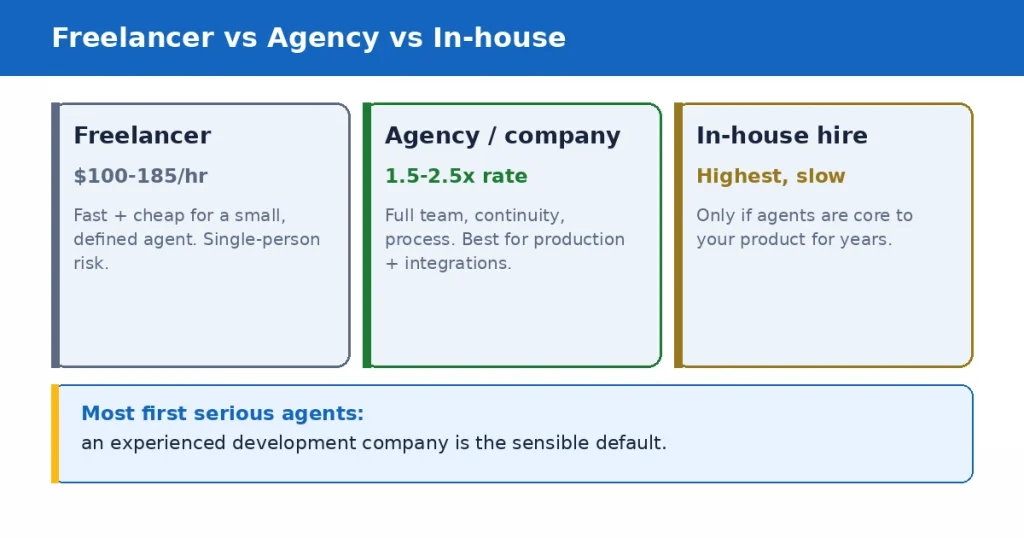
    Freelancer vs agency vs in-house for AI agent development: cost, risk, and best fit

    A freelancer is one independent developer. Freelance AI agent developers commonly charge $100 to $185 an hour, and more for top specialists, though rates range widely. A good freelancer is fast and cost-effective for a small, well-defined agent, and platforms like Upwork list many, though vetting is on you. The risk is single-person dependency: if they get busy, sick, or vanish, your project stalls, and one person rarely covers engineering, data, security, and design all at once.

    An agency or development company is a coordinated team. Agencies typically charge 1.5 to 2.5 times an individual rate because of overhead and coordination, but you get a team that covers the whole build, continuity if one person is out, and usually a real process for scoping, testing, and support. This is the right fit for anything production-grade or anything that has to integrate with your systems and keep running.

    An in-house hire makes sense only when AI agents are core to your product and you will keep building them for years. Hiring senior AI engineers is slow and expensive, and for a single project it is almost never worth it. Most companies are better served by a partner for the build and, if needed, a smaller in-house team to own it later.

    For most businesses building their first serious agent, an experienced development company is the sensible default: enough capability to ship something that works, without the cost and delay of hiring a permanent team.

    What separates a good AI agent development company

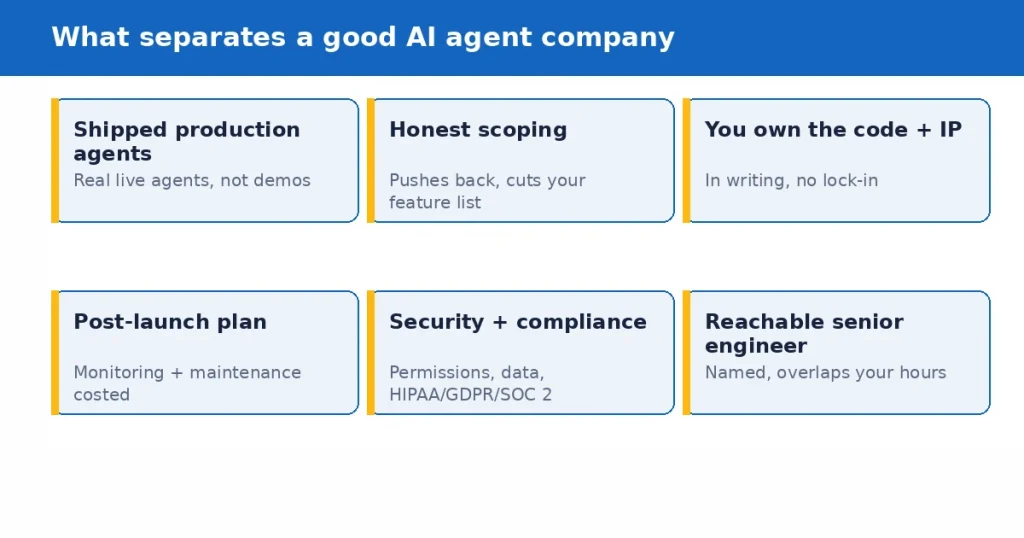
    When you work out how to choose an AI agent development company, here is what actually matters when you evaluate one. These are the signals that predict whether your agent will work in production, in rough order of importance.

    What separates a good AI agent development company: shipped production agents, honest
scoping, code ownership, post-launch plan, security, reachable engineer

    Shipped agents in production. The single strongest signal is real, live agents they have built, ideally ones you can see or that they can describe in detail. Building a demo is easy in 2026. Making an agent reliable when real users hit it, when a tool call fails, when the input is messy, is the actual engineering, and only teams who have done it before know where the traps are. Ask for specifics, not a logo wall.

    Honest scoping. The best companies argue with your feature list. They propose the smallest version that proves value, tell you what to cut, and are upfront about what AI is bad at. A partner who promises everything works flawlessly is either inexperienced or not being straight with you, because everyone who has shipped agents knows they need guardrails, evaluation, and human oversight.

    Clear ownership. In writing, you own the source code, the IP, and the documentation. Some vendors keep you dependent by holding the code or building on a proprietary layer you cannot leave. Walk away from anyone vague about this. You should be able to take everything and move to another team if you ever need to.

    A real plan for after launch. An agent is not done at launch. Models drift, your data changes, tools update, and edge cases appear. Ask what monitoring, evaluation, and maintenance look like, and what they cost. A company with no answer for month three is planning to disappear after the invoice clears.

    Security and compliance fluency. Agents that can take actions and touch data widen your risk. A serious partner talks naturally about permissions, data handling, and, if you are regulated, HIPAA, GDPR, or SOC 2. If security only comes up when you raise it, that tells you where it sits on their priority list.

    Communication that fits your schedule. Most failed builds are a communication failure long before they are an engineering one. You want a named senior engineer you can reach, working hours that overlap yours, and updates you do not have to chase.

    Questions to ask before you hire

    A short, pointed set of questions separates real teams from confident ones. Ask these, and listen for specific answers rather than reassurance.

    • Can you show me an AI agent you have built that runs in production, and describe how it handles failures?
    • Who specifically will build this, and can I talk to that senior engineer before we start?
    • How do you decide the smallest version worth building first?
    • Do I own the code, the IP, and the documentation, in writing?
    • How do you handle guardrails, testing, and evaluation so the agent behaves reliably?
    • What does monitoring and maintenance look like after launch, and what does it cost?
    • How will this integrate with the systems we already run?
    • How do you handle data security and, if relevant, our compliance requirements?

    The pattern to watch for: good teams answer with concrete detail and are comfortable saying what they will not do. Weak teams answer with enthusiasm and generalities.

    Red flags that should end the conversation

    Some signals are reliable enough to walk away on.

    A quote far below everyone else usually means missing scope, and the work reappears later as change requests or a rebuild. No named engineers, just a promise of our team, is how a senior pitch becomes a junior build. Vague or missing code-ownership terms are a plan to lock you in. Agreeing to your entire feature list on the first call with no pushback means no one is protecting your budget.

    No answer for what happens after launch means they are optimizing for handover, not for your agent still working next year. Guarantees of perfect accuracy or fully autonomous with no oversight are a sign they have not actually shipped agents, because anyone who has knows better. And slow, hard-to-reach communication during the sales phase, when they are trying to win you, only gets worse once the contract is signed.

    What AI agent development costs in 2026

    Costs vary widely because agents do, so treat any number before a scoping conversation as a rough range. Based on current market data, here is a realistic frame.

    A prototype or proof of concept commonly runs $10,000 to $30,000 over about four to six weeks. A minimum viable product runs roughly $20,000 to $60,000 over six to ten weeks. A production agent with retrieval and several integrations typically lands between $15,000 and $75,000 over four to eight weeks. A multi-agent enterprise system with monitoring, evaluation, and compliance can run $75,000 to $250,000 and up. A single, simple workflow agent can be much less, sometimes low four figures shipping in a week or two.

    The cost drivers are consistent: complexity (single task versus multi-agent coordination), the number of systems it integrates with, how autonomous it is, and any compliance requirements. The mistake to avoid is choosing on price alone. A cheap agent built without guardrails or testing is not a saving, it is a deferred bill, because you pay again to fix what it does wrong in production.

    Custom build vs plug-and-play

    Not every business needs a custom-built agent. For standard, common tasks, a no-code platform or an existing product may do the job well and cheaply, and a good company will point you there rather than sell you a build you do not need.

    Custom development earns its cost when your workflow is unusual, when the agent must integrate deeply with your own systems, when data or compliance rules out a hosted tool, or when the agent is central enough to your business that owning it matters. The honest way to decide is to try the off-the-shelf option first for anything standard, and reserve custom work for the parts where nothing off the shelf fits. A partner willing to recommend buying over building, when buying is right, is usually one worth building with when building is right.

    How to reduce your risk before committing

    You do not have to bet the whole project on one decision. A few moves lower the risk.

    Start small: a paid discovery or a scoped prototype tells you more about how a company works than any sales call. Check references and ask them the pointed questions (was it delivered, did it work in production, how was support). Read the contract for ownership, and for what happens if the relationship ends. And insist on a real plan for testing and monitoring before launch, not as an afterthought. A company that welcomes a small first engagement, rather than pushing for the full contract immediately, is showing you it is confident in the work.

    How Mobilions approaches AI agent projects

    We build production AI, including agents, and have shipped AI since 2016. For companies choosing a partner, we do the honest version of this work. We scope first and tell you if your idea is smaller than you think, or if an off-the-shelf tool would serve you better than hiring us. Senior engineers build the agent with guardrails, evaluation, and monitoring designed in, not bolted on. You keep full ownership of the code, IP, and documentation. And we plan for life after launch, because an agent that is never maintained slowly stops working.

    What we will not do is promise flawless autonomy or sell you a bigger build than your problem needs. The whole point of this guide is that the right partner is the honest one, and we try to be the company we are describing.

    The bottom line

    Learning how to choose an AI agent development company comes down to a simple test underneath all the criteria: is this a team that has actually shipped agents that work, and are they honest with you about what your project really needs. Everything else, the cost, the model, the questions, the red flags, is a way of getting to that answer before you sign.

    So look for shipped production work, insist on honest scoping and clear ownership, demand a real plan for after launch, and be suspicious of anyone who promises perfection or quotes far below the market. Start with a small engagement, check references, and read the contract. Do that, and you will filter out the demo shops and land with a partner who builds you an agent that runs, rather than one that impresses in a meeting and breaks in production.

    If you are weighing AI agent development companies and want a straight read on what your project actually needs, and an honest answer on build versus buy, that is exactly the conversation our senior engineers have with businesses every week.

    Book a discovery call and get an honest assessment, no obligation. You can also explore our AI agent development services.

    Key takeaways

    • Judge a company on shipped production agents, honest scoping, clear code and IP ownership, and a real post-launch plan, in that order.
    • Pick the model to fit the job: a freelancer for a small, defined agent; a development company for anything production-grade; in-house only if agents are core to your product for years.
    • Ask pointed questions and listen for specific answers, not reassurance. Good teams are comfortable saying what they will not do.
    • Walk away from suspiciously low quotes, no named engineers, vague ownership terms, no post-launch plan, and promises of flawless autonomy.
    • Expect $15,000 to $75,000 and a few weeks to a couple of months for a production agent; more for enterprise, less for a single simple workflow.
    • Try off-the-shelf for standard tasks; reserve custom development for unusual, deeply integrated, or business-critical agents.
    • Lower risk with a small paid first engagement, reference checks, and a contract that is clear on ownership.

    Frequently asked questions

    How do I choose an AI agent development company?

    Judge four things above all: whether they have shipped real agents in production, whether they scope honestly and push back on your idea, whether you keep full ownership of the code and IP, and whether they have a real plan for monitoring and maintenance after launch. Then check references, ask pointed questions, and start with a small engagement rather than the full contract.

    How much does it cost to hire an AI agent development company?

    It varies with complexity. A prototype commonly runs $10,000 to $30,000, an MVP $20,000 to $60,000, and a production agent with integrations $15,000 to $75,000. Enterprise multi-agent systems run $75,000 to $250,000 and up. Agencies typically charge 1.5 to 2.5 times an individual freelancer rate, but include a full team and support.

    Should I hire a freelancer or an agency for AI agent development?

    A freelancer is cost-effective and fast for a small, well-defined agent, but you carry single-person risk. An agency or development company is the better fit for anything production-grade or that must integrate with your systems and keep running, because you get a full team, continuity, and a real process for testing and support.

    What questions should I ask an AI development company before hiring?

    Ask to see a production agent they built and how it handles failures, who specifically will build yours, how they decide the smallest version to build first, whether you own the code and IP, how they handle guardrails and testing, what maintenance costs after launch, and how they handle integration and security. Listen for specific answers, not reassurance.

    What are the red flags when hiring an AI agent developer?

    A quote far below everyone else, no named engineers, vague or missing code-ownership terms, agreeing to your full feature list with no pushback, no plan for after launch, guarantees of perfect accuracy or fully autonomous with no oversight, and slow communication during the sales phase.

    How long does it take to build an AI agent?

    A simple single-workflow agent can ship in one to two weeks. A prototype takes about four to six weeks, an MVP six to ten weeks, and a production agent with integrations roughly four to eight weeks. Enterprise multi-agent systems take longer. Compliance and integrations drive the timeline more than the agent logic itself.

    Do I need a custom AI agent or can I use an off-the-shelf tool?

    For standard, common tasks, an off-the-shelf or no-code platform may solve your problem cheaply, and a good company will tell you so. Choose custom development when your workflow is unusual, when the agent must integrate deeply with your systems, when compliance rules out a hosted tool, or when the agent is central to your business.

    What skills should an AI agent development company have?

    Look for LLM and agent engineering, retrieval and data pipelines, integration with real systems, guardrails and evaluation, and security and compliance experience, plus the product sense to scope the right thing. A single skill set is rarely enough, which is one reason a coordinated team often beats a lone developer for production work.

    How do I know if an AI developer is actually good?

    The clearest sign is shipped agents that run in production, described in specific detail, including how they handle failures. Beyond that, good developers scope honestly, explain trade-offs, care about testing and monitoring, and are comfortable telling you what not to build. Reference checks and a small paid trial confirm it.

    Who owns the code when I hire an AI agent development company?

    You should, in writing. A trustworthy partner gives you full ownership of the source code, IP, and documentation, with no lock-in, so you can move to another team if you ever need to. If a vendor is vague about ownership or builds on a proprietary layer you cannot leave, treat that as a serious red flag.

    How do I reduce risk when hiring an AI development company?

    Start with a small paid discovery or scoped prototype instead of committing to the full project, check references with pointed questions about delivery and support, read the contract for ownership and exit terms, and insist on a testing and monitoring plan before launch. A company comfortable with a small first step is showing confidence in its work.

    Does Mobilions build AI agents?

    Yes. We build production AI agents with guardrails, evaluation, and monitoring designed in, and we have shipped AI since 2016. We scope honestly, tell you when an off-the-shelf tool is the better choice, and hand you full ownership of the code and IP. You can book a discovery call for a straight assessment of what your project needs.

  • Integrating AI Into Human Workflows: A Complete 2026 Guide

    Integrating AI Into Human Workflows: A Complete 2026 Guide

    Here is the uncomfortable gap that defines integrating AI into human workflows in 2026. According to McKinsey’s State of AI 2025, 88 percent of organizations now use AI in at least one business function, up from 78 percent the year before, yet only 39 percent report any measurable impact on their bottom line, and most of those attribute less than 5 percent of profit to it. Nearly everyone has adopted AI. Almost no one is getting real value from it. The difference is not the model you pick. It is how you fit it into the way people actually work.

    I design and ship production AI systems, so let me give you the answer up front rather than burying it. The single strongest predictor of whether AI pays off, per that same McKinsey survey, is whether a company fundamentally redesigns the workflow around the AI instead of bolting the AI onto the old workflow. High performers are nearly three times as likely to have done exactly that. So this guide is not a list of AI tools.

    It is about the two decisions that actually determine success: where the AI goes in the workflow, and where the human stays. Get those right and the tool almost does not matter. Get them wrong and the best model in the world will sit unused.

    Key takeaways

    If you only have a minute, these are the points that matter most about integrating AI into human workflows.

    Adoption is not the problem, impact is. 88 percent of organizations use AI, but only 39 percent see bottom-line impact, and the gap is almost entirely about workflow design, not model choice.

    Redesign the workflow, do not bolt AI on. McKinsey found that fundamentally redesigning the workflow is the strongest single predictor of AI impact, and high performers are about three times as likely to do it.

    Decide augment versus automate for each task, not for the whole job. Most real gains come from AI augmenting a person on the parts it is good at, while the person keeps the judgment, not from replacing the person outright.

    Keep a human in the loop where it counts. Put people at the decision points that carry risk, nuance, or accountability, and let the AI run the rest. Gartner projects that over 40 percent of agentic AI projects will be scrapped by 2027, largely from missing exactly this.

    Why do most AI-in-workflow efforts stall?

    The most common failure is not technical. A team buys an AI tool or wires up a model, drops it next to an existing process, and expects the process to get faster on its own. It rarely does, because the old process was designed around human constraints that no longer apply, and it still contains all the handoffs, approvals, and manual steps that made sense before AI existed. Adding AI to a workflow built for humans just gives you a human workflow with an AI bolted to the side.

    McKinsey’s data makes this concrete. Roughly two-thirds of organizations have not yet scaled AI beyond experiments, and only 39 percent see any profit impact. Meanwhile the small group of high performers, about 6 percent of respondents, do a specific thing differently: they are nearly three times as likely to have fundamentally redesigned their workflows, three times as likely to have senior leaders actually own the AI effort, and three times as likely to pursue transformative change rather than small efficiency wins. The pattern is clear. Value comes from rethinking the work, not from sprinkling AI on top of it.

    This is why integrating AI into human workflows is a design problem before it is an engineering problem. Before anyone writes a prompt or picks a model, someone has to look at the actual work, decide which parts AI should do, which parts a person must keep, and how the two hand off to each other. That redesign is the project. The model is just a component.

    Should you augment or automate? The first real decision

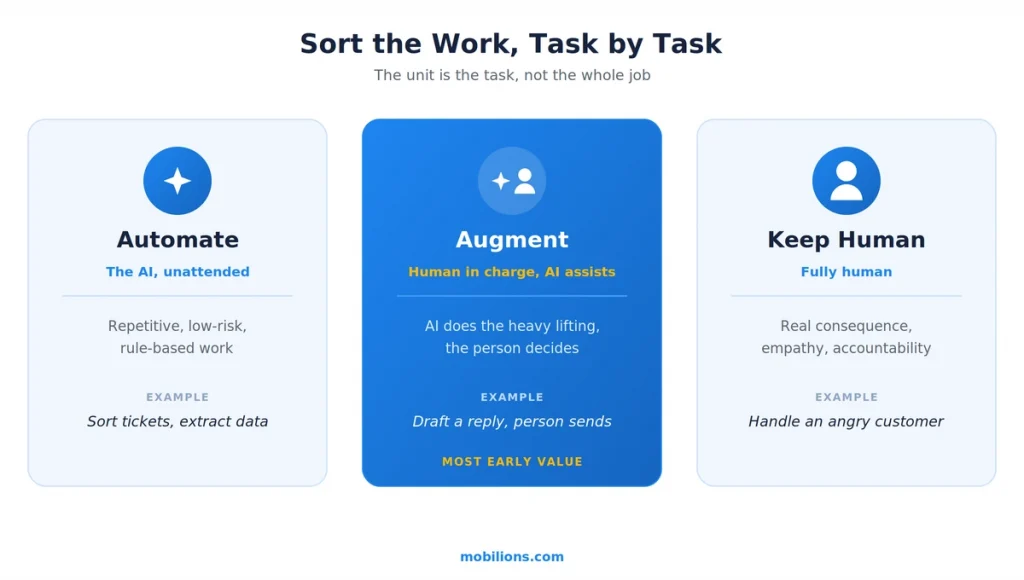
    The biggest conceptual mistake is treating AI integration as an all-or-nothing automation question. In practice, the useful unit is the task, not the job. A single person’s role is made of dozens of tasks, and AI is excellent at some of them, mediocre at others, and dangerous at a few. The job is to sort them.

    Automate augment or keep human AI task sorting

    Automate the tasks that are repetitive, high-volume, rule-based, and low-risk when they occasionally go wrong: sorting tickets, extracting data from documents, drafting first-pass summaries, categorizing inbound requests. Augment the tasks where a human brings judgment, context, or accountability but AI can do the heavy lifting underneath: a support agent who lets AI draft the reply but edits and sends it, an analyst who lets AI pull and structure the data but decides what it means, a lawyer who lets AI find the relevant clauses but makes the call. Keep fully human the tasks that carry real consequence, need empathy, or require someone accountable to stand behind them.

    ApproachBest forExampleWho is in charge
    AutomateRepetitive, high-volume, rule-based, low-risk tasksCategorizing tickets, extracting data from documentsThe AI, running unattended
    AugmentJudgment tasks where AI can do the heavy lifting underneathDrafting a reply a person edits and sendsThe human, with AI assisting
    Keep humanTasks with real consequence, empathy, or accountabilityHandling an angry enterprise customerThe human, fully

    The reason this matters is that augmentation, not automation, is where most of the near-term value actually lives. It keeps the human judgment that AI still lacks while removing the drudgery that wastes that judgment. When we scope AI work with clients through our AI development practice, this task-by-task sort is almost always the first exercise, because it decides the entire shape of what gets built.

    Where does the human go? Human-in-the-loop patterns

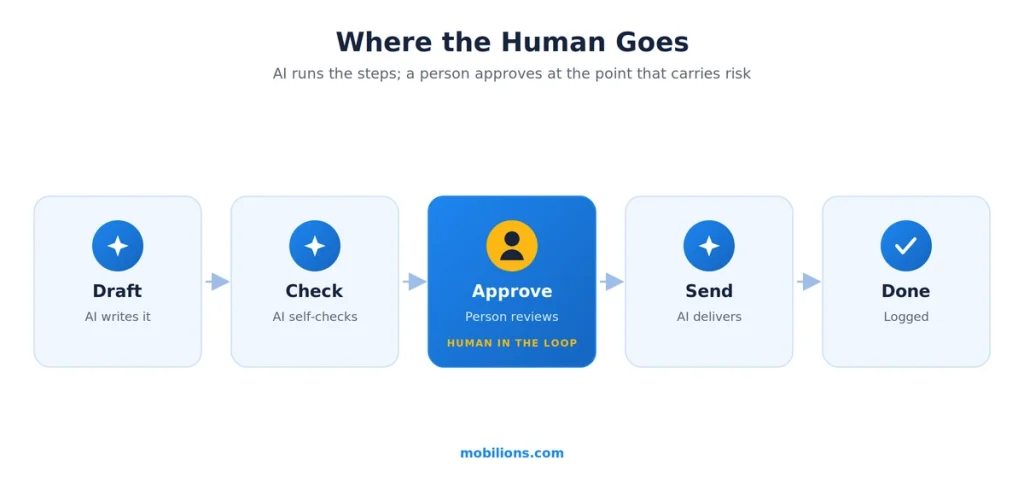
    Automate augment or keep human AI task sorting

    Once you know which tasks are augmented rather than fully automated, the next question is exactly where the human sits in the flow. This is what people mean by human-in-the-loop, and it is not one thing. There are a handful of proven patterns, well summarized in Zapier’s breakdown of human-in-the-loop, and picking the right one per step is most of the design work.

    An approval flow pauses the workflow at a checkpoint so a person can approve, reject, or edit the AI’s output before it proceeds, which is the right pattern when the action is visible to a customer or hard to undo. Confidence-based routing lets the AI act on its own when it is sure and escalate to a human only when its confidence drops below a threshold, which concentrates human attention exactly where the AI is shaky.

    Escalation paths send anything outside the AI’s scope, such as a refund above a set value, to the right person instead of forcing the automation to guess. Feedback loops let humans correct AI outputs in a way that becomes training data, so the system improves over time. And audit logging records every automated action for later review without slowing anything down, which gives you traceability even on the steps that run unattended.

    PatternWhat it doesUse it when
    Approval flowPauses for a person to approve, reject, or edit before proceedingThe action is customer-visible or hard to undo
    Confidence-based routingAI acts when sure, escalates to a human when uncertainYou want human attention only where the AI is shaky
    Escalation pathRoutes out-of-scope cases to the right personA request crosses a threshold, such as refund value
    Feedback loopTurns human corrections into training dataYou want the system to improve over time
    Audit loggingRecords every automated action for later reviewYou need traceability on unattended steps

    The skill is not using all of these everywhere. It is putting a human in the loop where decisions carry risk, nuance, or accountability, and letting the AI run unattended everywhere else. Put a person on every step and you have not saved anyone any time. Put a person on no steps and you get the failure mode the next section is about.

    How do you actually redesign a workflow around AI?

    Redesign sounds abstract, so here is the concrete version I use. Start by mapping the current workflow as it really runs, every step, handoff, and decision, not the idealized version in a process doc. Then, for each step, sort it into automate, augment, or keep-human using the test above.

    Now comes the part teams skip: redraw the workflow assuming the automated and augmented steps are nearly instant and nearly free. Handoffs that existed only because a human step was slow can often disappear. Approvals that existed only to catch human error may move to a confidence threshold. The shape of the new workflow is usually different from the old one, and that difference is where the McKinsey impact comes from.

    Then design the human-in-the-loop points deliberately using the patterns above, instrument everything so you can measure it, and roll it out to a small slice of real work before scaling. The order matters. Most failed integrations map the workflow, add AI to each step in place, and stop, which is the bolting-on trap. The redesign step, redrawing the flow around what AI makes cheap, is the one that actually moves the numbers, and it is usually where a custom software build is required, because off-the-shelf tools assume the old shape of the work.

    What about agentic AI, where the AI runs multiple steps itself?

    The frontier of integrating AI into human workflows in 2026 is agentic AI, where instead of assisting one step, an AI agent plans and executes a sequence of steps on its own. McKinsey found 62 percent of organizations are at least experimenting with agents and 23 percent are scaling them somewhere, so this is real and moving fast. It is also where the human-in-the-loop question gets sharpest, because an agent taking ten actions unattended can go ten steps wrong before anyone notices.

    The honest data is sobering. Gartner projects that over 40 percent of agentic AI projects will be scrapped by the end of 2027, citing escalating costs, unclear value, and inadequate risk controls, and independent coverage keeps arriving at the same conclusion: AI agents fail without human oversight.

    This is not an argument against agents. It is an argument for designing them the same way as any other AI integration: give the agent the steps it can run unattended, put approval and confidence checkpoints at the consequential moments, log everything, and keep a person accountable for the outcome. The teams that treat agents as fully autonomous employees are the ones filling out that 40 percent. The teams that treat them as fast, tireless workers who still report to a human are the ones getting value.

    How do you know if it is working?

    You measure it, and you measure the right thing. The trap is measuring adoption, how many people use the tool, when what matters is impact, whether the work is actually better, faster, or cheaper with quality holding. Pick a baseline before you start: how long the task takes, the error rate, the cost per unit, the throughput.

    Then compare honestly after, and watch for the quiet failure where AI makes a step faster but pushes errors downstream so the total workflow is no better. McKinsey’s whole adoption-to-impact gap is really a measurement story: plenty of usage, little proven value, because few teams instrumented the workflow well enough to know. If you cannot state the before-and-after number for the workflow you changed, you have adopted AI but you have not yet integrated it.

    How do you get people to actually adopt it?

    Here is the part that is easy to underrate: the hardest problem in integrating AI into human workflows is usually not the AI, it is the humans. A redesigned workflow only delivers value if the people in it trust it and use it, and trust is not automatic. People who feel the AI was dropped on them to replace them will quietly route around it, and a workflow everyone works around is worse than the one you had. The teams that succeed treat adoption as part of the design, not an afterthought.

    In practice that means a few things. Involve the people who do the work in the redesign, because they know where the real friction is and they adopt what they helped build. Be explicit that augmentation is removing their drudgery, not their job, and then make sure that is actually true. Start where the pain is obvious so the first win is felt, not argued.

    And give people an easy way to correct the AI and see their corrections matter, which is exactly what the feedback-loop pattern is for. This is the same reason we lean on genuinely useful, well-scoped tools rather than flashy ones, the way we approach the real-time and applied AI systems we build. The best-designed workflow on paper still fails if the people in it do not believe in it.

    A real-world scenario

    To make this concrete, picture a mid-size company’s customer support team drowning in inbound tickets. The tempting move is to buy an AI chatbot and point it at the queue. The redesign move is different.

    A systematic reading of this guide sorts it quickly. First, map the real workflow: tickets arrive, get categorized, get researched, get answered, and some get escalated. Then sort each step. Categorizing tickets is repetitive and low-risk, so automate it. Drafting the answer is where AI does the heavy lifting but a human should still approve customer-facing replies, so augment it with an approval flow. Judging an angry enterprise customer who is threatening to churn needs empathy and accountability, so keep it human, routed by an escalation path.

    Add confidence-based routing so the AI answers the easy, high-confidence tickets end to end and sends the ambiguous ones to a person. Log everything for later review. The result is not a chatbot bolted onto the old queue. It is a redesigned workflow where AI handles volume, humans handle judgment, and the handoffs are deliberate. That is the version that actually cuts response time without wrecking customer trust.

    Myths and common mistakes

    A few misconceptions cause most of the wasted effort.

    The first myth is that integrating AI means automating jobs. It almost never does at first. It means automating and augmenting tasks, and the biggest early wins are augmentation, where a person stays in charge.

    The second mistake is bolting AI onto the existing process. If you do not redesign the workflow, you keep all the handoffs and approvals built for a slower, human-only world, and you cap your upside at a small efficiency gain. This is the single most common reason AI projects underdeliver.

    The third mistake is going fully autonomous too early, especially with agents. Removing the human from consequential decisions is how you end up in Gartner’s 40 percent that get scrapped. Autonomy is earned step by step as the system proves itself, not granted on day one.

    The fourth mistake is measuring adoption instead of impact. Lots of logins is not value. If you cannot show the workflow got measurably better, the integration is not done.

    The honest caveat worth stating plainly: this is genuinely hard, and it is more organizational than technical. The models are capable enough today. The bottleneck is redesigning how people work and getting them to trust and adopt the new flow, which is change management as much as engineering. Any guide that makes it sound like a plug-in is selling you the easy 20 percent and skipping the 80 that decides the outcome.

    Why Mobilions

    Mobilions has been building custom software, mobile apps, and AI solutions since 2016. We have delivered more than 250 projects for over 100 clients across 20-plus countries, which means we have integrated AI into real human workflows, not just demoed models. When we take on this work, we start with the task-by-task sort and the workflow redesign rather than the model, we design the human-in-the-loop points deliberately, and we instrument the workflow so you can actually prove the impact.

    If you are planning to integrate AI into how your team works and want to get the design right before writing code, that is the conversation our AI development team has with leaders every week, and where it helps we pair it with the engineers who have shipped these systems before.

    Summary

    Integrating AI into human workflows in 2026 is not a tooling problem, it is a design problem. Adoption is nearly universal at 88 percent of organizations, but only 39 percent see real impact, and the difference is workflow redesign, the strongest predictor McKinsey found.

    Sort the work task by task into automate, augment, and keep-human. Put humans in the loop at the points that carry risk, nuance, or accountability using proven patterns like approval flows and confidence-based routing, and let AI run the rest. Redesign the flow around what AI makes cheap rather than bolting AI onto the old process. Be especially careful with agents, since over 40 percent of agentic projects are projected to fail, almost always from removing human oversight too soon. Measure impact, not adoption. Get the design right and the model is the easy part.

    Frequently asked questions

    What does integrating AI into human workflows actually mean?

    It means redesigning how work gets done so AI and people each handle the parts they are best at, with deliberate handoffs between them. It is not just adding an AI tool to an existing process. The work is deciding which tasks AI should automate, which it should augment with a human in charge, and which stay fully human.

    Why do so many AI workflow projects fail to deliver value?

    Because most teams bolt AI onto their existing process instead of redesigning it. McKinsey found that 88 percent of organizations use AI but only 39 percent see bottom-line impact, and the strongest predictor of impact is fundamentally redesigning the workflow, which most teams skip.

    What is the difference between augmenting and automating with AI?

    Automating means AI does a task end to end without a person, which suits repetitive, low-risk, rule-based work. Augmenting means AI does the heavy lifting while a human keeps judgment and accountability, such as drafting a reply the person edits and sends. Most early value comes from augmentation, not full automation.

    What is human-in-the-loop and when should you use it?

    Human-in-the-loop means placing people at specific decision points in an otherwise automated workflow. Use it where decisions carry risk, nuance, compliance implications, or need accountability. Common patterns include approval flows, confidence-based routing that escalates only uncertain cases, escalation paths, feedback loops, and audit logging.

    How do you redesign a workflow around AI?

    Map the current workflow step by step, sort each step into automate, augment, or keep-human, then redraw the flow assuming the automated and augmented steps are nearly instant, which often removes handoffs and approvals that only existed because human steps were slow. Then design the human-in-the-loop points, instrument everything, and roll out to a small slice before scaling.

    Is agentic AI safe to put in production workflows

    ? It can be, but only with human oversight designed in. Gartner projects over 40 percent of agentic AI projects will be scrapped by 2027, largely from inadequate controls. The safe pattern is to let an agent run the steps it can handle unattended while keeping approval and confidence checkpoints at consequential moments and a person accountable for the outcome.

    How do you measure whether an AI workflow integration is working?

    Measure impact, not adoption. Set a baseline before you start, such as task time, error rate, cost per unit, and throughput, then compare honestly after, watching for cases where a step gets faster but pushes errors downstream. If you cannot state the before-and-after number for the workflow, the integration is not finished.

    Will integrating AI replace my employees?

    Usually not, at least not first. The useful unit is the task, not the job, and most roles are a mix of tasks where AI augments the person rather than replacing them. The near-term pattern is people doing more valuable work because AI removed the drudgery, not people being removed.

    Where should a company start with integrating AI into workflows?

    Start with one real workflow that has clear, measurable pain, map it honestly, sort its tasks into automate, augment, and keep-human, redesign the flow, add deliberate human-in-the-loop checkpoints, and measure the before and after. A focused, measured pilot beats a broad rollout of AI tools that never gets redesigned into the work.

    Which tasks should you automate with AI first?

    Start with tasks that are repetitive, high-volume, rule-based, and low-risk when they occasionally go wrong, like categorizing tickets, extracting data from documents, or drafting first-pass summaries. Leave judgment, empathy, and accountability tasks to people. The useful unit is the task, not the whole job, so sort each one before automating anything.

    What are the biggest challenges of integrating AI into workflows?

    The hardest parts are organizational, not technical. Teams bolt AI onto an old process instead of redesigning it, remove human oversight too early, measure adoption instead of impact, and underestimate change management. The models are usually capable enough already. The real bottleneck is redesigning how people work and getting them to trust the new flow.

    How do you get your team to adopt AI tools?

    Treat adoption as part of the design, not an afterthought. Involve the people who do the work in the redesign, be explicit that augmentation removes drudgery rather than jobs, start where the pain is obvious so the first win is felt, and give people an easy way to correct the AI and see their corrections actually matter.

    How much training do employees need to use AI tools?

    Less than teams expect when the AI is designed into the workflow well, and more when it is bolted on awkwardly. The goal is tools that fit how people already work, so training focuses on the new handoffs and when to trust or override the AI, rather than on operating a complex separate system.

    How do you choose the right AI tool for a workflow?

    Decide the workflow redesign first, then pick a tool that fits it, not the other way around. Ask how it handles human-in-the-loop checkpoints, how it logs and audits actions, how it improves from corrections, and how it fits your existing systems. A tool that forces you back into the old process shape is the wrong tool.

    How much does it cost to integrate AI into a workflow?

    It varies with scope, but the largest cost is usually the redesign and integration work, not the model or tool license. A focused pilot on one workflow is comparatively cheap and is the right way to prove impact before spending more. Watch for hidden costs in agentic projects, which Gartner links to many being scrapped.

    Why do companies abandon their AI tools?

    Usually because the tool was dropped onto an unchanged process, delivered no measurable impact, and lost the trust of the people meant to use it. Gartner projects over 40 percent of agentic AI projects will be scrapped by 2027, citing rising cost, unclear value, and weak controls. Abandonment is a design and adoption failure, not a model failure.