Tag: MVP

  • The 6 Places Vibe-Coded Apps Break (and How to Fix Each)

    The 6 Places Vibe-Coded Apps Break (and How to Fix Each)

    Vibe coding gets you a working app in an afternoon. It rarely gets you an app that survives real users. The demo logs in, saves data, looks clean, and then the first hundred people show up and the cracks appear: leaked data, a login anyone can bypass, a screen that takes nine seconds to load.

    That gap is predictable. Vibe-coded apps tend to break in the same six places, every time, because the AI optimized for a demo that runs, not a product that holds. The good news is that each of those six failures has a known fix. This guide walks through all six, in the order they usually bite, with the exact thing to change.

    None of this means vibe coding is bad. It is a real shift, and it is here to stay. It just needs a second pass before you put real people and real data behind it.

    Key takeaways

    • Vibe coded apps almost always break in the same six areas: database access, exposed secrets, input validation, performance, missing tests and error handling, and architecture.
    • The root cause is not weak AI. These tools are built to produce a demo that works, so they skip the hardening that production needs.
    • Security is the one that hurts most. Veracode found that 45% of AI-generated code samples failed security tests, and cross-site scripting slipped through 86% of the time.
    • Most vibe-coded apps can be fixed in place. A full rebuild is only needed when the data model itself is wrong.
    • Before launch, check five things: row level security, secret keys, payments, a real login test, and one outside security review.

    What vibe coding actually is

    Andrej Karpathy coined the term in February 2025, describing a way of building where you describe what you want in plain English and let the model write the code, to the point where you can almost forget the code exists. Collins Dictionary liked the idea enough to name “vibe coding” its Word of the Year 2025.

    It is not a fringe habit either. In Y Combinator’s Winter 2025 batch, a quarter of the startups had codebases that were about 95% AI-generated, according to partner Jared Friedman. These are technical founders choosing speed. Tools like Lovable, Bolt, Cursor, Replit, and v0 turn a prompt into a running app in minutes.

    So the trend is real and the output is real. The problem starts when a prototype gets promoted to production without anyone hardening it first. Here is where that goes wrong.
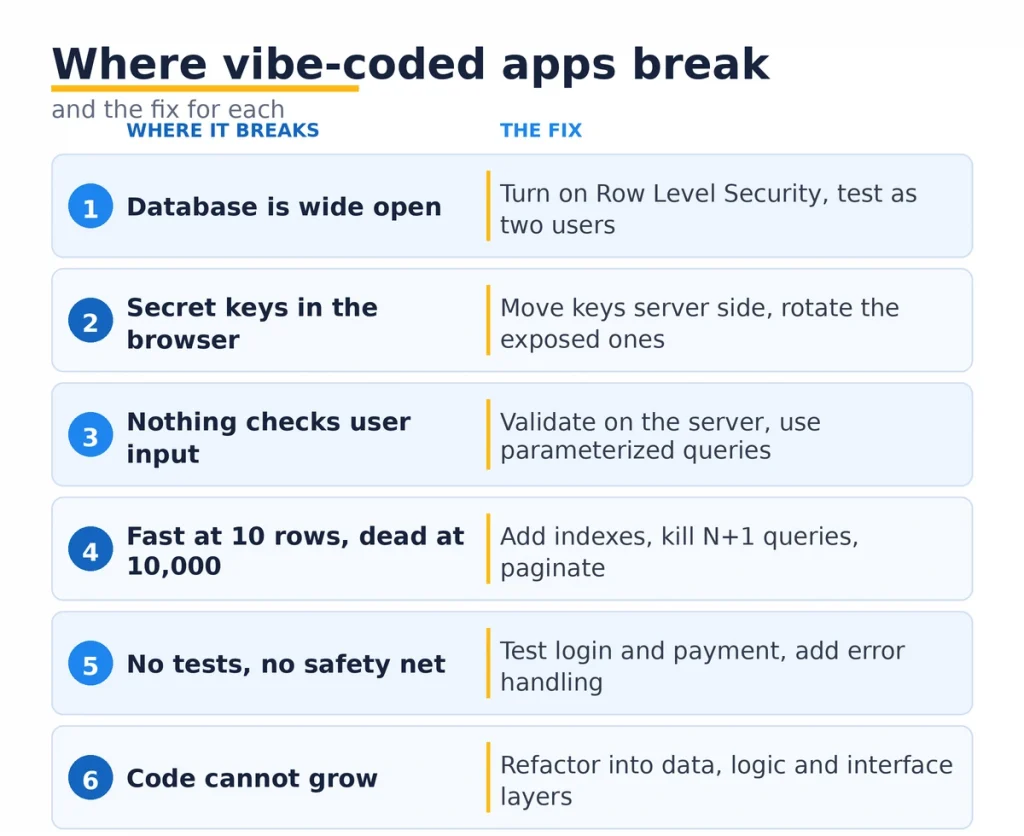
    Six places vibe-coded apps break: data access, secrets, input validation, performance, tests, architecture.

    1. Your database is wide open

    This is the vibe coding failure we see most at Mobilions, and it is the one that leaks data.

    Tools that wire up Supabase or Firebase create the tables and get your app reading and writing fast. What they usually skip is Row Level Security, the rule layer that decides who can see which rows. With it off, every signed-in user can read every other user’s records, and often anyone with your public key can read the whole table from a browser.

    You can check this in about a minute. Open your Supabase project, go to the Authentication or Policies tab, and look at each table. No policies listed means the table is open.

    How to fix it. Turn Row Level Security on for every table that holds real data. Write a policy so a user can only touch their own rows, usually by matching the row’s user id to auth.uid(). Then test it as two different accounts and confirm neither can see the other’s data. This one change closes the most common vibe coding data leak.

    2. Your secret keys are sitting in the browser

    The second break is secrets baked into the frontend. To make the demo work end to end, AI tools often hardcode API keys for Stripe, OpenAI, your database, or a third-party service straight into the client code.

    Anything in the frontend is public. A curious user opens developer tools, reads the bundle, and there is your key. Bots scan public code for exposed keys around the clock, so this is not a maybe.

    How to fix it. Treat every key that shipped in the frontend as already leaked and rotate it. Move secret keys to the server side, into environment variables or a secrets manager, and call the paid service through your own backend endpoint. The browser should never see a secret key again. Publishable keys meant for the client are fine to leave, but know the difference before you ship.

    3. Nothing checks what users type

    Vibe-coded apps trust their inputs. The form works when you type a normal name, so it looks done. It is not.

    This is where the security numbers get loud. Veracode’s 2025 report tested more than 100 AI models across four languages and found 45% of the code samples failed security tests by introducing an OWASP Top 10 vulnerability. Cross-site scripting alone got through in 86% of the relevant cases. Newer, smarter models did not do any better on security.

    Cross-site scripting and SQL injection both come from the same habit: taking whatever a user submits and using it directly, in a page or a database query, without cleaning it first.

    How to fix it. Validate and sanitize every input on the server, not just in the browser. Use parameterized queries so user text can never run as a command. Escape anything you render back onto a page. The OWASP Top 10 is the checklist to run against here, and it is free.

    4. It works at ten rows and dies at ten thousand

    Performance is the quiet one. The app feels instant in the demo because the demo has twelve rows. Real usage brings ten thousand, and the same screen now crawls.

    Three patterns cause most of it. Missing database indexes, so every lookup scans the whole table. N+1 queries, where loading a list fires one more query per item instead of one query total. And selecting entire tables when the screen needs ten rows.

    How to fix it. Add indexes on the columns you filter and sort by. Replace N+1 loops with a single joined query or a batched load. Paginate long lists and select only the columns you use. None of this is exotic, and it usually turns a nine-second screen into a fast one without touching the design.

    5. There are no tests and no safety net

    Ask an AI agent to add a feature and it will happily rewrite code that already worked. Without tests, nobody notices until a user does. This is the complaint behind every “the agent broke my login” post.

    Two things are missing at once. Tests, so a change that breaks checkout gets caught before it ships. And error handling, so when something does fail, the user sees a clear message instead of a blank white screen while your app silently loses their data.

    How to fix it. Add tests around the flows that matter most first: signup, login, payment, anything that touches money or accounts. Wrap risky operations in real error handling with fallbacks and clear messages. Add basic logging so you find out about failures before your users email you.

    A little test coverage on the critical paths is what turns a scary codebase into one you can change with confidence. This is the core of proper software testing, and it is worth doing early.

    6. The code cannot grow

    The last break shows up later, when you try to add the third or fourth big feature and everything slows to a crawl. The app was generated as one tangled piece, so every change risks breaking two things you did not touch.

    Vibe coding is great at a first version and weak at structure. There is no clear separation between the screens, the business logic, and the data. Feature five takes a week because the AI has to reason about the whole app at once, and so do you.

    How to fix it. Refactor into clear layers as soon as the app is worth keeping: a data layer, a logic layer, and the interface. Pull shared logic out of the screens. You do not need a rewrite for this. You need someone to draw the boundaries the AI never did, so the next ten features do not each cost a week.

    Why this keeps happening

    It is tempting to blame the tools, but that misses the point. Lovable, Bolt, Cursor, and the rest are doing exactly what they promise: turn an idea into a running app fast. Hardening is a different job, and they were never asked to do it.

    The mistake is human. A prototype gets users, the users make it feel real, and nobody stops to ask whether the thing was ever built to carry real data. Speed to a demo and readiness for production are two separate milestones. Vibe coding nails the first and skips the second, and the skip is invisible until it is not.

    Treated as a prototyping method, vibe coding is one of the better things to happen to software in years. Treated as a finished product, it is a data breach with a nice landing page.

    What a cleanup actually looks like

    A founder came to us with a Bolt-built scheduling app. Real customers, real bookings, growing fast. Then two users reported seeing each other’s client lists.

    It was Row Level Security, off on every table. Anyone logged in could read every booking in the system. We turned on policies, rotated the Stripe and database keys that were sitting in the frontend, added indexes to the two tables that were timing out, and wrote tests around booking and payment.

    Four days of work. No rebuild, because the data model was sound. The app the founder already had was fine. It just needed the second pass that vibe coding does not include.

    That is the usual shape with vibe coding. Most vibe-coded apps do not need to be thrown away. They need someone to walk the same six places and close each one.

    Five checks before you launch a vibe-coded app
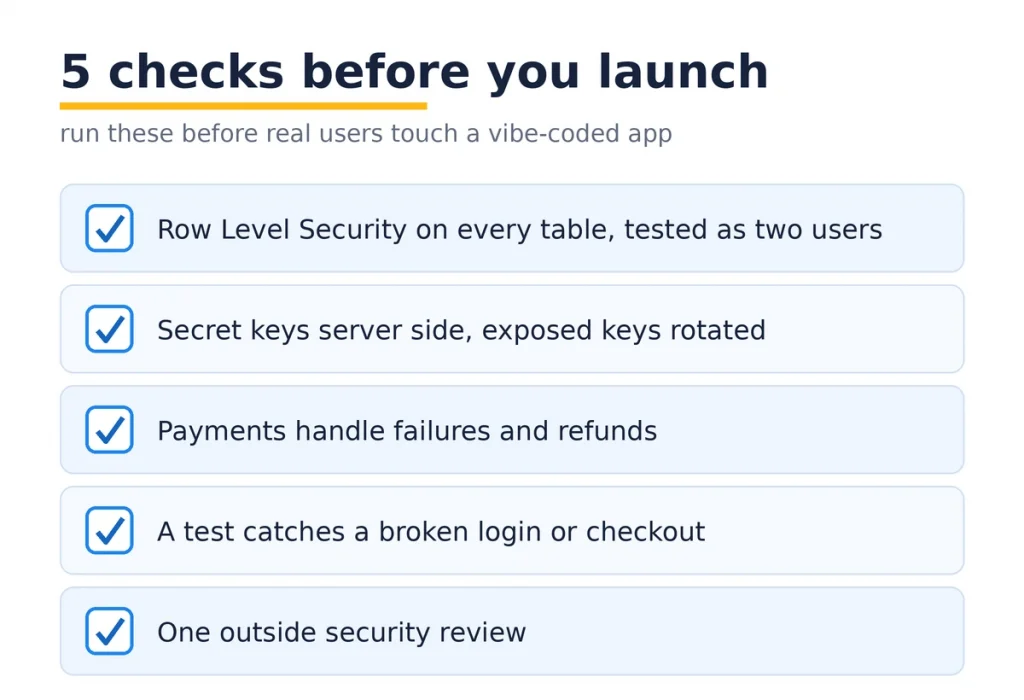
    Five checks before launching a vibe-coded app.

    If you are about to put a vibe-coded app in front of real users, run these first:

    1. Is Row Level Security on for every table with real data, tested as two different users?
    2. Are all secret keys on the server, with anything that shipped in the frontend rotated?
    3. Do payments handle failures and refunds, not just the happy path?
    4. Would a test catch a broken login or checkout before your users do?
    5. Has anyone outside the build looked at it for security?

    Any “no” on that list is a reason to pause. These five catch the worst of the vibe coding failures, and the first four you can often handle yourself. The fifth is where an outside set of eyes pays for itself.

    Where Mobilions fits

    We have been building and fixing software since 2016: 250+ projects for 100+ clients across 20+ countries. A growing share of that work now is exactly this, taking an app that started with vibe coding and getting it ready for real users.

    Our AI code cleanup service walks all six of the places above, closes the security holes first, then the performance and structure problems, and leaves you with the app you thought you had.

    If you are not sure whether yours needs a light pass or a deeper rebuild, that is the kind of call a fractional CTO makes well, and it is usually cheaper to ask early than to find out from a user.

    If you would rather build the next version properly from the start, our approach to custom AI software development keeps the speed of AI without the six breaks.

    FAQ

    What is vibe coding?

    Vibe coding means building software by describing what you want in plain language and letting an AI model write the code, often without reviewing it line by line. Andrej Karpathy coined the term in early 2025, and Collins Dictionary named it Word of the Year 2025.

    Is vibe coding good or bad?

    It is genuinely good for prototypes, internal tools, and testing an idea fast. It becomes risky when a prototype ships to real users with real data, because the AI skips the security and structure that production needs. The method is fine. Shipping it unchecked is the problem.

    Can vibe coding build a real production app?

    Yes, but not on its own. A vibe-coded app can become production ready after a hardening pass that adds database security, moves secret keys to the server, validates inputs, fixes performance, and adds tests. The build is a strong first draft, not the finished product.

    Why do vibe-coded apps break in production?

    They break because the tools optimize for a working demo, not a hardened product. The common failures are open database access, exposed API keys, no input validation, missing indexes, no tests, and tangled structure. Each is predictable and fixable.

    Is AI-generated code secure?

    Often not by default. Veracode’s 2025 study found 45% of AI-generated code samples introduced an OWASP Top 10 vulnerability, with cross-site scripting slipping through 86% of the time. AI code needs a security review before it goes live, the same as any code.

    How do I know if my vibe-coded app is safe to launch?

    Check five things: row level security on every table, secret keys kept server side, payments that handle failures and refunds, tests around login and checkout, and one outside security review. If any answer is no, pause and fix it first.

    How much does it cost to fix a vibe-coded app?

    It depends on how deep the problems go, but most cleanups are far cheaper than a rebuild. A typical security and performance pass on a sound app runs a few days of work. A rebuild is only needed when the data model itself is wrong.

    Should I rebuild or fix my vibe-coded app?

    Fix it if the data model is sound and the problems are security, performance, and structure, which is the common case. Rebuild only when the core data design is wrong in a way that every feature depends on. Most vibe-coded apps do not need a rebuild.

    What are the most common vibe coding mistakes?

    Leaving Row Level Security off, hardcoding API keys in the frontend, trusting user input without validation, skipping database indexes, and shipping with no tests. All five are common, and all five are quick to fix once you know to look.

    Is vibe coding good for MVPs?

    It is one of the fastest ways to build an MVP and validate an idea. Just treat the result as a prototype. Before you take payments or store personal data, run the six-point hardening pass so the MVP does not become a liability.

    Can vibe coders build complex applications?

    Vibe coding handles a first version of most apps well. Complexity is where it strains, because the generated code lacks the structure needed to add features safely. Complex apps usually need an engineer to set the architecture the AI never did.

    Vibe coding vs traditional coding, which is better?

    They are better at different jobs. Vibe coding wins on speed to a first version. Traditional engineering wins on security, scale, and long-term maintenance. The strongest teams use vibe coding to move fast, then apply real engineering before real users arrive.

    What tools are used for vibe coding?

    The common ones are Lovable, Bolt, Cursor, Replit, and v0, plus general assistants like ChatGPT and Claude. They differ in polish, but they share the same blind spot: they produce a working demo and leave production hardening to you.

    Do real companies actually use vibe coding?

    Yes. A quarter of Y Combinator’s Winter 2025 startups had codebases that were about 95% AI-generated. The difference between the ones that scale and the ones that stall is whether they hardened the code before growth, not whether they used AI to write it.

    How do I make my vibe-coded app secure?

    Start with the highest-impact fixes: turn on Row Level Security, move secret keys off the frontend and rotate the exposed ones, validate every input on the server, and run your code against the OWASP Top 10. Then add tests around login and payment.

    How long does it take to make a vibe-coded app production ready?

    For a sound app with the usual issues, a focused hardening pass is often a few days to two weeks. Apps with deeper data-model problems take longer. The security fixes come first because they carry the most risk.

    Can I scale a vibe-coded app?

    Not until the performance and structure breaks are fixed. Missing indexes, N+1 queries, and tangled code all cap how far an app can grow. Once those are addressed, a vibe-coded app can scale like any other well-built product.

    The next step

    Vibe coding is not going anywhere, and it should not. It is the fastest way to turn an idea into something you can click. Just remember that a running demo and a launch-ready product are two different things, separated by the six places above.

    If you already have a vibe-coded app with users on it, start with the five-point launch check today. Fix what you can, and get an outside review on the rest before the numbers grow.

    If you want that review from a team that does it most weeks, tell us what you built and we will point you at the shortest fix. Finding a leak yourself is a Tuesday. Finding out from a customer is a very different day.

  • 12 Mobile App Development Tips From Senior Engineers (2026)

    12 Mobile App Development Tips From Senior Engineers (2026)

    People downloaded about 142 billion apps in 2025 and spent roughly $166 billion in the two app stores, according to the Business of Apps App Data Report. Here’s the part that doesn’t make the headline: most of those apps get opened once and deleted. The market is enormous and the bar is brutal, and the difference between an app that survives and one that gets uninstalled on day one is rarely the idea. It’s the engineering decisions made in the first few weeks.

    I’ve spent years shipping iOS, Android, and cross-platform apps, and the same handful of mistakes sink projects over and over. So these aren’t generic “best practices” scraped from every other blog. They’re the mobile app development tips I actually give founders and product teams before they write a line of code, with the reasoning behind each one, the named tools, and the trade-offs nobody mentions until it’s too late. Many of these tips matter even more in enterprise mobile application development, where security, integration, and compliance leave little room for error.

    What’s the most important mobile app development tip?

    Scope discipline. The single biggest predictor of whether a first app ships on time and on budget is whether the team had the discipline to cut the feature list down to what actually proves the idea. Everything else on this list matters, but a bloated first release is the mistake that quietly kills the most projects. Start there, and the rest of these tips get easier.

    12 Essential Mobile App Development Tips

    With that principle in mind, here are the twelve mobile app development tips that make the biggest difference to a build, in the order I’d prioritize them.

    1. Build a tight MVP, not a feature list

    Every founder arrives with a feature list. The job of a good engineering partner is to help you cut it in half, then cut it again. Your first release exists to answer one question: do people want the core thing this app does? Every feature you add before you know that answer is a bet you’re placing with real money and real months.

    A focused MVP usually ships in a couple of months; a “let’s include everything” v1 slips for a year and launches into silence because nobody validated the core loop. Pick the one workflow that is the reason the app exists, build that part beautifully, and ship it. When we built an AI fitness coaching app, the win wasn’t the length of the feature list. It was nailing the core coaching experience first. You can always add the settings screen later. This is the tip that saves the most money, which is why it’s first.

    2. Should you build native or cross-platform?

    This one decision drives your cost, your timeline, and your ceiling on performance, and too many teams make it by default instead of on purpose. Here’s the honest version:


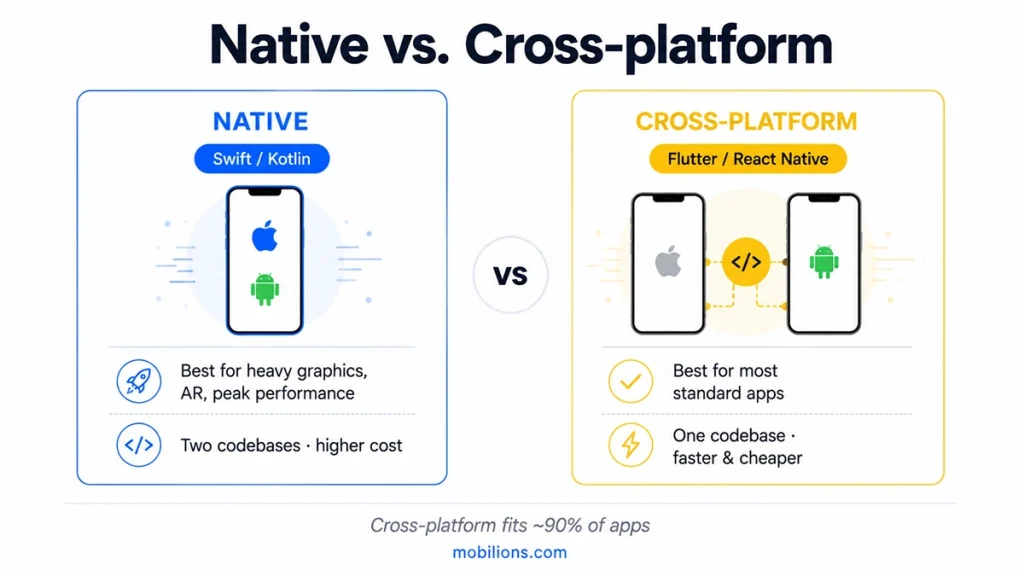
    Native (Swift / Kotlin)Cross-platform (Flutter / React Native)
    Best forHeavy device features, graphics, AR, peak performanceStandard apps: marketplace, social, booking, content
    Cost & speedTwo codebases, slower, pricierOne codebase, faster, cheaper to maintain
    Performance ceilingHighestExcellent for ~90% of apps
    When it hurtsDuplicated work across two teamsEdge cases needing deep native integration
    Native vs cross-platform app development

    For most standard apps, cross-platform development is the right call: one codebase, one team, faster iteration. Go native when your app lives or dies on device-specific performance, like real-time camera processing, heavy 3D, or tight hardware integration. Don’t pick native because it “feels” more serious; pick it because a specific requirement demands it. The reverse is just as common a mistake: forcing cross-platform onto an app that genuinely needs native and then fighting the framework for months.

    3. If you go cross-platform, pick Flutter or React Native for the right reasons

    Both are excellent in 2026, and the endless “which is better” debate misses the point. The right answer depends on your team and your app, not on a benchmark chart.


    FlutterReact Native
    LanguageDartJavaScript / TypeScript
    Shines atPixel-perfect custom UI, smooth animation, identical look across platformsReusing web/React skills, huge library ecosystem
    Pick it whenYour UI is highly custom and brand-drivenYou already have a JS/React team
    HiringGrowing talent poolVery large talent pool

    Reach for React Native when you already have a JavaScript/React team, since the shared language makes it a natural fit and hiring is easier. Reach for Flutter when pixel-perfect custom UI and consistent behavior across platforms matter most. But the factor that beats both: who’s going to maintain this for the next three years? A framework your team can’t staff is the wrong framework, however good it looks in a demo.

    4. Design for the slowest device and smallest screen first

    Your app will be judged on a three-year-old mid-range Android on a weak connection, not the flagship phone on your desk. If it’s smooth there, it’s smooth everywhere. Build it the other way around and you’ll ship something that feels great in the office and janky to half your users.

    Practically: test on real low-end hardware early, keep your main list screens light, lazy-load images, and watch memory on older devices. The smallest screen also forces you to prioritize what actually matters on each view, which usually makes the design better for everyone, including the person on the newest phone.

    5. Plan for offline from day one

    Mobile networks drop. Elevators, subways, parking garages, rural areas, overseas roaming all mean your users will hit dead zones, and an app that shows a spinner or an error the moment connectivity blips feels broken. Retrofitting offline support after launch is painful because it touches your entire data layer, so decide early.

    You don’t need full offline sync for every app, but you do need to answer one question honestly: what happens when a request fails? At minimum, cache the last good state, queue writes to retry when the connection returns, and tell the user clearly what’s happening. Apps that handle a dropped connection gracefully feel dramatically more solid than ones that freeze at the first hiccup.

    6. Read the App Store and Play guidelines before you build

    Nothing stings like finishing a feature and then getting it rejected because it violates a store policy nobody read. Apple’s and Google’s review rules cover privacy, permissions, payments, data handling, and content, and all of it changes every year. A rejection can cost you a week or more at exactly the moment you’re trying to launch.

    Read the current App Store Review Guidelines and Google Play policies before you design anything that touches payments, user data, login, or device information. Two examples that catch teams constantly: using your own payment system where the store requires theirs, and requesting a permission without a clear, justified reason. It’s an hour of reading that saves you a launch delay.

    7. Add analytics and crash reporting before launch, not after

    You cannot fix what you cannot see, and the week after launch is exactly when you most need to see. Ship with analytics and crash reporting already wired in, with tools like Firebase, Crashlytics, or Sentry, so the moment real users arrive, you know which screens they use, where they drop off, and what’s crashing on which devices.

    Teams that bolt analytics on “later” spend the critical first weeks flying blind, guessing at problems they could have measured in an afternoon. Instrument the core funnel before you ship: the app open, the one key action that defines success, and the moments users abandon. That data is what turns your v1.1 from a hunch into a decision backed by real behavior.

    8. Test on real devices, and automate it

    Simulators are convenient and they lie. They don’t reproduce real memory limits, real GPS drift, real camera quirks, real thermal throttling, or the specific weirdness of a particular Android skin. Keep a small rack of real devices, a couple of older Androids and iPhones especially, and test every release on them.

    Then automate the boring parts. Unit tests for your logic, integration tests for your data layer, and end-to-end tests with a framework like XCTest, Espresso, or Detox for the flows that must never break. For a multi-vendor marketplace app, the checkout and payment paths are exactly the flows you automate first, because a silent break there costs real revenue. You don’t need 100% coverage; you need confidence that the paths that make you money still work after every change.

    9. Budget for maintenance from day one

    An app is not a project you finish; it’s a product you keep alive. Every year Apple and Google ship new OS versions, deprecate APIs, and change requirements, and your dependencies age underneath you. Skip maintenance and your app slowly rots, and then one OS update takes it down entirely, usually the week of a big campaign.

    A useful rule of thumb: budget roughly 15 to 20 percent of the original build cost per year for maintenance, and more if the app is central to your business. Plan it before you launch so it’s a line item, not a nasty surprise in month eight. The apps that stay healthy in the store for years are the ones whose owners treated upkeep as normal, not optional.

    10. Secure user data early

    Security retrofitted after launch is expensive and never as good as security designed in. Bake it in: use the platform keychain/keystore for secrets, never store tokens in plain text, encrypt sensitive data at rest, use proper auth flows, and validate your API connections. If you touch health, finance, or children’s data, the bar, and the legal exposure, is higher.

    The common failures are boring and completely avoidable: hard-coded API keys shipped inside the binary, tokens saved in plain preferences, and over-broad permissions that scare both users and reviewers. Handle auth, storage, and API security deliberately in the first sprint, not as a pre-launch panic.

    11. Optimize app size and cold-start time

    First impressions are measured in seconds and megabytes. A bloated download makes people abandon before they install, especially on limited data, and a slow cold start makes the app feel cheap before it has shown anything. Both are fixable, and both are usually ignored until a user complains in a review.

    Strip unused libraries and assets, compress and correctly size images, enable the platform’s app-thinning and code-shrinking tools, and move heavy work off the startup path so the first screen appears fast. Measure your install size and time-to-first-screen like the real metrics they are, because to your users, that first slow launch is your app’s personality.

    12. Set up CI/CD from day one

    Manual builds and hand-typed release steps are where mistakes and wasted hours live. Set up continuous integration and delivery early, using Fastlane, GitHub Actions, TestFlight, or Play internal testing, so every commit builds, tests run automatically, and shipping a new version to testers is one command, not a lost afternoon.

    It feels like overhead on a small team, right up until the first time a broken build almost reaches production and the pipeline catches it. Automating builds, tests, and releases from the start pays for itself within the first month and keeps paying every single release after.

    How long does it take, and what drives the cost?

    A focused MVP typically takes a few months; a complex app with many integrations, custom hardware features, or a heavy backend takes longer. The timeline and budget are driven far more by scope than by platform, which is exactly why the first of these mobile app development tips, cutting scope, matters so much.

    Four things move the number the most: how many core features you insist on for v1, whether you go native or cross-platform, how much custom design and animation you want, and how many third-party systems (payments, maps, messaging, CRMs) you integrate. Trim any of those and you ship sooner for less. This is where an honest engineering partner earns their keep, not by saying yes to everything, but by telling you which 20% of the plan delivers 80% of the value.

    What does the mobile app development process look like?

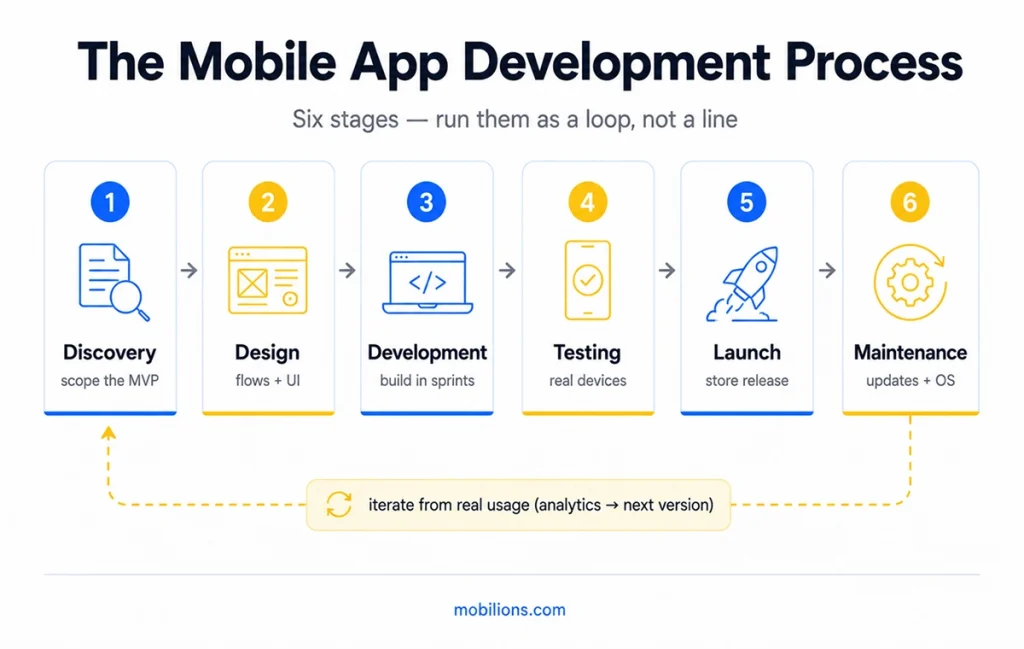
    At a high level, most successful apps move through the same stages: discovery and scoping (define the core problem and cut the MVP), design (flows and UI for the key screens), development (build the app and its backend in short iterations), testing (real devices plus automated tests), launch (store submission and release), and maintenance (updates, OS support, improvements informed by analytics).

    The teams that succeed treat these as a loop, not a line. You ship the MVP, watch what real users do, and feed that back into the next iteration. If you want a partner to run this loop with you end to end, that’s the heart of professional mobile app development, and if you just need experienced hands to extend your own team, you can also hire mobile developers directly.

    Six stages of mobile app development

    How do you get your app discovered?

    Building the app is half the battle; with 142 billion downloads spread across millions of apps, getting found is the other half. App Store Optimization (ASO) is the mobile equivalent of SEO, and most teams ignore it until downloads stall and they can’t work out why.

    The fundamentals are straightforward and high-impact. Your app’s title and subtitle carry real keyword weight, so use the words people actually search for, not clever branding nobody types. Screenshots and the preview video are your storefront, and the first two screenshots decide most installs, so lead with the benefit rather than a login screen. Ratings and reviews move both ranking and conversion, so prompt for a rating at a moment of delight, right after a user wins something in the app, never on first launch. And a steady update cadence signals to both stores that the app is alive and worth surfacing.

    None of this replaces a good product, but a great app with no ASO gets buried, and the fix costs a few hours, not a rebuild. Treat your store listing as a living asset you test and improve, exactly the way you would a landing page.

    Common mobile app mistakes to avoid

    Even good teams repeat the same avoidable errors:

    • Scope creep: adding “just one more feature” until the release date is meaningless.
    • Skipping real-device testing: shipping what happened to work on the simulator.
    • No analytics at launch: flying blind exactly when the data matters most.
    • Ignoring the maintenance budget: treating launch as the finish line.
    • Copying the desktop experience: mobile is a different context, not a smaller screen.
    • Permission overreach: asking for contacts, location, and camera on day one and scaring users off.

    Mobile App Development Tips: Key Takeaways

    • The hardest, highest-value discipline is scope: ship a tight MVP that proves the core idea, then expand.
    • Choose native vs. cross-platform on purpose; cross-platform (Flutter/React Native) fits most standard apps.
    • Design for the slowest device, plan for offline, and read store guidelines before building.
    • Ship with analytics and crash reporting already in, and test on real devices.
    • Treat maintenance, security, app size, and CI/CD as first-sprint concerns, not afterthoughts.

    Mobile app development tips are only useful if they change what you do before you build. Get the scope, the platform choice, and the boring foundations (testing, analytics, maintenance) right early, and everything downstream gets easier. If you want a second opinion on any of these decisions for your own app, that’s the work we do every day; reach out at hello@mobilions.com or explore our mobile app development services.

    Frequently asked questions


    What is the most important mobile app development tip? 

    Scope discipline. Build a tight MVP that proves your core idea instead of a long feature list. A focused first release ships faster, costs less, and gives you real user data to decide what to build next. That data is worth more than any feature you could have guessed at.


    How much does it cost to build a mobile app?

    A simple app usually runs $15,000 to $50,000, a mid-range app with custom features and integrations $50,000 to $150,000, and a complex app $150,000 or more. Cost is driven by features, integrations, and design polish far more than by platform. The fastest way to control it is to cut scope to a focused MVP first.


    How long does it take to build a mobile app? 

     A focused MVP typically takes a few months. Complex apps with multiple integrations, custom hardware features, or heavy backends take longer. The timeline depends far more on scope than on platform, which is why cutting scope is the fastest way to ship.


    Is native or cross-platform better for a new app?

    For most standard apps like marketplaces, social, booking, and content, cross-platform with Flutter or React Native is better: one codebase, faster to build, cheaper to maintain, and strong performance. Choose native with Swift or Kotlin only when a requirement like heavy graphics, AR, or deep hardware access demands the highest possible performance.


    Which is better, Flutter or React Native?

    Both are excellent in 2026. Choose React Native if you already have a JavaScript or React team and want an easier hiring pool. Choose Flutter if pixel-perfect custom UI and consistent cross-platform behavior matter most. The bigger factor than the framework is which one your team can realistically maintain for years.


    What programming language is best for mobile app development?

    It depends on the approach. Native iOS uses Swift, native Android uses Kotlin, and cross-platform uses Dart for Flutter or JavaScript and TypeScript for React Native. There is no single best language. The right choice follows from whether you go native or cross-platform and what skills your team already has.


    Should I build for iOS or Android first? 

    Build for the platform your target users actually carry. iOS often wins for US, higher-spending, or business audiences and is faster to test on fewer devices. Android wins for global reach and lower-cost markets. If budget allows, cross-platform frameworks let you launch on both from one codebase, which is why most new apps start there.


    What are the stages of the mobile app development process? 

    Discovery and scoping, design, development, testing, launch, and maintenance. The best teams treat these as a repeating loop: ship the MVP, learn from real usage through analytics, and feed that into the next iteration rather than trying to perfect everything before launch.


    What are the most common mobile app development mistakes? 

    Building too many features before validating the core idea, skipping real testing on real devices, ignoring performance and app size, treating security as an afterthought, and not budgeting for maintenance or marketing. Almost all of them trace back to one root cause: starting to build before the scope and the plan are clear.


    How do I make my mobile app secure? 

    Encrypt data at rest and in transit, never store secrets or API keys inside the app, use proper authentication with token expiry, and request only the permissions you truly need. Follow the OWASP Mobile guidelines and test for common vulnerabilities before launch. Security is far cheaper to design in early than to retrofit after an incident.


    Why is app testing so important? 

    Because a crash or a bad first impression costs you a user you paid to acquire, and app-store ratings punish it publicly. Test on real devices across screen sizes and OS versions, not just an emulator, and cover performance, offline behavior, and edge cases. Automated tests plus real-device checks catch the issues users would find first.


    Can I build a mobile app without coding, using no-code or AI? 

    For a simple app, an internal tool, or a quick prototype to validate an idea, yes. No-code platforms and AI assistants can get you to a working version fast. For a real, scalable, secure product with custom features, you still need proper development. No-code and AI are great for starting and testing, not for a serious app that must grow.


    How much does it cost to maintain a mobile app? 

    A common rule of thumb is 15 to 20 percent of the original build cost per year, and more if the app is central to your business. Maintenance covers new OS versions, deprecated APIs, security updates, and dependency upgrades. Budgeting for it before launch keeps your app from slowly breaking.


    How do I get more downloads for my app?

    Start with App Store Optimization: use searched keywords in your title and subtitle, lead with benefit-driven screenshots, and earn ratings by prompting at moments of delight. Pair that with a clear launch plan and steady updates. Discovery is as much work as development, so budget for it rather than assuming a good app markets itself.


    How do I stop my app from being rejected by the app stores? 

    Read Apple’s App Store Review Guidelines and Google Play’s policies before building features that touch payments, login, user data, or permissions. Most rejections come from privacy, permissions, and payment-policy issues that are simple to design around when you know the rules up front.


    How do I find and choose the right app developer? 

    Look at a relevant portfolio of shipped apps, not just screenshots, and check reviews or references. Ask how they handle testing, security, and post-launch support, and start with a small paid task before a big commitment. The best signal is clear communication: a developer who asks sharp questions about your idea usually builds a better app.


    Should I hire a freelancer or an agency to build my app? 

    A freelancer is cheaper and fine for a small, well-defined app or a single feature. An agency costs more but brings a full team, process, design, testing, and continuity, which matters for a real product you plan to grow. For a first serious app, an agency or a dedicated team usually beats coordinating several freelancers yourself.