OpenAI Dots are a new kind of always-on AI agent inside ChatGPT, announced at OpenAI’s DevDay 2026 on September 29. The simple way to think about a dot: instead of a chatbot you have to prompt step by step, you get a persistent digital coworker that runs in the background, uses its own computer and browser, and turns up with work already done. It is one of the biggest shifts in how people will actually use AI since ChatGPT launched, and it raises a real question for every business, do you rent an agent from OpenAI, or build your own?
This guide explains OpenAI Dots in plain language: what a dot is, how it works, the GPT-6 Astra model behind it, what it costs, what it can and cannot do, and the safety concerns people are raising. Then, because we build production AI for a living, we give an honest take on what Dots means for businesses and when an off-the-shelf dot is enough versus when you still want a custom agent. Where something is not yet confirmed by OpenAI, we say so rather than guess.
Key takeaways
- OpenAI Dots are always-on autonomous agents in ChatGPT that work in the background without step-by-step prompts, announced at DevDay 2026 on September 29.
- Each dot runs on its own cloud virtual computer powered by GPT-6 Astra, can browse the web, open and create files, and operate more than 4,000 connected apps like Slack, Teams, and Google Drive.
- Your first dot is included on ChatGPT Pro (from 100 dollars a month) and Business Premium. The cheapest company access works out to about 150 dollars a month. Free, Go, and Plus do not get one, and some regions are excluded at launch.
- Safety limits are enforced in code: research tasks cannot send messages, change content, or control a computer, monitoring can pause a dot, and sensitive actions like changing a password stay with the user.
- For businesses, Dots are a fast way to automate general workflows, but a shared, OpenAI-hosted agent is not the same as a custom agent built on your data, your rules, and your compliance needs. The choice depends on control, privacy, and fit.
What is OpenAI Dots?
OpenAI Dots is a new class of AI agent built into ChatGPT, introduced at the company’s DevDay 2026 event in San Francisco on September 29, 2026. Where ChatGPT has mostly been a tool you talk to and wait for, a dot is designed to work on its own, continuously, and come back when it has something for you. OpenAI describes it as less of a chatbot and more of a coworker that shows up with the work finished.
The name points at the idea: a small, persistent presence that is always there, quietly getting things done. A dot can run 24 hours a day, learn from your feedback over time, and act across the services you already use rather than being boxed inside a chat window. That shift, from a reactive assistant you drive to a proactive agent that drives itself, is the whole point, and it is why Dots has drawn so much attention. You can read OpenAI’s own framing on the OpenAI site, and the launch was widely covered, including by TechCrunch.
How OpenAI Dots works
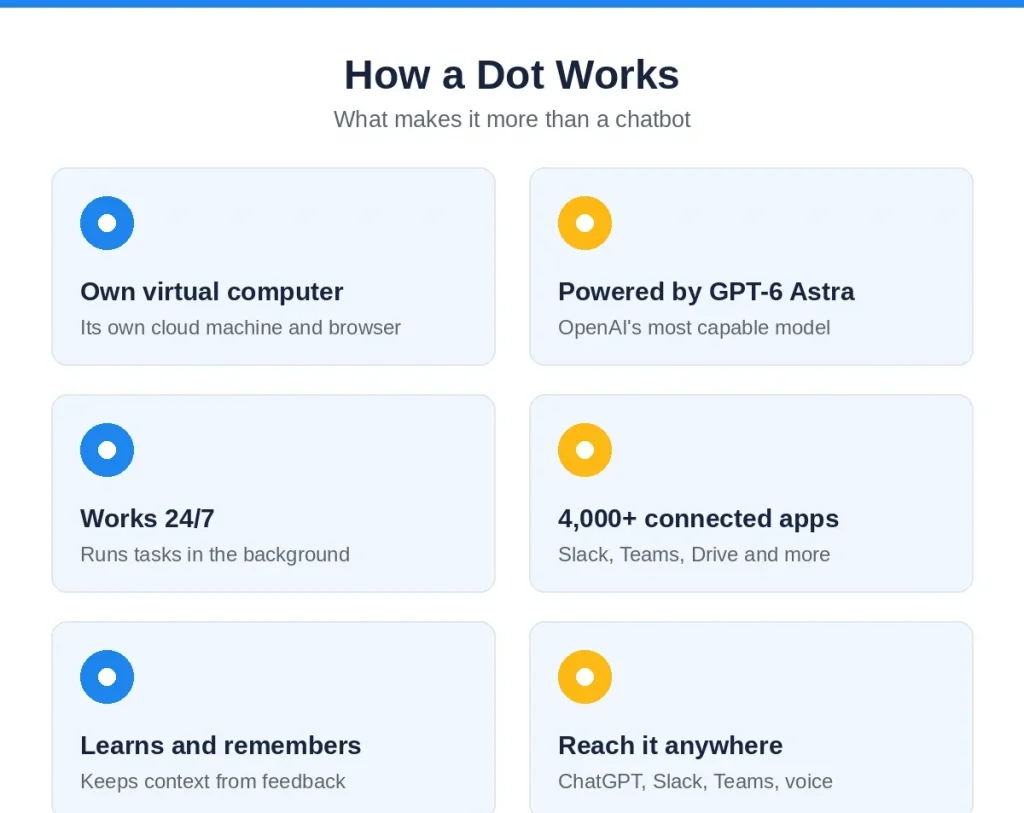
The mechanics are what make Dots different from a normal chatbot. Each dot runs on its own cloud-based virtual computer. That computer, powered by OpenAI’s GPT-6 Astra model, can browse the web, open and create files, and operate more than 4,000 connected third-party apps, including tools like Slack, Microsoft Teams, and Google Drive. Because it has its own machine, a dot can do multi-step work that spans several services, not just answer from what is inside ChatGPT.
The part that feels new is what happens when you are not talking to it. In that time, a dot runs background tasks: it reads the sources you have permitted, works through jobs you have handed it, and saves private notes so it remembers context for next time. You are not babysitting each step. You hand over a goal, and the dot works toward it on its own schedule.
You interact with a dot the way you would message a colleague. In ChatGPT it is available on desktop, web, and mobile, and you can also reach a dot inside Slack and Microsoft Teams. OpenAI says texting is coming soon, and you can hop on a voice call and talk to a dot in natural language. The experience is meant to feel less like opening a tool and more like pinging someone on your team who already has the context.
GPT-6 Astra: the model behind Dots
Dots run on GPT-6 Astra, which OpenAI introduced earlier in the same month and calls its most capable model. Astra is specifically optimized for the kind of work a dot has to do: complex, multi-step tasks, operating a computer, browsing the web, coding, and professional workflows. In other words, the model was built for action, not just conversation, which is what lets a dot plan a job, use tools, and carry it through rather than stopping at a written answer.
This matters because an always-on agent is only as reliable as the model steering it. A lot of earlier agent demos broke down on long, multi-step tasks, drifting off course or losing the thread. Astra is OpenAI’s attempt to close that gap, and Dots is the product that puts it to work. How well it holds up on real, messy business tasks over time is the thing to watch, and the honest answer in these early weeks is that it is promising but still being proven in the wild.
What can a Dot actually do? Real examples
Abstract talk about autonomous agents is easy to dismiss, so here are the concrete examples OpenAI and early coverage have described. They give a clear picture of where a dot fits.
- Catch and prepare routine work. A dot notices a forgotten invoice and prepares it for your approval, so the task does not slip through the cracks.
- Ship software changes end to end. A dot watches customer feedback, scopes the fixes, builds and tests them, and brings back complete pull requests with videos attached, ready for a developer to review.
- Keep work in sync as things change. A dot revises launch materials when the product scope changes, reruns analyses as new data arrives, and updates a proposal as requirements shift, without being asked each time.
The common thread is that a dot handles the ongoing, multi-step work that normally needs a person to remember, chase, and update it. It is not a single clever answer, it is continuous follow-through. That is genuinely useful for the busywork that fills a week, and it is exactly the sort of work most teams wish they could hand off.
How much does OpenAI Dots cost?
Pricing is where the detail matters, because Dots is not on the cheaper plans. Here is what OpenAI has confirmed at launch.
| Plan | Dot access | Cost |
|---|---|---|
| ChatGPT Pro | First dot included | From 100 dollars a month |
| Business Premium | First dot included | Premium seat (part of a workspace) |
| Cheapest company access | One dot | About 150 dollars a month, or 120 billed annually |
| Free, Go, Plus | No dot at launch | Not available |
A few specifics worth knowing. Your first dot is included at no extra charge on ChatGPT Pro, which starts at 100 dollars a month, and on Business Premium. A Business workspace needs at least two paid seats, and one Standard seat at 25 dollars plus one Premium seat qualifies, which by arithmetic from OpenAI’s price list makes the cheapest company access to a dot about 150 dollars a month, or 120 dollars billed annually.
There are limits on who can get one at launch. Free, Go, and Plus plans do not include a dot, and Pro users in the EEA, Switzerland, and the United Kingdom are excluded for now. OpenAI has said extra dots and more speed or monthly capacity will come later, but has not priced them yet, so the cost of scaling beyond a single dot is still unknown.
Limits, safety, and the concerns people are raising
An always-on agent that can use your apps and act on its own is powerful, and that power is exactly why safety is the loudest part of the conversation. OpenAI has built in several limits, and critics have flagged several open questions.
On the guardrail side, OpenAI says certain limits are enforced in code, not just policy. Research tasks, for example, cannot send messages, change content in connected apps, or control a browser or computer. Monitoring can pause or stop a dot’s work if it detects a safety concern. And certain sensitive actions, such as changing a password, always stay with the user rather than the agent. These are meaningful boundaries, and the in-code enforcement is a stronger promise than a written rule.
The concerns are real too. A dot learns from your feedback and retains context, but users currently cannot view, modify, or delete individual dot memories, which is a genuine privacy and control gap. Giving an autonomous agent standing access to your email, files, and work apps expands your attack surface and your exposure if something goes wrong. And several practical unknowns remain: additional-dot pricing, the full usage terms, the complete list of eligible countries, and any Dots-specific compliance attestation have not been published. For a regulated business, those unknowns are not small.
How Dots is different from regular ChatGPT and earlier agents
It helps to place Dots against what came before. Regular ChatGPT is reactive: you ask, it answers, and nothing happens until you ask again. Earlier agent features could take a few actions in a session, but they still ran while you watched and stopped when the session ended. A dot is different on three axes.
- Always-on, not per-session. A dot keeps working in the background between conversations, rather than only while you have a chat open.
- Its own computer. A dot operates a dedicated cloud machine with a browser and file access, so it can do real work across apps, not just talk about it.
- Proactive follow-through. A dot chases, updates, and finishes multi-step work on its own schedule, instead of waiting for the next prompt.
That is the leap: from a tool you operate to a coworker you delegate to. It is also why the comparison that matters for businesses is not Dots versus ChatGPT, but Dots versus an agent built for you, which is where the real decision sits.
What OpenAI Dots means for businesses
For a lot of teams, Dots will be the easiest on-ramp to real automation they have had. If your work lives in Slack, Google Drive, and the common business apps, a dot can start taking repetitive, multi-step jobs off people quickly, with no build project. That is a genuine win for general productivity, and it will raise the baseline expectation of what AI should do in a company.
But there is a catch worth being clear-eyed about. A dot is a shared, OpenAI-hosted agent running on OpenAI’s model, with memories you cannot yet inspect or delete, access tied to OpenAI’s connectors, and compliance terms that are not fully published. For general admin work that is often fine. For work that touches sensitive data, regulated workflows, your own private systems, or logic specific to your business, a one-size agent you do not control is a harder sell. That is the line every business should think about before handing a dot the keys.
OpenAI Dots vs building your own AI agent
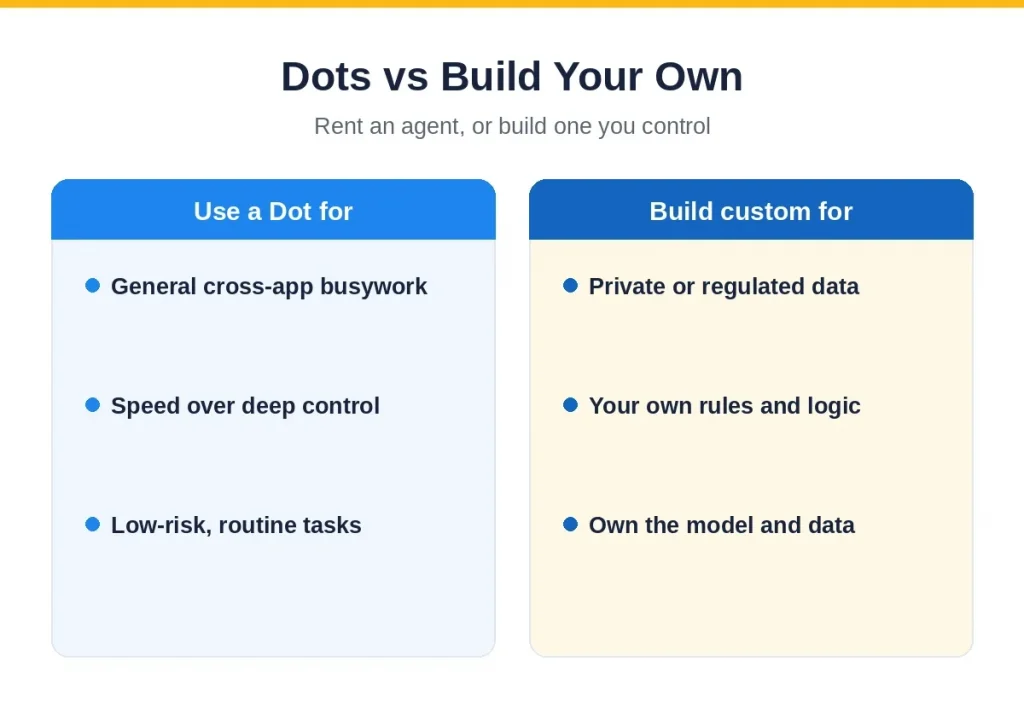
This is the question we get asked most since the launch, so here is the honest cut. Dots and a custom agent are not the same thing, and the right choice depends on what you are automating.
| Factor | OpenAI Dots | Custom AI agent |
|---|---|---|
| Setup | Fast, no build | Scoped and built for you |
| Control | OpenAI’s model and rules | Your model choice, rules, and logic |
| Data and privacy | Hosted by OpenAI, memories not editable | Your infrastructure, your data control |
| Compliance | Terms not fully published | Built to your HIPAA, SOC 2, or other needs |
| Integration | 4,000+ OpenAI connectors | Your exact systems, however custom |
| Best for | General, cross-app admin work | Sensitive, regulated, or business-specific work |
Put simply: use a dot for the general, low-risk busywork where speed matters more than control. Build a custom agent when the work touches private data, a regulated process, or logic that is specific to how your business runs, and when you need to own the model, the rules, and where the data lives. Many companies will do both, a dot for broad productivity and a custom agent for the core, sensitive workflows. That is the same honest advice we give in our agentic AI development work.
How to get ready for always-on agents
Whether you adopt Dots, build your own, or both, the groundwork is the same, and getting it right is what separates teams that benefit from agents from teams that get burned. A few practical steps.
- Tidy your data and permissions. Agents are only as safe as the access you give them. Decide what a dot or agent can see and do, and use least-privilege access, not blanket keys.
- Pick one workflow to start. Choose a repetitive, multi-step task where a mistake is cheap, prove the value, and expand from there rather than automating everything at once.
- Keep a human on consequential steps. Let the agent draft, chase, and prepare, but keep a person approving anything that spends money, sends on your behalf, or changes a record.
- Decide what must stay private. For anything sensitive or regulated, think hard before putting it on a shared, hosted agent, and consider a custom build you control instead.
None of this is heavy. It is the difference between agents that quietly save you a day a week and agents that quietly create a mess, and it applies to Dots just as much as to anything custom. The teams that win with agents are the ones that set these rules before switching anything on.
The bigger picture: what Dots signals
Step back and Dots is a marker of where AI is heading. The industry is moving from assistants you prompt to agents that act, from single answers to continuous work, and from tools inside a chat window to software that operates your other software. OpenAI putting an always-on agent in front of millions of ChatGPT users pushes that shift into the mainstream faster than any single company could on its own.
It also sharpens the build-versus-buy question for every company. A capable, general agent is now a subscription away, which is great for broad productivity and raises the bar for what counts as a real, differentiated AI product. The work that stays valuable to build yourself is the work that is specific to your business, your data, and your compliance reality, exactly the agents a generic dot cannot be. That is not a threat to custom AI; it is a clearer map of where custom AI is worth it.
A quick history: how AI got to always-on agents
Dots did not appear out of nowhere. The path runs through a few clear stages. First came chatbots you prompt one message at a time, which answer and then wait. Then came tools and plugins, letting a model call a calculator, search, or an API inside a single conversation. Next were the first agents, which could take a short chain of actions in one session while you watched, but stopped when the session ended. Dots is the next step: an agent that keeps its own computer, runs between your conversations, and acts on a standing goal rather than a single request.
Each stage moved the model a little further from answering and a little closer to doing. What changed with GPT-6 Astra is reliability on long, multi-step work, which is the thing that always broke the earlier attempts. Whether Astra holds up over weeks of real use is the open question, but the direction is unmistakable, and Dots is the clearest consumer-facing expression of it so far.
Common misconceptions about OpenAI Dots
Because Dots is new and the coverage is loud, a few wrong ideas are already spreading. Worth clearing up.
- “Dots is just a smarter chatbot.” No. The difference is that a dot has its own computer and runs in the background. It acts across your apps on its own schedule, which a chatbot does not do.
- “Dots can do anything autonomously.” No. OpenAI enforces limits in code, research tasks cannot send messages or control a computer, monitoring can pause a dot, and sensitive actions stay with you. It is autonomous within boundaries, not unlimited.
- “Everyone can use it now.” No. At launch it is Pro and Business Premium only, Free, Go, and Plus are excluded, and some regions including the EEA, Switzerland, and the UK are left out for now.
- “A dot replaces your custom AI project.” Not for everything. A shared, hosted dot is great for general work, but it is not built on your private data, your rules, or your compliance needs, which is exactly what a custom agent is for.
The honest summary is that Dots is a real step forward and a genuinely useful product, not magic and not a universal replacement for purpose-built AI. Treating it as either overhypes it or sells it short.
How Mobilions can help
Mobilions builds production AI, including autonomous and agentic systems, for companies that need more than an off-the-shelf tool. We start from the outcome, are honest about when a product like Dots is the right answer and when it is not, and design guardrails, human checkpoints, and compliance in from the start. We have delivered software and AI since 2016, more than 250 projects for over 100 clients across 20-plus countries, and the same senior engineers scope, build, and support the work.
If Dots has you thinking about agents and you want a straight read on buy versus build for your specific workflows, that is exactly the conversation we have. Explore our AI agent development services and AI automation, read our guide to AI agent frameworks, or book a discovery call.
Will Dots replace jobs?
This is the question under a lot of the worry, so here is a measured answer. A dot is built to take over tasks, not roles. The work it is good at, chasing invoices, syncing documents, running routine analyses, preparing changes for review, is the repetitive, low-judgment part of many jobs, not the whole job. For most people, the realistic near-term effect is that the busywork shrinks and the time shifts to the parts that need judgment, relationships, and decisions, which agents are not built to own.
That does not mean nothing changes. Roles that are almost entirely routine coordination are the most exposed, and every team will feel pressure to do more with the same headcount as this capability spreads. The sensible response is not panic, it is to get good at directing agents: deciding what to delegate, checking their work, and keeping judgment where it belongs. The people who thrive will be the ones who treat a dot as a capable junior coworker they manage, not a competitor. As with every past automation wave, the work moves up the value chain rather than simply disappearing.
What is OpenAI Dots?
OpenAI Dots is a new class of always-on AI agent in ChatGPT, announced at DevDay 2026 on September 29. Each dot runs on its own cloud virtual computer powered by GPT-6 Astra, works in the background without step-by-step prompts, and can browse the web, handle files, and operate more than 4,000 connected apps.
When did OpenAI launch Dots?
OpenAI announced Dots at its DevDay 2026 event in San Francisco on September 29, 2026, rolling out to ChatGPT Pro and Business Premium users in eligible markets, with more interaction options and wider availability described as coming in following weeks.
When did OpenAI launch Dots?
Your first dot is included on ChatGPT Pro, from 100 dollars a month, and on Business Premium. The cheapest company access works out to about 150 dollars a month, or 120 billed annually. Free, Go, and Plus do not include a dot at launch, and extra-dot pricing has not been announced.
What model powers Dots?
Dots run on GPT-6 Astra, OpenAI’s most capable model, optimized for complex, multi-step work, operating a computer, browsing, coding, and professional workflows, which is what lets a dot plan and carry out jobs rather than just answer.
What can a Dot do?
A dot handles ongoing, multi-step work on its own: noticing a forgotten invoice and preparing it, watching customer feedback and returning tested pull requests with videos, and updating launch materials, analyses, and proposals as things change, without being prompted each time.
Is OpenAI Dots safe?
OpenAI enforces limits in code: research tasks cannot send messages, change content, or control a computer, monitoring can pause a dot, and sensitive actions like changing a password stay with the user. Concerns remain, including that users cannot yet view or delete a dot’s memories and that compliance terms are not fully published.
How is Dots different from regular ChatGPT?
Regular ChatGPT is reactive and works only while you prompt it. A dot is always on, runs on its own computer with a browser and file access, and proactively chases and finishes multi-step work in the background. It is less a tool you operate and more a coworker you delegate to.
Can businesses use OpenAI Dots?
Yes, through ChatGPT Business Premium, with cheapest company access around 150 dollars a month. Dots are a fast way to automate general cross-app admin work. For sensitive data, regulated workflows, or business-specific logic, a custom agent you control is often the better fit.
Should I use Dots or build a custom AI agent?
Use a dot for general, low-risk busywork where speed matters and full control is not essential. Build a custom agent when the work touches private data, a regulated process, or business-specific logic, and when you need to own the model, the rules, and the data. Many companies use both.
Which countries and plans can get Dots?
At launch, Dots are on ChatGPT Pro and Business Premium in eligible markets. Free, Go, and Plus do not get one, and Pro users in the EEA, Switzerland, and the UK are excluded for now. OpenAI says availability will expand but has not published the full list.

Mayank Makwana is an AI Solution Architect and Full Stack Developer at Mobilions, where he designs and ships production AI systems — grounded, governed, and owned by the client. He specializes in LLM applications, retrieval-augmented generation (RAG), and AI agents, and also builds modern web applications. He writes senior-level guides on AI architecture, applied machine learning, and web engineering.