Tag: RAG

  • Fabric Architectures for AI Systems: A Complete 2026 Guide

    Fabric Architectures for AI Systems: A Complete 2026 Guide

    Ask ten engineers what an “AI fabric” is and you’ll get ten answers. One means a data platform. One means the network cabling between GPUs. One means whatever their vendor sold them last quarter. That confusion is the single biggest reason teams struggle to reason about fabric architectures for AI systems, so this guide starts by clearing it up, then goes deep on the version that actually matters when you’re building AI: the software one.

    Here’s the uncomfortable truth underneath the buzzword. Most AI systems that stall in production don’t stall because the model is weak. They stall because the plumbing underneath (the data access, the retrieval, the permissions, the monitoring) was wired together by hand, use case by use case, until nobody could safely change anything. Gartner reported in 2026 that organizations with successful AI initiatives invest up to four times more in their data and analytics foundations than everyone else. A fabric is what that investment looks like when it’s done well.

    What is a fabric architecture for an AI system?

    A fabric architecture for an AI system is a shared software layer that connects data, models, retrieval, orchestration, and governance through consistent interfaces, so the parts of your AI stack work as one system instead of a web of one-off integrations. You connect each component to the fabric once, rather than wiring every component directly to every other one.

    The name is borrowed from textiles on purpose. A fabric is a mesh of threads that behaves like a single continuous surface. Swap one thread and the cloth still holds. In software terms: swap your vector database, add a second model, tighten a permission, and the contract between layers stays put, so you change one connector instead of hunting down fifty call sites across a dozen services.

    It’s worth being precise about what a fabric is not. It isn’t a product you buy, despite what the demos imply, and it isn’t your database or your model. It’s an architectural pattern, a set of clean seams between the moving parts, that you assemble from platforms and glue code. The older enterprise idea of a “data fabric” covers just the data seam. An AI fabric stretches the same discipline across the whole path, from raw data to a governed agent doing real work.

    Why do AI systems end up needing a fabric?

    Because the pieces multiply faster than anyone plans for. A first AI feature usually starts clean: one model, one data source, a hard-coded prompt. It ships, it works, everyone’s happy. Then the second use case wants two more data sources and a cheaper model for the easy requests. The third needs an embedding model and access to a system the first two never touched. Each connection is bespoke, with its own auth, its own retries, its own logging, or no logging at all.

    Six months in, you’ve rebuilt the classic “n-by-m” mess, where every new model or data source multiplies the connections you have to babysit. AI makes this worse than traditional software for three concrete reasons:

    • You rarely end up with one model. A big model for hard reasoning, a small cheap one for classification, an embedding model for search, maybe a fine-tuned one for your domain. Each needs to be called, versioned, and paid for.
    • The inputs are messier than a normal app’s. Documents, databases, APIs, and live streams, all with different formats and freshness, all needing permission checks before a model ever sees them.
    • The system acts, it doesn’t just read. An AI system generates content and takes actions, so weak governance isn’t a tidiness problem, it’s a liability.

    The data problem is the one teams underestimate most. IBM found that only 29% of technology leaders believe their data quality is good enough to scale generative AI. A fabric doesn’t magically fix data quality, but it does give you one governed place to solve it, instead of re-solving it in every project. That’s the core move of the whole pattern: connect each thing once, to the fabric, not many times, to each other.

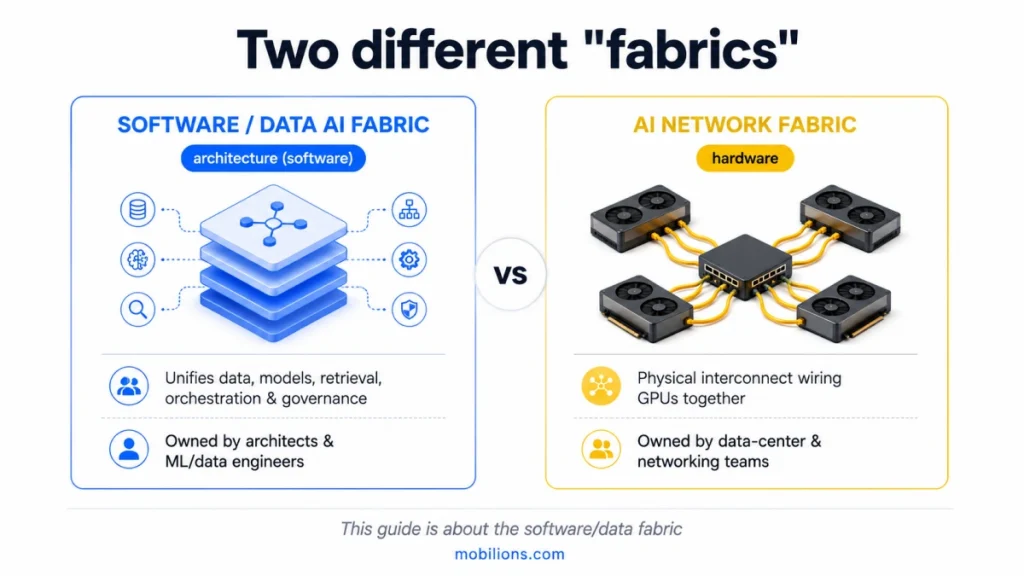
    Data fabric, AI network fabric, or Microsoft Fabric, which one do you mean?

    Three completely different things wear the word “fabric,” and mixing them up wastes weeks. Here’s the quick map:

    “Fabric”What it actually isWhose problem it is
    Data / software AI fabricAn architecture layer unifying data, models, retrieval, orchestration, and governance in softwareArchitects and ML/data engineers building AI products
    AI network fabricPhysical networking, the interconnect wiring GPUs together (InfiniBand, high-speed Ethernet)Data-center and hardware teams running training clusters
    Microsoft FabricA specific commercial analytics platform from MicrosoftTeams standardized on the Microsoft data stack
    Software data fabric vs AI network fabric — comparison for AI systems

    This guide is about the first one, the architecture you design when you build an AI product. The network fabric is a cabling-and-throughput conversation for whoever runs your GPU cluster, and it barely overlaps with application design. Microsoft Fabric is a real product that happens to share the word; it can serve as part of your data layer, but it isn’t the architectural pattern itself. When someone searches “fabric architecture for AI systems,” they almost always mean the software one. Keep the three straight and half the vendor noise disappears.

    What are the layers of a fabric architecture for AI systems?

    Nearly every production AI system I’ve worked on resolves into the same five layers. You won’t build all five fully on day one, and you shouldn’t try. But naming them tells you what you have, what’s missing, and, most usefully, where the risk is hiding.
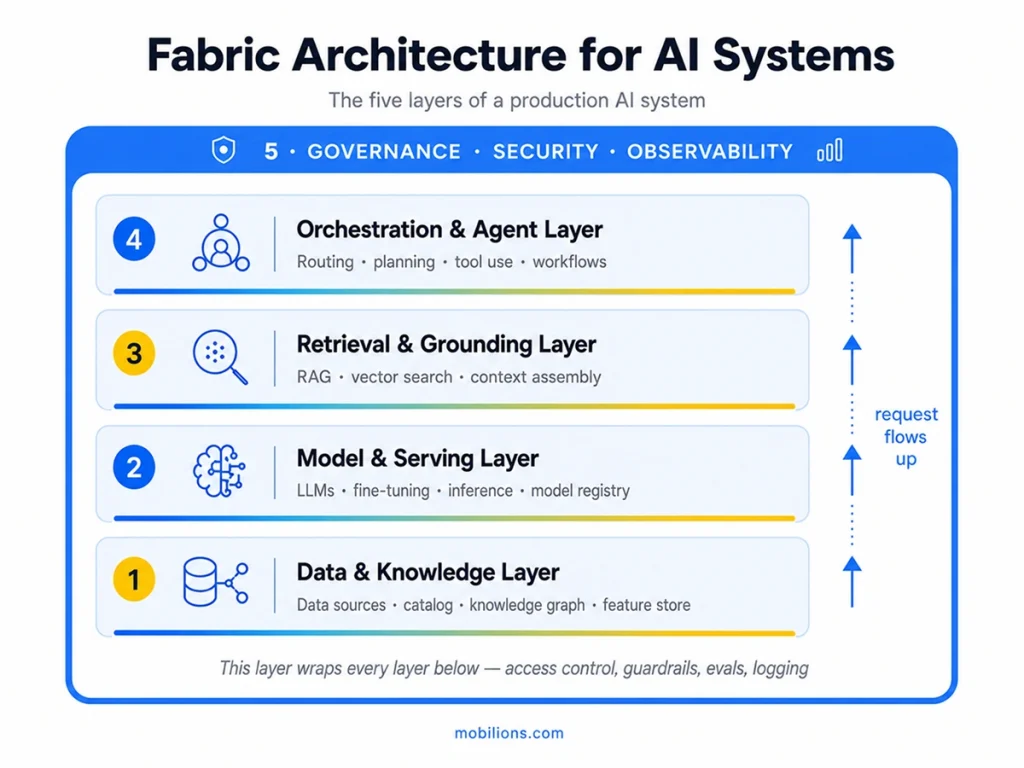
    Five-layer fabric architecture for AI systems

    1. The data and knowledge layer. This is the floor everything else stands on: governed access to your structured data, documents, and domain knowledge, usually through connectors, a catalog so people can find what exists, and often a knowledge graph or feature store. When this layer is weak, every layer above inherits the mess, which is why a surprising amount of “AI work” is really data work wearing a costume. In tooling terms this is where things like a warehouse, dbt or Airflow pipelines, and a graph store such as Neo4j tend to live. Getting data into the system cleanly and safely is exactly where careful AI integration pays for itself.

    2. The model and serving layer. Here sit the models, foundation LLMs, small task-specific models, embedding models, anything you fine-tune, plus the serving that turns a model into a fast, affordable endpoint. The piece people skip and later regret is the model gateway: a thin interface every other layer calls, so switching from one provider to another, or routing cheap requests to a small model and hard ones to a big one, doesn’t ripple through your code. Serving stacks like vLLM or a managed endpoint handle the runtime; a registry such as MLflow tracks versions. This is the domain of machine learning development and, when a language model is the product, focused LLM development.

    3. The retrieval and grounding layer. Foundation models don’t know your business and will confidently invent an answer when asked something they don’t know. Retrieval fixes that by fetching the right context, from documents, a database, or the knowledge graph, and handing it to the model at request time. This is where RAG, vector search, chunking, and context assembly live, with vector stores like pgvector, Weaviate, or Pinecone doing the lookup. The mistake is treating it as “just add a vector database.” The accuracy of the entire system is won or lost on retrieval quality: how you chunk, how you rank, how you handle freshness. Solid RAG development is usually the highest-impact work in an enterprise AI build.

    4. The orchestration and agent layer. This is the decision-making: routing a request, planning multi-step work, calling tools and APIs, recovering when a step fails. A simple system retrieves and answers. A serious one plans and acts, which is where real AI agent development, and frameworks like LangGraph, come in. It’s the layer that turns “a bot that talks” into “a system that does work,” and it leans hard on the layer above it for permission before it’s allowed to touch anything that matters.

    5. Governance, security, and observability: the AI fabric security architecture.
    This layer does not sit on top, it wraps the other four, and together they form the AI fabric security architecture. Access control for both users and agents, guardrails and policy, evaluation, plus logging and tracing so you can always answer what the system did and why. In a regulated setting this is not a feature you add later; it is the thing that lets you ship at all. Treat it as part of responsible AI development from the first commit, and use the NIST AI Risk Management Framework as a reference for what governed should mean.

    How is a data fabric different from a data mesh or data lakehouse?

    Short version: a data fabric unifies access through technology and metadata; a data mesh decentralizes ownership to domain teams; a data lakehouse is a storage-and-query platform. They answer different questions and often coexist. This is one of the most-searched confusions in the whole space, so here’s the honest comparison:

    ApproachCore ideaBest when
    Data fabricA unified access layer over distributed data, driven by active metadataYou need consistent, governed access across many systems
    Data meshDecentralized ownership, each domain team owns its data as a productLarge orgs where central data teams are a bottleneck
    Data lakehouseOne platform combining a lake’s flexibility with a warehouse’s structureYou want a single place to store and query all data types

    For an AI fabric, the data-fabric idea is the relevant one, it’s your data-and-knowledge layer. A mesh is an ownership model you might run alongside it; a lakehouse is often the storage the fabric reads from. They’re not competitors so much as answers to “who owns it,” “how do I reach it,” and “where does it sit.” IBM’s own comparison is a good neutral reference if you want to go deeper.

    What does a single request actually look like?

    Abstractions click when you trace one real request through them. Picture a support assistant, and a customer types: “Where’s my order, and can you change the delivery address?”

    The orchestration layer reads that as two intents, a lookup and an action, and plans accordingly. It calls retrieval, which pulls the customer’s order and the delivery policy from the data layer, where access control has already confirmed this agent is allowed to see this customer’s records. The model layer drafts a reply from that grounded context. Because changing an address is a sensitive action, the governance layer forces a checkpoint, a policy check, maybe a human approval, before orchestration is permitted to call the address-change tool. Every hop is logged, so if something looks wrong next week, you can replay exactly what happened.

    Notice what the fabric bought you: the same data access, model gateway, and governance rules that served this request will serve your next ten use cases. You didn’t rebuild grounding or permissioning for the support bot, you reused the fabric. That reuse is the entire economic case for the pattern, and it’s why the second AI feature on a good fabric ships in a fraction of the time the first one did.

    When do you actually need a fabric, and when is it overkill?

    A fabric is an investment that pays back only if you’ll build on it more than once. Over-building it for a single feature is one of the more expensive mistakes I see. So here’s the test I give clients.

    You’re ready for a fabric when:

    • You have, or clearly will have, multiple AI use cases sharing data, models, or infrastructure.
    • Your data is spread across many systems and every project keeps re-solving the same access and governance problems.
    • You need consistent governance and auditing across AI features, non-negotiable in finance, healthcare, or legal.
    • You expect to swap models or vendors and don’t want each change to trigger a rewrite.
    • Several teams build on shared AI foundations and need stable contracts instead of private wiring.

    You should hold off when:

    • You’re shipping one focused feature to learn how users behave.
    • Your data already sits in one or two systems with clean access.
    • You’re pre-product-market-fit and speed beats reuse.

    The sane path for most teams: build the first use case cleanly, keeping the five layers as separate concerns even inside one app, then promote them into a shared fabric as the second and third use cases arrive. You earn the abstraction from real demand instead of guessing at it.

    Should you buy or build your fabric?

    Nobody sells a finished AI fabric in a box, whatever the sales deck says. You assemble one, and the useful rule is: buy the commoditized plumbing, build the parts that encode your domain and your risk.

    • Data layer: mostly buy. Warehouses, catalogs, and vector stores are mature; rebuilding them rarely pays. What stays custom is your domain model and governance rules.
    • Model and serving: buy the models and the runtime; build the thin gateway that gives you routing and cost/latency logging. That small piece of custom code saves outsized pain later.
    • Retrieval: buy the vector database; build the retrieval quality. Chunking, ranking, and freshness are specific to your content, and they decide your accuracy.
    • Orchestration: frameworks accelerate this, but the actual workflows, tool definitions, and failure handling are custom, because they encode how your business runs.
    • Governance and observability: buy the monitoring tools; build the policies, approval flows, and evaluations, because “acceptable behavior” is specific to your risk tolerance.

    Teams that try to build everything drown in undifferentiated infrastructure. Teams that try to buy everything discover the differentiating 20% (retrieval quality, orchestration, governance) was never for sale. Finding that line for your stack is the real substance of serious AI development services, and it deserves a deliberate decision rather than a default.

    Where fabric projects go wrong

    The failure modes are predictable, which is good news, you can design around them.

    The most common is governance as an afterthought: bolting on access control and logging after launch, when it needed to wrap every layer from the start. Retrofitting it into a live agent is painful and sometimes means a rewrite. Close behind is over-engineering, building an elaborate five-layer platform for a single chatbot a weekend prototype could have served. Then there’s the gap between a demo and production: a prototype that works once in a clean test is not a system that holds up against real data, adversarial users, and edge cases, and that gap lives almost entirely in retrieval quality, evaluation, and guardrails rather than in model choice.

    Two more worth calling out. Skipping evaluation means every “improvement” is a guess, because you can’t tell whether a change made the system better or worse. And chasing the model instead of the system, spending weeks debating which LLM to use while the retrieval and orchestration layers, which matter far more to the result, get thrown together. Avoiding all of these is less about adding technology and more about sequencing: govern early, abstract only what you’ve proven you need, measure everything.

    How do you adopt a fabric without over-building?

    You grow a fabric; you don’t build it in one heroic project. A sane sequence looks like this.

    Start with one high-value, manageable-risk use case, a grounded internal assistant, a support deflector, one automation. Build it cleanly, but keep the five layers as distinct concerns even inside that single app rather than one tangled script. When the second use case arrives, you’ll notice you’re re-implementing data access or model calls; that’s your signal to promote those into shared services, a real model gateway, a shared retrieval service, a common policy. Now you’re factoring out what you’ve proven is common, not what you guessed would be.

    Most teams land on one of three fabric configurations: centralized, federated, or hybrid, and the right one depends on how your data and risk are spread.

    Make governance and observability a first-class shared layer as soon as more than one use case exists, or the moment any agent can take a consequential action. This is the one place worth investing slightly ahead of need, because it’s the most expensive thing to retrofit. After that, scale is the reward: each new use case inherits the fabric instead of rebuilding it, and the cost curve bends in your favor.

    Key takeaways

    • A fabric architecture for AI systems is a shared software layer connecting data, models, retrieval, orchestration, and governance so they behave as one system.
    • It exists to kill the point-to-point integration tangle: connect each thing once to the fabric, not many times to each other.
    • Three different things are called “fabric”, the software/data fabric (your concern), the AI network fabric (GPU hardware), and Microsoft Fabric (a product). Don’t conflate them.
    • Think in five layers: data & knowledge, model & serving, retrieval & grounding, orchestration & agents, and cross-cutting governance & observability.
    • Buy the plumbing, build what encodes your domain and risk, retrieval quality, orchestration, and governance.
    • Earn the abstraction: ship one clean use case first, then formalize the fabric as more arrive. Govern early, measure everything.

    Frequently asked questions

    What is a fabric architecture for AI systems?

    A fabric architecture for AI systems is a shared software layer that connects data, models, retrieval, orchestration, and governance through consistent interfaces, so the parts work as one coordinated system instead of many brittle point-to-point integrations. You connect each component to the fabric once, rather than wiring every component directly to every other one.

    What is the difference between a data fabric and a data mesh?

    A data fabric is a technical layer that unifies access to distributed data using metadata and automation. A data mesh is an organizational model that gives each domain team ownership of its data as a product. One is about how you reach the data; the other is about who owns it. Many large organizations run both together.

    Is a data fabric the same as a data lake or data warehouse?

    No. A data lake or warehouse is where data is stored; a data fabric is a layer that provides unified, governed access across those stores and other sources. A fabric often reads from a lake, lakehouse, or warehouse rather than replacing it, so the two work together instead of competing.

    What is the difference between an AI fabric and Microsoft Fabric?

    An AI fabric is a general architecture pattern for connecting the layers of an AI system. Microsoft Fabric is a specific commercial analytics platform from Microsoft. Microsoft Fabric can serve as part of your data layer, but it is a product you buy, not the architectural pattern itself. The two are easy to confuse but different.

    Is an AI fabric just RAG?

    No. RAG, or retrieval augmented generation, is one layer of a fabric, the retrieval and grounding layer. A full AI fabric also includes the data layer, model serving, orchestration and agents, and cross-cutting governance. RAG makes individual answers accurate; the fabric makes the whole system reusable, governed, and cheap to extend.

    Is a fabric hardware or software?

    It depends which fabric you mean. A software or data AI fabric is an architecture you design in code and configuration. An AI network fabric is physical networking hardware that connects GPUs inside a data center. This guide is about the software architecture, which is what most people mean when they are building AI products.

    Do I need a fabric architecture for a single AI feature?

    Usually not. A single grounded chatbot or one automation can ship cleanly without a full fabric. A fabric earns its cost once you have multiple AI use cases sharing data, models, and governance. Build the first feature cleanly, keep the layers as separate concerns, then formalize a fabric as more use cases arrive.

    How do you keep a fabric architecture secure and governed?

    Treat governance as a layer that wraps every other layer from day one: access control for both users and agents, guardrails and content policy, evaluation and testing, plus logging and tracing so every action is auditable. The NIST AI Risk Management Framework is a useful reference for what a governed system should include.

    What are the layers of a fabric architecture for AI systems?

    Most production systems resolve into five layers: a data and knowledge layer for governed access, a model and serving layer with a gateway, a retrieval and grounding layer for RAG, an orchestration and agent layer for planning and actions, and a governance and observability layer that wraps the other four.

    How much does it cost to build a fabric architecture?

    There is no fixed price, because you assemble a fabric from tools rather than buying one product. Most of your budget goes to the custom parts that encode your domain: retrieval quality, orchestration, and governance. The commoditized plumbing, such as warehouses and vector stores, is bought, so cost scales with how many use cases you support.

    How long does it take to implement a fabric architecture?

    You do not build a whole fabric at once. A first grounded use case with clean separation of the five layers typically takes a few months. The fabric itself emerges as you promote shared services, like a model gateway or a common retrieval service, once a second and third use case prove what is worth reusing.

    Should you buy or build a fabric architecture?

    Both. The rule is to buy the commoditized plumbing and build the parts that encode your domain and risk. Buy warehouses, vector stores, models, and monitoring. Build the thin model gateway, your retrieval quality, the orchestration workflows, and your governance policies. Teams that try to build everything drown; teams that buy everything lose their edge.

    Do I need a consultant or partner to build an AI fabric?

    Not always, but a partner helps most where the decisions are hard to reverse: designing the five layers, choosing what to buy versus build, and getting governance right from the start. Many teams build the first use case in-house, then bring in specialists to formalize the shared fabric as more use cases arrive.

    Is a fabric architecture worth it for a startup or small business?

    Often not yet. If you are shipping one focused feature or your data sits in one or two systems, a full fabric is premature and speed matters more than reuse. Build the first use case cleanly with the layers as separate concerns, then earn the fabric once you have several AI features to share.

    Can a fabric architecture integrate with our existing tools and data?

    Yes, and that is much of the point. A fabric connects to your existing warehouses, databases, document stores, and APIs through connectors, then presents them behind consistent interfaces. You connect each system to the fabric once, so new AI use cases reuse that governed access instead of every project building its own integration to every source.

    How does a fabric architecture handle real-time data?

    Through the data and knowledge layer, which can serve live streams and fresh sources alongside stored data, and through retrieval that fetches current context at request time. Freshness is a design decision in how you chunk, index, and refresh, so real-time behavior comes from the retrieval and data layers rather than from the model.

    What skills does my team need to build a fabric architecture?

    A fabric spans several disciplines: data engineering for the access layer, ML and LLM engineering for models and serving, retrieval and RAG expertise for grounding, and software and DevOps skills for orchestration, security, and observability. You rarely need all of it in-house at once. Start with the layers your first use case actually touches.

    What is AI fabric?

    An AI fabric is the software version of a fabric architecture applied end to end: it connects your data, models, retrieval, orchestration, and governance into one governed layer, so AI moves from isolated features to a coordinated system. It is the same five-layer pattern this guide describes, named for the whole stack rather than any single layer.

    The bottom line

    Fabric architectures for AI systems aren’t a product to buy or a buzzword to chase. They’re a way of treating AI as a system of interchangeable, governed parts instead of a pile of one-off integrations, and the payoff is that your second use case, and your tenth, get dramatically cheaper to build. If you’re mapping how these layers should fit your stack, that’s the architecture work we do every day; reach out at hello@mobilions.com or explore our AI development services.

  • Custom AI Software Development: A Complete 2026 Guide

    Custom AI Software Development: A Complete 2026 Guide

    Let me start custom AI software development with the most useful number in the field right now. An MIT report in 2025 found that 95 percent of enterprise generative-AI pilots fail to deliver measurable business value. Not 20 percent, not half. Almost all of them. If you are about to spend real money building custom AI, that number should stop you, and then it should teach you, because the reasons those pilots fail are specific and avoidable, and they have almost nothing to do with which model you chose.

    I design and ship production AI systems, so here is the answer up front. The 95 percent do not fail because the AI is not smart enough. They fail because the software around the AI was never built to fit the real workflow, the data, and the accountability of the business, which is exactly the part that custom AI software development is supposed to solve and often does not.

    The same MIT research found that the few teams who succeed do one thing consistently: they pick a single real problem, build software that integrates deeply into how work actually happens, and partner with people who have shipped this before rather than treating it as a science experiment. This guide is about how to be in that 5 percent: what custom AI software actually is, when to build it, what a real build involves, what it costs, and the mistakes that put projects in the 95 percent.

    Key takeaways

    If you only have a minute, these are the points that matter most about custom AI software development.

    Most AI projects fail on integration, not intelligence. MIT found 95 percent of enterprise generative-AI pilots deliver no measurable value, and the cause is almost always software that does not fit the real workflow and data, not a weak model.

    Custom does not mean building everything from scratch. The same research found that buying or partnering with specialists succeeds far more often than pure internal do-it-yourself builds. Custom AI software done well is a focused system built on proven components, often with an experienced partner.

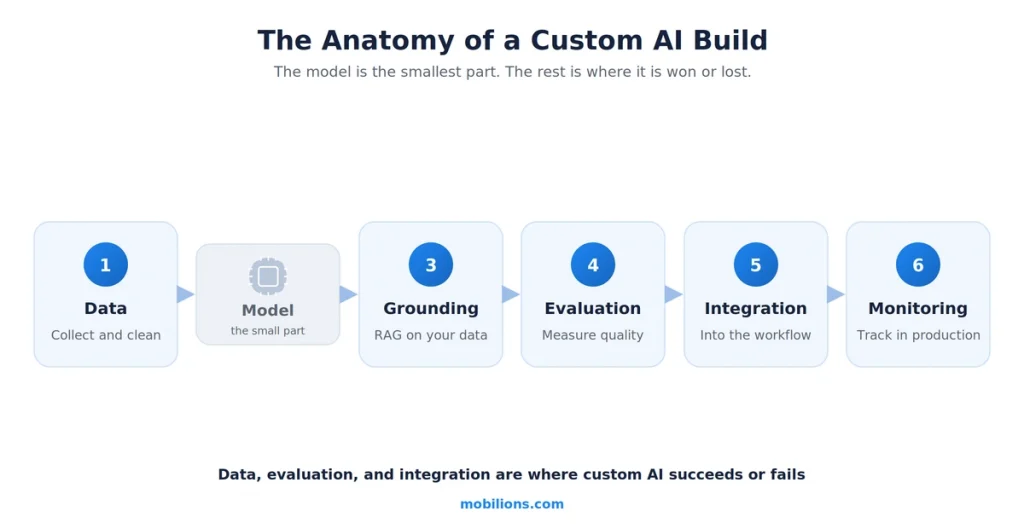
    The build has an anatomy, and the model is the small part. Data, retrieval, evaluation, integration, and monitoring are where most of the work and risk live. The model choice is a fraction of the project.

    Start with one real problem you can measure. Focused, well-integrated custom AI on a single high-value workflow beats a broad, flashy pilot that impresses in a demo and dies in production.

    What is custom AI software development?

    Custom AI software development means building an AI system tailored to your specific business, data, and workflow, rather than adopting a generic off-the-shelf tool and hoping it fits. It sits between two things people confuse it with. It is not just calling a model API and getting an answer, and it is not buying a finished AI SaaS product that does one fixed thing. It is the engineering that turns a capable model into a reliable system that does your particular job, on your data, inside your process, with the accountability your business needs.

    That distinction matters because the generic tools, as capable as they are, hit a wall in real organizations. The MIT research put it precisely: general tools work well for individuals because they are flexible, but they stall in enterprise use because they do not learn from or adapt to your workflows.

    Custom AI software is the layer that closes that gap. It is the retrieval that grounds the model in your documents, the evaluation that keeps it reliable, the integration that puts it inside the tools your team already uses, and the guardrails that make it safe to trust. When we scope AI development with clients, defining that layer clearly is the first job, because it is the layer that decides whether the project lands in the 5 percent or the 95.

    Why do most AI projects fail, and what do the 5 percent do?

    It is worth sitting with the failure data, because it is the clearest guide to doing this right. The MIT findings are blunt: executives tend to blame regulation or model performance, but the real problem is flawed integration. The tools do not adapt to the workflow, there is a learning gap on both sides, and the pilot never becomes part of how work actually happens. A related pattern showed up in budgets: more than half of generative-AI spending went to sales and marketing tools, while the highest return actually came from unglamorous back-office automation.

    This lines up with the broader picture. McKinsey’s State of AI research found that while 88 percent of organizations now use AI in some form, only 39 percent report any real impact on their bottom line. It is the same adoption-without-value gap the MIT pilots show, and for the same reason: buying or building the AI is the easy part, and redesigning the software and the workflow around it is the part almost everyone skips.

    The teams that succeed share a profile. They pick one pain point rather than trying to transform everything, they execute it well end to end, and they partner smartly instead of treating a from-scratch internal build as a point of pride. This connects to the single most counterintuitive finding, which deserves its own section because it changes how you should think about the word custom.

    Build, buy, or partner? The honest decision

    Here is the finding that surprises people. In the MIT data, buying AI solutions from specialized vendors succeeded about 67 percent of the time, while internal do-it-yourself builds succeeded only about a third as often. Read quickly, that sounds like an argument against custom AI entirely. Read carefully, it is not. It is an argument against a specific way of doing custom AI: a team with no track record trying to build a bespoke system from scratch, in isolation, as a first attempt.

    The useful way to hold all of this is a spectrum. At one end is buying a finished AI SaaS product, which is fast and cheap and correct when your need is common and a good product already exists. At the other end is a fully bespoke internal build, which gives maximum control and maximum risk.

    Custom AI software development, done well, lives in the productive middle: a system built specifically for your problem and your data, assembled from proven components and models rather than reinvented, and built by or with people who have shipped these systems before. That middle is where the control of custom meets the success rate of partnering, and it is precisely the shape the MIT survivors describe.

    ApproachBest whenTradeoff
    Buy an AI SaaS productYour need is common and a proven product fitsFast and cheap, but you get what it does, not what you need
    Custom, built with a specialist partnerThe problem is specific to your business and worth owningThe control of custom with a far higher success rate
    Fully internal from scratchYou have a proven in-house AI team and rare requirementsMaximum control, but the lowest success rate in the data

    So when should you build custom at all? When the problem is genuinely specific to your business, when it touches your proprietary data or workflow in a way no product covers, when it is core enough to be worth owning, and when getting it right is a real advantage. If the need is generic, buy. If it is specific and valuable, build it custom, and build it the way the 5 percent do.

    What does a custom AI build actually involve?

    Anatomy of a custom AI build data model grounding evaluation integration

    The biggest misconception is that a custom AI project is mostly about the model. It is not. In a real build, choosing and calling the model is one of the smaller pieces. Here is the anatomy of a serious custom AI system, and where the effort actually goes.

    StageWhat happensWhy it is hard
    DataCollect, clean, and structure the data the AI will useMost projects underestimate this; bad data caps everything downstream
    Model choicePick the right model and the right approach to using itCheaper and faster than teams expect, if the rest is right
    GroundingConnect the model to your knowledge with retrieval (RAG) or tuningThis is what makes answers accurate and specific to you
    EvaluationMeasure quality, accuracy, and failure rates systematicallyWithout this you are guessing whether it works
    IntegrationPut the AI inside the real tools and workflowThe step the 95 percent skip, and the reason they fail
    MonitoringTrack quality, cost, and drift in production over timeModels and data change; unmonitored systems quietly degrade

    The pattern to notice is that the model sits in the middle and is the least of your problems. Data quality, grounding, evaluation, and integration are where custom AI software is won or lost, and they are exactly the parts a generic tool cannot do for your specific business. This is also why a custom AI build is as much a custom software project as a modeling one, and why treating it as a pure data-science exercise is a common way to end up in the 95 percent.

    RAG, fine-tuning, or prompting? The key technical decision

    One choice comes up on almost every custom AI build: how to make a general model behave like an expert on your specific domain. There are three main options, and picking well saves a lot of money.

    Prompting, including careful prompt engineering, is giving the model good instructions and context in the request itself. It is the cheapest and fastest, and for many tasks it is enough. Retrieval-augmented generation, or RAG, connects the model to your own documents and data so it answers from your knowledge rather than its training, and it is the workhorse for most custom business AI because it keeps answers current, grounded, and traceable without retraining anything. Fine-tuning actually adjusts the model’s weights on your data, which is powerful for teaching a consistent style or a narrow specialized behavior, but it is more expensive, needs quality training data, and goes stale as your data changes.

    ApproachBest forCost and effort
    PromptingWell-defined tasks a strong model can already doLowest
    RAGAnswering from your own current documents and dataModerate, and the usual default
    Fine-tuningA consistent specialized style or narrow behaviorHighest, and stales as data changes

    The honest default for most custom AI software is RAG, often combined with good prompting, and fine-tuning only where it clearly earns its cost. Teams that reach for fine-tuning first usually spend more and get less than teams that ground a strong model well with retrieval.

    What are the hardest parts of custom AI?

    A few realities decide whether a custom AI system is trustworthy, and they are worth knowing before you scope one. Data is first and biggest, because an AI system is only as good as the data it stands on, and cleaning and structuring that data is usually the largest and most underestimated part of the work. Evaluation is second, because unlike normal software, AI does not simply pass or fail, so you need a real way to measure accuracy and catch regressions, and without it you are shipping on vibes.

    Reliability is third: models can be confidently wrong, so a serious build designs for that with grounding, confidence thresholds, human review where it matters, and clear limits on what the AI is allowed to decide, which is the same discipline behind integrating AI into real workflows. Cost is fourth and ongoing, because a custom AI system has real per-use inference costs and needs monitoring, so the budget does not end at launch.

    How much does custom AI software development cost?

    Cost varies widely with scope, data readiness, and how much the system has to integrate, but here is an honest picture of the ranges we see.

    TierWhat you getCost
    Focused pilotOne workflow, RAG on your data, real evaluation$30,000 to $80,000
    Production systemIntegrated, monitored, multiple workflows$80,000 to $250,000
    Enterprise platformMulti-team, complex data, strong governance$250,000+

    Two honest notes on cost. First, the model and its API usage are usually a small line item; the data work, integration, and evaluation dominate the budget. Second, a custom AI system has ongoing costs that off-the-shelf buyers sometimes forget: inference costs per use, monitoring, and periodic re-evaluation as your data and the models change. Budget for the system to live, not just to launch.

    A real-world scenario

    To make this concrete, picture a company whose support team answers the same complex product questions all day from a sprawling internal knowledge base. The tempting move is a flashy company-wide AI assistant. The move that lands in the 5 percent is narrower and smarter.

    A systematic reading of this guide sorts it. They pick one pain point, support answers, rather than boiling the ocean. They ground a strong general model in their actual knowledge base with RAG, so answers are current and traceable, instead of fine-tuning a model that would go stale. They build real evaluation so they know the accuracy before it touches a customer, and they integrate it directly into the support tool the team already uses, with a human approving customer-facing replies.

    They monitor quality and cost in production. And because they have not shipped one before, they build it with a partner who has, rather than making it a first-time internal science project. The result is a focused, integrated, measured system that actually deducts hours from real work, which is precisely what the 95 percent never achieve.

    Myths and common mistakes

    A few misconceptions send projects straight into the 95 percent.

    The first myth is that better models solve the problem. They do not. The MIT data is clear that failure is about integration and workflow, not model quality, so pouring effort into model selection while neglecting data and integration is backwards.

    The second mistake is boiling the ocean. A broad, transform-everything AI initiative impresses in a slide and dies in production. One focused, measurable problem is how the survivors start.

    The third mistake is treating custom as build-everything-from-scratch-internally. The data says that is the lowest-success path. Custom done well means a focused system on proven components, built by or with people who have done it before.

    The fourth mistake is skipping evaluation. If you cannot measure the accuracy and failure rate of your AI, you do not know if it works, and you will find out in front of a customer.

    The honest caveat worth stating plainly: this is a hard field with a genuinely high failure rate, and anyone who tells you custom AI is a quick plug-in is either selling something or has not shipped one. The good news is that the failures are predictable and avoidable, and the path into the 5 percent is well marked. It just requires doing the unglamorous parts, data, evaluation, and integration, properly.

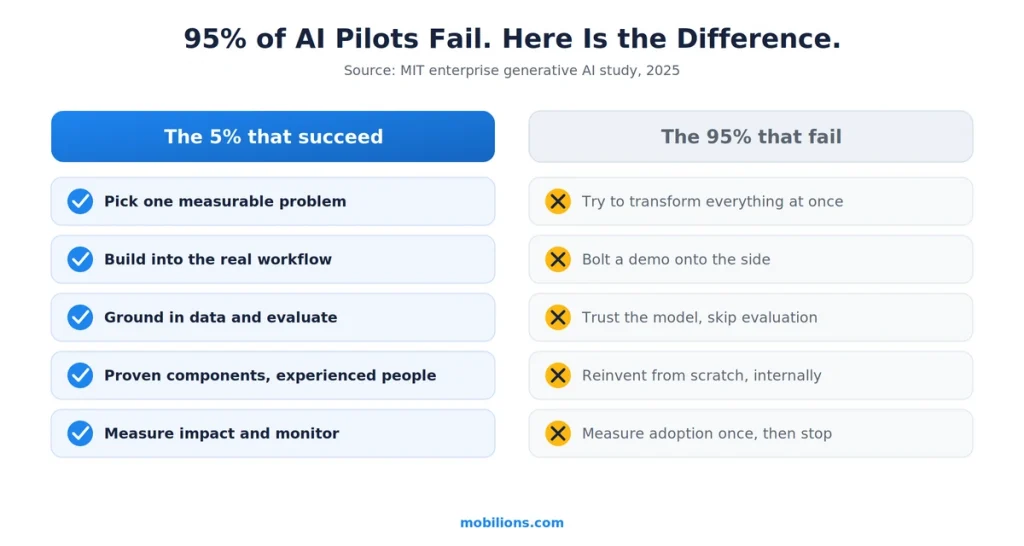
    What separates the 5 percent from the 95 percent?

    Everything above collapses into one contrast. The projects that deliver value and the projects that quietly die are not divided by budget or by which model they used. They are divided by a handful of choices, made at the start, about how the work is scoped and built.

    Why 95 percent of AI pilots fail versus the 5 percent that succeed
    The 5 percentThe 95 percent
    Pick one measurable problemTry to transform everything at once
    Build the AI into the real workflowBolt a demo onto the side of the business
    Ground the model in real data and evaluate itTrust the model and skip evaluation
    Assemble proven components with experienced peopleReinvent everything from scratch, internally, first time
    Measure impact and monitor in productionMeasure adoption once, then stop looking

    None of these are about the AI being clever. They are about the software engineering and the judgment around the AI, which is the entire point of custom AI software development and the reason it is worth doing properly rather than fast. If you get the left column right, the model in the middle almost takes care of itself.

    Why Mobilions

    Mobilions has been building custom software, mobile apps, and AI solutions since 2016. We have delivered more than 250 projects for over 100 clients across 20-plus countries, which means we have shipped the kind of focused, integrated, evaluated custom AI software this guide describes, not just demoed models. The MIT data is clear that the way into the successful 5 percent is to pick one real problem, integrate deeply, and build with people who have done it before rather than as a first-time internal experiment.

    That is exactly the work our AI development team does, and if you would rather not learn the 95 percent lesson the expensive way, or you need to hire AI engineers who have shipped production systems, that is the conversation we have with teams every week.

    Summary

    Custom AI software development in 2026 is defined by one hard fact: 95 percent of enterprise AI pilots fail, and almost always because the software around the model never fit the real workflow, data, and accountability of the business, not because the model was weak. Custom AI software is the engineering that closes that gap, and doing it well means a focused system built on proven components, grounded in your data with RAG, measured with real evaluation, integrated into the actual workflow, and built with people who have shipped one before.

    It does not mean building everything from scratch internally, which the data shows is the lowest-success path. Pick one real, measurable problem, get the unglamorous parts right, and you land in the 5 percent that actually deliver value.

    Frequently asked questions

    What is custom AI software development?

    It is building an AI system tailored to a specific business, its data, and its workflow, rather than using a generic off-the-shelf tool. It is the engineering that turns a capable model into a reliable system that does your particular job on your data, including retrieval, evaluation, integration, and guardrails, not just calling a model API.

    What is the difference between custom AI software and regular software?

    Regular software follows fixed rules and returns the same output every time. Custom AI software learns from data and handles language, patterns, and judgment, so its output is probabilistic rather than exact. That difference is why AI needs extra engineering regular software does not: grounding, evaluation, guardrails, and monitoring to stay reliable in production.

    Why do so many AI projects fail?

    MIT found that 95 percent of enterprise generative-AI pilots fail to deliver measurable value, and the cause is integration, not model quality. The tools do not adapt to the real workflow, there is a learning gap, and the pilot never becomes part of how work actually happens. Failure is predictable and avoidable.

    Should I build custom AI or buy an off-the-shelf tool?

    Buy when your need is common and a proven product fits, because it is faster and cheaper. Build custom AI software when the problem is specific to your business, touches your proprietary data or workflow, and is worth owning. The data favors building with an experienced partner over a from-scratch internal do-it-yourself effort, which has the lowest success rate.

    Should I outsource AI development or build an in-house team?

    Building a full in-house AI team is slow and costly, and pure do-it-yourself internal builds show the lowest success rate in the data. For most companies, partnering with an experienced AI team is faster and safer for the first production system, then bringing skills in-house over time once the system is proven and running.

    How much does custom AI software development cost?

    A focused pilot on one workflow with RAG and real evaluation runs about $30,000 to $80,000, a production system with integration and monitoring runs $80,000 to $250,000, and an enterprise platform runs $250,000 or more. The model is usually a small line item; data work, integration, and evaluation dominate the cost, plus ongoing inference and monitoring.

    What is the real cost of hiring an AI developer or agency?

    In 2026, freelance AI developers charge roughly $35 to $100 per hour in the US and $30 to $60 in Eastern Europe, with senior specialists at $80 to $120 and US consultancies at $125 to $175. An experienced agency usually costs less than a US senior hire and carries less risk than a solo freelancer, because vetting and accountability come built in.

    What are the hidden costs in custom AI development?

    The model API is rarely the big number. The costs that surprise teams are data cleaning and preparation, building real evaluation, integration into existing systems, ongoing inference at scale, and monitoring and maintenance after launch. A good partner names these upfront, because ignoring them is how a cheap pilot turns into an expensive surprise.

    Is custom AI software worth the investment?

    It is worth it when it solves one specific, measurable problem tied to your own data or workflow that an off-the-shelf tool cannot. Focused custom AI on a real bottleneck, like back-office automation or support, often pays back quickly. Broad, unfocused AI initiatives are the ones that waste money, not custom AI itself.

    Can I build custom AI software without coding?

    Partly. No-code AI tools are strong for quick internal automations and simple apps, but in 2026 they hit a wall at roughly 60 to 70 percent of what a real product needs. They struggle with custom logic, proprietary data integration, scale, and true ownership. For production custom AI on your own data, you still need engineering.

    What is the difference between RAG and fine-tuning?

    RAG, retrieval-augmented generation, connects a model to your own documents so it answers from your current knowledge without retraining. It is the usual default for custom business AI. Fine-tuning adjusts the model’s weights, which suits a narrow specialized style but costs more and goes stale as data changes. Most custom AI uses RAG with good prompting, and fine-tuning only where it earns its cost.

    What is the difference between RAG and fine-tuning?

    RAG, retrieval-augmented generation, connects a model to your own documents so it answers from your current knowledge without retraining. It is the usual default for custom business AI. Fine-tuning adjusts the model’s weights, which suits a narrow specialized style but costs more and goes stale as data changes. Most custom AI uses RAG with good prompting, and fine-tuning only where it earns its cost.

    What does a custom AI build actually involve?

    Data collection and cleaning, model choice, grounding the model in your knowledge with RAG or tuning, systematic evaluation, integration into your real tools and workflow, and production monitoring. The model choice is one of the smaller pieces; data, evaluation, and integration are where most of the effort and risk are.

    How long does it take to build custom AI software?

    A focused pilot typically takes a few months, and a fully integrated production system takes longer depending on data readiness and how many workflows it touches. The timeline is driven far more by data quality and integration complexity than by the model itself.

    Can I test custom AI with a pilot before full development?

    Yes, and you should. A focused pilot or proof of concept on one workflow, with real data and honest evaluation, tells you whether the approach works before you commit to a full build. It reduces risk, proves value to stakeholders, and is exactly how the successful 5 percent avoid expensive dead ends.

    What questions should I ask an AI development company before hiring?

    Ask how they ground the model in your data, how they measure accuracy, how they handle wrong answers and guardrails, who owns the code and data, and what ongoing cost looks like. Ask for a shipped example, not a demo. Vague answers on evaluation and ownership are the clearest warning signs.

    What are the biggest risks in custom AI development?

    Poor or messy data, no real evaluation so you cannot tell if it works, models that are confidently wrong without guardrails, weak integration so the AI never enters the real workflow, and unmanaged ongoing costs. Every one of these is addressable by design, and skipping them is how projects join the 95 percent that fail.

    Can small and mid-size companies afford custom AI software?

    Yes, if they scope it right. A focused custom AI system solving one real, measurable problem is well within reach for a mid-size company and often pays back quickly, especially in back-office automation. The expensive failures come from broad, unfocused initiatives, not from starting small and specific.