Tag: AI agents

  • Fabric Architectures for AI Systems: A Complete 2026 Guide

    Fabric Architectures for AI Systems: A Complete 2026 Guide

    Ask ten engineers what an “AI fabric” is and you’ll get ten answers. One means a data platform. One means the network cabling between GPUs. One means whatever their vendor sold them last quarter. That confusion is the single biggest reason teams struggle to reason about fabric architectures for AI systems, so this guide starts by clearing it up, then goes deep on the version that actually matters when you’re building AI: the software one.

    Here’s the uncomfortable truth underneath the buzzword. Most AI systems that stall in production don’t stall because the model is weak. They stall because the plumbing underneath (the data access, the retrieval, the permissions, the monitoring) was wired together by hand, use case by use case, until nobody could safely change anything. Gartner reported in 2026 that organizations with successful AI initiatives invest up to four times more in their data and analytics foundations than everyone else. A fabric is what that investment looks like when it’s done well.

    What is a fabric architecture for an AI system?

    A fabric architecture for an AI system is a shared software layer that connects data, models, retrieval, orchestration, and governance through consistent interfaces, so the parts of your AI stack work as one system instead of a web of one-off integrations. You connect each component to the fabric once, rather than wiring every component directly to every other one.

    The name is borrowed from textiles on purpose. A fabric is a mesh of threads that behaves like a single continuous surface. Swap one thread and the cloth still holds. In software terms: swap your vector database, add a second model, tighten a permission, and the contract between layers stays put, so you change one connector instead of hunting down fifty call sites across a dozen services.

    It’s worth being precise about what a fabric is not. It isn’t a product you buy, despite what the demos imply, and it isn’t your database or your model. It’s an architectural pattern, a set of clean seams between the moving parts, that you assemble from platforms and glue code. The older enterprise idea of a “data fabric” covers just the data seam. An AI fabric stretches the same discipline across the whole path, from raw data to a governed agent doing real work.

    Why do AI systems end up needing a fabric?

    Because the pieces multiply faster than anyone plans for. A first AI feature usually starts clean: one model, one data source, a hard-coded prompt. It ships, it works, everyone’s happy. Then the second use case wants two more data sources and a cheaper model for the easy requests. The third needs an embedding model and access to a system the first two never touched. Each connection is bespoke, with its own auth, its own retries, its own logging, or no logging at all.

    Six months in, you’ve rebuilt the classic “n-by-m” mess, where every new model or data source multiplies the connections you have to babysit. AI makes this worse than traditional software for three concrete reasons:

    • You rarely end up with one model. A big model for hard reasoning, a small cheap one for classification, an embedding model for search, maybe a fine-tuned one for your domain. Each needs to be called, versioned, and paid for.
    • The inputs are messier than a normal app’s. Documents, databases, APIs, and live streams, all with different formats and freshness, all needing permission checks before a model ever sees them.
    • The system acts, it doesn’t just read. An AI system generates content and takes actions, so weak governance isn’t a tidiness problem, it’s a liability.

    The data problem is the one teams underestimate most. IBM found that only 29% of technology leaders believe their data quality is good enough to scale generative AI. A fabric doesn’t magically fix data quality, but it does give you one governed place to solve it, instead of re-solving it in every project. That’s the core move of the whole pattern: connect each thing once, to the fabric, not many times, to each other.

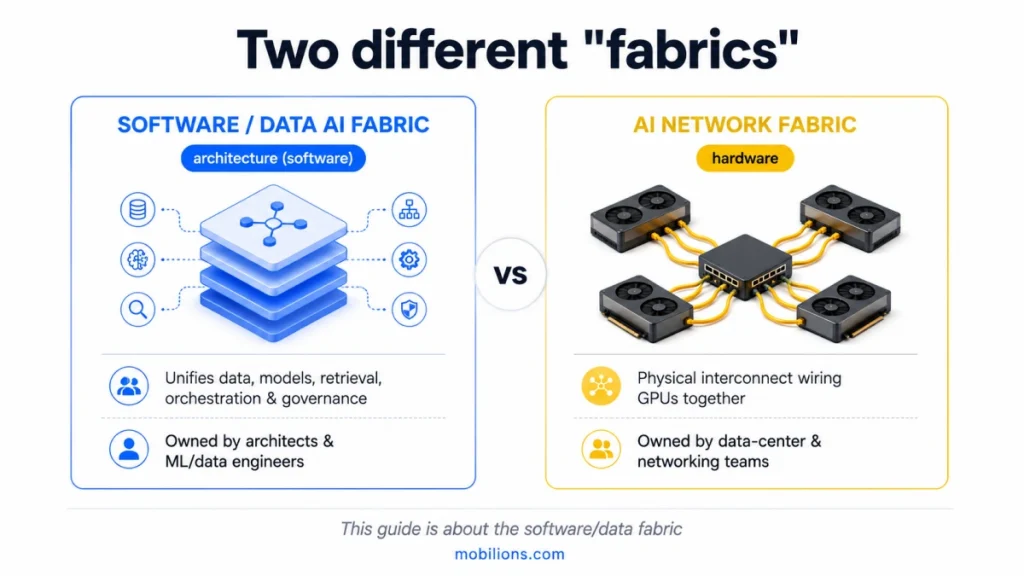
    Data fabric, AI network fabric, or Microsoft Fabric, which one do you mean?

    Three completely different things wear the word “fabric,” and mixing them up wastes weeks. Here’s the quick map:

    “Fabric”What it actually isWhose problem it is
    Data / software AI fabricAn architecture layer unifying data, models, retrieval, orchestration, and governance in softwareArchitects and ML/data engineers building AI products
    AI network fabricPhysical networking, the interconnect wiring GPUs together (InfiniBand, high-speed Ethernet)Data-center and hardware teams running training clusters
    Microsoft FabricA specific commercial analytics platform from MicrosoftTeams standardized on the Microsoft data stack
    Software data fabric vs AI network fabric — comparison for AI systems

    This guide is about the first one, the architecture you design when you build an AI product. The network fabric is a cabling-and-throughput conversation for whoever runs your GPU cluster, and it barely overlaps with application design. Microsoft Fabric is a real product that happens to share the word; it can serve as part of your data layer, but it isn’t the architectural pattern itself. When someone searches “fabric architecture for AI systems,” they almost always mean the software one. Keep the three straight and half the vendor noise disappears.

    What are the layers of a fabric architecture for AI systems?

    Nearly every production AI system I’ve worked on resolves into the same five layers. You won’t build all five fully on day one, and you shouldn’t try. But naming them tells you what you have, what’s missing, and, most usefully, where the risk is hiding.
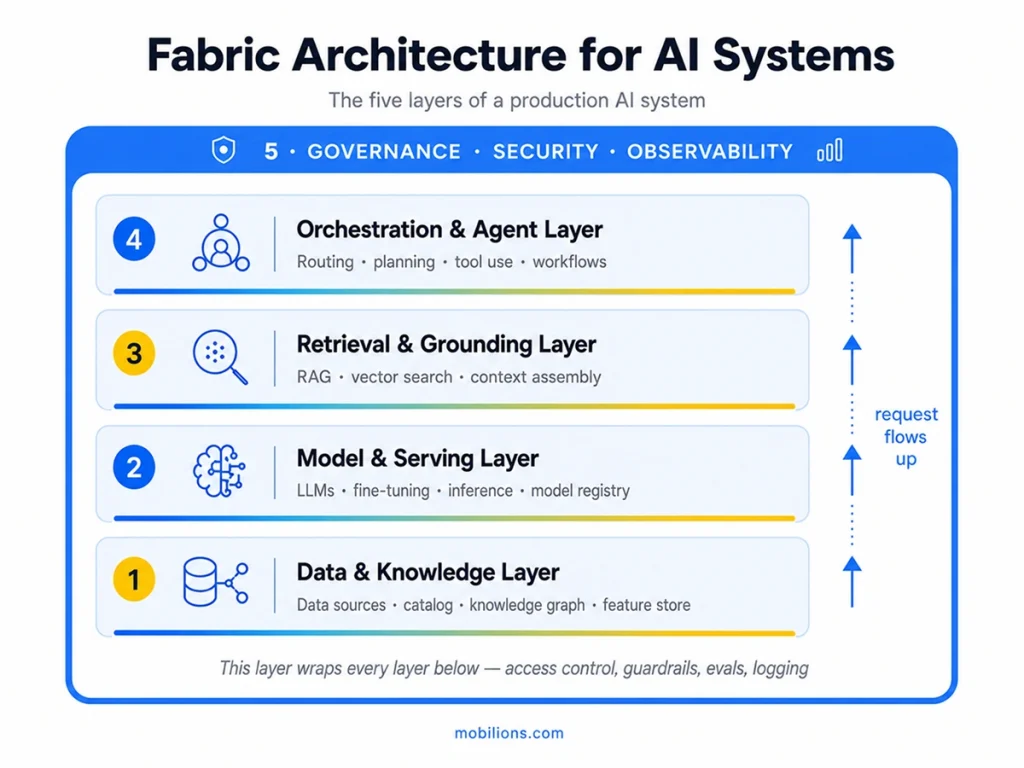
    Five-layer fabric architecture for AI systems

    1. The data and knowledge layer. This is the floor everything else stands on: governed access to your structured data, documents, and domain knowledge, usually through connectors, a catalog so people can find what exists, and often a knowledge graph or feature store. When this layer is weak, every layer above inherits the mess, which is why a surprising amount of “AI work” is really data work wearing a costume. In tooling terms this is where things like a warehouse, dbt or Airflow pipelines, and a graph store such as Neo4j tend to live. Getting data into the system cleanly and safely is exactly where careful AI integration pays for itself.

    2. The model and serving layer. Here sit the models, foundation LLMs, small task-specific models, embedding models, anything you fine-tune, plus the serving that turns a model into a fast, affordable endpoint. The piece people skip and later regret is the model gateway: a thin interface every other layer calls, so switching from one provider to another, or routing cheap requests to a small model and hard ones to a big one, doesn’t ripple through your code. Serving stacks like vLLM or a managed endpoint handle the runtime; a registry such as MLflow tracks versions. This is the domain of machine learning development and, when a language model is the product, focused LLM development.

    3. The retrieval and grounding layer. Foundation models don’t know your business and will confidently invent an answer when asked something they don’t know. Retrieval fixes that by fetching the right context, from documents, a database, or the knowledge graph, and handing it to the model at request time. This is where RAG, vector search, chunking, and context assembly live, with vector stores like pgvector, Weaviate, or Pinecone doing the lookup. The mistake is treating it as “just add a vector database.” The accuracy of the entire system is won or lost on retrieval quality: how you chunk, how you rank, how you handle freshness. Solid RAG development is usually the highest-impact work in an enterprise AI build.

    4. The orchestration and agent layer. This is the decision-making: routing a request, planning multi-step work, calling tools and APIs, recovering when a step fails. A simple system retrieves and answers. A serious one plans and acts, which is where real AI agent development, and frameworks like LangGraph, come in. It’s the layer that turns “a bot that talks” into “a system that does work,” and it leans hard on the layer above it for permission before it’s allowed to touch anything that matters.

    5. Governance, security, and observability: the AI fabric security architecture.
    This layer does not sit on top, it wraps the other four, and together they form the AI fabric security architecture. Access control for both users and agents, guardrails and policy, evaluation, plus logging and tracing so you can always answer what the system did and why. In a regulated setting this is not a feature you add later; it is the thing that lets you ship at all. Treat it as part of responsible AI development from the first commit, and use the NIST AI Risk Management Framework as a reference for what governed should mean.

    How is a data fabric different from a data mesh or data lakehouse?

    Short version: a data fabric unifies access through technology and metadata; a data mesh decentralizes ownership to domain teams; a data lakehouse is a storage-and-query platform. They answer different questions and often coexist. This is one of the most-searched confusions in the whole space, so here’s the honest comparison:

    ApproachCore ideaBest when
    Data fabricA unified access layer over distributed data, driven by active metadataYou need consistent, governed access across many systems
    Data meshDecentralized ownership, each domain team owns its data as a productLarge orgs where central data teams are a bottleneck
    Data lakehouseOne platform combining a lake’s flexibility with a warehouse’s structureYou want a single place to store and query all data types

    For an AI fabric, the data-fabric idea is the relevant one, it’s your data-and-knowledge layer. A mesh is an ownership model you might run alongside it; a lakehouse is often the storage the fabric reads from. They’re not competitors so much as answers to “who owns it,” “how do I reach it,” and “where does it sit.” IBM’s own comparison is a good neutral reference if you want to go deeper.

    What does a single request actually look like?

    Abstractions click when you trace one real request through them. Picture a support assistant, and a customer types: “Where’s my order, and can you change the delivery address?”

    The orchestration layer reads that as two intents, a lookup and an action, and plans accordingly. It calls retrieval, which pulls the customer’s order and the delivery policy from the data layer, where access control has already confirmed this agent is allowed to see this customer’s records. The model layer drafts a reply from that grounded context. Because changing an address is a sensitive action, the governance layer forces a checkpoint, a policy check, maybe a human approval, before orchestration is permitted to call the address-change tool. Every hop is logged, so if something looks wrong next week, you can replay exactly what happened.

    Notice what the fabric bought you: the same data access, model gateway, and governance rules that served this request will serve your next ten use cases. You didn’t rebuild grounding or permissioning for the support bot, you reused the fabric. That reuse is the entire economic case for the pattern, and it’s why the second AI feature on a good fabric ships in a fraction of the time the first one did.

    When do you actually need a fabric, and when is it overkill?

    A fabric is an investment that pays back only if you’ll build on it more than once. Over-building it for a single feature is one of the more expensive mistakes I see. So here’s the test I give clients.

    You’re ready for a fabric when:

    • You have, or clearly will have, multiple AI use cases sharing data, models, or infrastructure.
    • Your data is spread across many systems and every project keeps re-solving the same access and governance problems.
    • You need consistent governance and auditing across AI features, non-negotiable in finance, healthcare, or legal.
    • You expect to swap models or vendors and don’t want each change to trigger a rewrite.
    • Several teams build on shared AI foundations and need stable contracts instead of private wiring.

    You should hold off when:

    • You’re shipping one focused feature to learn how users behave.
    • Your data already sits in one or two systems with clean access.
    • You’re pre-product-market-fit and speed beats reuse.

    The sane path for most teams: build the first use case cleanly, keeping the five layers as separate concerns even inside one app, then promote them into a shared fabric as the second and third use cases arrive. You earn the abstraction from real demand instead of guessing at it.

    Should you buy or build your fabric?

    Nobody sells a finished AI fabric in a box, whatever the sales deck says. You assemble one, and the useful rule is: buy the commoditized plumbing, build the parts that encode your domain and your risk.

    • Data layer: mostly buy. Warehouses, catalogs, and vector stores are mature; rebuilding them rarely pays. What stays custom is your domain model and governance rules.
    • Model and serving: buy the models and the runtime; build the thin gateway that gives you routing and cost/latency logging. That small piece of custom code saves outsized pain later.
    • Retrieval: buy the vector database; build the retrieval quality. Chunking, ranking, and freshness are specific to your content, and they decide your accuracy.
    • Orchestration: frameworks accelerate this, but the actual workflows, tool definitions, and failure handling are custom, because they encode how your business runs.
    • Governance and observability: buy the monitoring tools; build the policies, approval flows, and evaluations, because “acceptable behavior” is specific to your risk tolerance.

    Teams that try to build everything drown in undifferentiated infrastructure. Teams that try to buy everything discover the differentiating 20% (retrieval quality, orchestration, governance) was never for sale. Finding that line for your stack is the real substance of serious AI development services, and it deserves a deliberate decision rather than a default.

    Where fabric projects go wrong

    The failure modes are predictable, which is good news, you can design around them.

    The most common is governance as an afterthought: bolting on access control and logging after launch, when it needed to wrap every layer from the start. Retrofitting it into a live agent is painful and sometimes means a rewrite. Close behind is over-engineering, building an elaborate five-layer platform for a single chatbot a weekend prototype could have served. Then there’s the gap between a demo and production: a prototype that works once in a clean test is not a system that holds up against real data, adversarial users, and edge cases, and that gap lives almost entirely in retrieval quality, evaluation, and guardrails rather than in model choice.

    Two more worth calling out. Skipping evaluation means every “improvement” is a guess, because you can’t tell whether a change made the system better or worse. And chasing the model instead of the system, spending weeks debating which LLM to use while the retrieval and orchestration layers, which matter far more to the result, get thrown together. Avoiding all of these is less about adding technology and more about sequencing: govern early, abstract only what you’ve proven you need, measure everything.

    How do you adopt a fabric without over-building?

    You grow a fabric; you don’t build it in one heroic project. A sane sequence looks like this.

    Start with one high-value, manageable-risk use case, a grounded internal assistant, a support deflector, one automation. Build it cleanly, but keep the five layers as distinct concerns even inside that single app rather than one tangled script. When the second use case arrives, you’ll notice you’re re-implementing data access or model calls; that’s your signal to promote those into shared services, a real model gateway, a shared retrieval service, a common policy. Now you’re factoring out what you’ve proven is common, not what you guessed would be.

    Most teams land on one of three fabric configurations: centralized, federated, or hybrid, and the right one depends on how your data and risk are spread.

    Make governance and observability a first-class shared layer as soon as more than one use case exists, or the moment any agent can take a consequential action. This is the one place worth investing slightly ahead of need, because it’s the most expensive thing to retrofit. After that, scale is the reward: each new use case inherits the fabric instead of rebuilding it, and the cost curve bends in your favor.

    Key takeaways

    • A fabric architecture for AI systems is a shared software layer connecting data, models, retrieval, orchestration, and governance so they behave as one system.
    • It exists to kill the point-to-point integration tangle: connect each thing once to the fabric, not many times to each other.
    • Three different things are called “fabric”, the software/data fabric (your concern), the AI network fabric (GPU hardware), and Microsoft Fabric (a product). Don’t conflate them.
    • Think in five layers: data & knowledge, model & serving, retrieval & grounding, orchestration & agents, and cross-cutting governance & observability.
    • Buy the plumbing, build what encodes your domain and risk, retrieval quality, orchestration, and governance.
    • Earn the abstraction: ship one clean use case first, then formalize the fabric as more arrive. Govern early, measure everything.

    Frequently asked questions

    What is a fabric architecture for AI systems?

    A fabric architecture for AI systems is a shared software layer that connects data, models, retrieval, orchestration, and governance through consistent interfaces, so the parts work as one coordinated system instead of many brittle point-to-point integrations. You connect each component to the fabric once, rather than wiring every component directly to every other one.

    What is the difference between a data fabric and a data mesh?

    A data fabric is a technical layer that unifies access to distributed data using metadata and automation. A data mesh is an organizational model that gives each domain team ownership of its data as a product. One is about how you reach the data; the other is about who owns it. Many large organizations run both together.

    Is a data fabric the same as a data lake or data warehouse?

    No. A data lake or warehouse is where data is stored; a data fabric is a layer that provides unified, governed access across those stores and other sources. A fabric often reads from a lake, lakehouse, or warehouse rather than replacing it, so the two work together instead of competing.

    What is the difference between an AI fabric and Microsoft Fabric?

    An AI fabric is a general architecture pattern for connecting the layers of an AI system. Microsoft Fabric is a specific commercial analytics platform from Microsoft. Microsoft Fabric can serve as part of your data layer, but it is a product you buy, not the architectural pattern itself. The two are easy to confuse but different.

    Is an AI fabric just RAG?

    No. RAG, or retrieval augmented generation, is one layer of a fabric, the retrieval and grounding layer. A full AI fabric also includes the data layer, model serving, orchestration and agents, and cross-cutting governance. RAG makes individual answers accurate; the fabric makes the whole system reusable, governed, and cheap to extend.

    Is a fabric hardware or software?

    It depends which fabric you mean. A software or data AI fabric is an architecture you design in code and configuration. An AI network fabric is physical networking hardware that connects GPUs inside a data center. This guide is about the software architecture, which is what most people mean when they are building AI products.

    Do I need a fabric architecture for a single AI feature?

    Usually not. A single grounded chatbot or one automation can ship cleanly without a full fabric. A fabric earns its cost once you have multiple AI use cases sharing data, models, and governance. Build the first feature cleanly, keep the layers as separate concerns, then formalize a fabric as more use cases arrive.

    How do you keep a fabric architecture secure and governed?

    Treat governance as a layer that wraps every other layer from day one: access control for both users and agents, guardrails and content policy, evaluation and testing, plus logging and tracing so every action is auditable. The NIST AI Risk Management Framework is a useful reference for what a governed system should include.

    What are the layers of a fabric architecture for AI systems?

    Most production systems resolve into five layers: a data and knowledge layer for governed access, a model and serving layer with a gateway, a retrieval and grounding layer for RAG, an orchestration and agent layer for planning and actions, and a governance and observability layer that wraps the other four.

    How much does it cost to build a fabric architecture?

    There is no fixed price, because you assemble a fabric from tools rather than buying one product. Most of your budget goes to the custom parts that encode your domain: retrieval quality, orchestration, and governance. The commoditized plumbing, such as warehouses and vector stores, is bought, so cost scales with how many use cases you support.

    How long does it take to implement a fabric architecture?

    You do not build a whole fabric at once. A first grounded use case with clean separation of the five layers typically takes a few months. The fabric itself emerges as you promote shared services, like a model gateway or a common retrieval service, once a second and third use case prove what is worth reusing.

    Should you buy or build a fabric architecture?

    Both. The rule is to buy the commoditized plumbing and build the parts that encode your domain and risk. Buy warehouses, vector stores, models, and monitoring. Build the thin model gateway, your retrieval quality, the orchestration workflows, and your governance policies. Teams that try to build everything drown; teams that buy everything lose their edge.

    Do I need a consultant or partner to build an AI fabric?

    Not always, but a partner helps most where the decisions are hard to reverse: designing the five layers, choosing what to buy versus build, and getting governance right from the start. Many teams build the first use case in-house, then bring in specialists to formalize the shared fabric as more use cases arrive.

    Is a fabric architecture worth it for a startup or small business?

    Often not yet. If you are shipping one focused feature or your data sits in one or two systems, a full fabric is premature and speed matters more than reuse. Build the first use case cleanly with the layers as separate concerns, then earn the fabric once you have several AI features to share.

    Can a fabric architecture integrate with our existing tools and data?

    Yes, and that is much of the point. A fabric connects to your existing warehouses, databases, document stores, and APIs through connectors, then presents them behind consistent interfaces. You connect each system to the fabric once, so new AI use cases reuse that governed access instead of every project building its own integration to every source.

    How does a fabric architecture handle real-time data?

    Through the data and knowledge layer, which can serve live streams and fresh sources alongside stored data, and through retrieval that fetches current context at request time. Freshness is a design decision in how you chunk, index, and refresh, so real-time behavior comes from the retrieval and data layers rather than from the model.

    What skills does my team need to build a fabric architecture?

    A fabric spans several disciplines: data engineering for the access layer, ML and LLM engineering for models and serving, retrieval and RAG expertise for grounding, and software and DevOps skills for orchestration, security, and observability. You rarely need all of it in-house at once. Start with the layers your first use case actually touches.

    What is AI fabric?

    An AI fabric is the software version of a fabric architecture applied end to end: it connects your data, models, retrieval, orchestration, and governance into one governed layer, so AI moves from isolated features to a coordinated system. It is the same five-layer pattern this guide describes, named for the whole stack rather than any single layer.

    The bottom line

    Fabric architectures for AI systems aren’t a product to buy or a buzzword to chase. They’re a way of treating AI as a system of interchangeable, governed parts instead of a pile of one-off integrations, and the payoff is that your second use case, and your tenth, get dramatically cheaper to build. If you’re mapping how these layers should fit your stack, that’s the architecture work we do every day; reach out at hello@mobilions.com or explore our AI development services.

  • How to Choose the Right AI Agent Development Company in 2026

    How to Choose the Right AI Agent Development Company in 2026

    To choose an AI agent development company, judge four things above all: whether they have shipped real agents in production (not demos), whether they scope honestly and push back on your idea, whether you keep full ownership of the code and IP, and whether they have a real plan for monitoring and maintenance after launch. Cost matters, but the cheapest quote is usually the most expensive choice once you count rework. A production agent typically runs $15,000 to $75,000 and a few weeks to a couple of months, so the decision is worth getting right.

    Knowing how to choose an AI agent development company is now a real business skill, because everyone is racing to build AI agents and a whole industry has appeared overnight to build them for you. Some of these companies are excellent. Many are a landing page, a few prompts, and a lot of confidence. Telling them apart before you sign is the difference between an agent that runs reliably in production and an expensive demo that falls over the first time a real user does something unexpected.

    This guide is the filter. It walks through how to evaluate an AI agent development company, which hiring model fits your project, what it should cost, the exact questions to ask, and the red flags that should end the conversation. We build production AI agents at Mobilions, so this is written from the inside, including the parts that make some vendors uncomfortable. Where the honest answer is to hire someone else, or to buy an off-the-shelf tool instead of hiring anyone, this guide says so.

    How to choose an AI agent development company: the short version

    If you only remember one thing about how to choose an AI agent development company, make it this: pick the team that has shipped real agents in production and is honest about what your project needs. The rest of this guide breaks that down into what to look for, which hiring model fits, what it costs, the questions to ask, and the red flags to avoid. Work through it in order and you will filter out the demo shops quickly.

    First, decide what you actually need

    Before you evaluate a single company, get clear on the job. The word agent covers a huge range (see IBM’s overview of AI agents), and the right partner for one is the wrong partner for another.

    A simple, single-task agent (say, one that drafts replies or routes tickets) is a small, fast build. A production agent that plans, calls several tools, and pulls from your data is a real engineering project. A multi-agent system that runs autonomously across your business, with monitoring and compliance, is a serious undertaking. If you do not know which of these you need, that is fine, and it is actually a useful test: a good company will help you figure it out and will happily tell you if your idea is smaller (or larger) than you think. A company that agrees enthusiastically to whatever you say, without asking what problem you are solving, is optimizing for the invoice.

    There is also a real chance you do not need a development company at all. For common, standard workflows, a no-code agent platform or an existing tool may solve your problem for a fraction of the cost.

    A trustworthy partner will tell you that too. If the first thing a vendor does is insist you need a big custom build, be skeptical.

    The hiring models: freelancer, agency, or in-house

    There are three ways to get an AI agent built, and each fits a different situation.

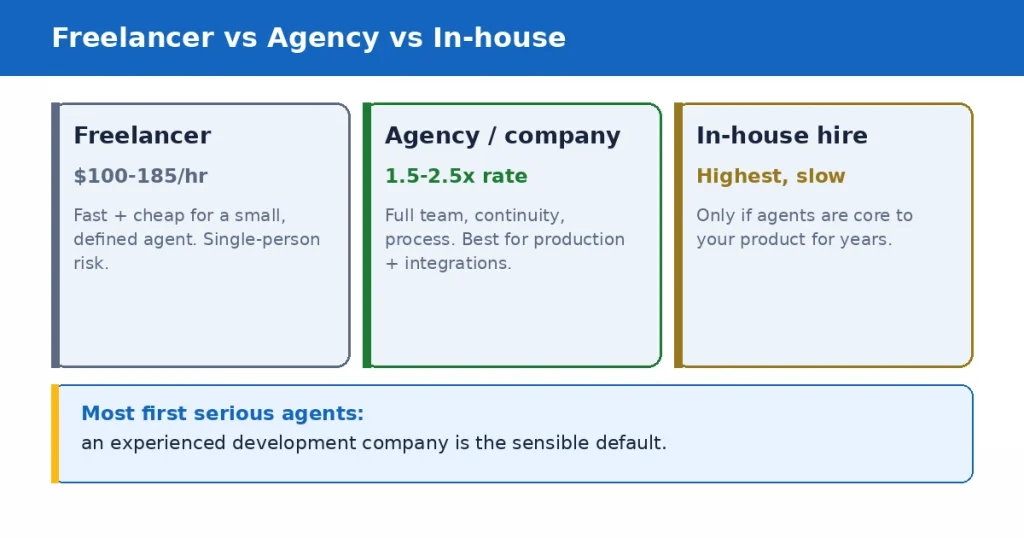
    Freelancer vs agency vs in-house for AI agent development: cost, risk, and best fit

    A freelancer is one independent developer. Freelance AI agent developers commonly charge $100 to $185 an hour, and more for top specialists, though rates range widely. A good freelancer is fast and cost-effective for a small, well-defined agent, and platforms like Upwork list many, though vetting is on you. The risk is single-person dependency: if they get busy, sick, or vanish, your project stalls, and one person rarely covers engineering, data, security, and design all at once.

    An agency or development company is a coordinated team. Agencies typically charge 1.5 to 2.5 times an individual rate because of overhead and coordination, but you get a team that covers the whole build, continuity if one person is out, and usually a real process for scoping, testing, and support. This is the right fit for anything production-grade or anything that has to integrate with your systems and keep running.

    An in-house hire makes sense only when AI agents are core to your product and you will keep building them for years. Hiring senior AI engineers is slow and expensive, and for a single project it is almost never worth it. Most companies are better served by a partner for the build and, if needed, a smaller in-house team to own it later.

    For most businesses building their first serious agent, an experienced development company is the sensible default: enough capability to ship something that works, without the cost and delay of hiring a permanent team.

    What separates a good AI agent development company

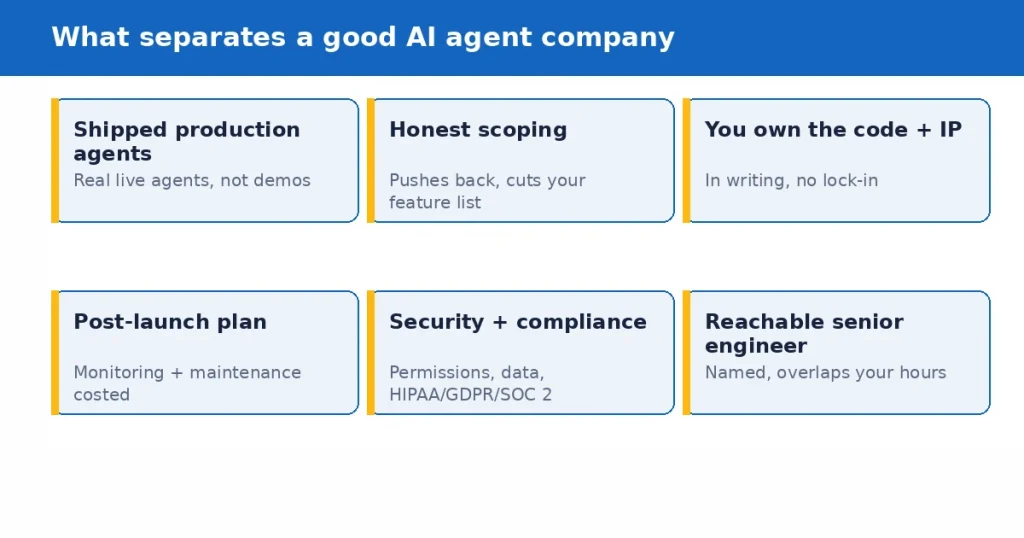
    When you work out how to choose an AI agent development company, here is what actually matters when you evaluate one. These are the signals that predict whether your agent will work in production, in rough order of importance.

    What separates a good AI agent development company: shipped production agents, honest
scoping, code ownership, post-launch plan, security, reachable engineer

    Shipped agents in production. The single strongest signal is real, live agents they have built, ideally ones you can see or that they can describe in detail. Building a demo is easy in 2026. Making an agent reliable when real users hit it, when a tool call fails, when the input is messy, is the actual engineering, and only teams who have done it before know where the traps are. Ask for specifics, not a logo wall.

    Honest scoping. The best companies argue with your feature list. They propose the smallest version that proves value, tell you what to cut, and are upfront about what AI is bad at. A partner who promises everything works flawlessly is either inexperienced or not being straight with you, because everyone who has shipped agents knows they need guardrails, evaluation, and human oversight.

    Clear ownership. In writing, you own the source code, the IP, and the documentation. Some vendors keep you dependent by holding the code or building on a proprietary layer you cannot leave. Walk away from anyone vague about this. You should be able to take everything and move to another team if you ever need to.

    A real plan for after launch. An agent is not done at launch. Models drift, your data changes, tools update, and edge cases appear. Ask what monitoring, evaluation, and maintenance look like, and what they cost. A company with no answer for month three is planning to disappear after the invoice clears.

    Security and compliance fluency. Agents that can take actions and touch data widen your risk. A serious partner talks naturally about permissions, data handling, and, if you are regulated, HIPAA, GDPR, or SOC 2. If security only comes up when you raise it, that tells you where it sits on their priority list.

    Communication that fits your schedule. Most failed builds are a communication failure long before they are an engineering one. You want a named senior engineer you can reach, working hours that overlap yours, and updates you do not have to chase.

    Questions to ask before you hire

    A short, pointed set of questions separates real teams from confident ones. Ask these, and listen for specific answers rather than reassurance.

    • Can you show me an AI agent you have built that runs in production, and describe how it handles failures?
    • Who specifically will build this, and can I talk to that senior engineer before we start?
    • How do you decide the smallest version worth building first?
    • Do I own the code, the IP, and the documentation, in writing?
    • How do you handle guardrails, testing, and evaluation so the agent behaves reliably?
    • What does monitoring and maintenance look like after launch, and what does it cost?
    • How will this integrate with the systems we already run?
    • How do you handle data security and, if relevant, our compliance requirements?

    The pattern to watch for: good teams answer with concrete detail and are comfortable saying what they will not do. Weak teams answer with enthusiasm and generalities.

    Red flags that should end the conversation

    Some signals are reliable enough to walk away on.

    A quote far below everyone else usually means missing scope, and the work reappears later as change requests or a rebuild. No named engineers, just a promise of our team, is how a senior pitch becomes a junior build. Vague or missing code-ownership terms are a plan to lock you in. Agreeing to your entire feature list on the first call with no pushback means no one is protecting your budget.

    No answer for what happens after launch means they are optimizing for handover, not for your agent still working next year. Guarantees of perfect accuracy or fully autonomous with no oversight are a sign they have not actually shipped agents, because anyone who has knows better. And slow, hard-to-reach communication during the sales phase, when they are trying to win you, only gets worse once the contract is signed.

    What AI agent development costs in 2026

    Costs vary widely because agents do, so treat any number before a scoping conversation as a rough range. Based on current market data, here is a realistic frame.

    A prototype or proof of concept commonly runs $10,000 to $30,000 over about four to six weeks. A minimum viable product runs roughly $20,000 to $60,000 over six to ten weeks. A production agent with retrieval and several integrations typically lands between $15,000 and $75,000 over four to eight weeks. A multi-agent enterprise system with monitoring, evaluation, and compliance can run $75,000 to $250,000 and up. A single, simple workflow agent can be much less, sometimes low four figures shipping in a week or two.

    The cost drivers are consistent: complexity (single task versus multi-agent coordination), the number of systems it integrates with, how autonomous it is, and any compliance requirements. The mistake to avoid is choosing on price alone. A cheap agent built without guardrails or testing is not a saving, it is a deferred bill, because you pay again to fix what it does wrong in production.

    Custom build vs plug-and-play

    Not every business needs a custom-built agent. For standard, common tasks, a no-code platform or an existing product may do the job well and cheaply, and a good company will point you there rather than sell you a build you do not need.

    Custom development earns its cost when your workflow is unusual, when the agent must integrate deeply with your own systems, when data or compliance rules out a hosted tool, or when the agent is central enough to your business that owning it matters. The honest way to decide is to try the off-the-shelf option first for anything standard, and reserve custom work for the parts where nothing off the shelf fits. A partner willing to recommend buying over building, when buying is right, is usually one worth building with when building is right.

    How to reduce your risk before committing

    You do not have to bet the whole project on one decision. A few moves lower the risk.

    Start small: a paid discovery or a scoped prototype tells you more about how a company works than any sales call. Check references and ask them the pointed questions (was it delivered, did it work in production, how was support). Read the contract for ownership, and for what happens if the relationship ends. And insist on a real plan for testing and monitoring before launch, not as an afterthought. A company that welcomes a small first engagement, rather than pushing for the full contract immediately, is showing you it is confident in the work.

    How Mobilions approaches AI agent projects

    We build production AI, including agents, and have shipped AI since 2016. For companies choosing a partner, we do the honest version of this work. We scope first and tell you if your idea is smaller than you think, or if an off-the-shelf tool would serve you better than hiring us. Senior engineers build the agent with guardrails, evaluation, and monitoring designed in, not bolted on. You keep full ownership of the code, IP, and documentation. And we plan for life after launch, because an agent that is never maintained slowly stops working.

    What we will not do is promise flawless autonomy or sell you a bigger build than your problem needs. The whole point of this guide is that the right partner is the honest one, and we try to be the company we are describing.

    The bottom line

    Learning how to choose an AI agent development company comes down to a simple test underneath all the criteria: is this a team that has actually shipped agents that work, and are they honest with you about what your project really needs. Everything else, the cost, the model, the questions, the red flags, is a way of getting to that answer before you sign.

    So look for shipped production work, insist on honest scoping and clear ownership, demand a real plan for after launch, and be suspicious of anyone who promises perfection or quotes far below the market. Start with a small engagement, check references, and read the contract. Do that, and you will filter out the demo shops and land with a partner who builds you an agent that runs, rather than one that impresses in a meeting and breaks in production.

    If you are weighing AI agent development companies and want a straight read on what your project actually needs, and an honest answer on build versus buy, that is exactly the conversation our senior engineers have with businesses every week.

    Book a discovery call and get an honest assessment, no obligation. You can also explore our AI agent development services.

    Key takeaways

    • Judge a company on shipped production agents, honest scoping, clear code and IP ownership, and a real post-launch plan, in that order.
    • Pick the model to fit the job: a freelancer for a small, defined agent; a development company for anything production-grade; in-house only if agents are core to your product for years.
    • Ask pointed questions and listen for specific answers, not reassurance. Good teams are comfortable saying what they will not do.
    • Walk away from suspiciously low quotes, no named engineers, vague ownership terms, no post-launch plan, and promises of flawless autonomy.
    • Expect $15,000 to $75,000 and a few weeks to a couple of months for a production agent; more for enterprise, less for a single simple workflow.
    • Try off-the-shelf for standard tasks; reserve custom development for unusual, deeply integrated, or business-critical agents.
    • Lower risk with a small paid first engagement, reference checks, and a contract that is clear on ownership.

    Frequently asked questions

    How do I choose an AI agent development company?

    Judge four things above all: whether they have shipped real agents in production, whether they scope honestly and push back on your idea, whether you keep full ownership of the code and IP, and whether they have a real plan for monitoring and maintenance after launch. Then check references, ask pointed questions, and start with a small engagement rather than the full contract.

    How much does it cost to hire an AI agent development company?

    It varies with complexity. A prototype commonly runs $10,000 to $30,000, an MVP $20,000 to $60,000, and a production agent with integrations $15,000 to $75,000. Enterprise multi-agent systems run $75,000 to $250,000 and up. Agencies typically charge 1.5 to 2.5 times an individual freelancer rate, but include a full team and support.

    Should I hire a freelancer or an agency for AI agent development?

    A freelancer is cost-effective and fast for a small, well-defined agent, but you carry single-person risk. An agency or development company is the better fit for anything production-grade or that must integrate with your systems and keep running, because you get a full team, continuity, and a real process for testing and support.

    What questions should I ask an AI development company before hiring?

    Ask to see a production agent they built and how it handles failures, who specifically will build yours, how they decide the smallest version to build first, whether you own the code and IP, how they handle guardrails and testing, what maintenance costs after launch, and how they handle integration and security. Listen for specific answers, not reassurance.

    What are the red flags when hiring an AI agent developer?

    A quote far below everyone else, no named engineers, vague or missing code-ownership terms, agreeing to your full feature list with no pushback, no plan for after launch, guarantees of perfect accuracy or fully autonomous with no oversight, and slow communication during the sales phase.

    How long does it take to build an AI agent?

    A simple single-workflow agent can ship in one to two weeks. A prototype takes about four to six weeks, an MVP six to ten weeks, and a production agent with integrations roughly four to eight weeks. Enterprise multi-agent systems take longer. Compliance and integrations drive the timeline more than the agent logic itself.

    Do I need a custom AI agent or can I use an off-the-shelf tool?

    For standard, common tasks, an off-the-shelf or no-code platform may solve your problem cheaply, and a good company will tell you so. Choose custom development when your workflow is unusual, when the agent must integrate deeply with your systems, when compliance rules out a hosted tool, or when the agent is central to your business.

    What skills should an AI agent development company have?

    Look for LLM and agent engineering, retrieval and data pipelines, integration with real systems, guardrails and evaluation, and security and compliance experience, plus the product sense to scope the right thing. A single skill set is rarely enough, which is one reason a coordinated team often beats a lone developer for production work.

    How do I know if an AI developer is actually good?

    The clearest sign is shipped agents that run in production, described in specific detail, including how they handle failures. Beyond that, good developers scope honestly, explain trade-offs, care about testing and monitoring, and are comfortable telling you what not to build. Reference checks and a small paid trial confirm it.

    Who owns the code when I hire an AI agent development company?

    You should, in writing. A trustworthy partner gives you full ownership of the source code, IP, and documentation, with no lock-in, so you can move to another team if you ever need to. If a vendor is vague about ownership or builds on a proprietary layer you cannot leave, treat that as a serious red flag.

    How do I reduce risk when hiring an AI development company?

    Start with a small paid discovery or scoped prototype instead of committing to the full project, check references with pointed questions about delivery and support, read the contract for ownership and exit terms, and insist on a testing and monitoring plan before launch. A company comfortable with a small first step is showing confidence in its work.

    Does Mobilions build AI agents?

    Yes. We build production AI agents with guardrails, evaluation, and monitoring designed in, and we have shipped AI since 2016. We scope honestly, tell you when an off-the-shelf tool is the better choice, and hand you full ownership of the code and IP. You can book a discovery call for a straight assessment of what your project needs.

  • Realtime AI Tools Frameworks 2026: A Complete 2026 Guide

    Realtime AI Tools Frameworks 2026: A Complete 2026 Guide

    Search for realtime ai tools frameworks 2026 and you get two very different kinds of results. One pile is generic “top AI frameworks” listicles that name TensorFlow, PyTorch, and LangChain and never once mention latency. The other pile is narrow vendor comparisons of a single pair of voice tools. Neither actually answers the question a founder or engineer is asking when they build something real-time, which is: what runs fast enough to feel live, and which pieces do I actually need.

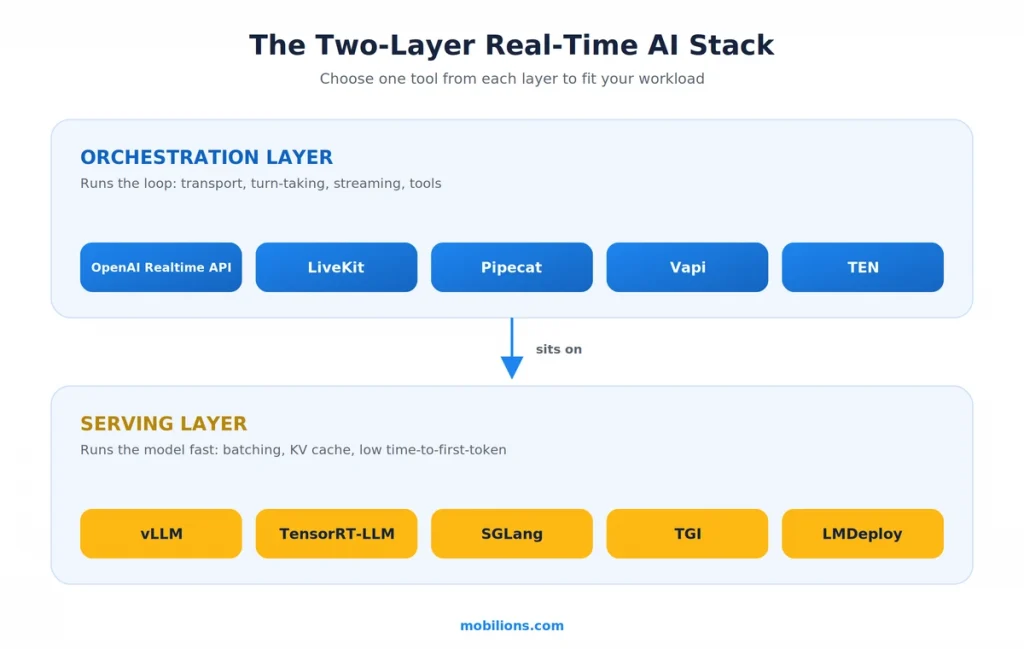
    Here is the answer up front. Real-time AI is not one tool. It is a stack with two layers that most articles blur together. On top sits an orchestration layer, the framework that runs the speak-listen-respond loop or streams tokens to a screen, such as the OpenAI Realtime API, LiveKit, Pipecat, or Vapi. Underneath sits a serving layer, the runtime that actually runs the model fast enough, such as vLLM, TensorRT-LLM, or SGLang. Get the wrong piece at either layer and the whole experience feels slow. The rest of this guide walks both layers, gives you the real latency numbers that define “real-time,” and ends with a simple way to choose.

    Key takeaways

    If you only have a minute, these are the points that matter most about the realtime ai tools frameworks 2026 landscape.

    Real-time is a latency budget, not a vibe. To feel natural, a voice agent needs to answer inside roughly one second end to end, and that budget is split across speech-to-text, the model, and text-to-speech. If any stage blows its share, the whole thing feels laggy.

    The stack has two layers. Orchestration frameworks (OpenAI Realtime API, LiveKit, Pipecat, Vapi, TEN) run the conversation loop. Serving runtimes (vLLM, TensorRT-LLM, SGLang, TGI, LMDeploy) run the model. You choose one from each layer, and they solve different problems.

    Managed versus open-source is the real decision. A managed API like the OpenAI Realtime API or Vapi gets you live in days but costs per minute and gives less control. Open-source frameworks like LiveKit and Pipecat take more setup but let you self-host, swap models, and tune latency.

    The model is rarely the only bottleneck. Network transport, turn detection, and time-to-first-token often matter more than raw model speed, which is why the serving runtime and the orchestration framework both matter.

    What does “real-time AI” actually mean in 2026?

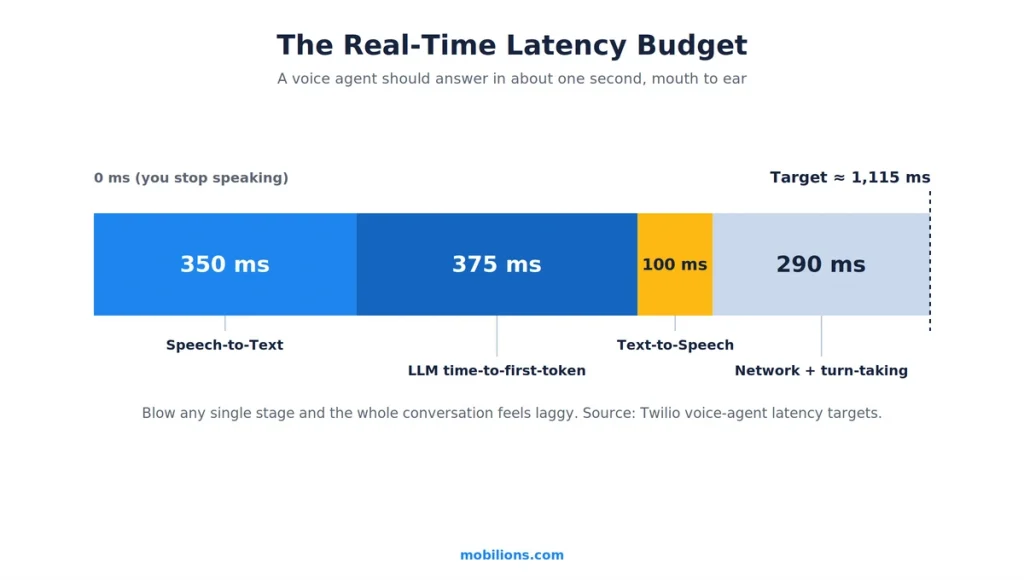
    Before naming tools, it helps to define the target, because “real-time” gets used loosely. For a conversational voice agent, real-time has a concrete budget. Twilio’s own guide to voice-agent latency puts the target mouth-to-ear turn gap at about 1,115 milliseconds, with 1,400 milliseconds as the upper limit before a conversation starts to feel broken. Humans have a deep, ingrained aversion to pauses in speech, so even a few hundred extra milliseconds reads as awkward.

    That budget is not spent in one place. It is split across the pipeline, and each stage has its own target. Speech-to-text should land around 350 milliseconds. The language model’s time to first token should land around 375 milliseconds. Text-to-speech should start speaking within about 100 milliseconds. Add network transport on top, and you can see how quickly the budget disappears. There is also the question of knowing when the user has finished talking. A naive system waits for a fixed silence window, often 500 milliseconds, before it responds, and smarter turn-detection models try to shave that down without cutting the speaker off.

    Two things follow from this. First, real-time is an engineering constraint you design against, not a feature you switch on. Second, the bottleneck is often not the model at all. It is transport, turn detection, or the time to first token. That is exactly why the tools split into two layers, and why picking the right one at each layer matters more than picking the single “best” framework.

    The two layers of the real-time AI stack

    Almost every real-time AI product is built from two layers, and confusing them is the most common reason teams pick the wrong tool.

    The orchestration layer runs the loop. For voice, that is the cycle of listening, transcribing, thinking, and speaking, plus handling interruptions when the user talks over the agent. For a text copilot, it is streaming tokens and tool-call events to the screen as they happen. Frameworks here include the OpenAI Realtime API, LiveKit, Pipecat, Vapi, and TEN.

    The serving layer runs the model. This is the inference runtime that takes a prompt and produces tokens as fast as the hardware allows, with tricks like continuous batching and KV-cache reuse to keep latency low under load. Runtimes here include vLLM, TensorRT-LLM, SGLang, Hugging Face TGI, and LMDeploy.

    Real-time AI stack orchestration and serving layers
    LayerWhat it doesTools
    OrchestrationRuns the conversation or streaming loop, transport, turn-taking, toolsOpenAI Realtime API, LiveKit, Pipecat, Vapi, TEN
    ServingRuns the model fast (batching, KV cache, low time-to-first-token)vLLM, TensorRT-LLM, SGLang, TGI, LMDeploy

    If you use a fully managed voice API, you may never touch the serving layer directly, because the provider runs it for you. The moment you self-host an open model to cut cost or keep data in-house, the serving layer becomes your problem, and its choice drives your latency. Keep the two layers separate in your head and most of the confusing tool comparisons online sort themselves out.

    What are the real-time AI agent and voice frameworks in 2026?

    This is the orchestration layer, and it is where the most movement happened in 2025 and into 2026. Here are the tools worth knowing, and what each is actually good at.

    OpenAI Realtime API with gpt-realtime-2. OpenAI’s Realtime API is the fastest path to a strong speech-to-speech voice agent. The original gpt-realtime reached general availability in August 2025 with remote Model Context Protocol (MCP) server support, image input, and direct SIP phone calling. On May 7, 2026 OpenAI advanced the line with gpt-realtime-2, the first voice model with GPT-5-class reasoning. It expands the context window from 32K to 128K tokens and adds tunable reasoning levels from minimal to xhigh, so you spend a little latency on harder thinking only when a call needs it. OpenAI reports it scoring 15.2 percent higher on Big Bench Audio and 13.8 percent higher on Audio MultiChallenge than the prior gpt-realtime-1.5. Pricing stays about $32 per million audio input tokens and $64 per million audio output tokens.

    Two companion models shipped the same day. gpt-realtime-translate does live speech translation from 70-plus input languages into 13 output languages at about $0.034 per minute, and gpt-realtime-whisper is a low-latency streaming transcription model at about $0.017 per minute. A later iteration, gpt-realtime-2.1 and a cheaper gpt-realtime-2.1-mini, followed as minor updates. Reach for the Realtime API when you want a capable voice agent fast and are comfortable on OpenAI’s platform.

    LiveKit Agents. LiveKit is the open-source heavyweight for real-time media. It is built on WebRTC using selective forwarding units, which is the same technology that powers serious video conferencing, so it scales to many participants and supports video, not just audio. You can self-host it, though it still relies on LiveKit’s WebRTC network, and there is a managed LiveKit Cloud with a free tier of 1,000 minutes. It exposes real controls for voice activity detection and interruptions, which you want when you are tuning how the agent handles being talked over. Reach for LiveKit when you need scale, self-hosting, video, or fine control.

    Pipecat. Pipecat is the other major open-source option, and often named as LiveKit’s closest competitor. It is Python-first with a flexible pipeline design that supports parallel processing and arbitrary component order, which makes it a favorite for teams that want to assemble their own stack of speech-to-text, model, and text-to-speech from different vendors. Its Smart Turn detection has iterated quickly. If you want maximum composability and you live in Python, Pipecat is a natural fit. You can see the project on its GitHub repository.

    Vapi. Vapi is the managed, get-live-fast option. It is closed-source and API-based, uses WebSockets, and, importantly, provisions phone numbers directly and assigns them to agents, so telephony is built in rather than bolted on. It handles the common patterns, such as appointment scheduling and support bots, with less configuration than the open-source frameworks, at the cost of less control and audio only. It is a strong pick when speed to launch beats deep customization.

    TEN Framework. TEN is the most flexible and the most demanding. It uses a graph-based JSON configuration to wire sub-processes together across multiple languages, including C++, Go, and Python, which is powerful for teams with unusual requirements and heavy for teams without them. Consider it when the mainstream frameworks genuinely cannot express what you need.

    FrameworkModelBest fitMain tradeoff
    OpenAI Realtime APIManagedFastest path to a strong speech-to-speech agentPer-minute cost, tied to OpenAI
    LiveKit AgentsOpen-sourceScale, video, self-hosting, fine controlMore setup; needs its WebRTC network
    PipecatOpen-sourceComposable Python stack, mix-and-match vendorsYou assemble and tune the pieces
    VapiManagedFastest launch, built-in telephonyClosed-source, audio-only, less control
    TEN FrameworkOpen-sourceMaximum flexibility, multi-languageHeavy graph configuration

    What runtimes serve real-time model inference in 2026?

    This is the serving layer, and it decides how fast your self-hosted model actually responds. Independent 2026 H100 benchmarks make the differences concrete. The common thread across all of them is that they treat the KV cache, the model’s short-term memory during generation, as the thing to optimize, paging it, quantizing it, and reusing it.

    vLLM is the sensible default, and in 2026 it is still where most teams should start. Its PagedAttention technique splits the KV cache into fixed blocks and cuts memory waste to under 4 percent, versus 60 to 80 percent for naive allocation, and it pairs the widest model support with strong throughput. On recent H100 tests it holds time to first token near 120 milliseconds under load. If you are not sure what to serve with, start here.

    TensorRT-LLM is the latency king on NVIDIA hardware. It compiles fused kernels per model and shape, and its KV reuse can cut time to first token by up to 14 times on an H100. Choose it when you are NVIDIA-only and latency is the whole point, and you can afford the per-model tuning.

    SGLang is built for agents and RAG. Its RadixAttention reuses shared prefixes through a tree structure, which is exactly the pattern in multi-turn agents and retrieval systems, and it reports up to 6.4 times more throughput and 3.7 times lower latency on structured workloads. If your real-time system is an agent that reuses a lot of context, this is worth a hard look.

    Hugging Face TGI v3 shines on long context and chat, processing around 3 times more tokens and running up to 13 times faster than vLLM on long prompts. LMDeploy pushes raw throughput per GPU, with its TurboMind engine reporting up to 1.8 times the throughput of vLLM and 4-bit inference about 2.4 times faster than FP16.

    RuntimeBest atNotable number
    vLLMGeneral-purpose default14 to 24x throughput vs HF Transformers
    TensorRT-LLMLowest latency on NVIDIAUp to 14x lower time-to-first-token on H100
    SGLangAgents, RAG, multi-turnUp to 6.4x throughput, 3.7x lower latency
    TGI v3Long context and chatUp to 13x faster on long prompts
    LMDeployMax throughput per GPUUp to 1.8x throughput vs vLLM

    The takeaway is not that one runtime wins. It is that time to first token, not total generation time, is what a user feels in a real-time system, and the runtimes differ most on exactly that. If you build production real-time systems the way our AI development team does, the serving runtime is a deliberate choice tuned to the workload, not a default you inherit.

    What about streaming for text and agent interfaces?

    Not every real-time AI product is voice. A copilot that types its answer live, an agent that shows its tool calls as they happen, a dashboard that updates as a model reasons, all of these are real-time too, and they lean on streaming rather than audio pipelines. The pattern here is token streaming, where the interface renders each token as the model produces it instead of waiting for the whole response, which turns a multi-second wait into an experience that feels instant even when total time is unchanged.

    Agent frameworks made this richer through 2025 and 2026 by moving from token streams to event streams. LangChain’s streaming documentation covers how LangGraph streams not just tokens but tool calls, state updates, and intermediate steps, so a user watching an agent work sees it think in real time rather than staring at a spinner. Under the hood this usually rides on server-sent events or WebSockets. The engineering lesson mirrors the voice one. Perceived latency is what matters, and streaming the first useful output early beats optimizing the total time to finish.

    How do you choose the right real-time AI tools and frameworks in 2026?

    Strip away the tool names and the whole realtime ai tools frameworks 2026 decision comes down to four questions, in order.

    First, is it voice or text? Voice pulls you toward the OpenAI Realtime API, LiveKit, Pipecat, or Vapi, because you need transport, turn detection, and a speech pipeline. Text and agent UIs pull you toward a streaming setup on top of your model, with an agent framework like LangGraph handling the event stream.

    Real-time voice AI latency budget breakdown

    Second, managed or self-hosted? If speed to launch and low operational burden matter most, a managed API such as the OpenAI Realtime API or Vapi gets you live in days. If cost at scale, data residency, or deep control matter more, an open-source framework such as LiveKit or Pipecat lets you self-host and swap components, and now the serving runtime becomes your decision too.

    Third, if you are self-hosting the model, what is the workload shape? A general chat load points to vLLM. A latency-critical NVIDIA deployment points to TensorRT-LLM. An agent or RAG system that reuses context points to SGLang. Long documents point to TGI.

    Fourth, what is your latency budget, and where is it going? Measure the pipeline before optimizing. Teams routinely tune the model when the real culprit is transport or turn detection. If you are weighing whether to build this in-house or bring in help, that is a genuine build-versus-buy decision worth making deliberately rather than by default, and if you go in-house, hiring engineers who have shipped low-latency systems before saves a lot of measuring-and-guessing later.

    A real-world scenario

    To make this concrete, picture a mid-size company that wants a real-time voice agent for customer support, handling phone calls, answering from its own knowledge base, and escalating to a human when it is stuck.

    A systematic reading of the four questions sorts the build quickly. It is voice and it needs telephony, so the shortlist is the OpenAI Realtime API, LiveKit, or Vapi. Because the team wants to keep customer data in-house and expects high call volume where per-minute pricing would hurt, they lean open-source and self-hosted, which points to LiveKit for transport and telephony via a SIP provider. Because the agent answers from a knowledge base, it is a RAG workload that reuses a lot of shared context, so on the serving layer they choose SGLang for its prefix reuse. And because the whole thing lives or dies on latency, they instrument the pipeline first and discover, as teams usually do, that their biggest win is tightening turn detection, not swapping the model.

    That is the pattern in practice. The real-time result comes from choosing one tool per layer to fit the workload, then measuring the latency budget, rather than chasing a single framework that claims to do everything.

    Myths and common mistakes

    A few misconceptions cause most of the wasted effort in real-time AI projects.

    The first myth is that real-time just means fast. It does not. It means fast enough, consistently, inside a specific budget, with graceful behavior when a stage runs slow. A system that is usually quick but occasionally stalls for three seconds feels worse than one that is steadily good.

    The second myth is that the model is the bottleneck. Often it is not. Network transport, turn detection, and time to first token frequently cost more than raw generation speed, which is why serious teams measure the whole pipeline before touching the model.

    The third mistake is skipping the serving layer decision. Teams pick a great orchestration framework, self-host a model on whatever runtime came first, and then wonder why responses lag under load. The runtime is a real choice with real latency consequences.

    The fourth mistake is over-buying. Not every product needs a self-hosted, fully tuned stack. For a low-volume internal tool, a managed API you ship in a week is the right call, and building bespoke infrastructure is effort spent where it does not move the needle.

    The honest caveat worth stating plainly: this space moves fast. The specific numbers and version names in this guide are accurate for 2026, but the frameworks ship constantly, and the right answer six months from now may name a tool that is young today. The two-layer mental model and the latency-budget discipline will outlast any single tool, which is exactly why they are the parts worth internalizing.

    Why Mobilions

    Mobilions has been building custom software, mobile apps, and AI solutions since 2016. We have delivered more than 250 projects for over 100 clients across 20-plus countries, and that includes production real-time AI, the kind of low-latency voice and streaming systems this guide describes, not just written about. When we scope a real-time build, we choose deliberately at both layers, orchestration and serving, and we measure the latency budget before optimizing anything. If you are planning a real-time AI feature and want to pressure-test the architecture before committing, that is the conversation our AI development team has with founders and product teams every week, and where it makes sense we pair it with custom software and integration work rather than treating them as separate projects.

    Summary

    Real-time AI in 2026 is best understood as a two-layer stack. The orchestration layer runs the loop, with the OpenAI Realtime API and Vapi leading the managed options and LiveKit, Pipecat, and TEN leading the open-source ones. The serving layer runs the model fast, with vLLM as the default, TensorRT-LLM for lowest latency, SGLang for agents and RAG, and TGI for long context. What ties it together is the latency budget, roughly a one-second target for voice, split across the pipeline, where time to first token and turn detection often matter more than the model itself. Choose one tool per layer to fit your workload, measure before you optimize, and you have the durable way to read the realtime ai tools frameworks 2026 landscape no matter which specific tool leads next quarter.

    Frequently asked questions

    What are the best real-time AI frameworks in 2026?

    It depends on the layer. For orchestration, the OpenAI Realtime API and Vapi lead the managed options, while LiveKit and Pipecat lead the open-source ones. For model serving, vLLM is the general-purpose default, TensorRT-LLM is the lowest-latency choice on NVIDIA, and SGLang is strongest for agents and RAG. Most real-time products use one tool from each layer.

    What is the difference between AI tools and AI agents?

    What is the difference between AI tools and AI agents? An AI tool performs one bounded task on request, like transcribing audio or generating text. An AI agent plans multiple steps, calls tools and APIs, reacts to results, and pursues a goal with less hand-holding. Real-time agents add live data and low latency, so they can act on what is happening right now rather than on a static prompt.

    What is the OpenAI Realtime API and what is gpt-realtime-2?

    The Realtime API is OpenAI’s speech-to-speech platform for building voice agents. Its flagship model, gpt-realtime-2, launched on May 7, 2026 as the first voice model with GPT-5-class reasoning, a 128K context window, and tunable reasoning levels. Pricing is about $32 per million audio input tokens and $64 per million audio output tokens.

    Which AI agent framework should I actually use?

    Match the framework to the job. For voice, choose LiveKit or Pipecat when you want open-source control, or the OpenAI Realtime API or Vapi when you want speed to launch. For text and multi-step agents, LangGraph handles planning, tool calls, and event streaming. There is no single best framework, only the right one per layer and workload.

    How fast does a real-time voice agent need to respond?

    To feel natural, the end-to-end mouth-to-ear turn gap should be around 1,115 milliseconds, with about 1,400 milliseconds as the upper limit before it feels broken. That budget splits across speech-to-text near 350 milliseconds, the model’s time to first token near 375 milliseconds, and text-to-speech near 100 milliseconds, plus network transport.

    What is the best runtime for real-time LLM inference?

    vLLM is the general-purpose default that most teams should start with, thanks to PagedAttention and broad model support. TensorRT-LLM gives the highest throughput and lowest latency on NVIDIA hardware once you accept its compilation step. SGLang is strongest for agents and RAG because its RadixAttention reuses shared context across turns.

    Can AI agents connect to my database and use real-time data?

    Yes. Real-time agents reach live data through tools, function calling, and connectors such as Model Context Protocol servers, so they can query a database, call an internal API, or read a live feed at the moment of the request. The work is wiring those connections securely with the right access controls, not the model itself.

    Can AI agents search the web for real-time information?

    Yes, when you give them a search or retrieval tool. The agent calls the tool, receives fresh results, and grounds its answer in them rather than relying only on training data. This matters for anything time-sensitive, like prices or news, and it is one reason retrieval quality often decides how useful a real-time agent feels.

    How much does it cost to run a real-time AI agent?

    Two models exist. Managed voice APIs bill per token or per minute, for example the OpenAI Realtime API at roughly $32 and $64 per million audio input and output tokens, which is quick to start but grows with usage. Self-hosting on your own GPUs trades that for fixed infrastructure cost, which wins at high, steady volume.

    How long does it take to build a real-time AI agent?

    A working prototype on a managed API can take days. A production system with your own data, telephony, guardrails, and a self-hosted model usually takes several weeks to a few months, driven mostly by integration, testing, and latency tuning rather than the model. Starting managed, then moving self-hosted once validated, is a common path.

    How secure are real-time AI agents with business data?

    As secure as you design them. Self-hosting keeps data in your own environment, while managed APIs mean data leaves your network, so read the provider’s retention terms. Either way, encrypt data in transit and at rest, apply least-privilege access for every tool the agent can call, and log actions so you can audit what happened.

    Can multiple AI agents work together in real time?

    Yes. Multi-agent systems split work across specialized agents, for example one that plans, one that retrieves, and one that acts, coordinated by an orchestration layer or an agent-to-agent protocol. It adds power for complex tasks but also latency and failure points, so use it only when a single agent genuinely cannot handle the job.

    Is real-time AI only about voice?

    No. Streaming text interfaces, live copilots, and agents that show their steps as they work are all real-time. They rely on token and event streaming, for example through LangGraph, rather than audio pipelines, but the same principle applies: stream the first useful output early so the experience feels instant even when total time is unchanged.

    Should I use a managed real-time AI API or an open-source framework?

    Use a managed API such as the OpenAI Realtime API or Vapi when speed to launch and low operational burden matter most. Use an open-source framework such as LiveKit or Pipecat when cost at scale, data residency, or deep control matter more, keeping in mind that self-hosting also makes the model-serving runtime your decision.

    Why is latency the hardest part of real-time AI?

    Because it accumulates across the whole pipeline, and the bottleneck is often not the model. Network transport, turn detection, and time to first token frequently cost more than raw generation, so the fix usually comes from measuring the entire budget rather than only speeding up the model itself.

    What is time to first token and why does it matter?

    Time to first token is how long the model takes to produce its first output after receiving a prompt. In a real-time system the user feels this delay directly, because it is the gap before anything starts happening, which is why serving runtimes optimize it heavily and why it often matters more than total generation speed.